Loading...
Loading...
Loading...
Loading...
Loading...
Loading...
Loading...
Loading...
Loading...
Loading...
Loading...
Loading...
Loading...
Loading...
Loading...
Loading...
Loading...
Loading...
Loading...
Loading...
Loading...
Loading...
Loading...
Loading...
Loading...
Loading...
Loading...
Loading...
Loading...
Loading...
Loading...
Loading...
Loading...
Loading...
Loading...
Loading...
Loading...
Loading...
Loading...
Loading...
Loading...
Loading...
Loading...
Loading...
Loading...
Loading...
Loading...
Loading...
Loading...
Loading...
Loading...
Loading...
Loading...
Loading...
Loading...
Loading...
Loading...
Loading...
Loading...
Loading...
Loading...
Loading...
Loading...
Loading...
Loading...
Loading...
Loading...
Loading...
Loading...
Loading...
Loading...
Loading...
Loading...
Loading...
Loading...
Loading...
Loading...
Loading...
Loading...
Loading...
Loading...
Loading...
Loading...
Loading...
Loading...
Loading...
Loading...
Loading...
Loading...
Loading...
Loading...
Loading...
Loading...
Loading...
Loading...
Loading...
Loading...
Loading...
The Endless Web3 Genesis Cloud is the world’s first distributed cloud-based intelligent component protocol, integrating a wide range of advanced technological solutions such as AI, serverless architecture, full distributed frameworks, relay networks, and various SDKs and APIs. These innovations enable developers to rapidly and seamlessly build decentralized applications (DApps) for Web3, utilizing any programming language while delivering a user experience comparable to Web2 applications.
The Endless Web3 Genesis Cloud is a truly secure Web3 cloud service platform that guarantees user privacy, virtual asset security, and data sovereignty. It offers Web2 application developers comprehensive support—from smart contract development, decentralized storage, and modular components to enhanced information security and privacy protections—significantly reducing the barriers to transitioning from Web2 to Web3 and improving the Web3 user experience.
The Endless was founded with the vision of leveraging technological innovation to empower users with greater autonomy, ensuring data privacy and security. It aims to foster a decentralized co-creation ecosystem where users can create and fully enjoy the value they deserve in the digital world. By shifting the focus of Web3 from financial orientation to practical utility, the Endless seeks to deliver on the promise of decentralized technologies by enabling user empowerment and collaborative value creation.
The core values of Endless include:
Security and Privacy as Foundational Elements
Endless ensures high levels of security and privacy protection for users throughout their interactions by leveraging an advanced data security and privacy architecture. This approach attracts security-conscious user groups, enhances trust in the project, and fosters deeper relationships with potential partners and investors. Endless’s data security and privacy framework relies on several key technologies: dynamic end-to-end encryption, data isolation and access control, zero-knowledge proofs, and storage security based on distributed key management and redundant encryption.
Developer and Project-Centric Modular Design
As a decentralized technology development platform, Endless introduces an innovative distributed cloud component protocol, redefining development approaches through its modular component framework. The Endless distributed cloud component protocol offers an open component marketplace and a rich suite of essential components, enabling developers to easily build and deploy Web3 applications through flexible component combinations without requiring an in-depth understanding of complex blockchain technology. This feature significantly lowers technical barriers, allowing Web2 developers to transition rapidly into the Web3 space.
User-Friendly Design with Low Barriers
To optimize user experience, the Endless introduces a gas subsidy mechanism that allows developers or project teams to cover gas fees required for blockchain transactions. Through this mechanism, users can explore DApp functionalities without bearing transaction costs, particularly beneficial for new users who can experience and understand Web3 applications without financial barriers. This feature also enables developers to promote their DApps more effectively, increasing user engagement and activity. The gas subsidy mechanism holds strategic importance in driving Web3 adoption and promoting application deployment.
AI Integration for Ecosystem Innovation and Enhanced User Experience
Endless deeply integrates AI capabilities with the platform’s decentralized architecture, empowering Web3 applications and accelerating the expansion of value-driven use cases. By incorporating advanced AI models, Endless brings AI capabilities to various application scenarios, such as automated execution of smart contracts, intelligent data analytics, automated processing, personalized recommendations, smart customer service, and dynamic risk management. This integration significantly enhances user experience and application engagement. By embedding AI technology within the Endless platform, developers can streamline their development processes, achieve intelligent user interactions and data processing, and provide users with personalized and efficient services, boosting engagement through precise recommendations and automated workflows.
By integrating AI technology, Endless will leverage decentralized storage solutions to safeguard user data privacy and security, providing users with customized and secure services.
Achieving True Economic Value through Co-Creation
Beyond innovations in technical architecture, Endless supports a truly decentralized co-creation economy. In the Endless ecosystem, users can share in ecosystem growth benefits through their participation and contributions, rather than relying on centralized platforms for value distribution.
Through smart contracts, creator economy innovations, and decentralized governance, the Endless ensures that users receive rewards for contributing content, providing services, or participating in community governance. This approach fosters user engagement, creating a diverse, secure, and user-centric ecosystem. Endless helps users break free from the constraints of traditional centralized platforms, granting them true autonomy and enabling them to earn fair rewards through transparent and equitable mechanisms.
\
Start here to get into the core concepts of the Endless blockchain. Then review our research papers and the Endless source code found in the Endless repository of GitHub while continuing your journey through this site. The source contains READMEs and code comments invaluable to developing on Endless.
If you are new to the Endless blockchain, begin with these tutorials before you get into in-depth development. These tutorials will help you become familiar with how to develop for the Endless blockchain using the Endless SDK.
How to generate, submit and verify a transaction to the Endless blockchain.
Learn the Endless token interface and how to use it to generate your first NFT. This interface is defined in the Move module.
Learn how to deploy and manage a coin. The coin interface is defined in the Move module.
Learn how to deploy and manage a fungible asset. The fungible asset interface is defined in the Move module.
Write your first Move module for the Endless blockchain.
Learn how to perform operations using Off-Chain K-of-N multi-signer authentication.
The Endless blockchain account addresses use Base58 encoding and have the following characteristics:
The length of most regular account addresses is between 43 and 44 characters.
You can quickly differentiate between accounts by checking the first and last few characters of the address.
Vanity addresses are supported.
Sponsored transactions on the Endless chain refer to transactions where the gas fees are paid by the contract invoked by the transaction.
On the Endless blockchain, executing transactions requires a fee, also known as a gas fee, which is typically paid in the native token of the Endless chain (EDS). Gas fees are paid to the validators of the Endless chain to ensure network security. However, for new users, especially those transitioning from Web 2.0, this requirement can increase the barrier to entry.
Sponsored transactions lower the difficulty of interacting with contracts for users, particularly beginners. By leveraging sponsored transaction technology, contracts can make it easier for users to interact while ensuring the contract itself covers the gas fees, thereby maintaining stable chain operations.
Endless is a per-transaction versioned database. When transactions are executed, the resulting state of each transaction is stored separately and thus allows for more granular data access. This is different from other blockchains where only the resulting state of a block (a group of transactions) is stored.
Blocks are still a fundamental unit within Endless. Transactions are batched and executed together in a block. In addition, the proofs within storage are at the block-level granularity. The number of transactions within a block varies depending on network activity and a configurable maximum block size limit. As the blockchain becomes busier, blocks will likely contain more transactions.
Each Endless block contains both user transactions and special system transactions to mark the beginning and end of the transaction batch. Specifically, there are two system transactions:
The EndlessBFT consensus protocol provides fault tolerance of up to one-third of malicious validator nodes.
Mempool is a component within each node that holds an in-memory buffer of transactions that have been submitted to the blockchain, but not yet agreed upon or executed. This buffer is replicated between validator nodes and fullnodes.The JSON-RPC service of a fullnode sends transactions to a validator node's mempool. Mempool performs various checks on the transactions to ensure transaction validity and protect against DOS attacks. When a new transaction passes initial verification and is added to mempool, it is then distributed to the mempools of other validator nodes in the network.When a validator node temporarily becomes a leader in the consensus protocol, consensus pulls the transactions from mempool and proposes a new transaction block. This block is broadcast to other validators and contains a total ordering over all transactions in the block. Each validator then executes the block and submits votes on whether to accept the new block proposal.
Welcome to Move, a next generation language for secure, sandboxed, and formally verified programming. It has been used as the smart contract language for several blockchains including Endless. Move allows developers to write programs that flexibly manage and transfer assets, while providing the security and protections against attacks on those assets. However, Move has been developed with use cases in mind outside a blockchain context as well.
Move takes its cue from by using resource types with move (hence the name) semantics as an explicit representation of digital assets, such as currency.
The purpose of Move programs is to read from and write to tree-shaped persistent global storage. Programs cannot access the filesystem, network, or any other data outside of this tree.
In pseudocode, the global storage looks something like:
Structurally, global storage is a consisting of trees rooted at an account address. Each address can store both resource data values and module code values. As the pseudocode above indicates, each address can store at most one resource value of a given type and at most one module with a given name.
Abstract
The rise of blockchains as a new Internet infrastructure has led to developers deploying tens of thousands of decentralized applications at rapidly growing rates. Unfortunately, blockchain usage is not yet ubiquitous due to frequent outages, high costs, low throughput limits, and numerous security concerns. To enable mass adoption in the web3 era, blockchain infrastructure needs to follow the path of cloud infrastructure as a trusted, scalable, cost-efficient, and continually improving platform for building widely-used applications.
We present the Endless blockchain, designed with scalability, safety, reliability, and upgradeability as key principles, to address these challenges. The Endless blockchain has been developed over the past three years by over 350+ developers across the globe. It offers new and novel innovations in consensus, smart contract design, system security, performance, and decentralization. The combination of these technologies will provide a fundamental building block to bring web3 to the masses:
First, the Endless blockchain natively integrates and internally uses the Move language for fast and secure transaction execution. The Move prover, a formal verifier for smart contracts written in the Move language, provides additional safeguards for contract invariants and behavior. This focus on security allows developers to better protect their software from malicious entities.
Second, the Endless data model enables flexible key management and hybrid custodial options. This, alongside transaction transparency prior to signing and practical light client protocols, provides a safer and more trustworthy user experience.
Third, to achieve high throughput and low latency, the Endless blockchain leverages a pipelined and modular approach for the key stages of transaction processing. Specifically, transaction dissemination, block metadata ordering, parallel transaction execution, batch storage, and ledger certification all operate concurrently. This approach fully leverages all available physical resources, improves hardware efficiency, and enables highly parallel execution.
Fourth, unlike other parallel execution engines that break transaction atomicity by requiring upfront knowledge of the data to be read and written, the Endless blockchain does not put such limitations on developers. It can efficiently support atomicity with arbitrarily complex transactions, enabling higher throughput and lower latency for real-world applications and simplifying development.
Fifth, the Endless modular architecture design supports client flexibility and optimizes for frequent and instant upgrades. Moreover, to rapidly deploy new technology innovations and support new web3 use cases, the Endless blockchain provides embedded on-chain change management protocols.
Finally, the Endless blockchain is experimenting with future initiatives to scale beyond individual validator performance: its modular design and parallel execution engine support internal sharding of a validator and homogeneous state sharding provides the potential for horizontal throughput scalability without adding additional complexity for node operators.
BlockMetadataTransaction - is inserted at the beginning of the block. A BlockMetadata transaction can also mark the end of an epoch and trigger reward distribution to validators.
StateCheckpointTransaction - is appended at the end of the block and is used as a checkpoint milestone.
In Endless, epochs represent a longer period of time in order to safely synchronize major changes such as validator set additions/removals. An epoch is a fixed duration of time, currently defined as two hours on mainnet. The number of blocks in an epoch depends on how many blocks can execute within this period of time. It is only at the start of a new epoch that major changes such as a validator joining the validator set don't immediately take effect among the validators.
Consensus is the component that is responsible for ordering blocks of transactions and agreeing on the results of execution by participating in the consensus protocol with other validator nodes in the network.
Execution is the component that coordinates the execution of a block of transactions and maintains a transient state. Consensus votes on this transient state. Execution maintains an in-memory representation of the execution results until consensus commits the block to the distributed database. Execution uses the virtual machine to execute transactions. Execution acts as the glue layer between the inputs of the system (represented by transactions), storage (providing a persistency layer), and the virtual machine (for execution).
The virtual machine (VM) is used to run the Move program within each transaction and determine execution results. A node's mempool uses the VM to perform verification checks on transactions, while execution uses the VM to execute transactions.
The storage component is used to persist agreed upon blocks of transactions and their execution results to the local database.
Nodes use their state synchronizer component to "catch up" to the latest state of the blockchain and stay up-to-date.
The Move tutorial to cover the basics of programming with Move.
Move Examples demonstrating many different aspects of Move especially those unique to Endless.
Endless Move Framework.
There are several IDE plugins available for Endless and the Move language:
Endless Move Analyzer for Visual Studio.
Move language plugin for JetBrains IDEs: Supports syntax highlighting, code navigation, renames, formatting, type checks and code generation.
The following external resources exist to further your education:
Move was designed and created as a secure, verified, yet flexible programming language. The first use of Move is for the implementation of the Diem blockchain, and it is currently being used on Endless.
This book is suitable for developers who are with some programming experience and who want to begin understanding the core programming language and see examples of its usage.
Begin with understanding modules and scripts and then work through the Move Tutorial.
The target users of Endless include Web2 developers, Web3 developers, project teams, and general users. Addressing the diverse needs and challenges of different user groups, Endless provides comprehensive solutions aimed at promoting the adoption and application of Web3 technology.
Below is a detailed analysis of each target group along with the corresponding application scenarios:
Web3 development involves complex technologies such as smart contracts, decentralized storage, and consensus mechanisms. For developers accustomed to the Web2 technology stack, transitioning to Web3 presents a steep learning curve. Web2 developers typically work with traditional programming languages and frameworks such as JavaScript, Python, and Java. To transition to Web3, they need to master new development languages such as Solidity, Rust, and Move, as well as blockchain technology. This transition not only requires learning an entirely new development paradigm but also demands an in-depth understanding of how decentralized systems operate.
To address the challenges faced by Web2 developers, Endless offers a series of pre-built modules and multi-language SDKs, enabling developers to build DApps using familiar programming languages such as JavaScript and Python. These modular components cover core functionalities such as payments, identity authentication, and data storage, allowing developers to focus on business logic without delving deeply into the underlying technical implementations. Additionally, Endless provides comprehensive documentation, tutorials, and community support to help developers quickly grasp key Web3 development concepts and tools. This not only lowers the learning barrier but also fosters a collaborative ecosystem where developers can share knowledge and insights.
Web3 developers require a high-performance blockchain platform to support the development of complex DApps, particularly those handling high-concurrency user transactions. The efficiency and stability of the system are essential for ensuring a seamless user experience. Furthermore, Web3 developers aim to create innovative functionalities and applications that cater to evolving market demands and user expectations.
For Web3 developers, Endless delivers powerful computing and data processing capabilities to ensure exceptional DApp performance even under high workloads. Its architectural design supports horizontal scalability, allowing for seamless growth in user base and business expansion. Additionally, Endless provides smart contract automation tools and AI-powered analytics, enabling developers to incorporate intelligent elements into contract design and execution. This enhances development efficiency and optimizes the overall intelligence of applications. Using the Endless platform, Web3 developers can build high-frequency trading applications or leverage AI functionalities to automate and refine smart contract execution.
In a highly competitive market environment, increasing user engagement and activity is a key priority for project teams. The ability to attract and retain users effectively is directly linked to the long-term success of a project. Additionally, project teams require efficient tools for managing communities and token economies to ensure sustained community engagement and token market stability.
For project teams, Endless provides an infrastructure that supports multi-currency payments and smart contract security, enhancing transaction convenience and security. Through the platform's token management tools, project teams can effortlessly manage token issuance, distribution, and governance, ensuring a healthy token economy. Additionally, Endless offers a range of private domain operation tools, including precision marketing, airdrop campaigns, and social platform integrations, helping project teams rapidly scale their community presence. These tools not only boost user interaction frequency but also enhance user engagement and loyalty.
Web2 users prioritize data privacy, while Web3 users place greater emphasis on decentralization and transparency. General users expect blockchain applications to provide a user experience comparable to Web2 applications while benefiting from the privacy protection inherent in decentralization. Additionally, users seek to avoid complex operations and high usage costs, aiming for a seamless and intuitive experience akin to traditional internet applications.
To cater to general users, Endless supports developers at both the protocol and component levels in optimizing user interfaces and enabling a seamless transition from Web2 to Web3. This ensures that users can enjoy the convenience and smooth experience of traditional applications. Furthermore, Endless integrates decentralized storage and zero-knowledge proof technologies to safeguard user data privacy and security.
As a blockchain-based ecosystem protocol, Endless has a diversified revenue stream. Below are the monetization models of Endless within the Web3 Genesis Cloud ecosystem:
The Endless Component Marketplace is a decentralized trading platform for components, where developers can publish and sell self-developed components. Users can browse, purchase, and integrate these components into their applications through the Endless platform. All transactions are executed automatically via smart contracts to ensure transparency and security. Endless charges a fixed percentage as a transaction fee for each sale. This fee model not only incentivizes developers to continuously innovate and release high-quality components but also provides a stable revenue stream for the platform.
By offering ready-made and easily integratable components, Endless significantly reduces developers' time to market. These components cover a wide range of functionalities, from user authentication to payment processing, enabling developers to focus on business logic without having to build complex underlying infrastructures. Additionally, Endless continuously expands its component library and offers developer support and marketing promotion services to attract more developers into its ecosystem. This strategy not only enhances the platform's market appeal but also strengthens its competitive edge in the Web3 industry.
Endless offers multi-language SDKs compatible with existing technology stacks, along with comprehensive documentation, tutorials, and technical support to help developers quickly master Web3 development. This lowers the entry barriers for Web2 developers, allowing them to smoothly transition into the Web3 development environment.
The Endless SDK and API follow a pay-per-call billing model, flexible to accommodate the needs of different developers, with fees calculated based on actual usage. Additionally, for enterprise customers requiring long-term and stable services, Endless provides a subscription-based model, enabling users to pay a fixed monthly or annual fee for unlimited or high-quota API access.
Endless offers flexible cloud service packages, allowing developers to choose different storage and bandwidth plans according to the scale and needs of their projects. Its pay-as-you-go model ensures that developers only pay for the resources they actually use, reducing operational costs. Furthermore, leveraging a distributed storage architecture and optimized network acceleration mechanisms, Endless enhances DApp access speed and stability, ensuring a smooth user experience. By providing efficient and secure storage and data transmission services, Endless not only generates a stable revenue stream but also reinforces its market competitiveness.
Endless token holders can stake their tokens to validator nodes to earn network staking rewards. Additionally, as a validator node operator, Endless accepts delegated staking from project teams or individual users and generates revenue through management fees or staking interest. The entire staking process is automated via smart contracts to ensure transparency and security. This mechanism not only creates revenue for the platform but also strengthens the security and stability of the network.
All on-chain transactions within the Endless ecosystem, including component transactions and DApp operations, require Endless tokens for gas fees. A portion of the collected gas fees will be used for token burning to maintain the economic equilibrium, while the remainder will be allocated to validator nodes and the ecosystem fund to support the sustainable development of the Endless ecosystem.
Endless provides a globalized application distribution platform, enabling developers to publish and promote their DApps and mini-programs. The platform is equipped with analytics tools and user feedback systems to help developers optimize their products and enhance user satisfaction. Endless monetizes this service by charging application promotion fees or sharing revenue with developers. This model not only generates economic benefits for the platform but also provides developers with additional exposure and marketing channels. Additionally, Endless regularly hosts developer conferences and application competitions to foster technological innovation and ecosystem collaboration, promoting long-term growth.
Endless builds a vibrant gaming and NFT marketplace to encourage long-term user engagement and increase platform retention. The platform supports user-generated content (UGC), allowing users to create and trade gaming assets or NFT artworks, thus enhancing interaction and fostering a sense of community. Moreover, Endless provides comprehensive tools and resources to empower developers for innovation in Web3 gaming and NFTs. The platform continuously expands its market influence by collaborating with well-known IPs and hosting creative competitions.
In the Web3 gaming sector, Endless generates revenue through in-game economic activities such as virtual item sales and in-game advertisements. In the NFT marketplace, Endless earns revenue by charging a fixed percentage as a transaction fee for NFT sales. Users need to pay transaction fees when conducting NFT trades on the platform. Additionally, Endless offers NFT minting and display services, further diversifying its revenue streams.
The value of the Endless token is a crucial component of the Endless business ecosystem. For more details, please refer to section "5.2 Endless Economic Model."
Account addresses are composed of multiple characters. To ensure the address matches your expectations, checking only the beginning and ending characters is insufficient.
For example, 5SHvmLEaSr76dsKy4XLR5vMht14PRuLzJFx6svJzqorP is an Endless account address.
Currently, addresses in Base58 encoding format are fully supported in both the command line and the block explorer.
Below is an example of how account transactions are displayed on the block explorer:
On the backend, Endless addresses are stored as 32-byte arrays. In some cases, you may see this format in the command line or the browser. For instance, the Endless chain has two system account addresses, represented in hexadecimal format:
0x0000000000000000000000000000000000000001, which can be simplified to 0x1. Its role is as the system account, responsible for executing system contracts.
0x0000000000000000000000000000000000000004, which can be simplified to 0x4. Its role is as the system token account, responsible for managing "Tokens" and "NFTs."
To convert between Base58 format and byte format, you can use the following methods:
Online Tools: Search for keywords such as "base58 encoder decoder"
Python Code (requires the base58 library):
import base58
def encode_base58(data: bytes) -> str:
"""Encode bytes into a Base58 string"""
return base58.b58encode(data).decode()
def decode_base58(data: str) -> bytes:
"""Decode a Base58 string into bytes"""
return base58.b58decode(data)struct GlobalStorage {
resources: Map<(address, ResourceType), ResourceValue>
modules: Map<(address, ModuleName), ModuleBytecode>
}Move Scripts are a way to run multiple public functions on Endless in a single transaction. This is similar to deploying a helper module that would do common tasks, but allows for the flexibility of not having to deploy beforehand.
An example would be a function to transfer a half of a user's balance to another account. This is something that is easily programmable, but likely would not need a module deployed for it:
script {
use std::signer;
use endless_framework::coin;
use endless_framework::endless_account;
fun transfer_half<Coin>(caller: &signer, receiver_address: address) {
// Retrieve the balance of the caller
let caller_address: address = signer::address_of(caller);
let balance: u64 = coin::balance<Coin>(caller_address);
// Send half to the receiver
let half = balance / 2;
endless_account::transfer_coins<Coin>(caller, receiver_address, half);
}
}Writing scripts
Compiling scripts
Running scripts
For more details on Move Scripts, checkout:
Move Book on Scripts
Tutorial on Scripts
Scenario 1 (under construction)
Scenario 2 (under construction)
Sponsored transactions are implemented at the contract level. Any contract function intending to offer this feature can include the sponsored keyword before the function declaration. This instructs the VM to mark the function as a "sponsored contract function."
Below is an example:
When a transaction invokes the fund function, the gas fees for that transaction will be paid by the contract. Ensure the contract account has sufficient funds to cover these fees; otherwise, the user will encounter an error indicating insufficient tokens to pay the gas fees when submitting the transaction.
Although sponsored functions are easy to implement, consider the following points before using them:
Access Control
External Calls Only
Access Control Determine whether the contract function should be accessible to all users. If the function is intended to sponsor only specific users, implement user checks within the contract to exclude unwanted users. Failing to do so may result in unnecessary gas fee expenses.
External Calls Only Mark the contract function as an entry function to allow only direct user-initiated transactions to call it. Prevent external contracts from invoking the sponsored transaction function to guard against potential attacks.
entry sponsored fun fund(dst_addr: &signer) {
...
}Learn SDKs and try examples on your local node
Learn how to use the component marketplace and the admin panel
Endless CLI
Running a Local Node
Endless Developer Community: Building a Web3 Connector Ecosystem
Endless is a Web3 platform designed to bridge Web2 and AI Agents, providing a foundation for developers to innovate freely. Through an open and collaborative model, Endless lowers the barriers to Web3 development, enabling global developers to share data sovereignty and ecosystem benefits, collectively shaping a decentralized future.
The future of Web3 belongs to every developer willing to explore and innovate. As a project dedicated to the Web3 ecosystem, Endless not only provides a robust technological infrastructure but also offers a comprehensive developer support system to help global developers build high-quality, innovative decentralized applications (DApps) and Web3 infrastructure.
Endless Developer Hub serves as a dedicated platform for developers, focusing on Web3 technology advancements, developer growth, and community co-building, helping developers unlock infinite possibilities.
\
To empower developers in building applications efficiently, Endless Developer Hub provides a comprehensive and well-equipped support system:
Extensive Toolkit: Offers SDKs and API documentation to help developers get started quickly.
Developer Showcase & App Demo: Provides example projects and real-world case studies to lower the development threshold.
Dedicated Technical Support Team: A specialized support team is available to promptly resolve development issues and assist developers in optimizing their projects.
2. Community Support
Building a Strong Developer Network: Developers can communicate and collaborate through multiple channels, including the official developer portal, forums, GitHub open-source community, Medium, and online seminars.
Community Governance Rights: Active contributors gain priority participation in community governance, allowing them to vote on key proposals and shape the future of the ecosystem.
Ecosystem Traffic Support: Developers receive priority access to traffic and market resources within the Endless ecosystem, accelerating their project’s growth.
Ecosystem Partnership Program: By participating in the Endless Ecosystem Partnership Program, developers can collaborate with other projects, share resources, and co-create more application scenarios.
Endless Developer Hub is more than just a technical community; it is an accelerator for developers' growth. If you aspire to make an impact in Web3 and collaborate with top-tier Web3 pioneers worldwide, then this is the place for you!
✅ Comprehensive technical, market, and community support
✅ Direct access to the Endless core team for prompt development assistance
✅ Participation in incentive programs to receive ecosystem support and rewards
✅ Collaborate with top Web3 developers globally to build groundbreaking applications
Whether you are an independent developer or a team looking to explore the future of Web3, we welcome you to join us! 📣 Join the Endless Developer Program! \
Website:
GitHub Community:
EndlessHub Email: [email protected]
Luffa Channel:
Luffa Official Endless Developer Community:
Telegram:If you're looking for new opportunities at the intersection of Web3 & AI, apply for the Endless Ecosystem Incentive Program and build the next generation of innovative applications!
\
address is a built-in type in Move that is used to represent locations (sometimes called accounts) in global storage. An address value is a 256-bit (32-byte) identifier. At a given address, two things can be stored: Modules and Resources.
Although an address is a 256-bit integer under the hood, Move addresses are intentionally opaque---they cannot be created from integers, they do not support arithmetic operations, and they cannot be modified. Even though there might be interesting programs that would use such a feature (e.g., pointer arithmetic in C fills a similar niche), Move does not allow this dynamic behavior because it has been designed from the ground up to support static verification.
You can use runtime address values (values of type address) to access resources at that address. You cannot access modules at runtime via address values.
Addresses come in two flavors, named or numerical. The syntax for a named address follows the same rules for any named identifier in Move. The syntax of a numerical address is not restricted to hex-encoded values, and any valid u256 numerical value can be used as an address value, e.g., 42, 0xCAFE, and 2021 are all valid numerical address literals.
To distinguish when an address is being used in an expression context or not, the syntax when using an address differs depending on the context where it's used:
When an address is used as an expression the address must be prefixed by the @ character, i.e., @<numerical_value> or @<named_address_identifier>.
Outside of expression contexts, the address may be written without the leading @ character, i.e., <numerical_value> or <named_address_identifier>.
In general, you can think of @ as an operator that takes an address from being a namespace item to being an expression item.
Named addresses are a feature that allow identifiers to be used in place of numerical values in any spot where addresses are used, and not just at the value level. Named addresses are declared and bound as top level elements (outside of modules and scripts) in Move Packages, or passed as arguments to the Move compiler.
Named addresses only exist at the source language level and will be fully substituted for their value at the bytecode level. Because of this, modules and module members must be accessed through the module's named address and not through the numerical value assigned to the named address during compilation, e.g., use my_addr::foo is not equivalent to use 0x2::foo even if the Move program is compiled with my_addr set to 0x2. This distinction is discussed in more detail in the section on Modules and Scripts.
The primary purpose of address values are to interact with the global storage operations.
address values are used with the exists, borrow_global, borrow_global_mut, and move_from operations.
The only global storage operation that does not use address is move_to, which uses signer.
As with the other scalar values built-in to the language, address values are implicitly copyable, meaning they can be copied without an explicit instruction such as copy.
Introduction
Modules and Scripts
Move Tutorial
Integers
Bool
Address
Vector
Local Variables and Scopes
Equality
Abort and Assert
Conditionals
Global Storage Structure
Global Storage Operators
Standard Library
Coding Conventions
Node Networks and Synchronization
Validator nodes and fullnodes form a hierarchical structure with validator nodes at the root and fullnodes everywhere else. The Endless blockchain distinguishes two types of fullnodes: validator fullnodes and public fullnodes. Validator fullnodes connect directly to validator nodes and offer scalability alongside DDoS mitigation. Public fullnodes connect to validator fullnodes (or other public fullnodes) to gain low-latency access to the Endless network.
Endless operates with these node types:
Validator nodes (VNs) - participates in consensus and drives transaction processing.
Validator fullnodes (VFNs) - captures and keeps up-to-date on the state of the blockchain; run by the validator operator, so it can connect directly to the validator node and therefore serve requests from public fullnodes. Otherwise, it works like a public fullnode.
Public fullnodes (PFNs) - run by someone who is not a validator operator, PFNs cannot connect directly to a validator node and therefore rely upon VFNs for synchronization.
Archival nodes (ANs) - is a fullnode that contains all blockchain data since the start of the blockchain's history.
The Endless blockchain supports distinct networking stacks for various network topologies. For example, the validator network is independent of the fullnode network. The advantages of having separate network stacks include:
Clean separation between the different networks.
Better support for security preferences (e.g., bidirectional vs server authentication).
Allowance for isolated discovery protocols (i.e., on-chain discovery for validator node's public endpoints vs. manual configuration for private organizations).
Endless nodes synchronize to the latest state of the Endless blockchain through two mechanisms: consensus or state synchronization. Validator nodes will use both consensus and state synchronization to stay up-to-date, while fullnodes use only state synchronization.
For example, a validator node will invoke state synchronization when it comes online for the first time or reboots (e.g., after being offline for a while). Once the validator is up-to-date with the latest state of the blockchain it will begin participating in consensus and rely exclusively on consensus to stay up-to-date. Fullnodes, however, continuously rely on state synchronization to get and stay up-to-date as the blockchain grows.
Each Endless node contains a State Synchronizer component which is used to synchronize the state of the node with its peers. This component has the same functionality for all types of Endless nodes: it utilizes the dedicated peer-to-peer network to continuously request and disseminate blockchain data. Validator nodes distribute blockchain data within the validator node network, while fullnodes rely on other fullnodes (i.e., validator nodes or public fullnodes).
Endless Project Development Goals and Key Milestones
1 Key Areas of Development and Operations
Optimization of Modular Component Protocols:Deepen the stan-dardization of component interface designs and optimize component perfor- mance to enhance flexibility and scalability,allowing adaptation to diverse application scenarios.
\
All Endless releases are available on GitHub: Endless Release
Currently, we offer the endless-cli, endless-node for all platforms, including Ubuntu and Windows. More tools will be released in the future.
Ubuntu 22.04 (x86_64):
Ubuntu-24.04 (x86_64):
Windows (x86_64):
macOS:
Ubuntu 22.04 (x86_64):
Ubuntu-24.04 (x86_64):
Windows (x86_64):
macOS:
Move scripts can be written in tandem with Move contracts, but it's highly suggested to use a separate Move package for it. This will make it easier for you to determine which bytecode file comes from the script.
The package needs a Move.toml and a sources directory, similar to code modules.
For example, we may have a directory layout like:
Scripts can be written exactly the same as modules on Endless. Imports can be used for any dependencies in the Move.toml file, and all public functions, including entry functions, can be called from the contract. There are a few limitations:
There must be only one function in the contract, it will compile to that name.
Input arguments can only be one of [u8, u16, u32, u64, u256, address, bool, signer,
An example below:
For more specific details see: Move Book on Scripts
An Endless node is an entity of the Endless ecosystem that tracks the state of the Endless blockchain. Clients interact with the blockchain via Endless nodes. There are two types of nodes:
Validator nodes
Fullnodes
Each Endless node comprises several logical components:
REST service
Mempool
Execution
Virtual Machine
Storage
State synchronizer
The Endless software can be configured to run as a validator node or as a fullnode.
Fullnodes can be run by anyone. Fullnodes verify blockchain history by either re-executing all transactions in the history of the Endless blockchain or replaying each transaction's output. Fullnodes replicate the entire state of the blockchain by synchronizing with upstream participants, e.g., other fullnodes or validator nodes. To verify blockchain state, fullnodes receive the set of transactions and the accumulator hash root of the ledger signed by the validators. In addition, fullnodes accept transactions submitted by Endless clients and forward them directly (or indirectly) to validator nodes. While fullnodes and validators share the same code, fullnodes do not participate in consensus.
Depending on the fullnode upstream, a fullnode can be called as a validator fullnode, or a public fullnode:
Validator fullnode state sync from a validator node directly.
Public fullnode state sync from other fullnodes.
There's no difference in their functionality, only whether their upstream node is a validator or another fullnode. Read more details about network topology here
Third-party blockchain explorers, wallets, exchanges, and dapps may run a local fullnode to:
Leverage the REST interface for blockchain interactions.
Get a consistent view of the Endless ledger.
Avoid rate limitations on read traffic.
Run custom analytics on historical data.
Move scripts can be compiled with the already existing Endless Move compiler in the Endless CLI. For more on how to install and use the Endless CLI with Move contracts, go to the Working With Move Contracts page.
Once you have the Endless CLI installed, you can compile a script by running the following command from within the script package:
endless move compileThere will then be compiled bytecode files under build/ with the same name as the function in Move.
For example this script in package transfer_half, would compile to build/transfer_half/bytecode_scripts/transfer_half.mv
Additionally, there is a convenience function for a package with exactly one script with the below command:
Providing output like below returning the exact location of the script and a hash for convenience
The vision of the Endless Web3 Genesis Cloud is to achieve true user empowerment and value co-creation through its innovative decentralized technology platform. By enabling Web3 applications that deliver genuine user value, the Genesis Cloud allows users to actively participate in value creation and sharing within the digital economy, thereby propelling Web3 toward sustainable prosperity.
The Endless Web3 Genesis Cloud is a truly secure Web3 cloud service platform that guarantees user privacy, virtual asset security, and data sovereignty. It offers Web2 application developers comprehensive support—from smart contract development, decentralized storage, and modular components to enhanced information security and privacy protections—significantly reducing the barriers to transitioning from Web2 to Web3 and improving the Web3 user experience.
The Endless Web3 Genesis Cloud is the world’s first distributed cloud-based intelligent component protocol, integrating a wide range of advanced technological solutions such as AI, serverless architecture, full distributed frameworks, relay networks, and various SDKs and APIs. These innovations enable developers to rapidly and seamlessly build decentralized applications (DApps) for Web3, utilizing any programming language while delivering a user experience comparable to Web2 applications.
A is a developer feature used to manage resources independent of an account managed by a user, specifically publishing modules and providing on-chain-only access control, e.g., signers.
Typically, a resource account is used for two main purposes:
Store and isolate resources; a module creates a resource account just to host specific resources.
When first creating an object, it will have a resource named 0x1::object::ObjectCore added. This contains metadata about the object, as well as information about the owner of the object.
Objects can be created in multiple ways depending on your needs. They can be broken into two main types of objects:
Deletable objects
On Endless, on-chain state is organized into resources and modules. These are then stored within the individual accounts. This is different from other blockchains, such as Ethereum, where each smart contract maintains their own storage space. See Accounts for more details on accounts.
Move modules define struct definitions. Struct definitions may include the abilities such as key or store. Resources are struct instance with The key ability that are stored in global storage or directly in an account. The store
The Move language controls access to resources using the store ability and accounts. The Object model provides a way to associate a collection of resources with a single address, using centralized resource control and ownership management. An Object is a container for resources at a single address which can be managed and accessed as a group for efficiency. The contract creating an Object can define custom behaviors around changes and transfers of those resources.
It's simply represented as an ObjectCore struct, which keeps track of the owner of the Object and transfer permissions. Along with the ability to store resources with an ObjectGroup. You can find more technical details at the Object standard page, and view the code at the framework generated object documentation.
Endless allows for permissionless publishing of modules within a package as well as upgrading those that have appropriate compatibility policy set.
A module contains several structs and functions, much like Rust.
During package publishing time, a few constraints are maintained:
Both Structs and public function signatures are published as immutable.
Only when a module is being published for the first time, and not during an upgrade, will the VM search for and execute an init_module(account: &signer) function. The signer of the account that is publishing the module is passed into the init_module
References
Tuples and Unit
Functions
Structs and Resources
Constants
Generics
Type Abilities
Uses and Aliases
Friends
Packages
Package Upgrades
Unit Tests
Get notifications about particular on-chain events.
It represents an important transformation from traditional blockchain technologies to Web3 application technologies. Nowadays, many blockchain solutions focus on specific fields, such as decentralized finance (DeFi) and social media. However, the rise of Web3 has brought the need for broader application support. The applications and solutions of Endless in these fields demonstrate its innovative ability and market adaptability in the Web3 ecosystem, providing strong support and broad application prospects for users, developers, and project parties/enterprises.
The Web3 ecosystem holds great potential, but its mass adoption also faces some challenges and certain development barriers.
High Development Barriers
The Web3 development environment presents significant technical challenges for traditional Web2 developers, requiring in-depth knowledge of blockchain infrastructure. These technologies differ substantially from the centralized architectures and technical logic of Web2 development.
Data Privacy and Security
Web3 technology enhances data privacy and security theoretically, but there are still many shortcomings in its practical application. Vulnerabilities in smart contracts and inadequate private key management can lead to data breaches and asset loss. Current Web3 platforms have notable deficiencies in privacy protection and security, causing investor skepticism regarding data privacy capabilities.
Immature Integration of Artificial Intelligence (AI) and Web3
AI has significant potential in Web3, offering innovations in smart contract optimization, data analysis, and automated decision-making. However, the integration of AI and Web3 is still in its infancy, with many potential applications underdeveloped and underutilized.
Technical Fragmentation and Poor Interoperability
The Web3 ecosystem suffers from fragmented technical standards, creating significant interoperability challenges that hinder collaboration and growth. Different chains employ distinct protocols and technology stacks, making cross-chain operations complex and costly, limiting seamless interactions for users and developers across chains.
Poor User Experience and Limited Ecosystem
The user experience of Web3 applications is often less smooth than that of Web2 applications. Additionally, the current Web3 application ecosystem remains relatively narrow, with limited diversity in application scenarios, restricting user choice and experience.
In response to the market pain points mentioned above, the Endless provides its solutions through various technological and mechanism innovations. It provides a secure, privacy-first, and decentralized environment that establishes a robust foundation for a diverse Web3 ecosystem, enabling users to co-create and share in the economic system.
The core of Web3 Genesis Cloud lies in co-creation. By leveraging efficient decentralized components, it has established a highly flexible and user-friendly development platform. The platform integrates a variety of technological solutions, including AI, serverless architecture, fully distributed frameworks, relay networks, and a wide range of SDKs and APIs, significantly lowering the technical barriers for developers entering the Web3 space. Through decentralized networks, distributed storage, smart contracts, zero-knowledge (ZK) technology, and cross-chain solutions, it ensures data asset security and privacy protection. Moreover, its innovative architecture supports a wide array of application scenarios.
These technical and innovative solutions collectively establish Endless’s competitive edge and innovation in the Web3 space. Within the Genesis Cloud’s co-creative Web3 economic ecosystem, users (community members) are no longer passive consumers or subjects of financial speculation but active contributors and beneficiaries. They can create value through content creation, service provision, and community governance, earning rewards within the ecosystem via a token economy model. Unlike traditional Web2, the Genesis Cloud transforms users from “products” into true partners within the ecosystem. Moreover, compared to existing Web3 infrastructures, the Genesis Cloud is directed towards supporting applications with real-world value, genuinely delivering economic value to users.
As a distributed cloud-based intelligent component Protocol, Endless Web3 Genesis Cloud aims to serve Web2 developers in seamlessly transitioning to Web3, laying the foundation for the prosperity of large-scale Web3 applications and creating value for Web3 users.
To achieve this, Endless Web3 Genesis Cloud builds a rich and convenient Web3 infrastructure foundation, encapsulating key components and capabilities including Super Stack, AI components, decentralized network services, and the Endless public chain, thereby creating an efficient, composable, privacy-protecting, and easy-to-use development ecosystem. In this ecosystem, large-scale, high-concurrency Web3 super applications—such as social media, short videos, music, cross-border e-commerce, as well as AI and financial applications—can thrive and expand freely. This is also Endless's ecological vision.
We invite developers, entrepreneurs, and technological innovators from around the world to explore the opportunities provided by Endless. By using our protocol, you can turn your ideas into reality faster and build innovative Web3 applications. Endless provides the necessary tools and support to help you find and seize new business opportunities in this rapidly evolving field. Let's work together to leverage the advantages of the Endless protocol and promote the growth and prosperity of the Web3 ecosystem. Your participation and innovation are key to driving this field forward.
\
Literals for bool are either true or false.
bool supports three logical operations:
&&
short-circuiting logical and
p && q is equivalent to if (p) q else false
||
short-circuiting logical or
p || q is equivalent to if (p) true else q
!
logical negation
!p is equivalent to if (p) false else true
bool values are used in several of Move's control-flow constructs:
if (bool) { ... }
while (bool) { .. }
assert!(bool, u64)
As with the other scalar values built-in to the language, boolean values are implicitly copyable, meaning they can be copied without an explicit instruction such as copy.
Publish module as a standalone (resource) account, a building block in a decentralized design where no private keys can control the resource account. The ownership (SignerCap) can be kept in another module, such as governance.
In Endless, a resource account is created based upon the SHA3-256 hash of the source's address and additional seed data. A resource account can be created only once; for a given source address and seed, there can be only one resource account. That is because the calculation of the resource account address is fully determined by the former.
An entity may call create_account in an attempt to claim an account ahead of the creation of a resource account. But if a resource account is found, Endless will transition ownership of the account over to the resource account. This is done by validating that the account has yet to execute any transactions and that the Account::signer_capbility_offer::for is none. The probability of a collision where someone has legitimately produced a private key that maps to a resource account address is improbably low.
The easiest way to set up a resource account is by:
Using Endless CLI: endless account create-resource-account creates a resource account, and endless move create-resource-account-and-publish-package creates a resource account and publishes the specified package under the resource account's address.
Writing custom smart contracts code: in the resource_account.move module, developers can find the resource account creation functions create_resource_account, create_resource_account_and_fund, and create_resource_account_and_publish_package. Developers can then call those functions to create resource accounts in their smart contracts.
Each of those options offers slightly different functionality:
create_resource_account - merely creates the resource account but doesn't fund it, retaining access to the resource account's signer until explicitly calling retrieve_resource_account_cap.
create_resource_account_and_fund - creates the resource account and funds it, retaining access to the resource account's signer until explicitly calling retrieve_resource_account_cap.
create_resource_account_and_publish_package - creates the resource account and results in loss of access to the resource account by design, because resource accounts are used to make contracts autonomous and immutable.
In this example, you will initialize the mint_nft module and retrieve the signer capability from both the resource account and module account. To do so, call create_resource_account_and_publish_package to publish the module under the resource account's address.
Initialize the module as shown in the minting.move example.
Call create_resource_account_and_publish_package to publish the module under the resource account's address, such as in the mint_nft.rs end-to-end example.
Retrieve the signer cap from the resource account + module account as shown in the minting.move example.
Note, if the above resource_account signer is not already set up as a resource account, retrieving the signer cap will fail. The source_addr field in the retrieve_resource_account_cap function refers to the address of the source account, or the account that creates the resource account.
For an example, see the SignerCapability employed by the mint_nft function in minting.move.
For more details, see the "resource account" references in resource_account.move and account.move.
The new Endless Digital Asset Standard allows:
Rich, flexible assets and collectibles.
Easy enhancement of base functionality to provide richer custom functionalities. An example of this is the endless_token module
Digital Asset (DA) is recommended for any new collections or protocols that want to build NFT or semi-fungible tokens.
The new Endless Fungible Asset Standard is a standard meant for simple, type-safe, and fungible assets based on object model intending to replace Endless coin. Fungible Asset (FA) offers more features and flexibility to Endless move developers on creating and managing fungible assets.
The Wallet standard ensures that all wallets use the same functionality for key features. This includes:
The same mnemonic so that wallets can be moved between providers.
Wallet adapter so that all applications can interact seamlessly with a common interface.

&signervector<u8>my_project/
├── Move.toml
└── sources/
└── my_script.move
script {
use std::signer;
use endless_framework::coin;
use endless_framework::endless_account;
fun transfer_half<Coin>(caller: &signer, receiver_address: address) {
// Retrieve the balance of the caller
let caller_address: address = signer::address_of(caller);
let balance: u64 = coin::balance<Coin>(caller_address);
// Send half to the receiver
let half = balance / 2;
endless_account::transfer_coins<Coin>(caller, receiver_address, half);
}
}endless move compile-scriptNon-deletable objects
Generally, users want objects to be deletable. If an object is deletable, then storage refunds can be acquired by deleting the object, saving on gas.
Create object generates a random unique address based on the transaction hash and a counter. The addresses of the objects are always unique and this is the preferred way to make most objects.
Non-deletable objects are useful for certain situations that need a guarantee of an existing object. There are two ways to handle this on Endless:
Named objects
Sticky objects
Create named object lets you create an object with a fixed seed. This makes it easy to later
This is exactly the same as deletable objects, but the object cannot be deleted. This is necessary for uses like fungible asset metadata that would want to not be deleted.
The Coin instance can be taken out of CoinStore with the owning account's permission and easily transferred to another CoinStore resource. It can also be kept in any other custom resource, if the definition allows, for example:
All instances and resources are defined within a module that is stored at an address. For example 0x1234::coin::Coin<0x1234::coin::SomeCoin> would be represented as:
In this example, 0x1234 is the address, coin is the module, Coin is a struct that can be stored as a resource, and SomeCoin is a struct that is unlikely to ever be represented as an instance. The use of the phantom type allows for there to exist many distinct types of CoinStore resources with different CoinType parameters.
Permissions of resources and other instances are dictated by the module where the struct is defined. For example, an instance within a resource may be accessed and even removed from the resource, but the internal state cannot be changed without permission from the module where the instance's struct is defined.
Ownership, on the other hand, is signified by either storing a resource under an account or by logic within the module that defines the struct.
Resources are stored within accounts. Resources can be located by searching within the owner's account for the resource at its full query path inclusive of the account where it is stored as well as its address and module. Resources can be viewed on the Endless Explorer by searching for the owning account or be directly fetched from a fullnode's API.
The module that defines a struct specifies how instances may be stored. For example, events for depositing a token can be stored in the receiver account where the deposit happens or in the account where the token module is deployed. In general, storing data in individual user accounts enables a higher level of execution efficiency as there would be no state read/write conflicts among transactions from different accounts, allowing for seamless parallel execution.
The conditional expressions may produce values so that the if expression has a result.
The expressions in the true and false branches must have compatible types. For example:
If the else clause is not specified, the false branch defaults to the unit value. The following are equivalent:
Commonly, if expressions are used in conjunction with expression blocks.
if-expression → if ( expression ) expression else-clauseopt
else-clause → else expression
if (x > 5) x = x - 5if (y <= 10) y = y + 1 else y = 10An example of creating and transferring an object:
Creating objects
Configuring objects
Using objects
For more details on objects, checkout:
Object standards page.
Framework generated object documentation
let a1: address = @0x1; // shorthand for 0x0000000000000000000000000000000000000000000000000000000000000001
let a2: address = @0x42; // shorthand for 0x0000000000000000000000000000000000000000000000000000000000000042
let a3: address = @0xDEADBEEF; // shorthand for 0x00000000000000000000000000000000000000000000000000000000DEADBEEF
let a4: address = @0x000000000000000000000000000000000000000000000000000000000000000A;
let a5: address = @std; // Assigns `a5` the value of the named address `std`
let a6: address = @66;
let a7: address = @0x42;
module 66::some_module { // Not in expression context, so no @ needed
use 0x1::other_module; // Not in expression context so no @ needed
use std::vector; // Can use a named address as a namespace item when using other modules
...
}
module std::other_module { // Can use a named address as a namespace item to declare a module
...
}script {
use std::signer;
use endless_framework::coin;
use endless_framework::endless_account;
fun transfer_half<Coin>(caller: &signer, receiver_address: address) {
// Retrieve the balance of the caller
let caller_address: address = signer::address_of(caller);
let balance: u64 = coin::balance<Coin>(caller_address);
// Send half to the receiver
let half = balance / 2;
endless_account::transfer_coins<Coin>(caller, receiver_address, half);
}
}Compiling, may take a little while to download git dependencies...
UPDATING GIT DEPENDENCY https://github.com/endless-labs/endless.git
INCLUDING DEPENDENCY EndlessFramework
INCLUDING DEPENDENCY EndlessStdlib
INCLUDING DEPENDENCY MoveStdlib
BUILDING transfer_half
{
"Result": {
"script_location": "/opt/git/developer-docs/apps/docusaurus/static/move-examples/scripts/transfer_half/script.mv",
"script_hash": "9b57ffa952da2a35438e2cf7e941ef2120bb6c2e4674d4fcefb51d5e8431a148"
}
}module my_addr::object_playground {
use std::signer;
use endless_framework::object;
entry fun create_my_object(caller: &signer) {
let caller_address = signer::address_of(caller);
let constructor_ref = object::create_object(caller_address);
// ...
}
}module my_addr::object_playground {
use std::signer;
use endless_framework::object;
/// Seed for my named object, must be globally unique to the creating account
const NAME: vector<u8> = b"MyAwesomeObject";
entry fun create_my_object(caller: &signer) {
let caller_address = signer::address_of(caller);
let constructor_ref = object::create_named_object(caller_address, NAME);
// ...
}
#[view]
fun has_object(creator: address): bool {
let object_address = object::create_object_address(&creator, NAME);
object_exists<0x1::object::ObjectCore>(object_address)
}
}module my_addr::object_playground {
use std::signer;
use endless_framework::object;
entry fun create_my_object(caller: &signer) {
let caller_address = signer::address_of(caller);
let constructor_ref = object::create_sticky_object(caller_address);
// ...
}
}/// A holder of a specific coin type and associated event handles.
/// These are kept in a single resource to ensure locality of data.
struct CoinStore<phantom CoinType> has key {
coin: Coin<CoinType>,
}
/// Main structure representing a coin/token in an account's custody.
struct Coin<phantom CoinType> has store {
/// Amount of coin this address has.
value: u64,
}struct CustomCoinBox<phantom CoinType> has key {
coin: Coin<CoinType>,
}module 0x1234::coin {
struct CoinStore<phantom CoinType> has key {
coin: Coin<CoinType>,
}
struct SomeCoin { }
}let z = if (x < 100) x else 100;// x and y must be u64 integers
let maximum: u64 = if (x > y) x else y;
// ERROR! branches different types
let z = if (maximum < 10) 10u8 else 100u64;
// ERROR! branches different types, as default false-branch is () not u64
if (maximum >= 10) maximum;if (condition) true_branch // implied default: else ()
if (condition) true_branch else ()let maximum = if (x > y) x else y;
if (maximum < 10) {
x = x + 10;
y = y + 10;
} else if (x >= 10 && y >= 10) {
x = x - 10;
y = y - 10;
}module my_addr::object_playground {
use std::signer;
use endless_framework::object::{self, ObjectCore};
entry fun create_and_transfer(caller: &signer, destination: address) {
// Create object
let caller_address = signer::address_of(caller);
let constructor_ref = object::create_object(caller_address);
// Set up the object...
// Transfer to destination
let object = object::object_from_constructor_ref<ObjectCore>(
&constructor_ref
);
object::transfer(caller, object, destination);
}
}Genesis and Waypoint
Chain ID
220
221
Epoch duration
7200 seconds
7200 seconds
Network providers
Fully decentralized.
Managed by Endless on behalf of Endless Foundation.
Release cadence
Monthly
Monthly
Wipe cadence
Never.
Never.
Purpose
The main Endless network.
Long-lived test network.
Network status
Always live.
Always live.
REST API
REST API Spec
Account
Transaction
Resources
Events
Native Token
SDKs
Faucet
First Transaction
Your First Move Module
Move Book
Endless RPC
User Guide
Developer User Guide
Due to the comparatively massive volumes sold during early-stage rounds, projects may encounter extreme selling pressure after the IDO and after the token has been posted on Centralized Exchange – CEX / Decentralized Exchange – DEX. It significantly lowers the price of tokens by increasing the total amount of tokens in circulation.
For the Token Economy to stay sustainable & effective, the majority of tokens must be kept by investors rather than being sold on the market. Members can stop the value of its token from sinking by locking up tokens. Additionally, it prevents team members from selling their tokens as soon as trade begins, safeguarding holders’ interests.
Endless's locking_coin_ex contract manages token distribution via a locking and unlocking mechanism, ensuring gradual token release over a defined period to control circulation.
The contract allows any user to:
Lock any amount of any fungible token, including native EDS.
Specify the recipient account for unlocked tokens.
Define a two-stage release plan:
Specify a portion of tokens for immediate release at a designated epoch.
The following are the main API interfaces provided by this contract:
total_locks(token_address: address): u128
Function: Query the total locked amount for the specified token address.
Parameters: token_address - The token address.
Return value: Total locked amount.
public fun get_all_stakers(token_address: address): vector<address>
Function: Query all staker addresses for the specified token address.
Parameters: token_address - The token address.
Return value: List of staker addresses.
public fun staking_amount(token_address: address, recipient: address): u128
Function: Query the staking amount for the specified staker at the specified token address.
Parameters: token_address - The token address, recipient - The staker address.
Return value: Staking amount.
the structure contains receiver's address when release, and next release plan(amount and related epoch)
public fun get_all_stakers_unlock_info(token_address: address): vector<UnlockInfo>
Function: Query the unlock information for all stakers at the specified token address.
Parameters: token_address - The token address.
Return value: List of unlock information.
public fun get_unlock_info(token_address: address, sender: address): UnlockInfo
Function: Query the unlock information for the specified staker at the specified token address.
Parameters: token_address - The token address, sender - The staker address.
Return value: Unlock information.
public entry fun add_locking_plan_from_unlocked_balance(sender: &signer, token_address: address, receiver: address, total_coins: u128, first_unlock_bps: u64, first_unlock_epoch: u64, stable_unlock_interval: u64, stable_unlock_periods: u64)
Function: Add a locking plan from the unlocked balance.
Parameters:
sender - The signer,
token_address - The token address,
public entry fun add_locking_plan(sender: &signer, token_address: address, receiver: address, total_coins: u128, first_unlock_bps: u64, first_unlock_epoch: u64, stable_unlock_interval: u64, stable_unlock_periods: u64)
Function: Add a locking plan.
Parameters:
sender - The signer,
token_address - The token address,
public entry fun claim(sender: &signer, token_address: address, amount: u128)
Function: Claim unlocked tokens.
Parameters:
sender - The signer,
token_address - The token address,
An account on the Endless blockchain represents access control over a set of assets including on-chain currency and NFTs. In Endless, these assets are represented by a Move language primitive known as a resource that emphasizes both access control and scarcity.
Each account on the Endless blockchain is identified by a (base58 encoded) account address.
Different from other blockchains where accounts and addresses are implicit, accounts on Endless are explicit and need to be created before they can execute transactions. The account can be created explicitly or implicitly by transferring Endless tokens (EDS) there. See the Creating an account section for more details. In a way, this is similar to other chains where an address needs to be sent funds for gas before it can send transactions.
There are three types of accounts on Endless:
Standard account - This is a typical account corresponding to an address with a corresponding pair of public/private keys.
Resource account - An autonomous account without a corresponding private key used by developers to store resources or publish modules on-chain.
Object - A complex set of resources stored within a single address representing a single entity.
Account address example
Account addresses are Base58-encoded strings derived from 32-byte values, typically have a length of approximately 43 characters. See the Your First Transaction for an example of how an address appears, reproduced below:
Alice: BtXV19CoB1F3maLzzmmV8UaSZC4Jo3wHU9PDHeuwDo99
When a user requests to create an account, for example by using the Endless, the following steps are executed:
Select the authentication scheme for managing the user's account, e.g., Ed25519.
Generate a new private key, public key pair.
Combine the public key with the public key's authentication scheme to generate a 32-byte authentication key and the account address.
The user should use the private key for signing the transactions associated with this account.
The sequence number for an account indicates the number of transactions that have been submitted and committed on-chain from that account. Committed transactions either execute with the resulting state changes committed to the blockchain or abort wherein state changes are discarded and only the transaction is stored.
Every transaction submitted must contain a unique sequence number for the given sender's account. When the Endless blockchain processes the transaction, it looks at the sequence number in the transaction and compares it with the sequence number in the on-chain account. The transaction is processed only if the sequence number is equal to or larger than the current sequence number. Transactions are only forwarded to other mempools or executed if there is a contiguous series of transactions from the current sequence number. Execution rejects out of order sequence numbers preventing replay attacks of older transactions and guarantees ordering of future transactions.
The initial account address is set to the authentication key derived during account creation. However, the authentication key may subsequently change, for example when you generate a new public-private key pair, public keys to rotate the keys. An account address never changes.
The Endless blockchain supports authentication schemes
To generate an authentication key and the account address for an Ed25519 signature:
Generate a key-pair: Generate a fresh key-pair (privkey_A, pubkey_A). The Endless blockchain uses the PureEdDSA scheme over the Ed25519 curve, as defined in RFC 8032.
Derive a 32-byte authentication key: Derive a 32-byte authentication key from the pubkey_A:
where | denotes concatenation. The
The state of each account comprises both the code (Move modules) and the data (Move resources). An account may contain an arbitrary number of Move modules and Move resources:
Move modules: Move modules contain code, for example, type and procedure declarations; but they do not contain data. A Move module encodes the rules for updating the Endless blockchain's global state.
Move resources: Move resources contain data but no code. Every resource value has a type that is declared in a module published on the Endless blockchain.
The sender of a transaction is represented by a signer. When a function in a Move module takes signer as an argument, the Endless Move VM translates the identity of the account that signed the transaction into a signer in a Move module entry point. See the below Move example code with signer in the initialize and withdraw functions. When a signer is not specified in a function, for example, the below deposit function, then no signer-based access controls will be provided for this function:
Events are emitted during the execution of a transaction. Each Move module can define its own events and choose when to emit the events upon execution of the module. Endless Move supports two form of events: module events and EventHandle events. Module events are the modern event mechanism and shipped in the framework release 1.7. EventHandle events are deprecated and shipped with the original framework. Because of how blockchains work, EventHandle events will likely never be fully removed from Endless.
Module events are global event streams identified by a struct type. To define an event struct, add the attribute #[event] to a normal Move struct that has drop and store abilities. For example,
And then create and emit the event:
Examples of coin transfer on testnet is here(https://scan.endless.link/txn/3143636/events?network=testnet) . Indices 0(Withdraw), 1(Deposit) are module events of type 0x1::fungible_asset.
Events are stored in a separate merkle tree called event accumulator for each transaction. As it is ephemeral and hence independent of the state tree, MoveVM does not have read access to events when executing transaction in production. But in tests, Endless Move supports two native functions that read emitted events for testing and debugging purposes:
There is support for querying both module events and EventHandle events using the .
EventHandle is identified by a globally unique value, GUID, and a per-event sequence number and stored within a resource. Each event within a stream has a unique sequence number derived from the EventHandle sequence number.
For example, during a EDS Coin transfer, 0x1::fungible_assert module will emit event of Withdraw and Deposit associated with the sender and receiver's EDS CoinStore. This data is stored within the ledger and can be queried via the REST interface's .
Assuming that an account GinLHfukKufLYJ757NfyCLpeDvjeNjLPQwc7waco3o7b had sent coins to another account, the following query could be made to the REST interface: https://rpc-test.endless.link/v1/accounts/GinLHfukKufLYJ757NfyCLpeDvjeNjLPQwc7waco3o7b/events/0x1::fungible_asset::FungibleStore<0x1::endless_coin::EndlessCoin>/owner. The output would be all WithdrawEvents stored on that account, it would look like
Each registered event has a unique key. The key 0x0000000000000000caa60eb4a01756955ab9b2d1caca52ed maps to the event 0x1::fungible_asset::FungibleStore<0x1::endless_coin::EndlessCoin>/sent_events registered on account GinLHfukKufLYJ757NfyCLpeDvjeNjLPQwc7waco3o7b.
These represent event streams, or a list of events with each entry containing a sequentially increasing sequence_number beginning at 0, a type, and data. Each event must be defined by some type. There may be multiple events defined by the same or similar types especially when using generics. Events have associated data. The general principle is to include all data necessary to understand the changes to the underlying resources before and after the execution of the transaction that changed the data and emitted the event.
With the release of module events, EventHandle events are deprecated. To support migration to the module events, projects should emit a module event wherever they currently emit EventHandle events. Once external systems have sufficiently adopted module events, the legacy event may no longer need to be emitted.
Note, the EventHandle events cannot and will not be deleted and hence projects that are unable to upgrade will continue to be able to leverage them.
Transaction simulation, often referred to as "dry runs," is a method used to predict the outcome of a blockchain transaction before broadcasting it on-chain. This process is especially useful for smart contracts and decentralized applications (dApps) to ensure transactions perform as intended.
Transaction simulation plays a critical role in enhancing security and mitigating malicious activity in the Web3 ecosystem. By simulating a transaction, you can inspect it for unexpected or harmful behavior prior to execution. For instance, when interacting with a new dApp or calling a smart contract function, a simulation may reveal unauthorized token transfers or wallet access that were neither disclosed nor expected. This capability is invaluable for identifying and avoiding scams or malicious contracts designed to compromise user funds.
Designed Use Cases
Understanding Transaction Outcomes Blockchain transactions, particularly those involving complex smart contracts or DeFi protocols, often yield outcomes that aren't immediately apparent. Simulations clarify the consequences of executing a transaction, providing users with a detailed preview of what they are signing. For instance, in DAO voting or executing intricate financial strategies, transaction simulation can illuminate the implications of a decision, leading to safer and better-informed choices.
Gas Fee Estimation and Cost Savings Ethereum transactions incur gas fees, which can vary significantly based on network congestion and transaction complexity. Simulating transactions provides an accurate gas estimate, helping users avoid issues like overpaying or underpaying gas fees.
Overpaying unnecessarily increases transaction costs. Underpaying risks leaving transactions stuck in the mempool. By simulating a transaction beforehand, users can set appropriate gas limits and prices, minimizing costs and avoiding failures.
While transaction simulation is a powerful tool, it is inherently limited—it only predicts outcomes based on current blockchain states, without actual execution on-chain. This limitation can be exploited by attackers in what is known as transaction simulation spoofing.
In a typical spoofing scenario:
The attacker lures the victim to a malicious website disguised as a legitimate platform.
transaction simulates outputs, such as a "Claim" function, which deceptively shows that the user will receive a small amount of ETH.
Trusting the wallet's simulation result, the victim signs the transaction, unknowingly allowing the attacker to drain their wallet.
Between the simulation and actual execution, the attacker alters the on-chain contract state, causing the approved transaction to perform a different, malicious action.
A victim signed a fraudulent transaction 30 seconds after an on-chain state change, resulting in the loss of 143.35 ETH.
Phishing transaction
This incident highlights the limitations of transaction simulations: on Ethereum and many other blockchains, simulation is not equivalent to "What You See Is What You Sign" (WYSIWYS).
To address the limitations of transaction simulations, Endless Wallet introduces the Safe Transaction feature, equipped with a Safety Switch.
When enabled, the Safety Switch ensures that the simulation result (transaction output) is embedded within the transaction itself.
Here's how it works:
The Safety Switch hashes the user's balance change(specifically refers to user's balance deduction) resulting from the transaction and embeds the hash into a transaction field.
Nodes executing the transaction validate the user's actual balance change by recalculating the hash and comparing it to the embedded value.
If the two hashes do not match, the transaction is reverted.
By default enabling the Safety Switch, users can make their transactions deterministic, effectively mitigating the risk of simulation spoofing.
Any decentralized application (Dapp) that may submit non-deterministic transactions, such as those involving dynamic deduction of the sender's account balance, should be carefully considered. Examples include:
Liquidity pool swaps in Endless Swap, where the results depend on real-time asset ratios.
Any contract interaction that leads to variable deductions from the sender's transaction balance.
It is crucial to address the potential impact of the "Safety Transaction" feature, which may block transaction submissions. Possible solutions include:
Remind the end user to disable the "Safety Transaction" feature when submitting transactions via the wallet.
Alternatively, modify the program logic to adopt a "deterministic transaction" design.
Move scripts are supported in the Endless TypeScript SDK, Endless Wallet Adapter, and in the Endless CLI.
To use a script with the TypeScript SDK, add the bytecode directly to the transaction in place of an entry function name.
:::warning Not all wallets support scripts, but when the wallet supports scripts, it can be provided as below :::
Similar to the TypeScript SDK, the same inputs are accepted as a transaction type on the wallet adapter. Just simply load the bytecode as a hex string or a uint8array.
Running scripts with the CLI can be run with the command
There are two ways to run it, with a pre-compiled script, or it will compile the script in-place similar to the compile step.
If you already have a compiled script, you can run it with --compiled-script-path like the example below:
Similarly, if it's not compiled, just use --script-path
signer is a built-in Move resource type. A signer is a capability that allows the holder to act on behalf of a particular address. You can think of the native implementation as being:
A signer is somewhat similar to a Unix UID in that it represents a user authenticated by code outside of Move (e.g., by checking a cryptographic signature or password).
addressA Move program can create any address value without special permission using address literals:
However, signer values are special because they cannot be created via literals or instructions--only by the Move VM. Before the VM runs a script with parameters of type signer, it will automatically create signer values and pass them into the script:
This script will abort with code 0 if the script is sent from any address other than 0x42.
A Move script can have an arbitrary number of signers as long as the signers are a prefix to any other arguments. In other words, all of the signer arguments must come first:
This is useful for implementing multi-signer scripts that atomically act with the authority of multiple parties. For example, an extension of the script above could perform an atomic currency swap between s1 and s2.
signer OperatorsThe std::signer standard library module provides two utility functions over signer values:
In addition, the move_to<T>(&signer, T) global storage operator requires a &signer argument to publish a resource T under signer.address's account. This ensures that only an authenticated user can elect to publish a resource under their address.
Unlike simple scalar values, signer values are not copyable, meaning they cannot be copied from any operation whether it be through an explicit copy instruction or through a dereference *.
This section lays out some basic coding conventions for Move that the Move team has found helpful. These are only recommendations, and you should feel free to use other formatting guidelines and conventions if you have a preference for them.
Module names: should be lowercase snake case, e.g., fixed_point32, vector.
Type names: should be camel case if they are not a native type, e.g., Coin, RoleId.
Function names: should be lowercase snake case, e.g., destroy_empty
All module use statements should be at the top of the module.
Functions should be imported and used fully qualified from the module in which they are declared, and not imported at the top level.
Types should be imported at the top-level. Where there are name clashes, as should be used to rename the type locally as appropriate.
For example, if there is a module:
this would be imported and used as:
And, if there is a local name-clash when importing two modules:
Each module, struct, and public function declaration should be commented.
Move has doc comments ///, regular single-line comments //, block comments /* */, and block doc comments /** */.
The Move team plans to write an auto-formatter to enforce formatting conventions. However, in the meantime:
Four space indentation should be used except for script and address blocks whose contents should not be indented.
Lines should be broken if they are longer than 100 characters.
Structs and constants should be declared before all functions in a module.
Constants are a way of giving a name to shared, static values inside of a module or script.
The constant's must be known at compilation. The constant's value is stored in the compiled module or script. And each time the constant is used, a new copy of that value is made.
Constant declarations begin with the const keyword, followed by a name, a type, and a value. They can exist in either a script or module
For example
Constants must start with a capital letter A to Z. After the first letter, constant names can contain underscores _, letters a to z, letters A to Z, or digits 0 to 9.
Even though you can use letters a to z in a constant. The general style guidelines are to use just uppercase letters A to Z, with underscores _ between each word.
This naming restriction of starting with A to Z is in place to give room for future language features. It may or may not be removed later.
public constants are not currently supported. const values can be used only in the declaring module.
Currently, constants are limited to the primitive types bool, u8, u16, u32, u64, u128, u256, address, and vector<u8>. Future support for other vector values (besides the "string"-style literals) will come later.
Commonly, consts are assigned a simple value, or literal, of their type. For example
In addition to literals, constants can include more complex expressions, as long as the compiler is able to reduce the expression to a value at compile time.
Currently, equality operations, all boolean operations, all bitwise operations, and all arithmetic operations can be used.
If the operation results in a runtime exception, the compiler will give an error that it is unable to generate the constant's value
Note that constants cannot currently refer to other constants. This feature, along with support for other expressions, will be added in the future.
On the Endless chain, all types of tokens adhere to the FungibleAsset(FA) standard. This concept is equivalent to "fungible tokens" on other blockchains, such as Ethereum. For simplicity, in the following sections, "token" and "asset" are used interchangeably.
In simple terms, every token corresponds to:
Token Metadata
Move has two different types of programs: Modules and Scripts. Modules are libraries that define struct types along with functions that operate on these types. Struct types define the schema of Move's global storage, and module functions define the rules for updating storage. Modules themselves are also stored in global storage. A scripts is an executable entrypoint similar to a main function in a conventional language. A script typically calls functions of a published module that perform updates to global storage. Scripts are ephemeral code snippets that are not published in global storage.
A Move source file (or compilation unit) may contain multiple modules and scripts. However, publishing a module or executing a script are separate VM operations.
Move does not fully support tuples as one might expect coming from another language with them as a . However, in order to support multiple return values, Move has tuple-like expressions. These expressions do not result in a concrete value at runtime (there are no tuples in the bytecode), and as a result they are very limited: they can only appear in expressions (usually in the return position for a function); they cannot be bound to local variables; they cannot be stored in structs; and tuple types cannot be used to instantiate generics.
Similarly, is a type created by the Move source language in order to be expression based. The unit value () does not result in any runtime value. We can consider unit() to be an empty tuple, and any restrictions that apply to tuples also apply to unit.
We strongly recommend that you read about Staking first.
Delegated staking is an extension of the staking protocol. A delegation pool abstracts the stake owner to an entity capable of collecting stake from delegators and adding it on their behalf to the native stake pool attached to the validator. This allows multiple entities to form a stake pool that achieves the minimum requirements for the validator to join the validator set. While delegators can add stake to an inactive pool, the delegation pool will not earn rewards until it is active.
Delegation pools are permissionless and anyone can add stake. Delegation pools cannot be changed to stake pools once it's created or vice versa, though it can be removed from the validator set and assets withdrawn. For full details of the stake pool, see Staking
For the full delegation pool smart contract, see
Move code (e.g., Move modules) on the Endless blockchain can be upgraded. This allows code owners and module developers to update and evolve their contracts under a single, stable, well-known account address that doesn't change. If a module upgrade happens, all consumers of that module will automatically receive the latest version of the code (e.g., the next time they interact with it).
The Endless blockchain natively supports different upgrade policies, which allow move developers to explicitly define the constraints around how their move code can be upgraded. The default policy is backwards compatible. This means that code upgrades are accepted only if they guarantee that no existing resource storage or public APIs are broken by the upgrade (including public functions). This compatibility checking is possible because of Move's strongly typed bytecode semantics.
We note, however, that even compatible upgrades can have hazardous effects on applications and dependent Move code (for example, if the semantics of the underlying module are modified). As a result, developers should be careful when depending on third-party Move code that can be upgraded on-chain. See Security considerations for dependencies for more details.
The friend syntax is used to declare modules that are trusted by the current module. A trusted module is allowed to call any function defined in the current module that have the public(friend) visibility. For details on function visibilities, please refer to the Visibility section in Functions.
/// 0xcafe::my_module_name
/// An example module event struct denotes a coin transfer.
#[event]
struct TransferEvent has drop, store {
sender: address,
receiver: address,
amount: u64
}struct signer has drop { a: address }

Release the remaining tokens linearly over a stipulated epoch interval.
The recipient invokes the do_claim function to fetch the released asset.
receiver - The receiver address,
total_coins - The total locked amount,
first_unlock_bps - The first unlock percentage,
first_unlock_epoch - The first unlock epoch,
stable_unlock_interval - The stable unlock interval,
stable_unlock_periods - The number of stable unlock periods.
receiver - The receiver address,
total_coins - The total locked amount,
first_unlock_bps - The first unlock percentage,
first_unlock_epoch - The first unlock epoch,
stable_unlock_interval - The stable unlock interval,
stable_unlock_periods - The number of stable unlock periods.
amount - The claim amount.

0x00Use this initial authentication key as the permanent account address.
endless move run-scriptsigner::address_of(&signer): address
Return the address wrapped by this &signer.
signer::borrow_address(&signer): &address
Return a reference to the address wrapped by this &signer.
Constant names: should be upper camel case and begin with an E if they represent error codes (e.g., EIndexOutOfBounds) and upper snake case if they represent a non-error value (e.g., MIN_STAKE).
Generic type names: should be descriptive, or anti-descriptive where appropriate, e.g., T or Element for the Vector generic type parameter. Most of the time the "main" type in a module should be the same name as the module e.g., option::Option, fixed_point32::FixedPoint32.
Module file names: should be the same as the module name e.g., option.move.
Script file names: should be lowercase snake case and should match the name of the "main" function in the script.
Mixed file names: If the file contains multiple modules and/or scripts, the file name should be lowercase snake case, where the name does not match any particular module/script inside.
:::tip Tutorial To learn how to publish and execute a Move script, follow the Move Scripts example. :::
A script has the following structure:
A script block must start with all of its use declarations, followed by any constants and (finally) the main function declaration. The main function can have any name (i.e., it need not be called main), is the only function in a script block, can have any number of arguments, and must not return a value. Here is an example with each of these components:
Scripts have very limited power—they cannot declare friends, struct types or access global storage. Their primary purpose is to invoke module functions.
A module has the following syntax:
where <address> is a valid named or literal address.
For example:
The module 0x42::example part specifies that the module example will be published under the account address 0x42 in global storage.
Modules can also be declared using named addresses. For example:
Because named addresses only exist at the source language level and during compilation, named addresses will be fully substituted for their value at the bytecode level. For example if we had the following code:
and we compiled it with my_addr set to 0xC0FFEE, then it would be equivalent to the following operationally:
However, at the source level, these are not equivalent—the function m::foo must be accessed through the my_addr named address, and not through the numerical value assigned to that address.
Module names can start with letters a to z or letters A to Z. After the first character, module names can contain underscores _, letters a to z, letters A to Z, or digits 0 to 9.
Typically, module names start with a lowercase letter. A module named my_module should be stored in a source file named my_module.move.
All elements inside a module block can appear in any order. Fundamentally, a module is a collection of types and functions. The use keyword is used to import types from other modules. The friend keyword specifies a list of trusted modules. The const keyword defines private constants that can be used in the functions of a module.
Tuples are created by a comma separated list of expressions inside of parentheses.
()
(): ()
Unit, the empty tuple, or the tuple of arity 0
(e1, ..., en)
(e1, ..., en): (T1, ..., Tn) where e_i: Ti s.t. 0 < i <= n and n > 0
A n-tuple, a tuple of arity n, a tuple with n elements
Note that (e) does not have type (e): (t), in other words there is no tuple with one element. If there is only a single element inside the parentheses, the parentheses are only used for disambiguation and do not carry any other special meaning.
Sometimes, tuples with two elements are called "pairs" and tuples with three elements are called "triples."
The only operation that can be done on tuples currently is destructuring.
For tuples of any size, they can be destructured in either a let binding or in an assignment.
For example:
For more details, see Move Variables.
Along with references, tuples are the only other type that have subtyping in Move. Tuples have subtyping only in the sense that they subtype with references (in a covariant way).
For example:
As mentioned above, tuple values don't really exist at runtime. And currently they cannot be stored into local variables because of this (but it is likely that this feature will come soon). As such, tuples can only be moved currently, as copying them would require putting them into a local variable first.
Move code upgrades on the Endless blockchain happen at the Move package granularity. A package specifies an upgrade policy in the Move.toml manifest:
:::tip Compatibility check Endless checks compatibility at the time a Move package is published via an Endless transaction. This transaction will abort if deemed incompatible. :::
To upgrade already published Move code, simply attempt to republish the code at the same address that it was previously published. This can be done by following the instructions for code compilation and publishing using the Endless CLI. For an example, see the Your First Move Module tutorial.
There are two different upgrade policies currently supported by Endless:
compatible: these upgrades must be backwards compatible, specifically:
For storage, all old struct declarations must be the same in the new code. This ensures that the existing state of storage is correctly interpreted by the new code. However, new struct declarations can be added.
For APIs, all existing public functions must have the same signature as before. New functions, including public and entry functions, can be added.
immutable: the code is not upgradeable and is guaranteed to stay the same forever.
Those policies are ordered regarding strength such that compatible < immutable, i.e., compatible is weaker than immutable. The policy of a package on-chain can only get stronger, not weaker. Moreover, the policy of all dependencies of a package must be stronger or equal to the policy of the given package. For example, an immutable package cannot refer directly or indirectly to a compatible package. This gives users the guarantee that no unexpected updates can happen under the hood.
Note that there is one exception to the above rule: framework packages installed at addresses 0x1 to 0xa are exempted from the dependency check. This is necessary so one can define an immutable package based on the standard libraries, which have the compatible policy to allow critical upgrades and fixes.
When using compatible upgrade policy, a module package can be upgraded. However, updates to existing modules already published previously need to be compatible and follow the rules below:
All existing structs' fields cannot be updated. This means no new fields can be added and existing fields cannot be modified. Struct abilities also cannot be changed (no new ones added or existing removed).
All public and entry functions cannot change their signature (argument types, type argument, return types). However, argument names can change.
public(friend) functions are treated as private and thus their signature can arbitrarily change. This is safe as only modules in the same package can call friend functions anyway, and they need to be updated if the signature changes.
When updating your modules, if you see an incompatible error, make sure to check the above rules and fix any violations.
As mentioned above, even compatible upgrades can have disastrous effects for applications that depend on the upgraded code. These effects can come from bugs, but they can also be the result of malicious upgrades. For example, an upgraded dependency can suddenly make all functions abort, breaking the operation of your Move code. Alternatively, an upgraded dependency can make all functions suddenly cost much more gas to execute then before the upgrade. As result, dependencies to upgradeable packages need to be handled with care:
The safest dependency is, of course, an immutable package. This guarantees that the dependency will never change, including its transitive dependencies. In order to update an immutable package, the owner would have to introduce a new major version, which is practically like deploying a new, separate and independent package. This is because major versioning can be expressed only by name (e.g. module feature_v1 and module feature_v2). However, not all package owners like to publish their code as immutable, because this takes away the ability to fix bugs and update the code in place.
If you have a dependency to a compatible package, it is highly recommended you know and understand the entity publishing the package. The highest level of assurance is when the package is governed by a Decentralized Autonomous Organization (DAO) where no single user can initiate an upgrade; a vote or similar has to be taken. This is the case for the Endless framework.
In general, Endless offers, via the Move module endless_framework::code, ways to publish code from anywhere in your smart contracts. However, notice that code published in the current transaction can be executed only after that transaction ends.
The Endless framework itself, including all the on-chain administration logic, is an example for programmatic upgrade. The framework is marked as compatible. Upgrades happen via specific generated governance scripts. For more details, see Endless Governance.
==
equal
Returns true if the two operands have the same value, false otherwise
!=
not equal
Returns true if the two operands have different values, false otherwise
Both the equal (==) and not-equal (!=) operations only work if both operands are the same type
Equality and non-equality also work over user defined types!
If the operands have different types, there is a type checking error
When comparing references, the type of the reference (immutable or mutable) does not matter. This means that you can compare an immutable & reference with a mutable one &mut of the same underlying type.
The above is equivalent to applying an explicit freeze to each mutable reference where needed
But again, the underlying type must be the same type
Both == and != consume the value when comparing them. As a result, the type system enforces that the type must have drop. Recall that without the drop ability, ownership must be transferred by the end of the function, and such values can only be explicitly destroyed within their declaring module. If these were used directly with either equality == or non-equality !=, the value would be destroyed which would break drop ability safety guarantees!
But, a programmer can always borrow the value first instead of directly comparing the value, and reference types have the drop ability. For example
While a programmer can compare any value whose type has drop, a programmer should often compare by reference to avoid expensive copies.
This code is perfectly acceptable (assuming Foo has drop), just not efficient. The highlighted copies can be removed and replaced with borrows
The efficiency of the == itself remains the same, but the copys are removed and thus the program is more efficient.
struct UnlockInfo has drop {
address: address,
unlocked: u128,
unlock_list: vector<UnlockAt>,
}auth_key = sha3-256(pubkey_A | 0x00)module Test::Coin {
struct Coin has key { amount: u64 }
public fun initialize(account: &signer) {
move_to(account, Coin { amount: 1000 });
}
public fun withdraw(account: &signer, amount: u64): Coin acquires Coin {
let balance = &mut borrow_global_mut<Coin>(Signer::address_of(account)).amount;
*balance = *balance - amount;
Coin { amount }
}
public fun deposit(account: address, coin: Coin) acquires Coin {
let balance = &mut borrow_global_mut<Coin>(account).amount;
*balance = *balance + coin.amount;
Coin { amount: _ } = coin;
}
}// Define an event.
let event = TransferEvent {
sender: 0xcafe,
receiver: 0xface,
amount: 100
};
// Emit the event just defined.
0x1::event::emit(event);/// Return all emitted module events with type T as a vector.
# [test_only]
public native fun emitted_events<T: drop + store>(): vector<T>;
/// Return true iff `msg` was emitted.
# [test_only]
public fun was_event_emitted<T: drop + store>(msg: & T): bool[
{
"key": "0x0000000000000000caa60eb4a01756955ab9b2d1caca52ed",
"sequence_number": "0",
"type": "0x1::endless_coin::WithdrawEvent",
"data": {
"amount": "1000"
}
}
]import { readFileSync } from "fs";
import { Endless, Account, AccountAddress } from "@endless-labs/ts-sdk";
// Setup client, and account to sign
const endless = new Endless();
const account = Account.generate();
// Load script bytecode
const buffer = readFileSync("./transfer_half.mv", "buffer");
const bytecode = new Uint8Array.from(buffer);
// Build a transaction with the bytecode of the script
const transaction = await endless.transaction.build.simple({
sender: account.accountAddress,
data: {
bytecode,
typeArguments: ["0x1::endless_coin::EndlessCoin"],
functionArguments: ["0x1"],
},
});
// Submit and wait for the transaction to complete
const pendingTxn = await endless.signAndSubmitTransaction({
signer: account,
transaction,
});
await endless.waitForTransaction({ transactionHash: pendingTxn.hash });import { useWallet } from "@endless-labs/wallet-adapter-react";
//...
// Load the bytecode either as a uint8array or a hex encoded string
const BYTECODE_IN_HEX = "0xa11ceb0b...78979";
export default function App() {
const { signAndSubmitTransaction } = useWallet();
function submitScript() {
signAndSubmitTransaction({
data: {
bytecode: BYTECODE_IN_HEX,
typeArguments: ["0x1::endless_coin::EndlessCoin"],
functionArguments: ["0x1"],
},
});
}
// ...
}endless move run-script --compiled-script-path /opt/git/developer-docs/apps/docusaurus/static/move-examples/scripts/transfer_half/script.mvendless move run-script --script-path ./sources/transfer_half.movelet a1 = @0x1;
let a2 = @0x2;
// ... and so on for every other possible addressscript {
use std::signer;
fun main(s: signer) {
assert!(signer::address_of(&s) == @0x42, 0);
}
}script {
use std::signer;
fun main(s1: signer, s2: signer, x: u64, y: u8) {
// ...
}
}module 0x1::foo {
struct Foo { }
const CONST_FOO: u64 = 0;
public fun do_foo(): Foo { Foo{} }
...
}module 0x1::bar {
use 0x1::foo::{Self, Foo};
public fun do_bar(x: u64): Foo {
if (x == 10) {
foo::do_foo()
} else {
abort 0
}
}
...
}module 0x1::other_foo {
struct Foo {}
...
}
module 0x1::importer {
use 0x1::other_foo::Foo as OtherFoo;
use 0x1::foo::Foo;
...
}const <name>: <type> = <expression>;script {
const MY_ERROR_CODE: u64 = 0;
fun main(input: u64) {
assert!(input > 0, MY_ERROR_CODE);
}
}
address 0x42 {
module example {
const MY_ADDRESS: address = @0x42;
public fun permissioned(s: &signer) {
assert!(std::signer::address_of(s) == MY_ADDRESS, 0);
}
}
}const FLAG: bool = false;
const MY_ERROR_CODE: u64 = 0;
const ADDRESS_42: address = @0x42;const MY_BOOL: bool = false;
const MY_ADDRESS: address = @0x70DD;
const BYTES: vector<u8> = b"hello world";
const HEX_BYTES: vector<u8> = x"DEADBEEF";const RULE: bool = true && false;
const CAP: u64 = 10 * 100 + 1;
const SHIFTY: u8 = {
(1 << 1) * (1 << 2) * (1 << 3) * (1 << 4)
};
const HALF_MAX: u128 = 340282366920938463463374607431768211455 / 2;
const REM: u256 = 57896044618658097711785492504343953926634992332820282019728792003956564819968 % 654321;
const EQUAL: bool = 1 == 1;const DIV_BY_ZERO: u64 = 1 / 0; // error!
const SHIFT_BY_A_LOT: u64 = 1 << 100; // error!
const NEGATIVE_U64: u64 = 0 - 1; // error!script {
<use>*
<constants>*
fun <identifier><[type parameters: constraint]*>([identifier: type]*) <function_body>
}script {
// Import the debug module published at the named account address std.
use std::debug;
const ONE: u64 = 1;
fun main(x: u64) {
let sum = x + ONE;
debug::print(&sum)
}
}module <address>::<identifier> {
(<use> | <friend> | <type> | <function> | <constant>)*
}module 0x42::example {
struct Example has copy, drop { i: u64 }
use std::debug;
friend 0x42::another_example;
const ONE: u64 = 1;
public fun print(x: u64) {
let sum = x + ONE;
let example = Example { i: sum };
debug::print(&sum)
}
}module example_addr::example {
struct Example has copy, drop { a: address }
use std::debug;
friend example_addr::another_example;
public fun print() {
let example = Example { a: @example_addr };
debug::print(&example)
}
}script {
fun example() {
my_addr::m::foo(@my_addr);
}
}script {
fun example() {
0xC0FFEE::m::foo(@0xC0FFEE);
}
}module my_module {}
module foo_bar_42 {}address 0x42 {
module example {
// all 3 of these functions are equivalent
// when no return type is provided, it is assumed to be `()`
fun returns_unit_1() { }
// there is an implicit () value in empty expression blocks
fun returns_unit_2(): () { }
// explicit version of `returns_unit_1` and `returns_unit_2`
fun returns_unit_3(): () { () }
fun returns_3_values(): (u64, bool, address) {
(0, false, @0x42)
}
fun returns_4_values(x: &u64): (&u64, u8, u128, vector<u8>) {
(x, 0, 1, b"foobar")
}
}
}address 0x42 {
module example {
// all 3 of these functions are equivalent
fun returns_unit() {}
fun returns_2_values(): (bool, bool) { (true, false) }
fun returns_4_values(x: &u64): (&u64, u8, u128, vector<u8>) { (x, 0, 1, b"foobar") }
fun examples(cond: bool) {
let () = ();
let (x, y): (u8, u64) = (0, 1);
let (a, b, c, d) = (@0x0, 0, false, b"");
() = ();
(x, y) = if (cond) (1, 2) else (3, 4);
(a, b, c, d) = (@0x1, 1, true, b"1");
}
fun examples_with_function_calls() {
let () = returns_unit();
let (x, y): (bool, bool) = returns_2_values();
let (a, b, c, d) = returns_4_values(&0);
() = returns_unit();
(x, y) = returns_2_values();
(a, b, c, d) = returns_4_values(&1);
}
}
}let x: &u64 = &0;
let y: &mut u64 = &mut 1;
// (&u64, &mut u64) is a subtype of (&u64, &u64)
// since &mut u64 is a subtype of &u64
let (a, b): (&u64, &u64) = (x, y);
// (&mut u64, &mut u64) is a subtype of (&u64, &u64)
// since &mut u64 is a subtype of &u64
let (c, d): (&u64, &u64) = (y, y);
// error! (&u64, &mut u64) is NOT a subtype of (&mut u64, &mut u64)
// since &u64 is NOT a subtype of &mut u64
let (e, f): (&mut u64, &mut u64) = (x, y);[package]
name = "MyApp"
version = "0.0.1"
upgrade_policy = "compatible"
...0 == 0; // `true`
1u128 == 2u128; // `false`
b"hello" != x"00"; // `true`address 0x42 {
module example {
struct S has copy, drop { f: u64, s: vector<u8> }
fun always_true(): bool {
let s = S { f: 0, s: b"" };
// parens are not needed but added for clarity in this example
(copy s) == s
}
fun always_false(): bool {
let s = S { f: 0, s: b"" };
// parens are not needed but added for clarity in this example
(copy s) != s
}
}
}1u8 == 1u128; // ERROR!
// ^^^^^ expected an argument of type 'u8'
b"" != 0; // ERROR!
// ^ expected an argument of type 'vector<u8>'let i = &0;
let m = &mut 1;
i == m; // `false`
m == i; // `false`
m == m; // `true`
i == i; // `true`let i = &0;
let m = &mut 1;
i == freeze(m); // `false`
freeze(m) == i; // `false`
m == m; // `true`
i == i; // `true`let i = &0;
let s = &b"";
i == s; // ERROR!
// ^ expected an argument of type '&u64'address 0x42 {
module example {
struct Coin has store { value: u64 }
fun invalid(c1: Coin, c2: Coin) {
c1 == c2 // ERROR!
// ^^ ^^ These resources would be destroyed!
}
}
}address 0x42 {
module example {
struct Coin as store { value: u64 }
fun swap_if_equal(c1: Coin, c2: Coin): (Coin, Coin) {
let are_equal = &c1 == &c2; // valid
if (are_equal) (c2, c1) else (c1, c2)
}
}
}let v1: vector<u8> = function_that_returns_vector();
let v2: vector<u8> = function_that_returns_vector();
assert!(copy v1 == copy v2, 42);
// ^^^^ ^^^^
use_two_vectors(v1, v2);
let s1: Foo = function_that_returns_large_struct();
let s2: Foo = function_that_returns_large_struct();
assert!(copy s1 == copy s2, 42);
// ^^^^ ^^^^
use_two_foos(s1, s2);let v1: vector<u8> = function_that_returns_vector();
let v2: vector<u8> = function_that_returns_vector();
assert!(&v1 == &v2, 42);
// ^ ^
use_two_vectors(v1, v2);
let s1: Foo = function_that_returns_large_struct();
let s2: Foo = function_that_returns_large_struct();
assert!(&s1 == &s2, 42);
// ^ ^
use_two_foos(s1, s2);FungibleStore,the storage location for a specific account's token balance:
FungibleAsset(FA), the memory representation of a fungible token in VM enviroment:
FungibleAsset's maximum_supply and FungibleStore's amount are all u128 type.
FungibleAsset only exists in VM memory; at the end of transaction, any FA needs be merged into FungibleStore of corrsponding Account, otherwise FA is burned or dropped.
Endless provides move functions to handle token operations, such as:
public entry fun transfer<T: key>(sender: & signer, from: Object<T>, to: Object<T>, amount: u128)
public fun withdraw<T: key>(owner: & signer, store: Object<T>, amount: u64): FungibleAsset
public fun deposit<T: key>(store: Object<T>, fa: FungibleAsset)
public fun mint_to<T: key>( ref: & MintRef, store: Object<T>, amount: u128)
public fun burn_from<T: key>( ref: & BurnRef, store: Object<T>, amount: u128)
...
These functions enable token minting, transferring, and burning between accounts.
The metadata for the native token EDS is as follows:
The smallest denomination of EDS is Vein; 1 EDS is equivalent to veins.
Assume Alice has an account on the Endless Chain but does not currently hold any EDS tokens.
If Bob transfers 1 EDS to Alice, the transaction will involve the following steps:
Withdraw
Deduct 1 EDS from Bob's account and create a corresponding FungibleAsset with an amount of 1 EDS.
CreateFungibleStore
Check if Alice's account has an associated storage location for FungibleStore. If not, create a new storage location and link it to Alice's account.
Deposit
Call the system function deposit to store the token in Alice's FungibleStore.
For more details on system functions related to EDS, refer to the source code
Unlike a stake pool, a delegation pool can be initialized with zero stake. When initialized, the delegated stake pool is owned indirectly via a resource account. This account will manage the stake of the underlying stake pool on behalf of the delegators by forwarding their stake-management operations to it (add, unlock, reactivate, withdraw) while the resource account cannot be directly accessed nor externally owned.
See full list of Delegation Pool Operations
image
There are four entity types:
Owner
Operator
Voter
Delegator
Using this model, the owner does not have to stake on the Endless blockchain in order to run a validator.
How Validation on the Endless blockchain works
The delegation pool owner has the following capabilities:
Creates delegation pool
Assigns operator for the delegation pool
Sets operator commission percentage for the delegation pool
Assigns voter for the delegation pool
A node operator is assigned by the pool owner to run the validator node. The operator has the following capabilities:
Join or leave the validator set once the delegation pool reaches 1M EDS
Perform validating functions
Change the consensus key and network addresses. The consensus key is used to participate in the validator consensus process, i.e., to vote and propose a block. The operator is allowed to change ("rotate") this key in case this key is compromised.
The operator receives commission that is distributed automatically at the end of each epoch as rewards.
An owner can designate a voter. This enables the voter to participate in governance. The voter will use the voter key to sign the governance votes in the transactions.
Governance
This document describes staking. See Governance for how to participate in the Endless on-chain governance using the owner-voter model.
A delegator is anyone who has stake in the delegation pool. Delegators earn rewards on their stake minus any commissions for the operator. Delegators can perform the following delegator operations:
Add stake
Unlock stake
Reactivate stake
Withdraw stake
Delegation pool operations
See Delegation pool operations for the correct sequence of commands to run for the below flow.
Operator deploys validator node
Run command to get delegation pool address
Operator connects to the network using pool address derived in step 2
Owner initializes the delegation pool and sets operator
Delegators can add stake at any time
When the delegation pool reaches 1M EDS, the operator can call endless node join-validator-set to join the active validator set. Changes will be effective in the next epoch.
Validator validates (proposes blocks as a leader-validator) and gains rewards. Rewards are distributed to delegators proportionally to stake amount. The stake will automatically be locked up for a fixed duration (set by governance) and automatically renewed at expiration.
At any point, if the operator wants to update the consensus key or validator network addresses, they can call endless node update-consensus-key or endless node update-validator-network-addresses. Similar to changes to stake, the changes to consensus key or validator network addresses are only effective in the next epoch.
Delegators can request to unlock their stake at any time. However, their stake will only become withdrawable when the delegation pool lockup expires.
Validator can either explicitly leave the validator set by calling endless node leave-validator-set or if their stake drops below the min required, they would get removed at the end of the epoch.
Participating as a delegation validator node on the Endless network works like this:
Operator runs a validator node and configures the on-chain validator network addresses and rotates the consensus key.
Owner initializes the delegation pool.
The validator node cannot sync until the delegation pool becomes active. The delegation pool becomes active when it reaches 1M EDS.
Operator validates and gains rewards.
The stake pool is automatically locked up for a fixed duration (set by the Endless governance) and will be automatically renewed at expiration. Commissions are automatically distributed to the operator as rewards. The operator can unlock stake at any time, but cannot withdraw until the delegation pool’s lockup period expires.
Operator must wait until the new epoch starts before their validator becomes active.
Joining the validator set
For step-by-step instructions on how to join the validator set, see: Joining Validator Set.
When the operator joins the validator set, the delegation pool's stake will automatically be locked up for a fixed duration that is set by the Endless governance. Delegators will follow the delegation pool's lockup cycle.
When the lockup period expires, it will be automatically renewed, so that the validator can continue to validate and receive the rewards.
Delegators can unlock stake at any time. However, the stake will only become withdrawable after the delegation pool's lockup period expires. Unlocked stake will continue earning rewards until the stake becomes withdrawable.
Lockup cannot be reset.
Rewards for delegated staking are calculated by using:
The rewards_rate, an annual percentage yield (APY), i.e., rewards accrue as a compound interest on your current staked amount.
Delegator stake
Validator rewards performance
See Computing delegation pool rewards
A module can declare other modules as friends via friend declaration statements, in the format of
friend <address::name> — friend declaration using fully qualified module name like the example below, or
friend <module-name-alias> — friend declaration using a module name alias, where the module alias is introduced via the use statement.
A module may have multiple friend declarations, and the union of all the friend modules forms the friend list. In the example below, both 0x42::B and 0x42::C are considered as friends of 0x42::A.
Unlike use statements, friend can only be declared in the module scope and not in the expression block scope. friend declarations may be located anywhere a top-level construct (e.g., use, function, struct, etc.) is allowed. However, for readability, it is advised to place friend declarations near the beginning of the module definition.
Note that the concept of friendship does not apply to Move scripts:
A Move script cannot declare friend modules as doing so is considered meaningless: there is no mechanism to call the function defined in a script.
A Move module cannot declare friend scripts as well because scripts are ephemeral code snippets that are never published to global storage.
Friend declarations are subject to the following rules:
A module cannot declare itself as a friend.
Friend modules must be known by the compiler
Friend modules must be within the same account address. (Note: this is not a technical requirement but rather a policy decision which may be relaxed later.)
Friends relationships cannot create cyclic module dependencies.
Cycles are not allowed in the friend relationships, e.g., the relation 0x2::a friends 0x2::b friends 0x2::c friends 0x2::a is not allowed. More generally, declaring a friend module adds a dependency upon the current module to the friend module (because the purpose is for the friend to call functions in the current module). If that friend module is already used, either directly or transitively, a cycle of dependencies would be created.
The friend list for a module cannot contain duplicates.
Uri is the co-founder of the Endless Protocol and is responsible for shaping the strategic direction of the Endless Foundation.
Uri is a global investor and entrepreneur specializing in AI, blockchain, and the infrastructure powering next-generation commerce and loyalty platforms. He is General Partner and Co-CEO of Tabiya Capital, a technology-native investment firm anchored in Abu Dhabi and active across Hong Kong, London, and New York, with investments spanning North America, Asia, and the Middle East.
As CEO of Concordia, Uri leads the development of performance optimization and risk infrastructure for decentralized financial systems. He also serves as a board member of Spree Finance, a next-generation commerce and rewards platform, and as Senior Advisor for Product Strategy to UMusic Hospitality and Lifestyle, part of the Universal Music Group ecosystem.
Previously, Uri was Vice President of Business Development at Binance, where he raised institutional capital for Binance Labs from a global top-ten fund and led the firm’s first Move-ecosystem investment via Aptos. As founding Director of Strategy and Investments at JD.com’s AI division, he scaled the team to 400+ engineers, launched an AI accelerator backing 15+ companies, and co-founded JD’s blockchain innovation studio.
A Fulbright Scholar at Peking University, Uri holds degrees from UNC Chapel Hill (Phi Beta Kappa), Harvard University, and New York University, and is fluent in Mandarin Chinese.
X
Yu Xiong is co-founder of the Endless Protocol and the President and Chief Scientist of the Endless Foundation.
Yu Xiong is an internationally renowned scholar and industry leader, specializing in business analytics, blockchain, metaverse technologies, and innovation ecosystems. He has published over 100 academic papers in leading journals, including Nature Communications, European Journal of Operational Research, and Production and Operations Management.
As a pioneer in blockchain and metaverse applications, Professor Xiong founded and leads the University of Surrey Academy of Blockchain and Metaverse Applications, advancing cutting-edge research and fostering collaboration between academia and industry. He also chairs the UK All Party Parliamentary Group on Metaverse and Web 3.0, shaping policies in emerging digital fields. And he is a member of the advisory board for All-Party Parliamentary Groups(APPGs) in the UK Parliament.
Professor Xiong's career bridges academia and industry. He has served as a non-executive director for leading companies, including Fotor AI, a platform with over 650 million users, and Yinde Group, which invests in over 30 companies annually in the UK. His work drives innovation and strategic partnerships at the forefront of technological transformation.
X
Eduard Romulus Goean is Managing Director of Operations & Sustainability at the Endless Foundation, overseeing the organisation’s operations and sustainability initiatives across the ecosystem.\
Eduard Romulus GOEAN is an expert in international relations with extensive experience in government and diplomacy. He has held significant roles, including chief of staff to the Romanian Ministry of Economic Affairs and personal counselor to the Minister of Transport. Eduard also served as Romania’s Consul General in Hong Kong and Macao and as the first secretary at the Romanian Embassy in China, where he played a key role in fostering international cooperation and cross-cultural dialogue.
In addition to his government work, Eduard has contributed to projects in the sustainable development and blockchain sectors, particularly in the tourism industry, where he explored the use of blockchain to address carbon emissions and improve token economics.
LinkedIn \
Amit Kumar Jaiswal is an expert in AI, blockchain, and Web3, with an extensive technical background in machine learning, natural language processing, and quantum-inspired models. He served as the academic chair at the Indian Institute of Technology (BHU) and conducted pioneering research at the University of Surrey, focusing on AI, DeFi, and Web3.
Amit's technical innovations include quantum-inspired deep neural networks for interactive information retrieval and AI-driven healthcare models. His work earned him the Marie Skłodowska-Curie ITN fellowship under the EU’s Horizon 2020 program. As a co-founder and CTO of Quanonblocks LLP, he led the creation of decentralized applications for global clients. Additionally, he developed risk mitigation models for DeFi lending while working as a quantitative researcher at Roci Finance.
X
Ned is a seasoned expert with over 10 years of experience in artificial intelligence and blockchain ecosystems. His work focuses on data science, distributed systems, and tokenomics, having led pioneering projects in blockchain, decentralized finance (DeFi), and Web3 innovation. With years of R&D experience at both Oxford and Cambridge University, Ned has conducted advanced research on tokenomics design, protocol optimization, and zero-knowledge proof applications. Additionally, he developed AI-driven quantitative trading systems and performed sentiment analysis on social media platforms.
Ned actively participates in global Web3 and fintech events as a keynote speaker and ETH hackathon judge. With deep academic knowledge and practical expertise, he designs innovative tokenomics systems that drive sustainable, decentralized ecosystems, contributing significantly to the Web3 space.
LinkedIn https://www.linkedin.com/in/ninges/
X
Scott Trowbridge is a seasoned business leader with over a decade of experience in Al, blockchain, and strategic business growth. He has successfully led high-performing teams, driven revenue expansion, and developed commercial strategies for leading fintech and AI enterprises.
As Vice President of Business Development and Partnerships at Stability AI, Scott built and led the company's Al commercial team, with a proven track record of integrating cutting-edge artificial intelligence technologies across industries.
With extensive experience in fintech and blockchain, he plays a pivotal role in fintech and blockchain acceleration, specializing in driving revenue growth, GTM, leading high-performing sales teams, and crafting strategic business solutions.
Neeraj Sharma is a seasoned executive with over 24 years experience across investment banking, asset management, financial market infrastructure and digital finance having held senior roles at Barclays Capital, LGT and NetOTC. He has significant operating experience at both CEO and COO level across financial services, as well as, digital assets and Fintech.
As a strategic advisor, Neeraj has also worked with Binance Europe, providing essential legal and regulatory guidance and helping design a new operating model. He has also advised financial institutions on corporate restructuring, regulatory compliance, and the development of digital finance platforms, leveraging his deep expertise across traditional finance, Web3 and blockchain technologies.
Yehong Ji provides strategic fundraising advice for the Endless Protocol and serves on the board of the Endless Foundation.
Yehong Ji is currently Senior Advisor at Barclays Singapore. He has over 30 years of experience in investment banking, including capital markets, and cross-border M&A. Prior to his current role, he served as Vice Chairman of Greater China Banking and Managing Director at Barclays, and was Managing Director and Co-head of China Business Development at ICBC International.
Earlier in his career, Mr. Ji spent 22 years in senior roles at JP Morgan, Credit Suisse, Citi, and Morgan Stanley, etc. He has led a broad range of capital markets and M&A transactions for leading Chinese and global companies. He began his career at the Ministry of Foreign Economic Relations and Trade of China, where he oversaw China’s outbound investment activities.
An account on the Endless blockchain represents access control over a set of assets including on-chain currency and NFTs. In Endless, these assets are represented by a Move language primitive known as a resource that emphasizes both access control and scarcity.
Each account on the Endless blockchain is identified by a 32-byte. More details, refer:
Account Address FormatDifferent from other blockchains where accounts and addresses are implicit, accounts on Endless are explicit and need to be created before they can execute transactions.
The account can be created explicitly or implicitly by transferring Endless Coin(EDS) there. See the Creating an account section for more details.
In a way, this is similar to other chains where an address needs to be sent funds for gas before it can send transactions.
Explicit accounts support "native" Multisig feature via Authentication key; accounts on Endless support k-of-n multisig using Ed25519 signature schemes when constructing the 32-byte authentication key.
There are three types of accounts on Endless:
Standard account - This is a typical account corresponding to an address with a corresponding pair of public/private keys.
Resource account - An autonomous account without a corresponding private key used by developers to store resources or publish modules on-chain.
Object - A complex set of resources stored within a single address representing a single entity.
When a user requests to create an account, for example by using the Endless SDK, the following steps are executed:
Generate a new private key, public key pair with Ed25519 authentication scheme.
Combine the public key with the public key’s authentication scheme to generate a 32-byte authentication key and the account address.
The user should use the private key for signing the transactions associated with this account.
The sequence number for an account indicates the number of transactions that have been submitted and committed on-chain from that account. Committed transactions either execute with the resulting state changes committed to the blockchain or abort wherein state changes are discarded and only the transaction is stored.
Every transaction submitted must contain a unique sequence number for the given sender’s account. When the Endless blockchain processes the transaction, it looks at the sequence number in the transaction and compares it with the sequence number in the on-chain account. The transaction is processed only if the sequence number is equal to or larger than the current sequence number. Transactions are only forwarded to other mempools or executed if there is a contiguous series of transactions from the current sequence number. Execution rejects out of order sequence numbers preventing replay attacks of older transactions and guarantees ordering of future transactions.
The initial account address is equal to authentication key during account creation. However, the authentication key content may subsequently change, from one authentication key to a list of authentication keys, for example when you upgrade an account to , adding more accounts as individual signer.
The Endless blockchain supports the following authentication schemes:
Ed25519
K-of-N multi-signatures
The Endless blockchain defaults to Ed25519 signature.
To generate an authentication key and the account address for an Ed25519 signature:
Generate a key-pair: Generate a fresh key-pair (privkey_A, pubkey_A). The Endless blockchain uses the PureEdDSA scheme over the Ed25519 curve, as defined in .
Derive a 32-byte authentication key Derive a 32-byte authentication key from the pubkey_A:
where | denotes concatenation. The 0x00 is the 1-byte single-signature scheme identifier.
Use this initial authentication key as the permanent account address.
With K-of-N multisig authentication, there are a total of N signers for the account, and at least K of those N signatures must be used to authenticate a transaction.
To generate a K-of-N multisig account’s authentication key and the account address, we may choose via Endless , or Endless CLI.
Here we use Endless CLI to demonstrates:
Generate key-pairs: Generate N ed25519 public keys p_1, …, p_n.
Decide on the value of K, the threshold number of signatures needed for authenticating the transaction.
Fund these accounts to ensure accounts are created on chain.
Here we choose p_1 as multisig account, and adding left N-1 accounts into p_1
repeat to add all accounts into p_1's authentication key list. Now p_1 account is Multisig account, and Threshold is 1-of-N
Update Threshold K of p_1.
Now approve any transaction on behaves of p_1 account, K signatures is required at least.
The state of each account comprises both the code (Move modules) and the data (Move resources). An account may contain an arbitrary number of Move modules and Move resources:
Move modules: Move modules contain code, for example, type and procedure declarations; but they do not contain data. A Move module encodes the rules for updating the Endless blockchain’s global state.
Move resources: Move resources contain data but no code. Every resource value has a type that is declared in a module published on the Endless blockchain.
The sender of a transaction is represented by a signer. When a function in a Move module takes signer as an argument, the Endless Move VM translates the identity of the account that signed the transaction into a signer in a Move module entry point. See the below Move example code with signer in the initialize and withdraw functions. When a signer is not specified in a function, for example, the below deposit function, then no signer-based access controls will be provided for this function:
coin.move
The Endless blockchain stores three types of data:
Transactions: Transactions represent an intended operation being performed by an account on the blockchain (e.g., transferring assets).
States: The (blockchain ledger) state represents the accumulation of the output of execution of transactions, the values stored within all resources.
Events: Ancillary data published by the execution of a transaction.
Endless transactions contain information such as the sender’s account address, authentication from the sender, the desired operation to be performed on the Endless blockchain, and the amount of gas the sender is willing to pay to execute the transaction.
A transaction may end in one of the following states:
Committed on the blockchain and executed. This is considered as a successful transaction.
Committed on the blockchain and aborted. The abort code indicates why the transaction failed to execute.
Discarded during transaction submission due to a validation check such as insufficient gas, invalid transaction format, or incorrect key.
Discarded after transaction submission but before attempted execution. This could be caused by timeouts or insufficient gas due to other transactions affecting the account.
The sender’s account will be charged gas for any committed transactions.
During transaction submission, the submitter is notified of successful submission or a reason for failing validations otherwise.
A transaction that is successfully submitted but ultimately discarded may have no visible state in any accessible Endless node or within the Endless network. A user can attempt to resubmit the same transaction to re-validate the transaction. If the submitting node believes that this transaction is still valid, it will return an error stating that an identical transaction has been submitted.
The submitter can try to increase the gas cost by a trivial amount to help make progress and adjust for whatever may have been causing the discarding of the transaction further downstream.
Read more
See Endless Blockchain Deep Dive for a comprehensive description of the Endless transaction lifecycle.
A signed transaction on the blockchain contains the following information:
Signature: The sender uses a digital signature to verify that they signed the transaction (i.e., authentication).
Sender address: The sender's account address.
Sender public key: The public authentication key that corresponds to the private authentication key used to sign the transaction.
Payload: Indicates an action or set of actions Alice's behalf. In the case this is a Move function, it directly calls into Move bytecode on the chain. Alternatively, it may be Move bytecode peer-to-peer Move script. It also contains a list of inputs to the function or script. For this example, it is a function call to transfer an amount of Endless Coins from Alice account to Bob's account, where Alice's account is implied by sending the transaction and Bob's account and the amount are specified as transaction inputs.
Within a given transaction, the two most common types of payloads include:
An entry point
A script (payload)
Currently, the Typescript SDK support both. This guide points out many of those entry points, such as endless_account::transfer and endless_account::create_account.
All operations on the Endless blockchain should be available via entry point calls. While one could submit multiple transactions calling entry points in series, many such operations may benefit from being called atomically from a single transaction. A script payload transaction can call any entry point or public function defined within any module.
The Endless blockchain's ledger state, or global state, represents the state of all accounts in the Endless blockchain. Each validator node in the blockchain must know the latest version of the global state to execute any transaction.
Anyone can submit a transaction to the Endless blockchain to modify the ledger state. Upon execution of a transaction, a transaction output is generated. A transaction output contains zero or more operations to manipulate the ledger state called write sets emitting a vector of resulting events, the amount of gas consumed, and the executed transaction status.
The Endless blockchain uses proof to verify the authenticity and correctness of the blockchain data.
Data within the Endless blockchain is replicated across the network. Each validator and fullnode's storage is responsible for persisting the agreed upon blocks of transactions and their execution results to the database.
The blockchain is represented as an ever-growing Merkle tree, where each leaf appended to the tree represents a single transaction executed by the blockchain.
All operations executed by the blockchain and all account states can be verified cryptographically. These cryptographic proofs ensure that:
The validator nodes agree on the state.
The client does not need to trust the entity from which it is receiving data. For example, if a client fetches the last n transactions from an account, a proof can attest that no transactions were added, omitted or modified in the response. The client may also query for the state of an account, ask whether a specific transaction was processed, and so on.
The ledger state is versioned using an unsigned 64-bit integer corresponding to the number of transactions the system has executed. This versioned database allows the validator nodes to:
Execute a transaction against the ledger state at the latest version.
Respond to client queries about ledger history at both current and previous versions.
The above figure shows how executing transaction changes the state of the Endless blockchain from to .
In the figure:
Accounts A and B: Represent Alice's and Bob's accounts on the Endless blockchain.
: Represents the (-1) the state of the blockchain. In this state, Alice's account A has a balance of 110 EDS (Endless coins), and Bob's account B has a balance of 52 EDS.
: This is the -th transaction executed on the blockchain. In this example, it represents Alice sending 10 EDS to Bob.
Move - A Web3 Language and Runtime
The Endless blockchain consists of validator nodes that run a consensus protocol. The consensus protocol agrees upon the ordering of transactions and their output when executed on the Move Virtual Machine (MoveVM). Each validator node translates transactions along with the current blockchain ledger state as input into the VM. The MoveVM processes this input to produce a changeset or storage delta as output. Once consensus agrees and commits to the output, it becomes publicly visible. In this guide, we will introduce you to core Move concepts and how they apply to developing on Endless.
Move is a safe and secure programming language for Web3 that emphasizes scarcity and access control. Any assets in Move can be represented by or stored within resource. Scarcity is enforced by default as structs cannot be accidentally duplicated or dropped. Only structs that have explicitly been defined at the bytecode layer as copy can be duplicated and drop can be dropped, respectively.
Access control comes from both the notion of accounts and module access privileges. A module in Move may either be a library or a program that can create, store, or transfer assets. Move ensures that only public module functions may be accessed by other modules. Unless a struct has a public constructor, it can only be constructed within the module that defines it. Similarly, fields within a struct can only be accessed and mutated within its module that or via public accessors and setters. Furthermore, structs defined with key can be stored and read from global storage only within the module defines it. Structs with store can be stored within another store or key struct inside or outside the module that defines that struct.
In Move, a transaction's sender is represented by a signer, a verified owner of a specific account. The signer has the highest level of permission in Move and is the only entity capable of adding resources into an account. In addition, a module developer can require that a signer be present to access resources or modify assets stored within an account.
Each deployment of the MoveVM has the ability to extend the core MoveVM with additional features via an adapter layer. Furthermore, MoveVM has a framework to support standard operations much like a computer has an operating system.
The Endless Move adapter features include:
that offer an extensible programming model for globally access to heterogeneous set of resources stored at a single address on-chain.
Cryptography primitives for building scalable, privacy-preserving dapps.
Resource accounts that offer programmable accounts on-chain, which can be useful for DAOs (decentralized autonomous organizations), shared accounts, or building complex applications on-chain.
for storing key, value data within an account at scale.
The Endless framework ships with many useful libraries:
An Endless standard as defined in and that makes it possible to create interoperable NFTs with either lightweight smart contract development or none at all.
A that makes it possible to create type-safe Coins by publishing a trivial module.
A as defined in to modernize the coin concept with better programmability and controls.
A
With updates frequently.
Developers can begin their journey in Move by heading over to our Move developer page.
This tutorial explains how to write and execute a Move script. You can use Move scripts to execute a series of commands across published Move module interfaces.
For more information about scripts, see the Move scripts docs
The following example calls functions on the module to confirm the balance of the destination account is less than desired_balance, and if so, tops it up to desired_balance.
Now that you know what you would like to accomplish, you need to determine:
Where do I put these files?
What do I name them?
Do I need a Move.toml?
How do I run my script with the CLI?
Let us run through how to execute a Move script with a step-by-step example using the Endless CLI.
Make a new directory for your work:
Set up the Endless CLI and create an account:
You may reuse an existing private key (which looks like this: 0xbd944102bf5b5dfafa7fe865d8fa719da6a1f0eafa3cd600f93385482d2c37a4), or it can generate a new one for you, as part of setting up your account. Let's say your account looks like the example below:
From this same directory, initialize a new Move project:
Note that the path of the compiled script is under build/run_script/, not build/my_script/. This is because it uses the name of the project contained in Move.toml, which is run_script from when we ran endless move init --name run_script.
See the used for this document. The full example explains how to use a Move script that relies on a user-created Move module as well.
See also how to do this with the instead of the Endless CLI in Endless Developer Discussions.
The Endless Gas Profiler is a powerful tool that can help you understand the gas usage of Endless transactions. Once activated, it will simulate transactions using an instrumented VM, and generate a web-based report. [Sample]
The gas profiler can also double as a debugger since the report also includes a full execution trace.
struct Metadata has key {
/// Token name, e.g., "US Dollar Tether"
name: String,
/// More commonly used token symbol, e.g., "USDT"
symbol: String,
/// Token precision, e.g., EDS or Ether
decimals: u8,
/// Token icon URI
icon_uri: String,
/// Project URI
project_uri: String,
}struct FungibleStore has key {
/// Address of the metadata object
metadata: Object<Metadata>,
/// Token balance
balance: Aggregator<u128>,
/// Freeze option
frozen: bool,
}struct FungibleAsset {
// Associated token metadata
metadata: Object<Metadata>,
// Token amount
amount: u128,
}name: string::utf8(b"Endless Coin"),
symbol: string::utf8(EDS_SYMBOL)
decimals: 8,
icon_uri: "https://www.endless.link/eds-icon.svg"
project_uri: "https://www.endless.link"address 0x42 {
module a {
friend 0x42::b;
}
}address 0x42 {
module a {
use 0x42::b;
friend b;
}
}address 0x42 {
module m { friend Self; // ERROR! }
// ^^^^ Cannot declare the module itself as a friend
}
address 0x43 {
module m { friend 0x43::M; // ERROR! }
// ^^^^^^^ Cannot declare the module itself as a friend
}address 0x42 {
module m { friend 0x42::nonexistent; // ERROR! }
// ^^^^^^^^^^^^^^^^^ Unbound module '0x42::nonexistent'
}address 0x42 {
module m {}
}
address 0x43 {
module n { friend 0x42::m; // ERROR! }
// ^^^^^^^ Cannot declare modules out of the current address as a friend
}address 0x42 {
module a {
friend 0x42::b;
friend 0x42::c;
}
}Gas unit price: The amount the sender is willing to pay per unit of gas, to execute the transaction. This is represented as Octa or units of 10-8 utility tokens.
Maximum gas amount: The maximum gas amount in units of gas the sender is willing to pay for this transaction. Gas charges are equal to the base gas cost covered by computation and IO multiplied by the gas price. Gas costs also include storage with an EDS-fixed priced storage model. This is represented in gas units, not Octas (i.e., 10-8 Endless utility tokens). The final gas charged is equal to the gas price multiplied by units of gas required to process this transaction. The required units of gas should not exceed the maximum gas amount for the transaction to be successfully executed.
Gas price (in specified gas units): This is the amount the sender is willing to pay per unit of gas to execute the transaction. Gas is a way to pay for computation and storage. A gas unit is an abstract measurement of computation with no inherent real-world value.
Maximum gas amount: The maximum gas amount is the maximum gas units the transaction is allowed to consume.
Sequence number: This is an unsigned integer that must be equal to the sender's account sequence number at the time of execution.
Expiration time: A timestamp after which the transaction ceases to be valid (i.e., expires).
Apply(): This is a deterministic function that always returns the same final state for a specific initial state and a specific transaction. If the current state of the blockchain is , and transaction is executed on the state , then the new state of the blockchain is always . The Endless blockchain uses the Move language to implement the deterministic execution function Apply().
: This is the -the state of the blockchain. When the transaction is applied to the blockchain, it generates the new state (an outcome of applying Apply() to and ). This causes Alice’s account balance to be reduced by 10 to 100 EDS and Bob’s account balance to be increased by 10 to 62 EDS. The new state shows these updated balances.

Sequence number
Transaction uniqueness
nonces, similar to sequence numbers
Transaction uniqueness
Type safety
Module structs and generics
Program structs
Contract types
Module structs and generics
Function calling
Static dispatch
Static dispatch
Dynamic dispatch
Static dispatch
Authenticated Storage
Yes
No
Yes
No
Object global accessibility
Yes
Not applicable
Not applicable
No, can be placed in other objects
Parallelism via Block-STM that enables concurrent execution of transactions without any input from the user.
Multi-agent framework that enables a single transaction to be submitted with multiple distinct signer entities.
A type_of service to identify at run-time the address, module, and struct name of a given type.
A timestamp service that provides a monotonically increasing clock that maps to the actual current Unix time.
Data storage
Stored at a global address or within the owner's account
Stored within the owner's account associated with a program
Stored within the account associated with a smart contract
Stored at a global address
Parallelization
Capable of inferring parallelization at runtime within Endless
Requires specifying all data accessed
Currently serial nothing in production
Requires specifying all data accessed
Transaction safety
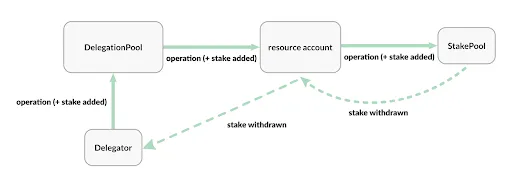
Create a my_script.move file containing the example script above in a sources/ subdirectory of your testing/ directory. Also, create a my_module.move file as seen in the example below:
This results in the following file structure:
Compile the script:
Note how we use the --named-addresses argument. This is necessary because in the code we refer to this named address called addr. The compiler needs to know what this refers to. Instead of using this CLI argument, you could put something like this in your Move.toml:
Run the compiled script:
addressTFor more generic functions, this can be handled as providing a generic T for typing the input:
Additionally, the individual resources that are at the object can be used. The resource will be checked for existence before the function executes.
The resource 0x1::object::ObjectCore is available for all objects
Objects can store multiple resources at their address, and you can refer to an Object by any of those types. You can convert an address to an object, or convert an object between types as long as the resource is available.
Objects can be owned by any address, this includes Objects, Accounts, and Resource accounts. This allows composability between objects, as well as complex relationships between objects.
Ownership can be found by a few methods:
An object can be transferred as long as ungated transfer has not been disabled. See disabling transfer of an object.
If the ungated transfer is disabled, only transfers can be done with a TransferRef or a LinearTransferRef. When ungated transfers are enabled, objects can be transferred as follows:
There are two ways to remove an object:
Delete
Burn
To delete an object, the user must have a DeleteRef see allowing deletion of an object.
However, if the object is not deletable, you can tombstone and burn the unwanted object.
If a user decided that they did not want to burn it, they can un-burn it
abortabort is an expression that takes one argument: an abort code of type u64. For example:
The abort expression halts execution of the current function and reverts all changes made to global state by the current transaction. There is no mechanism for "catching" or otherwise handling an abort.
Luckily, in Move transactions are all or nothing, meaning any changes to global storage are made all at once only if the transaction succeeds. Because of this transactional commitment of changes, after an abort there is no need to worry about backing out changes. While this approach is lacking in flexibility, it is incredibly simple and predictable.
Similar to return, abort is useful for exiting control flow when some condition cannot be met.
In this example, the function will pop two items off of the vector, but will abort early if the vector does not have two items
This is even more useful deep inside a control-flow construct. For example, this function checks that all numbers in the vector are less than the specified bound. And aborts otherwise
assert is a builtin, macro-like operation provided by the Move compiler. It takes two arguments, a condition of type bool and a code of type u64
Since the operation is a macro, it must be invoked with the !. This is to convey that the arguments to assert are call-by-expression. In other words, assert is not a normal function and does not exist at the bytecode level. It is replaced inside the compiler with
assert is more commonly used than just abort by itself. The abort examples above can be rewritten using assert
and
Note that because the operation is replaced with this if-else, the argument for the code is not always evaluated. For example:
Will not result in an arithmetic error, it is equivalent to
So the arithmetic expression is never evaluated!
When using abort, it is important to understand how the u64 code will be used by the VM.
Normally, after successful execution, the Move VM produces a change-set for the changes made to global storage (added/removed resources, updates to existing resources, etc.).
If an abort is reached, the VM will instead indicate an error. Included in that error will be two pieces of information:
The module that produced the abort (address and name)
The abort code.
For example
If a transaction, such as the script always_aborts above, calls 0x2::example::aborts, the VM would produce an error that indicated the module 0x2::example and the code 42.
This can be useful for having multiple aborts being grouped together inside a module.
In this example, the module has two separate error codes used in multiple functions
The abort i expression can have any type! This is because both constructs break from the normal control flow, so they never need to evaluate to the value of that type.
The following are not useful, but they will type check
This behavior can be helpful in situations where you have a branching instruction that produces a value on some branches, but not all. For example:
The gas profiler can be invoked by appending the --profile-gas option to Endless CLI’s move publish, move run or move run-script commands.
Here is an example using the hello_blockchain package from move examples. First, cd into the package directory.
Then, we can simulate module publishing with the extra option --profile-gas.
Notice that you do need to have your CLI profile set up properly and bind the named addresses correctly. Please refer to CLI Configuration for more details.
This will result in some terminal output that looks like this:
Again, it should be emphasized that even though the live chain-state is being used, this is a simulation so the module has NOT really been published to the target network.
You can then find the generated gas report in the directory gas-profiling:
index.html is the main page of the report, and you can view it in your web browser.
The gas report consists of three parts, enabling you to understand the gas usage through different lenses.
The first section consists of visualization of the gas usage in the form of two flamegraphs: one for execution & IO, the other for storage. The reason why we need two graphs is that these are measured in different units: one in gas units, and the other in EDS.
It is possible to interact with various elements in the graph. If you hover your cursor over an item, it will show you the precise cost and percentage.
If you click on an item, you can zoom into it and see the child items more clearly. You can reset the view by clicking the "Reset Zoom" button in the top-left corner.
There is also "Search" button in the top-right corner that allows to match certain items and highlight them.
The second section is a detailed break-down of all gas costs. Data presented in this section is categorized, aggregated and sorted. This can be especially helpful if you know what numbers to look at.
For example, the following tables show the IO costs of all storage operations. The percentage here is relative to the total cost of the belonging category (Exec + IO in this case).
The final section of the gas report is the full execution trace of the transaction that looks like this:
The left column lists all Move instructions and operations being executed, with each level of indentation indicating a function call.
The middle column represents the gas costs associated with the operations.
There is also a special notation @number that represents a jump to a particular location in the byte code. This is purely informational and to help understand the control flow.
We plan to extend the gas profiler with the following features:
Ability to replay historical transactions that have been committed (on mainnet, testnet etc.).
Ability to annotate source files.
Feedbacks and feature requests are welcome! Please kindly submit them by creating GitHub issues here.
address 0x2 {
module a {
use 0x2::c;
friend 0x2::b;
public fun a() {
c::c()
}
}
module b {
friend 0x2::c; // ERROR!
// ^^^^^^ This friend relationship creates a dependency cycle: '0x2::b' is a friend of '0x2::a' uses '0x2::c' is a friend of '0x2::b'
}
module c {
public fun c() {}
}
}address 0x42 {
module a {}
module m {
use 0x42::a as aliased_a;
friend 0x42::A;
friend aliased_a; // ERROR!
// ^^^^^^^^^ Duplicate friend declaration '0x42::a'. Friend declarations in a module must be unique
}
}auth_key = sha3-256(pubkey_A | 0x00)$ endless account add-authentication-key \
--private-key ${p1-private-key} \
--new-private-key ${p2-private-key} $ endless account update-signature-required \
-n ${K} \
--private-key ${anyone-in-the-list-of-private-key} module Test::Coin {
struct Coin has key { amount: u64 }
public fun initialize(account: &signer) {
move_to(account, Coin { amount: 1000 });
}
public fun withdraw(account: &signer, amount: u64): Coin acquires Coin {
let balance = &mut borrow_global_mut<Coin>(Signer::address_of(account)).amount;
*balance = *balance - amount;
Coin { amount }
}
public fun deposit(account: address, coin: Coin) acquires Coin {
let balance = &mut borrow_global_mut<Coin>(account).amount;
*balance = *balance + coin.amount;
Coin { amount: _ } = coin;
}
}module addr::my_module {
public entry fun do_nothing() { }
}testing/
Move.toml
sources/
my_script.move
my_module.move$ endless move compile --named-addresses addr=cb265645385819f3dbe71aac266e319e7f77aed252cacf2930b68102828bf615
Compiling, may take a little while to download git dependencies...
INCLUDING DEPENDENCY EndlessFramework
INCLUDING DEPENDENCY EndlessStdlib
INCLUDING DEPENDENCY MoveStdlib
BUILDING run_script
{
"Result": [
"cb265645385819f3dbe71aac266e319e7f77aed252cacf2930b68102828bf615::my_module"
]
}[addresses]
addr = "cb265645385819f3dbe71aac266e319e7f77aed252cacf2930b68102828bf615"$ endless move run-script --compiled-script-path build/my_script/bytecode_scripts/main.mv --args address:b078d693856a65401d492f99ca0d6a29a0c5c0e371bc2521570a86e40d95f823 --args u64:5
Do you want to submit a transaction for a range of [17000 - 25500] Octas at a gas unit price of 100 Octas? [yes/no] >
yes
{
"Result": {
"transaction_hash": "0xa6ca6275c73f82638b88a830015ab81734a533aebd36cc4647b48ff342434cdf",
"gas_used": 3,
"gas_unit_price": 100,
"sender": "cb265645385819f3dbe71aac266e319e7f77aed252cacf2930b68102828bf615",
"sequence_number": 4,
"success": true,
"timestamp_us": 1683030933803632,
"version": 3347495,
"vm_status": "Executed successfully"
}
}script {
use std::signer;
use endless_framework::endless_account;
use endless_framework::endless_coin;
use endless_framework::coin;
fun main(src: &signer, dest: address, desired_balance: u64) {
let src_addr = signer::address_of(src);
addr::my_module::do_nothing();
let balance = coin::balance<endless_coin::EndlessCoin>(src_addr);
if (balance < desired_balance) {
endless_account::transfer(src, dest, desired_balance - balance);
};
}
}mkdir testing
cd testingendless init --network devnet---
profiles:
default:
private_key: "0xbd944102bf5b5dfafa7fe865d8fa719da6a1f0eafa3cd600f93385482d2c37a4"
public_key: "0x47673ec83bb254cc9a8bfdb31846daacd0c96fe41f81855462f5fc5306312b1b"
account: cb265645385819f3dbe71aac266e319e7f77aed252cacf2930b68102828bf615
rest_url: "https://api.devnet.endlesslabs.com"
faucet_url: "https://faucet.devnet.endlesslabs.com"endless move init --name run_scriptmodule my_addr::object_playground {
use endless_framework::object::Object;
/// This will fail of the object doesn't have the generic `T` stored
entry fun do_something<T>(object: Object<T>) {
// ...
}
}module my_addr::object_playground {
use endless_framework::object::Object;
struct MyAwesomeStruct has key {}
/// This will fail if the object doesn't have MyAwesomeStruct stored
entry fun do_something(object: Object<MyAwesomeStruct>) {
// ...
}
}module my_addr::object_playground {
use endless_framework::object::{Object, ObjectCore};
/// This will only fail of the address is not an object
entry fun do_something(object: Object<ObjectCore>) {
// ...
}
}module my_addr::object_playground {
use endless_framework::object::{self, Object, ObjectCore};
struct MyAwesomeStruct has key {}
fun convert_type(object: Object<ObjectCore>): Object<MyAwesomeStruct> {
object::convert<MyAwesomeStruct>(object)
}
fun address_to_type(object_address: address): Object<MyAwesomeStruct> {
object::address_to_object<MyAwesomeStruct>(object)
}
}module my_addr::object_playground {
use std::signer;
use endless_framework::object::{self, Object};
// Not authorized!
const E_NOT_AUTHORIZED: u64 = 1;
fun check_owner_is_caller<T>(caller: &signer, object: Object<T>) {
assert!(
object::is_owner(object, signer::address_of(caller)),
E_NOT_AUTHORIZED
);
}
fun check_is_owner_of_object<T>(addr: address, object: Object<T>) {
assert!(object::owner(object) == addr, E_NOT_AUTHORIZED);
}
fun check_is_nested_owner_of_object<T, U>(
caller: &signer,
outside_object: Object<T>,
inside_object: Object<U>
) {
// Ownership expected
// Caller account -> Outside object -> inside object
// Check outside object owns inside object
let outside_address = object::object_address(outside_object);
assert!(object::owns(inside_object, outside_address), E_NOT_AUTHORIZED);
// Check that the caller owns the outside object
let caller_address = signer::address_of(caller);
assert!(object::owns(outside_object, caller_address), E_NOT_AUTHORIZED);
// Check that the caller owns the inside object (via the outside object)
// This can skip the first two calls (and even more nested)
assert!(object::owns(inside_object, caller_address), E_NOT_AUTHORIZED);
}
}module my_addr::object_playground {
use endless_framework::object::{self, Object};
/// Transfer to another address, this can be an object or account
fun transfer<T>(owner: &signer, object: Object<T>, destination: address) {
object::transfer(owner, object, destination);
}
/// Transfer to another object
fun transfer_to_object<T, U>(
owner: &signer,
object: Object<T>,
destination: Object<U>
) {
object::transfer_to_object(owner, object, destination);
}
}module my_addr::object_playground {
use endless_framework::object::{self, Object};
fun burn_object<T>(owner: &signer, object: Object<T>) {
object::burn(owner, object);
assert!(object::is_burnt(object) == true, 1);
}
}module my_addr::object_playground {
use endless_framework::object::{self, Object};
fun unburn_object<T>(owner: &signer, object: object::Object<T>) {
object::unburn(owner, object);
assert!(object::is_burnt(object) == false, 1);
}
}abort 42use std::vector;
fun pop_twice<T>(v: &mut vector<T>): (T, T) {
if (vector::length(v) < 2) abort 42;
(vector::pop_back(v), vector::pop_back(v))
}use std::vector;
fun check_vec(v: &vector<u64>, bound: u64) {
let i = 0;
let n = vector::length(v);
while (i < n) {
let cur = *vector::borrow(v, i);
if (cur > bound) abort 42;
i = i + 1;
}
}assert!(condition: bool, code: u64)if (condition) () else abort codeuse std::vector;
fun pop_twice<T>(v: &mut vector<T>): (T, T) {
assert!(vector::length(v) >= 2, 42); // Now uses 'assert'
(vector::pop_back(v), vector::pop_back(v))
}use std::vector;
fun check_vec(v: &vector<u64>, bound: u64) {
let i = 0;
let n = vector::length(v);
while (i < n) {
let cur = *vector::borrow(v, i);
assert!(cur <= bound, 42); // Now uses 'assert'
i = i + 1;
}
}assert!(true, 1 / 0)if (true) () else (1 / 0)address 0x2 {
module example {
public fun aborts() {
abort 42
}
}
}
script {
fun always_aborts() {
0x2::example::aborts()
}
}address 0x42 {
module example {
use std::vector;
const EMPTY_VECTOR: u64 = 0;
const INDEX_OUT_OF_BOUNDS: u64 = 1;
// move i to j, move j to k, move k to i
public fun rotate_three<T>(v: &mut vector<T>, i: u64, j: u64, k: u64) {
let n = vector::length(v);
assert!(n > 0, EMPTY_VECTOR);
assert!(i < n, INDEX_OUT_OF_BOUNDS);
assert!(j < n, INDEX_OUT_OF_BOUNDS);
assert!(k < n, INDEX_OUT_OF_BOUNDS);
vector::swap(v, i, k);
vector::swap(v, j, k);
}
public fun remove_twice<T>(v: &mut vector<T>, i: u64, j: u64): (T, T) {
let n = vector::length(v);
assert!(n > 0, EMPTY_VECTOR);
assert!(i < n, INDEX_OUT_OF_BOUNDS);
assert!(j < n, INDEX_OUT_OF_BOUNDS);
assert!(i > j, INDEX_OUT_OF_BOUNDS);
(vector::remove<T>(v, i), vector::remove<T>(v, j))
}
}
}let y: address = abort 0;let b =
if (x == 0) false
else if (x == 1) true
else abort 42;
// ^^^^^^^^ `abort 42` has type `bool`$ cd endless-move/move-examples/hello_blockchain$ endless move publish --named-addresses hello_blockchain=default --profile-gasCompiling, may take a little while to download git dependencies...
INCLUDING DEPENDENCY EndlessFramework
INCLUDING DEPENDENCY EndlessStdlib
INCLUDING DEPENDENCY MoveStdlib
BUILDING Examples
package size 1755 bytes
Simulating transaction locally with the gas profiler...
{
"Result": {
"transaction_hash": "0x26cc23d11070e6756c6b2ae0ea7d3fc4c791b59cf821f268ba0f03eebb487543",
"gas_used": 1039,
"gas_unit_price": 100,
"sender": "dbcbe741d003a7369d87ec8717afb5df425977106497052f96f4e236372f7dd5",
"success": true,
"version": 762354147,
"vm_status": "status EXECUTED of type Execution"
}
}- hello_blockchain
- gas-profiling
- txn-xxxxxxxx-0x1-code-publish_package_txn
- assets
- index.html
- sources
- Move.tomlexecution & IO (gas unit, full trace) 106.45206 100.00%
intrinsic 3.94 3.70%
0x1::code::publish_package_txn 100.02706 93.96%
move_loc 0.0024 0.00%
move_loc 0.0024 0.00%
call_generic 0.024 0.02%
0x1::util::from_bytes<0x1::code::PackageMetadata> 0.1094 0.10%
move_loc 0.0024 0.00%
call 0.064 0.06%
0x1::code::publish_package 99.82126 93.77%
call 0.02 0.02%
0x1::code::upgrade_policy_arbitrary 0.0076 0.01%
ld_u8 0.0012 0.00%
pack 0.0052 0.00%
ret 0.0012 0.00%
st_loc 0.0024 0.00%
imm_borrow_loc 0.0012 0.00%
imm_borrow_field 0.004 0.00%
imm_borrow_field 0.004 0.00%
read_ref 0.0072 0.01%
imm_borrow_loc 0.0012 0.00%
imm_borrow_field 0.004 0.00%
read_ref 0.0072 0.01%
gt 0.0032 0.00%
br_false 0.0024 0.00%
branch 0.0016 0.00%
@17
...Compile and test a Move module.
Publish a Move module to the Endless blockchain.
Interact with a Move module.
Install the precompiled binary for the Endlesss CLI.
After installing the CLI binary, create and fund an account on the Endless blockchain.
Start a new terminal and run the following command to initialize a new local account:
You will see output asking to choose a network:
Press return to accept the default devnet network or specify the network of your choosing:
See and respond to the prompt for your private key by accepting the default to create a new or by entering an existing key:
Assuming you elected to create a new, you will see:
The account address in the above output a345dbfb0c94416589721360f207dcc92ecfe4f06d8ddc1c286f569d59721e5a is your new account and is aliased as the profile default. This account address will be different for you as it is generated randomly. From now on, either default or 0xa345dbfb0c94416589721360f207dcc92ecfe4f06d8ddc1c286f569d59721e5a are used interchangeably in this document. Of course, substitute your own address as needed.
Now fund this account by running this command:
You will see output resembling:
input yes to send fund transaction, and console output:
Several example Move modules are available in the move-examples directory for your use. Open a terminal and change directories into the hello_blockchain directory:
Run the below command to compile the hello_blockchain module:
You will see output resembling:
The compile command must contain --named-addresses as above because the Move.toml file leaves this as undefined (see below).
To test the module run:
And receive output like:
To prepare the module for the account created in the previous step, we specify that the named address hello_blockchain is set to our account address, using the default profile alias.
After the code is compiled and tested, we can publish the module to the account created for this tutorial with the command:
You will see the output similar to:
At this point, the module is now stored on the account in the Endless blockchain.
Move modules expose access points, known as entry functions. These entry functions can be called via transactions. The Endless CLI allows for seamless access to these entry functions. The example Move module hello_blockchain exposes a set_message entry function that takes in a string. This can be called via the CLI:
Upon success, the CLI will print out the following:
The set_message function modifies the hello_blockchain MessageHolder resource. A resource is a data structure that is stored in global storage. The resource can be read by querying the following REST API:
After the first execution, this should contain:
Notice that the message field contains hello, blockchain.
Each succesful call to set_message after the first call results in the MessageChange event being emitted. MessageChange is a Module Event.

This tutorial introduces assorted K-of-N multi-signer authentication operations and supplements content from the following tutorials:
Your First Transaction
Your First Coin
Your First Move Module
Install your preferred SDK from the below list:
TypeScript SDK
Clone the endless-ts-sdk repo and build it:
Navigate to the Typescript examples directory:
Install the necessary dependencies:
Run the example:
First, we will generate accounts for Alice, Bob, and Chad and fund them:
Fresh accounts are generated for each example run, but the output should resemble:
For each user, at this moment, the account address and authentication key are identical.
Next, Alice adds Bob's authentication key to her list of authentication keys. This involves submitting a transaction that invokes the `add_authentication_key` function within the account module of the system contract. Both Alice and Bob must sign this transaction.
After add authentication key transaction, bob's authentication key is added into Alice's authentication
We now build an EDS transfer transaction, sender is Alice's account, receiver is Chad, transaction is signed by Bob.
We invoke 0x1::account::remove_authentication_key to remove Bob's authenticaion key, restore Alice's authentication key as default. This transaction also must be signed by both Alice and Bob.
Threashold to 2By adding Bob and Chad auth key to Alice's auth key list, either Bob or Chad can sign transaction on Alice behalf. A required signature count of 2 (Threshold = 2) is enforced for transactions originating from Alice. Verification will fail if fewer than two signatures are present (e.g., only Alice's signature, or only one of Bob's or Chad's)
The above examples showcase the Endless multi-signature feature, demonstrating how to manage Authentication Keys and generate transaction signatures. This multi-signature implementation, combined with Keyless functionality, offers an emergency escape route.
For example, if a Keyless account (A) is locked due to Web2 service issues, and its authentication key list includes another wallet (AA), then AA can rescue the funds by initiating a transaction on A's behalf, avoiding assets locked.
Endless Explorer: https://scan.endless.link
The Endless Explorer lets you delve into the activity on the Endless blockchain in great detail, seeing transactions, validators, and account information. With the Endless Explorer, you can ensure that the transactions performed on Endless are accurately reflected.
The Endless Explorer provides a one-step search engine across the blockchain to discover details about wallets, transactions, network analytics, user accounts, smart contracts, and more. The Endless Explorer also offers dedicated pages for key elements of the blockchain and acts as the source of truth for all things Endless. See the Endless Glossary for definitions of many of the terms found here.
The Endless Explorer gives you a near real-time view into the status of the network and the activity related to the core on-chain entities. It serves these audiences and purposes by letting:
App developers understand the behavior of the smart contracts and sender-receiver transaction flows.
General users view and analyze Endless blockchain activity on key entities - transactions, blocks, accounts, and resources.
Node operators check the health of the network and maximize the value of operating the node.
Token holders find the best node operator to delegate the tokens and earn a staking reward.
Follow the instructions here to conduct typical work in the Endless Explorer.
The Endless Explorer renders data from all Endless networks: Mainnet, Testnet, Devnet, and your local host if configured. See Endless Blockchain Networks for a detailed view of their purposes and differences.
To select a network in the Endless Explorer, load the explorer and use the Select Network drop-down menu at the top right to select your desired network.
One of the most common tasks is to track a transaction in Endless Explorer. You may search by the account address, transaction version and hash, or block height and version.
To find a transaction:
Enter the value in the Search transactions field near the top of any page.
Do not press return.
Click the transaction result that appears immediately below the search field, highlighted in green within the following screenshot:
The resulting Transaction details page appears.
The simplest way to find your address is to use the Endless Wallet.
Then simply append it to the following URL to load its details in the Endless Explorer: https://scan.endless.link/account/
Like so: https://scan.endless.link/account/0x778bdeebb67d3914b181236c2f1f4acc0e561482fc265b9a5709488a97fb3303
See Accounts for instructions on use.
This section walks you through the available screens in Endless Explorer to help you find the information you need.
The Endless Explorer home page provides an immediate view into the total supply of Endless coins, those that are now staked, transactions per second (TPS), and active validators on the network, as well as a rolling list of the latest transactions:
Click the Transactions tab at the top or View all Transactions at the bottom to go to the Transactions page.
The Transactions page displays all transactions on the Endless blockchain in order, with the latest at the top of an ever-growing list.
In the transactions list, single-click the Hash column to see and copy the hash for the transaction or double-click the hash to go directly to the transaction details for the hash.
Otherwise, click anywhere else in the row of the desired transaction to load its Transaction details page.
Use the controls at the bottom of the list to navigate back through transactions historically.
The Transaction details page reveals all information for a given transaction, starting with its default Overview tab. There you can see a transaction's status, sender, version, gas fee, and much more:
Scrolling down on the Overview, you can also see the transaction's signature (with public_key) and hashes for tracking.
The Transaction details page offers even more information in the following tabs.
Balance Change
The Balance Change details BalanceChange tab shows the balance changes of every account the transaction involves, including gas transaction consumes.
Events
The Transaction details Events tab shows the transaction's sequence numbers, including their types and data.
Payload
The Transaction details Payload tab presents the transaction's actual code used. Click the down arrow at the bottom of the code block to expand it and see all contents.
Changes
The Transaction details Changes tab shows the addresses, state key hashes, and data for each index in the transaction.
The Accounts page aggregates all transactions, tokens, and other resources in a single set of views starting with its default Transactions tab:
You can load your account page by appending your account address to: https://explorer.endlesslabs.com/account/
See Find account address for more help.
On the Accounts > Transactions tab, click any transaction to go to its Transaction details page.
As on the main Transactions page, you may also single-click the Hash column to see and copy the hash for the transaction or double-click the hash to go directly to the transaction details for the hash.
As with Transactions, the Endless Explorer provides tabs for additional information about the account.
The Coins tab presents any assets owned by the account, lists the coin's name and symbol, the amount the accounts holds. Click any of the assets to go to the Coins details page.
Coin details
The Coin details page contains:
Overview tab including Coin name, symbol, coin address, creater, coin total supply, holders count.
Transactions tab showing all transfer associated with the coin.
Holders tab showing all accounts who hold the coin, sort by holding quantity.
The NFTs tab presents any Non-Fungible Assets owned by the account, lists the nft's name, collection the nft belongs to. Click any of the nft to go to the NFT details page.
NFT details
The NFT details page contains:
Overview tab including token name, owner, collection, creator, royalty, and more.
Activities tab showing all transfer types, the addresses involved, property version, and amount.
On either tab, click an address to go to the Account page for the address.
The Resources tab presents a view of all types used by the account. Use the Collapse All toggle at top right to see all types at once.
The Modules tab displays the source code and ABI used by the account. Select different modules on the left sidebar to view Move source code and ABI of a specific module. Use the expand button at the top right of the source code to expand the code for better readability.
The Info tab shows the sequence number and authentication key used by the account.
The Blocks page presents a running list of the latest blocks to be committed to the Endless blockchain.
Click the:
Hash to see and copy the hash of the block.
First version to go to the first transaction in the block.
Last version to go to the last transaction in the block.
Block ID or anywhere else to go to the Block details page.
The Block details page contains:
Overview tab including block height, versions, timestamp, proposer, epoch and round.
Transactions tab showing the version, status, type, hash, gas, and timestamp.
On the Overview tab, click the versions to go to the related transactions or double-click the address of the proposer to go to the Account page for that address.
On the Transactions tab, click the desired row to go to the Transactions details page.
The Validators page lists every validator on the Endless blockchain, including their validator address, voting power, public key, fullnode address, and network address.
Click the validator address to go to the Account page for that address. Click the public key or any of the other addresses to see and copy their values.
Move offers three constructs for looping: while, for, and loop.
while loopsThe while construct repeats the body (an expression of type unit) until the condition (an expression of type bool) evaluates to false.
Here is an example of simple while loop that computes the sum of the numbers from 1 to n:
Infinite loops are allowed:
breakThe break expression can be used to exit a loop before the condition evaluates to false. For example, this loop uses break to find the smallest factor of n that's greater than 1:
The break expression cannot be used outside of a loop.
continueThe continue expression skips the rest of the loop and continues to the next iteration. This loop uses continue to compute the sum of 1, 2, ..., n, except when the number is divisible by 10:
The continue expression cannot be used outside of a loop.
break and continuebreak and continue, much like return and abort, can have any type. The following examples illustrate where this flexible typing can be helpful:
for expressionThe for expression iterates over a range defined using integer-typed lower_bound (inclusive) and upper_bound (non-inclusive) expressions, executing its loop body for each element of the range. for is designed for scenarios where the number of iterations of a loop is determined by a specific range.
Here is an example of a for loop that computes the sum of the elements in a range from 0 to n-1:
The loop iterator variable (i in the above example) currently must be a numeric type (inferred from the bounds), and the bounds 0 and n here can be replaced by arbitrary numeric expressions. Each is only evaluated once at the start of the loop. The iterator variable i is assigned the lower_bound (in this case 0) and incremented after each loop iteration; the loop exits when the iterator i reaches or exceeds upper_bound (in this case n).
break and continue in for loopsSimilar to while loops, the break expression can be used in for loops to exit prematurely. The continue expression can be used to skip the current iteration and move to the next. Here's an example that demonstrates the use of both break and continue. The loop will iterate through numbers from 0 to n-1, summing up them up. It will skip numbers that are divisible by 3 (using continue) and stop when it encounters a number greater than 10 (using break):
loop expressionThe loop expression repeats the loop body (an expression with type ()) until it hits a break
Without a break, the loop will continue forever
Here is an example that uses loop to write the sum function:
As you might expect, continue can also be used inside a loop. Here is sum_intermediate from above rewritten using loop instead of while
while, loop, and for expressionMove loops are typed expressions. The while and for expression always has type ().
If a loop contains a break, the expression has type unit ()
If loop does not have a break, loop can have any type much like return, abort, break, and continue.
The Endless on-chain governance is a process by which the Endless community members can create and vote on proposals that minimize the cost of blockchain upgrades. The following describes the scope of these proposals for the Endless on-chain governance:
Changes to the blockchain parameters, for example, the epoch duration, and the minimum required and maximum allowed validator stake.
Changes to the core blockchain code.
Upgrades to the Endless Framework modules for fixing bugs or for adding or enhancing the Endless blockchain functionality.
Deploying new framework modules (at the address 0x1 - 0xa).
See below for a summary description of how a proposal comes to exist and when it becomes ready to be resolved:
The Endless community can suggest an Endless Improvement Proposal (AIP) in the Endless Foundation AIP GitHub.
When appropriate, an on-chain proposal can be created for the AIP via the endless_governance module.
Voters can then vote on this proposal on-chain via the endless_governance module. If there is sufficient support for a proposal, then it can be resolved.
To either propose or vote, you must stake, but you are not required to run a validator node. However, we recommend that you run validator with a stake as part of the validator set to gain rewards from your stake.
To create a proposal, the proposer's backing stake pool must have the minimum required proposer stake. The proposer's stake must be locked up for at least as long as the proposal's voting period. This is to avoid potential spam proposals.
Proposers can create a proposal by calling .
To vote, you must stake, though you are not required to run a validator node. Your voting power is derived from the backing stake pool.
Voting power is calculated based on the current epoch's active stake of the proposer or voter's backing stake pool. In addition, the stake pool's lockup must be at least as long as the proposal's duration.
Verify proposals before voting. Ensure each proposal is linked to its source code, and if there is a corresponding AIP, the AIP is in the title and description.
If you are a staking pool voter, follow the instructions for voting here.
If you are a delegated staker, follow the instructions for voting here.
Anyone can resolve an on-chain proposal that has passed voting requirements by using the endless governance execute-proposal command from Endless CLI.
AIPs are proposals created by the Endless community or the Endless Labs team to improve the operations and development of the Endless chain. To submit an AIP, create an issue in Endless Foundation's GitHub repository using the To keep up with new AIPs, check the #aip-announcements channel on Endless' discord channel. To view and vote on on-chain proposals, go to Endless' Governance website.
The majority of the governance logic is in . The endless_governance module outlines how users can interact with Endless Governance. It's the external-facing module of the Endless on-chain governance process and contains logic and checks that are specific to Endless Governance. The voting module is the Endless governance standard that can be used by DAOs on the Endless chain to create their own on-chain governance process.
If you are thinking about creating a DAO on Endless, you can refer to endless_governance's usage of the voting module as an example. In endless_governance, we rely on the voting module to create, vote on, and resolve a proposal.
endless_governance::create_proposal calls voting::create_proposal to create a proposal on-chain, when an off-chain AIP acquires sufficient importance.
endless_governance::vote calls voting::vote to record the vote on a proposal on-chain;
endless_governance::resolve
endless initChoose network from [devnet, testnet, mainnet, local, custom | defaults to devnet]No network given, using devnet...Enter your private key as a hex literal (0x...) [Current: None | No input: Generate new key (or keep one if present)]No key given, generating key...
Account a345dbfb0c94416589721360f207dcc92ecfe4f06d8ddc1c286f569d59721e5a doesn't exist, creating it and funding it with 100000000 Veins
Account a345dbfb0c94416589721360f207dcc92ecfe4f06d8ddc1c286f569d59721e5a funded successfully
---
Endless CLI is now set up for account a345dbfb0c94416589721360f207dcc92ecfe4f06d8ddc1c286f569d59721e5a as profile default! Run `endless --help` for more information about commands
{
"Result": "Success"
}endless account fund-with-move --account defaultDo you want to submit a transaction for a range of [144900 - 217300] Veins at a gas unit price of 100 Veins? [yes/no] >tx version: ...
Added fund to account 0xa345dbfb0c94416589721360f207dcc92ecfe4f06d8ddc1c286f569d59721e5aendless move compile --named-addresses hello_blockchain=default{
"Result": [
"a345dbfb0c94416589721360f207dcc92ecfe4f06d8ddc1c286f569d59721e5a::message"
]
}endless move test --named-addresses hello_blockchain=defaultINCLUDING DEPENDENCY EndlessFramework
INCLUDING DEPENDENCY EndlessStdlib
INCLUDING DEPENDENCY MoveStdlib
BUILDING Examples
Running Move unit tests
[ PASS ] 0x1a42874787568af30c785622899a27dacce066d671fa487e7fb958d6d0c85077::message::sender_can_set_message
[ PASS ] 0x1a42874787568af30c785622899a27dacce066d671fa487e7fb958d6d0c85077::message_tests::sender_can_set_message
Test result: OK. Total tests: 2; passed: 2; failed: 0
{
"Result": "Success"
}[addresses]
hello_blockchain = "_"endless move publish --named-addresses hello_blockchain=defaultpackage size 1631 bytes
{
"Result": {
"transaction_hash": "0x45d682997beab297a9a39237c588d31da1cd2c950c5ab498e37984e367b0fc25",
"gas_used": 13,
"gas_unit_price": 1,
"pending": null,
"sender": "a345dbfb0c94416589721360f207dcc92ecfe4f06d8ddc1c286f569d59721e5a",
"sequence_number": 8,
"success": true,
"timestamp_us": 1661320216343795,
"version": 3977,
"vm_status": "Executed successfully"
}
}endless move run \
--function-id 'default::message::set_message' \
--args 'string:hello, blockchain'{
"Result": {
"transaction_hash": "0x1fe06f61c49777086497b199f3d4acbee9ea58976d37fdc06d1ea48a511a9e82",
"gas_used": 1,
"gas_unit_price": 1,
"pending": null,
"sender": "a345dbfb0c94416589721360f207dcc92ecfe4f06d8ddc1c286f569d59721e5a",
"sequence_number": 1,
"success": true,
"timestamp_us": 1661320878825763,
"version": 5936,
"vm_status": "Executed successfully"
}
}
https://rpc-test.endless.link/v1/accounts/a345dbfb0c94416589721360f207dcc92ecfe4f06d8ddc1c286f569d59721e5a/resource/0xa345dbfb0c94416589721360f207dcc92ecfe4f06d8ddc1c286f569d59721e5a::message::MessageHolder{
"type": "0xa345dbfb0c94416589721360f207dcc92ecfe4f06d8ddc1c286f569d59721e5a::message::MessageHolder",
"data": {
"message": "hello, blockchain"
}
}


#[test_only], and#[expected_failure].
They respectively mark a function as a test, mark a module or module member (use, function, or struct) as code to be included for testing only, and mark that a test is expected to fail. These annotations can be placed on a function with any visibility. Whenever a module or module member is annotated as #[test_only] or #[test], it will not be included in the compiled bytecode unless it is compiled for testing.
Both the #[test] and #[expected_failure] annotations can be used either with or without arguments.
Without arguments, the #[test] annotation can only be placed on a function with no parameters. This annotation simply marks this function as a test to be run by the unit testing harness.
A test can also be annotated as an #[expected_failure]. This annotation marks that the test should is expected to raise an error.
You can ensure that a test is aborting with a specific abort <code> by annotating it with #[expected_failure(abort_code = <code>)], corresponding to the parameter to an abort statement (or failing assert! macro).
Instead of an abort_code, an expected_failure may specify program execution errors, such as arithmetic_error, major_status, vector_error, and out_of_gas. For more specificity, a minor_status may optionally be specified.
If the error is expected from a specific location, that may also be specified: #[expected_failure(abort_code = <code>, location = <loc>)]. If the test then fails with the right error but in a different module, the test will also fail. Note that <loc> can be Self(in the current module) or a qualified name, e.g. vector::std.
Only functions that have the #[test] annotation can also be annotated as an #[expected_failure].
With arguments, a test annotation takes the form #[test(<param_name_1> = <address>, ..., <param_name_n> = <address>)]. If a function is annotated in such a manner, the function's parameters must be a permutation of the parameters <param_name_1>, ..., <param_name_n>, i.e., the order of these parameters as they occur in the function and their order in the test annotation do not have to be the same, but they must be able to be matched up with each other by name.
Only parameters with a type of signer are supported as test parameters. If a parameter other than signer is supplied, the test will result in an error when run.
A module and any of its members can be declared as test only. In such a case the item will only be included in the compiled Move bytecode when compiled in test mode. Additionally, when compiled outside of test mode, any non-test uses of a #[test_only] module will raise an error during compilation.
Unit tests for a Move package can be run with the endless move test command. See package for more info.
When running tests, every test will either PASS, FAIL, or TIMEOUT. If a test case fails, the location of the failure along with the function name that caused the failure will be reported if possible. You can see an example of this below.
A test will be marked as timing out if it exceeds the maximum number of instructions that can be executed for any single test. This bound can be changed using the options below, and its default value is set to 100000 instructions. Additionally, while the result of a test is always deterministic, tests are run in parallel by default, so the ordering of test results in a test run is non-deterministic unless running with only one thread (see OPTIONS below).
There are also a number of options that can be passed to the unit testing binary to fine-tune testing and to help debug failing tests. These can be found using the help flag:
A simple module using some of the unit testing features is shown in the following example:
First create an empty package inside an empty directory:
Next add the following to the Move.toml:
Next add the following module under the sources directory:
You can then run these tests with the endless move test command:
-f <str> or --filter <str>
This will only run tests whose fully qualified name contains <str>. For example if we wanted to only run tests with "zero_coin" in their name:
--coverage
This will compute code being covered by test cases and generate coverage summary.
Then by running endless move coverage, we can get more detailed coverage information. These can be found using the help flag:
git clone https://github.com/endless-labs/endless-ts-sdk.git
cd endless-ts-sdk
pnpm install
pnpm buildcd examples/endlesspnpm installpnpm run bindingsFund alice: version 633280
Fund bob: version 633291
=== Account addresses ===
Alice: 0x91c381ec582ee96f96841a8f71b13a9feea83f52441e15a9e8b9d2bcf2ebbbc9
Bob: 0xd92dffdee6345ed5a0b3e3fe72b972dd90ba200bb478693dba4288998bc8343d
Chad: 0x820a4393e98c207b920a098c251c72435b5830b5b938bdb1aee77f83713d359c
=== Authentication keys ===
Alice: 0x91c381ec582ee96f96841a8f71b13a9feea83f52441e15a9e8b9d2bcf2ebbbc9
Bob: 0xd92dffdee6345ed5a0b3e3fe72b972dd90ba200bb478693dba4288998bc8343d
Chad: 0x820a4393e98c207b920a098c251c72435b5830b5b938bdb1aee77f83713d359clet txn = await endless.transaction.build.multiAgent({
sender: alice.accountAddress,
data: {
function: "0x1::account::add_authentication_key",
functionArguments: []
},
secondarySignerAddresses: [bob.accountAddress],
})
let aliceAuth = alice.signTransactionWithAuthenticator(txn)
let bobAuth = bob.signTransactionWithAuthenticator(txn)
pending = await endless.transaction.submit.multiAgent({
transaction: txn,
senderAuthenticator: aliceAuth,
additionalSignersAuthenticators: [bobAuth],
})
tx_response = await endless.waitForTransaction({ transactionHash: pending.hash })
console.log(`\nAdd Bob's authkey into Alice authkey list: version ${tx_response.version}`)Alice authentication_key:
0x91c381ec582ee96f96841a8f71b13a9feea83f52441e15a9e8b9d2bcf2ebbbc9,
0xd92dffdee6345ed5a0b3e3fe72b972dd90ba200bb478693dba4288998bc8343d
Bob controlled accounts:
0x91c381ec582ee96f96841a8f71b13a9feea83f52441e15a9e8b9d2bcf2ebbbc9let transferEDSRawTransaction = await endless.transaction.build.simple({
sender: alice.accountAddress,
data: {
function: "0x1::endless_account::transfer",
functionArguments: [chad.accountAddress, 1000]
},
})
let multiAuthKeyAccount = new MultiAuthKeyAccount({ sender: alice.accountAddress, signers: [bob] })
pending = await endless.signAndSubmitTransaction({
transaction: transferEDSRawTransaction,
signer: multiAuthKeyAccount,
})
tx_response = await endless.waitForTransaction({ transactionHash: pending.hash })
console.log(`\ntransfer EDS from Alice to Chad with Bob auth: version ${tx_response.version}`)txn = await endless.transaction.build.simple({
sender: alice.accountAddress,
data: {
function: "0x1::account::remove_authentication_key",
functionArguments: [bob.accountAddress.data]
},
})
aliceAuth = alice.signTransactionWithAuthenticator(txn)
pending = await endless.transaction.submit.simple({
transaction: txn,
senderAuthenticator: aliceAuth,
})
tx_response = await endless.waitForTransaction({ transactionHash: pending.hash })
console.log(`\nRemove Bob from Alice's auth key : version ${tx_response.version}`)Alice authentication_key:
0x91c381ec582ee96f96841a8f71b13a9feea83f52441e15a9e8b9d2bcf2ebbbc9
Bob controlled accounts:
Nonetxn = await endless.transaction.build.multiAgent({
sender: alice.accountAddress,
data: {
function: "0x1::account::batch_add_authentication_key",
functionArguments: [2]
},
secondarySignerAddresses: [bob.accountAddress, chad.accountAddress],
})
aliceAuth = alice.signTransactionWithAuthenticator(txn)
bobAuth = bob.signTransactionWithAuthenticator(txn)
let chadAuth = chad.signTransactionWithAuthenticator(txn)
pending = await endless.transaction.submit.multiAgent({
transaction: txn,
senderAuthenticator: aliceAuth,
additionalSignersAuthenticators: [bobAuth, chadAuth],
})
tx_response = await endless.waitForTransaction({ transactionHash: pending.hash })
console.log(`\nBatch Add auth key, set "AuthThreadhold" to 2: version ${tx_response.version}`)transferEDSRawTransaction = await endless.transaction.build.simple({
sender: alice.accountAddress,
data: {
function: "0x1::endless_account::transfer",
functionArguments: [chad.accountAddress, 1000]
},
})
multiAuthKeyAccount = new MultiAuthKeyAccount({ sender: alice.accountAddress, signers: [bob] })
try {
pending = await endless.signAndSubmitTransaction({
transaction: transferEDSRawTransaction,
signer: multiAuthKeyAccount,
})
await endless.waitForTransaction({ transactionHash: pending.hash });
} catch (error) {
console.log("\nFailed to transfer EDS from Alice to Chad with only by Bob auth, cause `Auth Threshold` is 2")
}multiAuthKeyAccount = new MultiAuthKeyAccount({ sender: alice.accountAddress, signers: [bob, alice] })
pending = await endless.signAndSubmitTransaction({
transaction: transferEDSRawTransaction,
signer: multiAuthKeyAccount,
})
tx_response = await endless.waitForTransaction({ transactionHash: pending.hash })
console.log(`\ntransfer EDS from Alice to Chad with Alice and Bob auth, version ${tx_response.version}`)fun sum(n: u64): u64 {
let sum = 0;
let i = 1;
while (i <= n) {
sum = sum + i;
i = i + 1
};
sum
}fun foo() {
while (true) { }
}fun smallest_factor(n: u64): u64 {
// assuming the input is not 0 or 1
let i = 2;
while (i <= n) {
if (n % i == 0) break;
i = i + 1
};
i
}fun sum_intermediate(n: u64): u64 {
let sum = 0;
let i = 0;
while (i < n) {
i = i + 1;
if (i % 10 == 0) continue;
sum = sum + i;
};
sum
}fun pop_smallest_while_not_equal(
v1: vector<u64>,
v2: vector<u64>,
): vector<u64> {
let result = vector::empty();
while (!vector::is_empty(&v1) && !vector::is_empty(&v2)) {
let u1 = *vector::borrow(&v1, vector::length(&v1) - 1);
let u2 = *vector::borrow(&v2, vector::length(&v2) - 1);
let popped =
if (u1 < u2) vector::pop_back(&mut v1)
else if (u2 < u1) vector::pop_back(&mut v2)
else break; // Here, `break` has type `u64`
vector::push_back(&mut result, popped);
};
result
}fun pick(
indexes: vector<u64>,
v1: &vector<address>,
v2: &vector<address>
): vector<address> {
let len1 = vector::length(v1);
let len2 = vector::length(v2);
let result = vector::empty();
while (!vector::is_empty(&indexes)) {
let index = vector::pop_back(&mut indexes);
let chosen_vector =
if (index < len1) v1
else if (index < len2) v2
else continue; // Here, `continue` has type `&vector<address>`
vector::push_back(&mut result, *vector::borrow(chosen_vector, index))
};
result
}fun sum(n: u64): u64 {
let sum = 0;
for (i in 0..n) {
sum = sum + i;
};
sum
}fun sum_conditional(n: u64): u64 {
let sum = 0;
for (iter in 0..n) {
if (iter > 10) {
break; // Exit the loop if the number is greater than 10
}
if (iter % 3 == 0) {
continue; // Skip the current iteration if the number is divisible by 3
}
sum = sum + iter;
};
sum
}fun foo() {
let i = 0;
loop { i = i + 1 }
}fun sum(n: u64): u64 {
let sum = 0;
let i = 0;
loop {
i = i + 1;
if (i > n) break;
sum = sum + i
};
sum
}fun sum_intermediate(n: u64): u64 {
let sum = 0;
let i = 0;
loop {
i = i + 1;
if (i % 10 == 0) continue;
if (i > n) break;
sum = sum + i
};
sum
}let () = while (i < 10) { i = i + 1 };
let () = for (i in 0..10) {};(loop { if (i < 10) i = i + 1 else break }: ());
let () = loop { if (i < 10) i = i + 1 else break };(loop (): u64);
(loop (): address);
(loop (): &vector<vector<u8>>);#[test] // OK
fun this_is_a_test() { ... }
#[test] // Will fail to compile since the test takes an argument
fun this_is_not_correct(arg: signer) { ... }#[test]
#[expected_failure]
public fun this_test_will_abort_and_pass() { abort 1 }
#[test]
#[expected_failure]
public fun test_will_error_and_pass() { 1/0; }
#[test]
#[expected_failure(abort_code = 0, location = Self)]
public fun test_will_error_and_fail() { 1/0; }
#[test, expected_failure] // Can have multiple in one attribute. This test will pass.
public fun this_other_test_will_abort_and_pass() { abort 1 }
#[test]
#[expected_failure(vector_error, minor_status = 1, location = Self)]
fun borrow_out_of_range() { ... }
#[test]
#[expected_failure(abort_code = 26113, location = extensions::table)]
fun test_destroy_fails() { ... }#[test(arg = @0xC0FFEE)] // OK
fun this_is_correct_now(arg: signer) { ... }
#[test(wrong_arg_name = @0xC0FFEE)] // Not correct: arg name doesn't match
fun this_is_incorrect(arg: signer) { ... }
#[test(a = @0xC0FFEE, b = @0xCAFE)] // OK. We support multiple signer arguments, but you must always provide a value for that argument
fun this_works(a: signer, b: signer) { ... }
// somewhere a named address is declared
#[test_only] // test-only named addresses are supported
address TEST_NAMED_ADDR = @0x1;
...
#[test(arg = @TEST_NAMED_ADDR)] // Named addresses are supported!
fun this_is_correct_now(arg: signer) { ... }#[test_only] // test only attributes can be attached to modules
module abc { ... }
#[test_only] // test only attributes can be attached to named addresses
address ADDR = @0x1;
#[test_only] // .. to uses
use 0x1::some_other_module;
#[test_only] // .. to structs
struct SomeStruct { ... }
#[test_only] // .. and functions. Can only be called from test code, but not a test
fun test_only_function(...) { ... }$ endless move test -h$ endless move init --name TestExample[dependencies]
MoveStdlib = { git = "https://github.com/endless-labs/endless.git", subdir="endless-move/framework/move-stdlib", rev = "main", addr_subst = { "std" = "0x1" } }// filename: sources/my_module.move
module 0x1::my_module {
struct MyCoin has key { value: u64 }
public fun make_sure_non_zero_coin(coin: MyCoin): MyCoin {
assert!(coin.value > 0, 0);
coin
}
public fun has_coin(addr: address): bool {
exists<MyCoin>(addr)
}
#[test]
fun make_sure_non_zero_coin_passes() {
let coin = MyCoin { value: 1 };
let MyCoin { value: _ } = make_sure_non_zero_coin(coin);
}
#[test]
// Or #[expected_failure] if we don't care about the abort code
#[expected_failure(abort_code = 0, location = Self)]
fun make_sure_zero_coin_fails() {
let coin = MyCoin { value: 0 };
let MyCoin { value: _ } = make_sure_non_zero_coin(coin);
}
#[test_only] // test only helper function
fun publish_coin(account: &signer) {
move_to(account, MyCoin { value: 1 })
}
#[test(a = @0x1, b = @0x2)]
fun test_has_coin(a: signer, b: signer) {
publish_coin(&a);
publish_coin(&b);
assert!(has_coin(@0x1), 0);
assert!(has_coin(@0x2), 1);
assert!(!has_coin(@0x3), 1);
}
}$ endless move test
BUILDING MoveStdlib
BUILDING TestExample
Running Move unit tests
[ PASS ] 0x1::my_module::make_sure_non_zero_coin_passes
[ PASS ] 0x1::my_module::make_sure_zero_coin_fails
[ PASS ] 0x1::my_module::test_has_coin
Test result: OK. Total tests: 3; passed: 3; failed: 0$ endless move test -f zero_coin
CACHED MoveStdlib
BUILDING TestExample
Running Move unit tests
[ PASS ] 0x1::my_module::make_sure_non_zero_coin_passes
[ PASS ] 0x1::my_module::make_sure_zero_coin_fails
Test result: OK. Total tests: 2; passed: 2; failed: 0$ endless move test --coverage
INCLUDING DEPENDENCY EndlessFramework
INCLUDING DEPENDENCY EndlessStdlib
INCLUDING DEPENDENCY MoveStdlib
BUILDING TestExample
Running Move unit tests
[ PASS ] 0x1::my_module::make_sure_non_zero_coin_passes
[ PASS ] 0x1::my_module::make_sure_zero_coin_fails
[ PASS ] 0x1::my_module::test_has_coin
Test result: OK. Total tests: 3; passed: 3; failed: 0
+-------------------------+
| Move Coverage Summary |
+-------------------------+
Module 0000000000000000000000000000000000000000000000000000000000000001::my_module
>>> % Module coverage: 100.00
+-------------------------+
| % Move Coverage: 100.00 |
+-------------------------+
Please use `endless move coverage -h` for more detailed source or bytecode test coverage of this package$ endless move coverage -hvoting::resolveRust SDK
Clone the endless-ts-sdk repo and build it:
Navigate to the Typescript examples directory:
Install the necessary dependencies:
Run the transfer_coin example:
Clone the endless-core repo:
Rust
Clone the endless-core repo:
Navigate to the Rust SDK directory:
Run the transfer_coin example:
An output very similar to the following will appear after executing the above command:
The above output demonstrates that the transfer-coin example executes the following steps:
Initializing the Endless client.
The creation of two accounts: Alice and Bob.
The funding and creation of Alice's account from a faucet.
The transferring of 1000000 coins from Alice to Bob.
The 100500 coins of gas paid for by Alice to make that transfer.
Now see the below walkthrough of the SDK functions used to accomplish the above steps.
The transfer-coin example code uses helper functions to interact with the REST API. This section reviews each of the calls and gives insights into functionality.
In the first step, the transfer_coin example initializes the Endless client:
In the first step, the `transfer_coin` example initializes the REST and indexer clients:
The REST client interacts with the REST API.
The indexer client interacts with the tesnet indexer service for complex searching.
The next step is to create two accounts locally. Accounts represent both on and off-chain state. Off-chain state consists of an address and the public/private key pair used to authenticate ownership. This step demonstrates how to generate that off-chain state.
In Endless, each account must have an on-chain representation in order to receive tokens and coins and interact with other dapps. An account represents a medium for storing assets; hence, it must be explicitly created. This example leverages the Faucet to create and fund Alice's account and to create but not fund Bob's account:
In this step, the SDK translates a single call into the process of querying a resource and reading a field from that resource.
Behind the scenes, the balance function uses the SDK viewCoinBalance function that reads the FungibleStore stored value:
Like the previous step, this is another helper step that constructs a transaction transferring the coins from Alice to Bob. The SDK provides a helper function to generate a transferEDS transaction that can be simulated or submitted to chain. Once a transaction has been submitted to chain, the API will return a transaction hash that can be used in the subsequent step to check on the transaction status. The Endless blockchain does perform a handful of validation checks on submission; and if any of those fail, the user will instead be given an error. These validations use the transaction signature and unused sequence number, and submitting the transaction to the appropriate chain.
Behind the scenes, the transferEDS function generates a transaction payload that can be simulated or submitted to chain:
Breaking the above down into pieces:
transfer_coins internally is a EntryFunction in the Endless Account Move module, i.e. an entry function in Move that is directly callable.
The Move function is stored on the endless_account module: 0x1::endless_account.
Like the previous step, this is another helper step that constructs a transaction transferring the coins from Alice to Bob. For correctly generated transactions, the API will return a transaction hash that can be used in the subsequent step to check on the transaction status. The Endless blockchain does perform a handful of validation checks on submission; and if any of those fail, the user will instead be given an error. These validations use the transaction signature and unused sequence number, and submitting the transaction to the appropriate chain.
In the TypeScript SDK, just calling waitForTransaction is sufficient to wait for the transaction to complete. The function will return the Transaction returned by the API once it is processed (either successfully or unsuccessfully) or throw an error if processing time exceeds the timeout.
The transaction hash can be used to query the status of a transaction:
Any transaction execution on the Endless blockchain requires a processing fee. As of today, this fee comprises two components:
Execution & IO costs
This covers your usage of transient computation resources, such as processing your transactions and propagating the validated record throughout the distributed network of the mainnet.
It is measured in Gas Units whose price may fluctuate according to the load of the network. This allows execution and IO costs to be low when the network is less busy.
This portion of gas is burned permanently upon the execution of a transaction.
Storage fees
This covers the cost to persistently store validated record in the distributed blockchain storage.
It is measured in fixed EDS prices, so the permanent storage cost stays stable even as the gas unit price fluctuates with the network's transient load.
The storage fee can be refunded when the allocated storage slot is deleted. Currently, the network is configured to refund the entirety of the storage fee paid over the lifetime of a state storage slot.
To keep system implementation simple, this portion of gas is burned and minted again upon refund.
Transactions can range from simple and inexpensive to complicated based upon what they do. In the Endless blockchain, a unit of gas represents a basic unit of consumption for transient resources, such as doing computation or accessing the storage. The latter should not be conflated with the long-term storage aspect of such operations, as that is covered by the storage fees separately.
See How Base Gas Works for a detailed description of gas fee types and available optimizations.
Unit of gas
A unit of gas is a dimensionless number or a unit that is not associated with any one item such as a coin, expressed as an integer. The total gas units consumed by your transaction depend on the complexity of your transaction. The gas price, on the other hand, is expressed in terms of Endless blockchain's native coin (Octas). Also see Transactions and States for how a transaction submitted to the Endless blockchain looks like.
As of Endless Framework release 1.7, the breakdown of fee charges and refunds is emitted as a module event represented by struct 0x1::transaction_fee::FeeStatement.
In the Endless network, the Endless governance sets the absolute minimum gas unit price. However, the market determines how quickly a transaction with a particular gas unit price is processed. See , for example, which shows the market price movements of Ethereum gas price.
By specifying a higher gas unit price than the current market price, you can increase the priority level for your transaction on the blockchain by paying a larger processing fee. As part of consensus, when the leader selects transactions from its mempool to propose as part of the next block, it will prioritize selecting transactions with a higher gas unit price. Please note that higher gas fees only prioritize transaction selection for the next block.
However, within a block, the order of transaction execution is determined by the system. This order is based on , which makes parallel execution more efficient by considering conflict patterns. While in most cases this is unnecessary, if the network is under load this measure can ensure your transaction is processed more quickly. See the gas_unit_price entry under Estimating the gas units via simulation for details.
Increasing gas unit price with in-flight transactions
If you are increasing gas unit price, but have in-flight (uncommitted) transactions for the same account, you should resubmit all of those transactions with the higher gas unit price. This is because transactions within the same account always have to respect sequence number, so effectively the higher gas unit price transaction will increase priority only after the in-flight transactions are included in a block.
When a transaction is submitted to the Endless blockchain, the transaction must contain the following mandatory gas fields:
max_gas_amount: The maximum number of gas units that the transaction sender is willing to spend to execute the transaction. This determines the maximum computational resources that can be consumed by the transaction.
gas_price: The gas price the transaction sender is willing to pay. It is expressed in Octa units, where 1 Octa equals 10-8 Endless utility token.
During the transaction execution, the total gas amount, expressed as:
must not exceed max_gas_amount
The transaction fee charged to the client will be at the most gas_price * max_gas_amount.
The following gas parameters are set by Endless governance.
On-chain gas schedule
These on-chain gas parameters are published on the Endless blockchain at 0x1::gas_schedule::GasScheduleV2.
txn.maximum_number_of_gas_units: Maximum number of gas units that can be spent (this is the maximum allowed value for the max_gas_amount gas parameter in the transaction). This is to ensure that the dynamic pricing adjustments do not exceed how much you are willing to pay in total.
txn.min_transaction_gas_units: Minimum number of gas units that can be spent. The max_gas_amount value in the transaction must be set to greater than this parameter鈥檚 value.
There also exists some global per-category limits:
txn.max_execution_gas: The maximum number of gas units a transaction can spend on execution.
txn.max_io_gas: The maximum number of gas units a transaction can spend on IO.
txn.max_storage_fee: The maximum amount of EDS a transaction can spend on persistent storage. These limits help decouple one category from another, allowing us to set txn.maximum_number_of_gas_units generously without having to worry about abuses.
The storage fee for a transaction is charged according to the number of new slots allocated in the global state and the size increase in the existing slots.
There are some nuances with regard to price changing and legacy slots which didn't pay for the size of the slot below a historical "free quota".
It should also be noted that due to some backward compatibility reasons, the total storage fee of a transaction is currently presented to the client as part of the total gas_used. This means, this amount could vary based on the gas unit price even for the same transaction.
Here is an example. Suppose we have a transaction that costs 100 gas units in execution & IO, and 5000 Octa in storage fees. The network will show that you have used
100 + 5000 / 100 = 150 gas units if the gas unit price is 100, or
100 + 5000 / 200 = 125 gas units if the unit price is 200.
We are aware of the confusion this might create, and plan to present these as separate items in the future. However, this will require some changes to the transaction output format and downstream clients, so please be patient while we work hard to make this happen.
If a transaction deletes state items, a refund is issued to the transaction payer for the released storage slots. Currently, a full refund is issued -- that is, all storage fee paid for the slot and bytes of the item over the lifetime of it.
The refund amount is denominated in EDS and is not converted to gas units or included in the total gas_used. Instead, this refund amount is specifically detailed in the storage_fee_refund_octas field of the FeeStatement. As a result, the transaction's net effect on the payer's EDS balance is determined by gas_used * gas_unit_price - storage_refund. If the result is positive, there is a deduction from the account balance; if negative, there is a deposit.
The sender's account must have sufficient funds to pay for the transaction fee.
If, let's say, you transfer all the money out of your account so that you have no remaining balance to pay for the transaction fee. In such case the Endless blockchain would let you know that the transaction will fail, and your transfer wouldn't succeed either.
Transaction fee is independent of transfer amounts in the transaction.
In a transaction, for example, transaction A, you are transferring 1000 coins from one account to another account. In a second transaction B, with the same gas field values of transaction A, you now transfer 100,000 coins from one account to another one account. Assuming that both the transactions A and B are sent roughly at the same time, then the gas costs for transactions A and B would be near-identical.
The gas used for a transaction can be estimated by simulating the transaction on chain as described here or locally via the gas profiling feature of the Endless CLI. The results of the simulated transaction represent the exact amount that is needed at the exact state of the blockchain at the time of the simulation. These gas units used may change based on the state of the chain. For this reason, any amount coming out of the simulation is only an estimate, and when setting the max gas amount, it should include an appropriate amount of headroom based upon your comfort-level and historical behaviors. Setting the max gas amount too low will result in the transaction aborting and the account being charged for whatever gas was consumed.
To simulate transactions on chain, used the API. This API will run the exact transaction that you plan to run.
To simulate the transaction locally, use the gas profiler, which is integrated into the Endless CLI. This will generate a web-based report to help you understand the precise gas usage of your transaction. See Gas Profiling for more details.
Note that the Signature
provided on the transaction must be all zeros. This is to prevent someone from using the valid signature.
To simulate the transaction, there are two flags:
estimate_gas_unit_price: This flag will estimate the gas unit price in the transaction using the same algorithm as the API.
estimate_max_gas_amount: This flag will find the maximum possible gas you can use, and it will simulate the transaction to tell you the actual gas_used.
The simulation steps for finding the correct amount of gas for a transaction are as follows:
Estimate the gas via simulation with both estimate_gas_unit_price and estimate_max_gas_amount set to true.
Use the gas_unit_price in the returned transaction as your new transaction鈥檚 gas_unit_price.
View the
tip
Prioritization is based upon buckets of gas_unit_price. The buckets are defined in . The current buckets are [0, 150, 300, 500, 1000, 3000, 5000, 10000, 100000, 1000000]. Therefore, a gas_unit_price of 150 and 299 would be prioritized nearly the same.
tip
Note that the safety factor only takes into consideration changes related to execution and IO. Unexpected creation of storage slots may not be sufficiently covered.
The use syntax can be used to create aliases to members in other modules. use can be used to create aliases that last either for the entire module, or for a given expression block scope.
There are several different syntax cases for use. Starting with the most simple, we have the following for creating aliases to other modules
For example
use std::vector; introduces an alias vector for std::vector. This means that anywhere you would want to use the module name std::vector (assuming this use is in scope), you could use vector instead. use std::vector; is equivalent to use std::vector as vector;
Similarly use std::vector as V; would let you use V instead of std::vector
If you want to import a specific module member (such as a function, struct, or constant). You can use the following syntax.
For example
This would let you use the function std::vector::empty without full qualification. Instead, you could use empty and empty_vec respectively. Again, use std::vector::empty; is equivalent to use std::vector::empty as empty;
If you want to add aliases for multiple module members at once, you can do so with the following syntax
For example
If you need to add an alias to the Module itself in addition to module members, you can do that in a single use using Self. Self is a member of sorts that refers to the module.
For clarity, all the following are equivalent:
If needed, you can have as many aliases for any item as you like
moduleInside a module all use declarations are usable regardless of the order of declaration.
The aliases declared by use in the module usable within that module.
Additionally, the aliases introduced cannot conflict with other module members. See Uniqueness for more details
You can add use declarations to the beginning of any expression block
As with let, the aliases introduced by use in an expression block are removed at the end of that block.
Attempting to use the alias after the block ends will result in an error
Any use must be the first item in the block. If the use comes after any expression or let, it will result in a parsing error
Aliases must follow the same rules as other module members. This means that aliases to structs or constants must start with A to Z
Inside a given scope, all aliases introduced by use declarations must be unique.
For a module, this means aliases introduced by use cannot overlap
And, they cannot overlap with any of the module's other members
Inside an expression block, they cannot overlap with each other, but they can shadow other aliases or names from an outer scope
use aliases inside of an expression block can shadow names (module members or aliases) from the outer scope. As with shadowing of locals, the shadowing ends at the end of the expression block;
An unused use will result in an error
Move supports six unsigned integer types: u8, u16, u32, u64, u128, and u256. Values of these types range from 0 to a maximum that depends on the size of the type.
Literal values for these types are specified either as a sequence of digits (e.g.,112) or as hex literals, e.g., 0xFF. The type of the literal can optionally be added as a suffix, e.g., 112u8. If the type is not specified, the compiler will try to infer the type from the context where the literal is used. If the type cannot be inferred, it is assumed to be u64.
Number literals can be separated by underscores for grouping and readability. (e.g.,1_234_5678, 1_000u128, 0xAB_CD_12_35).
If a literal is too large for its specified (or inferred) size range, an error is reported.
Each of these types supports the same set of checked arithmetic operations. For all of these operations, both arguments (the left and right side operands) must be of the same type. If you need to operate over values of different types, you will need to first perform a cast. Similarly, if you expect the result of the operation to be too large for the integer type, perform a cast to a larger size before performing the operation.
All arithmetic operations abort instead of behaving in a way that mathematical integers would not (e.g., overflow, underflow, divide-by-zero).
The integer types support the following bitwise operations that treat each number as a series of individual bits, either 0 or 1, instead of as numerical integer values.
Bitwise operations do not abort.
Similar to the bitwise operations, each integer type supports bit shifts. But unlike the other operations, the right-hand side operand (how many bits to shift by) must always be a u8 and need not match the left side operand (the number you are shifting).
Bit shifts can abort if the number of bits to shift by is greater than or equal to 8, 16, 32, 64, 128 or 256 for u8, u16, u32, u64, u128 and u256 respectively.
Integer types are the only types in Move that can use the comparison operators. Both arguments need to be of the same type. If you need to compare integers of different types, you will need to cast one of them first.
Comparison operations do not abort.
Like all types with drop in Move, all integer types support the "equal" and "not equal" operations. Both arguments need to be of the same type. If you need to compare integers of different types, you will need to cast one of them first.
Equality operations do not abort.
For more details see the section on equality
Integer types of one size can be cast to integer types of another size. Integers are the only types in Move that support casting.
Casts do not truncate. Casting will abort if the result is too large for the specified type
Here, the type of e must be 8, 16, 32, 64, 128 or 256 and T must be u8, u16, u32, u64, u128 or u256.
For example:
(x as u8)
(y as u16)
(873u16 as u32)
As with the other scalar values built-in to the language, integer values are implicitly copyable, meaning they can be copied without an explicit instruction such as copy.
The native blockchain token of the Endless Web3 Genesis Cloud (EDS) serves as the fundamental economic unit of the network, fulfilling multiple core func- tions, including transaction fee payments, governance participation, and staking rewards. A well-structured token issuance and inflation mechanism, incentive staking, governance framework, and transaction fee allocation are designed to ensure the long-term stability of the network, encourage positive engagement from ecosystem participants, and drive the sustainable growth of the ecosystem.
Initial Total Supply: 10 billion EDS.
Token Allocation Ratio:
• Ecosystem and Community (32.10%): Used to incentivize community participation, reward developers, promote ecosystem growth, and support network staking and governance incentives.
• Foundation (20.00%): Allocated for ecosystem development support, long- term reserves, project operations, and emergency response to ensure the sustainable growth of the system.
• Early Supporters (11.46%):Rewarding the substantive contributions of early supporters of the project.
• Team (20.00%):Rewarding core team members to ensure their long-term commitment and continuous technological innovation.
• Market Partners (8.64%):Dedicated to market expansion,strategic col-laborations,and incentives for ecosystem partners.
• Public Sale (3.00%):Used for initial fundraising and token liquidity pro-visioning.
• Venture Capital and Strategic Partners (2.20%):Allocated for strate-gic resource integration and liquidity enhancement.
• Genesis Node Staking (2.60%):Used for staking by genesis nodes to maintain network operations.
Endless adopts an inflationary economic model to support network growth. Newly issued inflationary tokens are primarily allocated to network rewards, the ecosystem fund, and governance budgets. The inflation rate will be dynamically adjusted based on economic models and the overall development of the ecosystem. The specific mechanisms are as follows:
• Initial Inflation Rate: Set at 8%.
• Annual Reduction Mechanism: The inflation rate decreases by 15% per year until it stabilizes at a minimum rate of 1.5%. This ensures long- term reward incentives for the network while avoiding excessive inflation that could destabilize the ecosystem.
• Inflation Rate Cap: The maximum inflation rate is capped at 8% to prevent excessive dilution of token value.
• Governance-Adjustable Inflation: Token holders can participate in an- nual governance voting to fine-tune the inflation rate within a limited range of ±1% to adapt to ecosystem development needs.
To mitigate the potential negative impact of inflation on token value,Endless will implement both a Gas Fee Burning Mechanism and Periodic Buyback and Burn strategies.These measures ensure the stability of the economic system under varying market conditions.
Distribution of Inflationary Tokens:
• Staking Rewards (60%):Used to incentivize validator nodes and tokenstakers,ensuring the security and stability of the network.
• Ecosystem Development Fund (30%):Allocated to foster ecosystemgrowth,attract developers,and encourage community members to actively contribute to the enhancement and optimization of the ecosystem.
• Relay Network Incentives (10%):Provided to support relay node oper-ations,promoting efficient network communication and data transmission.
Within the Endless ecosystem, the native public blockchain token EDS has a wide range of applications across multiple dimensions, including but not limited to:
• Transaction Fee Payments: Used for paying Gas fees and on-chain trans-action fees.
• Network Staking and Incentives: Holders can participate in network validation through EDS staking and receive staking rewards.
• Underlying Native Asset Functions:
– Used as collateral for decentralized lending;
– Supports AMM (Automated Market Maker) liquidity mining;
– Functions as a medium for cross-chain asset transfers, enabling inter- operability between different blockchains;
– Used as collateral for issuing synthetic assets, such as minting stable-coins.
• Ecosystem Growth Incentives:
– Developer Incentives: Includes protocol development subsidies, bug bounty programs, and innovation application incubation funds;
– Project Support: Provides early-stage project funding, market pro- motion subsidies, and technical support rewards;
– User Incentives: Used for early user airdrops, event rewards, and community contribution appreciation.
• Ecosystem Service Payments: Used to pay for various services, includ- ing component purchases, decentralized storage, AI services, etc.
• Governance Participation: EDS holders can participate in ecosystem governance by staking tokens. Through a voting mechanism, they can decide on technical, economic, and ecosystem-related proposals, such as network upgrades and inflation rate adjustments.
Transaction fees are a crucial component of the Endless economic system, designed to:
• Prevent Network Abuse: Implement a reasonable fee mechanism to prevent excessive resource consumption;
• Optimize Resource Allocation: Facilitate transaction prioritization and improve blockchain space utilization efficiency;
• Provide Rewards for Stakers and Validators: Ensure the economic sustainability of network operations.
The transaction fees in the Endless network consist of Base Fees and Dy- namic Fees:
• Base Fees: All on-chain transactions require a base fee, calculated based on transaction data size, ensuring that each transaction covers at least the minimum network resource consumption costs. This includes:
– Computation Fees: Covers computational resource costs;
– Storage Fees: Covers long-term storage costs of transaction data.
• Dynamic Fees: The gas price in the Endless blockchain is subject to a dynamic adjustment mechanism that fluctuates based on network supply and demand. Validator nodes prioritize transactions with higher gas prices, and users can opt to pay a higher gas fee to increase transaction execution priority and accelerate processing times.
Transaction Fee Allocation Mechanism:
• A portion of transaction fees is allocated to validator nodes as incentives for processing transactions and maintaining network operations;
• Another portion of EDS tokens is burned through a token-burning mecha- nism to reduce market supply and optimize the economic balance.
The specific allocation and burning ratios for transaction fees will be dynamically adjusted based on network conditions and governance voting, with adjustments implemented through on-chain smart contract parameters to ensure optimal net- work efficiency.
The major roles within the Endless ecosystem and their token economic flows are illustrated below
Foundation: Responsible for managing EDS token treasury,with founda- tion management members consisting of the Endless Team and Endless Labs.
The Endless Team focuses on the development of Endless'core technolo-gies;
Endless Labs: Focuses on innovations in cryptography and cross-chaintechnology research.
Treasury: The treasury employs a hybrid fund management approach that combines pre-set allocation ratios with dynamic adjustments.It establishes strate- gic reserves,a community governance fund,an ecosystem development fund,and a validator node incentive pool.Additionally,inflationary EDS tokens will be allocated to a dedicated relay node incentive system to ensure flexible resource allocation and long-term economic sustainability.
Treasury assets are categorized as follows:
• Foundation Reserves:
– Reserve assets consist of EDS issued by Endless, NUSD, and USDT raised through funding;
– Maintains and manages the collateral assets of NUSD to ensure 100% over-collateralization of the stablecoin. Initially accepted collateral assets include USDT, EDS, and tokens from ecosystem applications, with future expansion to include more yield-bearing assets as collat- eral.
• Ecosystem Development Fund:
– Promotes the development of ecosystem applications and stablecoin adoption;
– A portion of the gas fees generated by ecosystem applications will be burned, while another portion will be returned to the ecosystem fund, and part will be used to incentivize staking nodes.
• Community Governance Fund: Allocated as governance rewards for community governance participants.
• Validator Node Incentives: Rewards for validator nodes and token stakers to enhance network security.
• Relay Node Incentives: Encourages relay node operations and services to improve ecosystem interoperability.
Community Governance Committee / DAO:
• Responsible for managing the Community Governance Fund;
• Allows token holders to participate in network governance via DAO voting, making decisions on key parameters such as network upgrades, inflation rate adjustments, stablecoin collateral asset types, and over-collateralization ra- tios;
• Voting with tokens results in their burning, ensuring the fairness and long-
term sustainability of the governance system. Relay Nodes:
• Relay nodes provide data forwarding and network optimization services for the system and ecosystem applications;
• Contributors operating relay nodes receive EDS rewards.
Stakers: Earn network rewards and a share of on-chain transaction fees by staking EDS.
Validator Nodes: Operators of validator nodes receive EDS rewards as an incentive for maintaining network security and stability.
Endless implements a well-designed staking and incentive mechanism to en- sure the active participation of network participants (validators and delegators) while maintaining network security and decentralization. The following sections provide a detailed explanation of Endless’ staking mechanism, reward distribu- tion, and penalty system.
Endless adopts a delegated staking mechanism, described as follows:
• Validator Nodes: In the Endless network, entities that hold a sufficient amount of Endless tokens and meet specific requirements can become val- idator nodes. Validators are responsible for processing transactions and participating in network consensus.
• Delegated Stakers: Endless token holders can delegate their tokens to one or more validator nodes. Delegated stakers support validator opera- tions through staking, and the staking rewards earned by validators will be proportionally distributed to delegated stakers.
Staking Rewards
Validator nodes and stakers participate in network validation by staking EDS tokens and receive corresponding rewards.
• Reward Sources: Staking rewards mainly come from the following three sources:
1. Staking reward pool
2. Newly minted tokens from Endless ’inflationary issuance
3. Distribution of transaction fees
Rewards are automatically distributed at the end of each Epoch cycle (every two hours).
• Reward Distribution: Staking rewards are allocated between validator nodes and delegated stakers. Validators can set a commission rate, which is automatically deducted from staking rewards during distribution.
Penalty Mechanism
• Early Stage: During the early stages of the Endless network, no slashing mechanism will be applied to validator nodes. Even if a validator node un- derperforms, its staked tokens will not be penalized. However, the Endless network will monitor the operational status of validator nodes. Nodes that fail to meet performance standards will be temporarily disqualified from validation and lose their reward eligibility for a specified period. Once the node resumes normal operations and meets the required observation period, its validator status will be reinstated.
• Future Plans: In the future, Endless may introduce stricter penalty mech- anisms through on-chain governance to further enhance network security and stability. Potential measures may include reducing staked tokens or decreasing staking rewards for underperforming validators.\
Move has two types of references: immutable & and mutable &mut. Immutable references are read only, and cannot modify the underlying value (or any of its fields). Mutable references allow for modifications via a write through that reference. Move's type system enforces an ownership discipline that prevents reference errors.
For more details on the rules of references, see Structs and Resources
Move provides operators for creating and extending references as well as converting a mutable reference to an immutable one. Here and elsewhere, we use the notation e: T for "expression e has type T".
The &e.f and &mut e.f operators can be used both to create a new reference into a struct or to extend an existing reference:
A reference expression with multiple fields works as long as both structs are in the same module:
Finally, note that references to references are not allowed:
Both mutable and immutable references can be read to produce a copy of the referenced value.
Only mutable references can be written. A write *x = v discards the value previously stored in x and updates it with v.
Both operations use the C-like * syntax. However, note that a read is an expression, whereas a write is a mutation that must occur on the left hand side of an equals.
In order for a reference to be read, the underlying type must have the copy ability as reading the reference creates a new copy of the value. This rule prevents the copying of resource values:
Dually: in order for a reference to be written to, the underlying type must have the drop ability as writing to the reference will discard (or "drop") the old value. This rule prevents the destruction of resource values:
freeze inferenceA mutable reference can be used in a context where an immutable reference is expected:
This works because the under the hood, the compiler inserts freeze instructions where they are needed. Here are a few more examples of freeze inference in action:
With this freeze inference, the Move type checker can view &mut T as a subtype of &T. As shown above, this means that anywhere for any expression where a &T value is used, a &mut T value can also be used. This terminology is used in error messages to concisely indicate that a &mut T was needed where a &T was supplied. For example
will yield the following error messages
The only other types currently that has subtyping are tuples
Both mutable and immutable references can always be copied and extended even if there are existing copies or extensions of the same reference:
This might be surprising for programmers familiar with Rust's ownership system, which would reject the code above. Move's type system is more permissive in its treatment of copies, but equally strict in ensuring unique ownership of mutable references before writes.
References and tuples are the only types that cannot be stored as a field value of structs, which also means that they cannot exist in global storage. All references created during program execution will be destroyed when a Move program terminates; they are entirely ephemeral. This invariant is also true for values of types without the store ability, but note that references and tuples go a step further by never being allowed in structs in the first place.
This is another difference between Move and Rust, which allows references to be stored inside of structs.
Currently, Move cannot support this because references cannot be , but every Move value must be serializable. This requirement comes from Move's persistent global storage, which needs to serialize values to persist them across program executions. Structs can be written to global storage, and thus they must be serializable.
One could imagine a fancier, more expressive, type system that would allow references to be stored in structs and ban those structs from existing in global storage. We could perhaps allow references inside of structs that do not have the store ability, but that would not completely solve the problem: Move has a fairly complex system for tracking static reference safety, and this aspect of the type system would also have to be extended to support storing references inside of structs. In short, Move's type system (particularly the aspects around reference safety) would have to expand to support stored references. But it is something we are keeping an eye on as the language evolves.
Abilities are a typing feature in Move that control what actions are permissible for values of a given type. This system grants fine-grained control over the "linear" typing behavior of values, as well as if and how values are used in global storage. This is implemented by gating access to certain bytecode instructions so that for a value to be used with the bytecode instruction, it must have the ability required (if one is required at all—not every instruction is gated by an ability).
git clone https://github.com/endless-labs/endless-ts-sdk.git
cd endless-ts-sdk
pnpm install
pnpm buildcd examples/endlesspnpm installpnpm run transfer_coingit clone https://github.com/endless-labs/endless.gitgit clone https://github.com/endless-labs/endless.gitcd endless-core/sdkcargo run --example transfer_coin=== Addresses ===
Alice's address is: 0xbd20517751571ba3fd06326c23761bc0bc69cf450898ffb43412fbe670c28806
Bob's address is: 0x8705f98a74f5efe17740276ed75031927402c3a965e10f2ee16cda46d99d8f7f
=== Funding Alice ===
=== Initial Balances ===
Alice's balance is: 1000000000
Bob's balance is: 0
=== Transfer 1000000 from Alice to Bob ===
Committed transaction: 0xc0d348afdfc34ae2c48971b253ece727cc9980dde182e2f2c42834552cbbf04c
=== Balances after transfer ===
Alice's balance is: 998899500
Bob's balance is: 1000000const config = new EndlessConfig({
network: Network.TESTNET,
fullnode: "https://rpc-test.endless.link/v1",
indexer: "https://idx-test.endless.link/api/v1",
});
const endless = new Endless(config);const alice = Account.generate();
const bob = Account.generate();const fund_tx = await endless.fundAccount({ signer: alice });
await endless.waitForTransaction({ transactionHash: fund_tx.hash });const ALICE_INITIAL_BALANCE = await endless.viewEDSBalance(alice.accountAddress);
const BOB_INITIAL_BALANCE = await endless.viewEDSBalance(bob.accountAddress);const EDSMetadataAddress = "ENDLESSsssssssssssssssssssssssssssssssssssss";
return viewCoinBalance({
endlessConfig: this.config,
account,
fungibleAssetMetadataAddress: AccountAddress.from(EDSMetadataAddress),
});const transaction = await endless.transferEDS({
sender: alice,
recipient: bob.accountAddress,
amount: Number(TRANSFER_AMOUNT),
});
const pendingTxn = await endless.signAndSubmitTransaction({ signer: alice, transaction });export async function transferEDS(args: {
endlessConfig: EndlessConfig;
sender: Account;
recipient: AccountAddress;
amount: AnyNumber;
options?: InputGenerateTransactionOptions;
}): Promise<SimpleTransaction> {
const { endlessConfig, sender, recipient, amount, options } = args;
return generateTransaction({
endlessConfig,
sender: sender.accountAddress,
data: {
function: "0x1::endless_account::transfer",
functionArguments: [recipient, amount],
abi: transferEDSAbi,
},
options,
});
}const response = await endless.waitForTransaction({
transactionHash: pendingTxn.hash,
});


gas_used * gas_unit_priceTo calculate the upper bound of the cost, take the minimum of the max_gas_amount in the returned transaction, and the gas_used * safety factor. In the CLI a value of 1.5 is used for safety factor. Use this value as max_gas_amount for the transaction you want to submit. Note that the upper bound for the cost of the transaction is max_gas_amount * gas_unit_price, i.e., this is the most the sender of the transaction is charged.
At this point you now have your gas_unit_price and max_gas_amount to submit your transaction as follows:
gas_unit_price from the returned simulated transaction.
max_gas_amount as the minimum of the gas_used * a safety factor or the max_gas_amount from the transaction.
If you feel the need to prioritize or deprioritize your transaction, adjust the gas_unit_price of the transaction. Increase the value for higher priority, and decrease the value for lower priority.
/
truncating division
The divisor is 0
(2u8 as u64)(1 + 3 as u128)
(4/2 + 12345 as u256)
Unsigned 8-bit integer, u8
0 to 28 - 1
Unsigned 16-bit integer, u16
0 to 216 - 1
Unsigned 32-bit integer, u32
0 to 232 - 1
Unsigned 64-bit integer, u64
0 to 264 - 1
Unsigned 128-bit integer, u128
0 to 2128 - 1
Unsigned 256-bit integer, u256
0 to 2256 - 1
+
addition
Result is too large for the integer type
-
subtraction
Result is less than zero
*
multiplication
Result is too large for the integer type
%
modular division
The divisor is 0
&
bitwise and
Performs a boolean and for each bit pairwise
|
bitwise or
Performs a boolean or for each bit pairwise
^
bitwise xor
Performs a boolean exclusive or for each bit pairwise
<<
shift left
Number of bits to shift by is greater than the size of the integer type
>>
shift right
Number of bits to shift by is greater than the size of the integer type
<
less than
>
greater than
<=
less than or equal to
>=
greater than or equal to
==
equal
!=
not equal
(e as T)
Cast integer expression e into an integer type T
e is too large to represent as a T
freeze(e)
&T where e: &mut T
Convert the mutable reference e into an immutable reference.
&e
&T where e: T and T is a non-reference type
Create an immutable reference to e
&mut e
&mut T where e: T and T is a non-reference type
Create a mutable reference to e.
&e.f
&T where e.f: T
Create an immutable reference to field f of struct e.
&mut e.f
&mut T where e.f: T
Create a mutable reference to field f of structe.
*e
T where e is &T or &mut T
Read the value pointed to by e
*e1 = e2
() where e1: &mut T and e2: T
Update the value in e1 with e2.
If signer.address already holds a T
move_from<T>(address): T
Remove T from address and return it
If address does not hold a T
borrow_global_mut<T>(address): &mut T
Return a mutable reference to the T stored under address
If address does not hold a T
borrow_global<T>(address): &T
Return an immutable reference to the T stored under address
If address does not hold a T
exists<T>(address): bool
Return true if a T is stored under address
Never
Each of these instructions is parameterized by a type T with the key ability. However, each type T must be declared in the current module. This ensures that a resource can only be manipulated via the API exposed by its defining module. The instructions also take either an address or &signer representing the account address where the resource of type T is stored.
References to global resources returned by borrow_global or borrow_global_mut mostly behave like references to local storage: they can be extended, read, and written using ordinary reference operators and passed as arguments to other function. However, there is one important difference between local and global references: a function cannot return a reference that points into global storage. For example, these two functions will each fail to compile:
Move must enforce this restriction to guarantee absence of dangling references to global storage. This section contains much more detail for the interested reader.
Global storage operations can be applied to generic resources with both instantiated and uninstantiated generic type parameters:
The ability to index into global storage via a type parameter chosen at runtime is a powerful Move feature known as storage polymorphism. For more on the design patterns enabled by this feature, see Move generics.
The simple Counter module below exercises each of the five global storage operators. The API exposed by this module allows:
Anyone to publish a Counter resource under their account
Anyone to check if a Counter exists under any address
Anyone to read or increment the value of a Counter resource under any address
An account that stores a Counter resource to reset it to zero
An account that stores a Counter resource to remove and delete it
In the counter example, you might have noticed that the get_count, increment, reset, and delete functions are annotated with acquires Counter. A Move function m::f must be annotated with acquires T if and only if:
The body of m::f contains a move_from<T>, borrow_global_mut<T>, or borrow_global<T> instruction, or
The body of m::f invokes a function m::g declared in the same module that is annotated with acquires
For example, the following function inside Counter would need an acquires annotation:
However, the same function outside Counter would not need an annotation:
If a function touches multiple resources, it needs multiple acquires:
The acquires annotation does not take generic type parameters into account:
Finally: redundant acquires are not allowed. Adding this function inside Counter will result in a compilation error:
For more information on acquires, see Move functions.
Move prohibits returning global references and requires the acquires annotation to prevent dangling references. This allows Move to live up to its promise of static reference safety (i.e., no dangling references, no null or nil dereferences) for all reference types.
This example illustrates how the Move type system uses acquires to prevent a dangling reference:
In this code, line 6 acquires a reference to the T stored at address a in global storage. The callee remove_t then removes the value, which makes t_ref a dangling reference.
Fortunately, this cannot happen because the type system will reject this program. The acquires annotation on remove_t lets the type system know that line 7 is dangerous, without having to recheck or introspect the body of remove_t separately!
The restriction on returning global references prevents a similar, but even more insidious problem:
Line 16 acquires a reference to a global resource m1::T, then line 17 removes that same resource, which makes t_ref dangle. In this case, acquires annotations do not help us because the borrow_then_remove_bad function is outside the m1 module that declares T (recall that acquires annotations can only be used for resources declared in the current module). Instead, the type system avoids this problem by preventing the return of a global reference at line 6.
Fancier type systems that would allow returning global references without sacrificing reference safety are possible, and we may consider them in future iterations of Move. We chose the current design because it strikes a good balance between being expressive, annotation burden, and type system complexity.
move_to<T>(&signer,T)
Publish T under signer.address
#[event]
/// Breakdown of fee charge and refund for a transaction.
/// The structure is:
///
/// - Net charge or refund (not in the statement)
/// - total charge: total_charge_gas_units, matches `gas_used` in the on-chain `TransactionInfo`.
/// This is the sum of the sub-items below. Notice that there's potential precision loss when
/// the conversion between internal and external gas units and between native token and gas
/// units, so it's possible that the numbers don't add up exactly. -- This number is the final
/// charge, while the break down is merely informational.
/// - gas charge for execution (CPU time): `execution_gas_units`
/// - gas charge for IO (storage random access): `io_gas_units`
/// - storage fee charge (storage space): `storage_fee_octas`, to be included in
/// `total_charge_gas_unit`, this number is converted to gas units according to the user
/// specified `gas_unit_price` on the transaction.
/// - storage deletion refund: `storage_fee_refund_octas`, this is not included in `gas_used` or
/// `total_charge_gas_units`, the net charge / refund is calculated by
/// `total_charge_gas_units` * `gas_unit_price` - `storage_fee_refund_octas`.
///
/// This is meant to be emitted as a module event.
struct FeeStatement has drop, store {
/// Total gas charge.
total_charge_gas_units: u64,
/// Execution gas charge.
execution_gas_units: u64,
/// IO gas charge.
io_gas_units: u64,
/// Storage fee charge.
storage_fee_octas: u64,
/// Storage fee refund.
storage_fee_refund_octas: u64,
}(total gas units consumed) * (gas_price)use <address>::<module name>;
use <address>::<module name> as <module alias name>;use std::vector;
use std::vector as V;use std::vector;
use std::vector as V;
fun new_vecs(): (vector<u8>, vector<u8>, vector<u8>) {
let v1 = std::vector::empty();
let v2 = vector::empty();
let v3 = V::empty();
(v1, v2, v3)
}use <address>::<module name>::<module member>;
use <address>::<module name>::<module member> as <member alias>;use std::vector::empty;
use std::vector::empty as empty_vec;use std::vector::empty;
use std::vector::empty as empty_vec;
fun new_vecs(): (vector<u8>, vector<u8>, vector<u8>) {
let v1 = std::vector::empty();
let v2 = empty();
let v3 = empty_vec();
(v1, v2, v3)
}use <address>::<module name>::{<module member>, <module member> as <member alias> ... };use std::vector::{push_back, length as len, pop_back};
fun swap_last_two<T>(v: &mut vector<T>) {
assert!(len(v) >= 2, 42);
let last = pop_back(v);
let second_to_last = pop_back(v);
push_back(v, last);
push_back(v, second_to_last)
}use std::vector::{Self, empty};use std::vector;
use std::vector as vector;
use std::vector::Self;
use std::vector::Self as vector;
use std::vector::{Self};
use std::vector::{Self as vector};use std::vector::{
Self,
Self as V,
length,
length as len,
};
fun pop_twice<T>(v: &mut vector<T>): (T, T) {
// all options available given the `use` above
assert!(vector::length(v) > 1, 42);
assert!(V::length(v) > 1, 42);
assert!(length(v) > 1, 42);
assert!(len(v) > 1, 42);
(vector::pop_back(v), vector::pop_back(v))
}address 0x42 {
module example {
use std::vector;
fun example(): vector<u8> {
let v = empty();
vector::push_back(&mut v, 0);
vector::push_back(&mut v, 10);
v
}
use std::vector::empty;
}
}address 0x42 {
module example {
fun example(): vector<u8> {
use std::vector::{empty, push_back};
let v = empty();
push_back(&mut v, 0);
push_back(&mut v, 10);
v
}
}
}address 0x42 {
module example {
fun example(): vector<u8> {
let result = {
use std::vector::{empty, push_back};
let v = empty();
push_back(&mut v, 0);
push_back(&mut v, 10);
v
};
result
}
}
}fun example(): vector<u8> {
let result = {
use std::vector::{empty, push_back};
let v = empty();
push_back(&mut v, 0);
push_back(&mut v, 10);
v
};
let v2 = empty(); // ERROR!
// ^^^^^ unbound function 'empty'
result
}{
let x = 0;
use std::vector; // ERROR!
let v = vector::empty();
}address 0x42 {
module data {
struct S {}
const FLAG: bool = false;
fun foo() {}
}
module example {
use 0x42::data::{
S as s, // ERROR!
FLAG as fLAG, // ERROR!
foo as FOO, // valid
foo as bar, // valid
};
}
}address 0x42 {
module example {
use std::vector::{empty as foo, length as foo}; // ERROR!
// ^^^ duplicate 'foo'
use std::vector::empty as bar;
use std::vector::length as bar; // ERROR!
// ^^^ duplicate 'bar'
}
}address 0x42 {
module data {
struct S {}
}
module example {
use 0x42::data::S;
struct S { value: u64 } // ERROR!
// ^ conflicts with alias 'S' above
}
}address 0x42 {
module example {
struct WrappedVector { vec: vector<u64> }
fun empty(): WrappedVector {
WrappedVector { vec: std::vector::empty() }
}
fun example1(): (WrappedVector, WrappedVector) {
let vec = {
use std::vector::{empty, push_back};
// 'empty' now refers to std::vector::empty
let v = empty();
push_back(&mut v, 0);
push_back(&mut v, 1);
push_back(&mut v, 10);
v
};
// 'empty' now refers to Self::empty
(empty(), WrappedVector { vec })
}
fun example2(): (WrappedVector, WrappedVector) {
use std::vector::{empty, push_back};
let w: WrappedVector = {
use 0x42::example::empty;
empty()
};
push_back(&mut w.vec, 0);
push_back(&mut w.vec, 1);
push_back(&mut w.vec, 10);
let vec = empty();
push_back(&mut vec, 0);
push_back(&mut vec, 1);
push_back(&mut vec, 10);
(w, WrappedVector { vec })
}
}
}address 0x42 {
module example {
use std::vector::{empty, push_back}; // ERROR!
// ^^^^^^^^^ unused alias 'push_back'
fun example(): vector<u8> {
empty()
}
}
}// literals with explicit annotations;
let explicit_u8 = 1u8;
let explicit_u16 = 1u16;
let explicit_u32 = 1u32;
let explicit_u64 = 2u64;
let explicit_u128 = 3u128;
let explicit_u256 = 1u256;
let explicit_u64_underscored = 154_322_973u64;
// literals with simple inference
let simple_u8: u8 = 1;
let simple_u16: u16 = 1;
let simple_u32: u32 = 1;
let simple_u64: u64 = 2;
let simple_u128: u128 = 3;
let simple_u256: u256 = 1;
// literals with more complex inference
let complex_u8 = 1; // inferred: u8
// right hand argument to shift must be u8
let _unused = 10 << complex_u8;
let x: u8 = 38;
let complex_u8 = 2; // inferred: u8
// arguments to `+` must have the same type
let _unused = x + complex_u8;
let complex_u128 = 133_876; // inferred: u128
// inferred from function argument type
function_that_takes_u128(complex_u128);
// literals can be written in hex
let hex_u8: u8 = 0x1;
let hex_u16: u16 = 0x1BAE;
let hex_u32: u32 = 0xDEAD80;
let hex_u64: u64 = 0xCAFE;
let hex_u128: u128 = 0xDEADBEEF;
let hex_u256: u256 = 0x1123_456A_BCDE_F;let s = S { f: 10 };
let f_ref1: &u64 = &s.f; // works
let s_ref: &S = &s;
let f_ref2: &u64 = &s_ref.f // also worksstruct A { b: B }
struct B { c : u64 }
fun f(a: &A): &u64 {
&a.b.c
}let x = 7;
let y: &u64 = &x;
let z: &&u64 = &y; // will not compilefun copy_resource_via_ref_bad(c: Coin) {
let c_ref = &c;
let counterfeit: Coin = *c_ref; // not allowed!
pay(c);
pay(counterfeit);
}fun destroy_resource_via_ref_bad(ten_coins: Coin, c: Coin) {
let ref = &mut ten_coins;
*ref = c; // not allowed--would destroy 10 coins!
}let x = 7;
let y: &u64 = &mut x;fun takes_immut_returns_immut(x: &u64): &u64 { x }
// freeze inference on return value
fun takes_mut_returns_immut(x: &mut u64): &u64 { x }
fun expression_examples() {
let x = 0;
let y = 0;
takes_immut_returns_immut(&x); // no inference
takes_immut_returns_immut(&mut x); // inferred freeze(&mut x)
takes_mut_returns_immut(&mut x); // no inference
assert!(&x == &mut y, 42); // inferred freeze(&mut y)
}
fun assignment_examples() {
let x = 0;
let y = 0;
let imm_ref: &u64 = &x;
imm_ref = &x; // no inference
imm_ref = &mut y; // inferred freeze(&mut y)
}address 0x42 {
module example {
fun read_and_assign(store: &mut u64, new_value: &u64) {
*store = *new_value
}
fun subtype_examples() {
let x: &u64 = &0;
let y: &mut u64 = &mut 1;
x = &mut 1; // valid
y = &2; // invalid!
read_and_assign(y, x); // valid
read_and_assign(x, y); // invalid!
}
}
}error:
┌── example.move:12:9 ───
│
12 │ y = &2; // invalid!
│ ^ Invalid assignment to local 'y'
·
12 │ y = &2; // invalid!
│ -- The type: '&{integer}'
·
9 │ let y: &mut u64 = &mut 1;
│ -------- Is not a subtype of: '&mut u64'
│
error:
┌── example.move:15:9 ───
│
15 │ read_and_assign(x, y); // invalid!
│ ^^^^^^^^^^^^^^^^^^^^^ Invalid call of '0x42::example::read_and_assign'. Invalid argument for parameter 'store'
·
8 │ let x: &u64 = &0;
│ ---- The type: '&u64'
·
3 │ fun read_and_assign(store: &mut u64, new_value: &u64) {
│ -------- Is not a subtype of: '&mut u64'
│fun reference_copies(s: &mut S) {
let s_copy1 = s; // ok
let s_extension = &mut s.f; // also ok
let s_copy2 = s; // still ok
...
}struct R has key { f: u64 }
// will not compile
fun ret_direct_resource_ref_bad(a: address): &R {
borrow_global<R>(a) // error!
}
// also will not compile
fun ret_resource_field_ref_bad(a: address): &u64 {
&borrow_global<R>(a).f // error!
}struct Container<T> has key { t: T }
// Publish a Container storing a type T of the caller's choosing
fun publish_generic_container<T>(account: &signer, t: T) {
move_to<Container<T>>(account, Container { t })
}
/// Publish a container storing a u64
fun publish_instantiated_generic_container(account: &signer, t: u64) {
move_to<Container<u64>>(account, Container { t })
}address 0x42 {
module counter {
use std::signer;
/// Resource that wraps an integer counter
struct Counter has key { i: u64 }
/// Publish a `Counter` resource with value `i` under the given `account`
public fun publish(account: &signer, i: u64) {
// "Pack" (create) a Counter resource. This is a privileged operation that
// can only be done inside the module that declares the `Counter` resource
move_to(account, Counter { i })
}
/// Read the value in the `Counter` resource stored at `addr`
public fun get_count(addr: address): u64 acquires Counter {
borrow_global<Counter>(addr).i
}
/// Increment the value of `addr`'s `Counter` resource
public fun increment(addr: address) acquires Counter {
let c_ref = &mut borrow_global_mut<Counter>(addr).i;
*c_ref = *c_ref + 1
}
/// Reset the value of `account`'s `Counter` to 0
public fun reset(account: &signer) acquires Counter {
let c_ref = &mut borrow_global_mut<Counter>(signer::address_of(account)).i;
*c_ref = 0
}
/// Delete the `Counter` resource under `account` and return its value
public fun delete(account: &signer): u64 acquires Counter {
// remove the Counter resource
let c = move_from<Counter>(signer::address_of(account));
// "Unpack" the `Counter` resource into its fields. This is a
// privileged operation that can only be done inside the module
// that declares the `Counter` resource
let Counter { i } = c;
i
}
/// Return `true` if `addr` contains a `Counter` resource
public fun exists(addr: address): bool {
exists<Counter>(addr)
}
}
}// Needs `acquires` because `increment` is annotated with `acquires`
fun call_increment(addr: address): u64 acquires Counter {
counter::increment(addr)
}address 0x43 {
module m {
use 0x42::counter;
// Ok. Only need annotation when resource acquired by callee is declared
// in the same module
fun call_increment(addr: address): u64 {
counter::increment(addr)
}
}
}address 0x42 {
module two_resources {
struct R1 has key { f: u64 }
struct R2 has key { g: u64 }
fun double_acquires(a: address): u64 acquires R1, R2 {
borrow_global<R1>(a).f + borrow_global<R2>.g
}
}
}address 0x42 {
module m {
struct R<T> has key { t: T }
// `acquires R`, not `acquires R<T>`
fun acquire_generic_resource<T: store>(a: addr) acquires R {
let _ = borrow_global<R<T>>(a);
}
// `acquires R`, not `acquires R<u64>
fun acquire_instantiated_generic_resource(a: addr) acquires R {
let _ = borrow_global<R<u64>>(a);
}
}
}// This code will not compile because the body of the function does not use a global
// storage instruction or invoke a function with `acquires`
fun redundant_acquires_bad() acquires Counter {}address 0x42 {
module dangling {
struct T has key { f: u64 }
fun borrow_then_remove_bad(a: address) acquires T {
let t_ref: &mut T = borrow_global_mut<T>(a);
let t = remove_t(a); // type system complains here
// t_ref now dangling!
let uh_oh = *&t_ref.f
}
fun remove_t(a: address): T acquires T {
move_from<T>(a)
}
}
}address 0x42 {
module m1 {
struct T has key {}
public fun ret_t_ref(a: address): &T acquires T {
borrow_global<T>(a) // error! type system complains here
}
public fun remove_t(a: address) acquires T {
let T {} = move_from<T>(a);
}
}
module m2 {
fun borrow_then_remove_bad(a: address) {
let t_ref = m1::ret_t_ref(a);
let t = m1::remove_t(a); // t_ref now dangling!
}
}
}The four abilities are:
copy
Allows values of types with this ability to be copied.
drop
Allows values of types with this ability to be popped/dropped.
store
Allows values of types with this ability to exist inside a struct in global storage.
key
Allows the type to serve as a key for global storage operations.
The copy ability allows values of types with that ability to be copied. It gates the ability to copy values out of local variables with the copy operator and to copy values via references with dereference *e.
If a value has copy, all values contained inside of that value have copy.
The drop ability allows values of types with that ability to be dropped. By dropped, we mean that value is not transferred and is effectively destroyed as the Move program executes. As such, this ability gates the ability to ignore values in a multitude of locations, including:
not using the value in a local variable or parameter
not using the value in a sequence via ;
overwriting values in variables in assignments
overwriting values via references when writing *e1 = e2.
If a value has drop, all values contained inside of that value have drop.
The store ability allows values of types with this ability to exist inside a struct (resource) in global storage, but not necessarily as a top-level resource in global storage. This is the only ability that does not directly gate an operation. Instead, it gates the existence in global storage when used in tandem with key.
If a value has store, all values contained inside of that value have store
The key ability allows the type to serve as a key for global storage operations. It gates all global storage operations, so in order for a type to be used with move_to, borrow_global, move_from, etc., the type must have the key ability. Note that the operations still must be used in the module where the key type is defined (in a sense, the operations are private to the defining module).
If a value has key, all values contained inside of that value have store. This is the only ability with this sort of asymmetry.
Most primitive, builtin types have copy, drop, and store except for signer, which just has drop
bool, u8, u16, u32, u64, u128, u256, and address all have copy, drop, and store.
signer has drop
Cannot be copied and cannot be put into global storage
vector<T> may have copy, drop, and store depending on the abilities of T.
See Conditional Abilities and Generic Types for more details.
Immutable references & and mutable references &mut both have copy and drop.
This refers to copying and dropping the reference itself, not what they refer to.
References cannot appear in global storage, hence they do not have store
None of the primitive types have key, meaning none of them can be used directly with the global storage operations.
To declare that a struct has an ability, it is declared with has <ability> after the struct name but before the fields. For example:
In this case: Ignorable has the drop ability. Pair has copy, drop, and store.
All of these abilities have strong guarantees over these gated operations. The operation can be performed on the value only if it has that ability; even if the value is deeply nested inside some other collection!
As such: when declaring a struct’s abilities, certain requirements are placed on the fields. All fields must satisfy these constraints. These rules are necessary so that structs satisfy the reachability rules for the abilities given above. If a struct is declared with the ability...
copy, all fields must have copy.
drop, all fields must have drop.
store, all fields must have store.
key, all fields must have store.
key is the only ability currently that doesn't require itself.
For example:
and similarly:
When abilities are annotated on a generic type, not all instances of that type are guaranteed to have that ability. Consider this struct declaration:
It might be very helpful if Cup could hold any type, regardless of its abilities. The type system can see the type parameter, so it should be able to remove abilities from Cup if it sees a type parameter that would violate the guarantees for that ability.
This behavior might sound a bit confusing at first, but it might be more understandable if we think about collection types. We could consider the builtin type vector to have the following type declaration:
We want vectors to work with any type. We don't want separate vector types for different abilities. So what are the rules we would want? Precisely the same that we would want with the field rules above. So, it would be safe to copy a vector value only if the inner elements can be copied. It would be safe to ignore a vector value only if the inner elements can be ignored/dropped. And, it would be safe to put a vector in global storage only if the inner elements can be in global storage.
To have this extra expressiveness, a type might not have all the abilities it was declared with depending on the instantiation of that type; instead, the abilities a type will have depends on both its declaration and its type arguments. For any type, type parameters are pessimistically assumed to be used inside the struct, so the abilities are only granted if the type parameters meet the requirements described above for fields. Taking Cup from above as an example:
Cup has the ability copy only if T has copy.
It has drop only if T has drop.
It has store only if T has store.
It has key only if T has store.
Here are examples for this conditional system for each ability:
The Object model allows Move to represent a complex type as a set of resources stored within a single address and offers a rich capability model that allows for fine-grained resource control and ownership management.
In the object model, an NFT or token can place common token data within a Token resource, object data within an ObjectCore resource, and then specialize into additional resources as necessary. For example, a Player object could define a player within a game and be an NFT at the same time. The ObjectCore itself stores both the address of the current owner and the appropriate data for creating event streams.
For more usage based details checkout Building With Objects.
The existing Endless data model emphasizes the use of the store ability within Move. Store allows for a struct to exist within any struct that is stored on-chain. As a result, data can live anywhere within any struct and at any address. While this provides great flexibility it has many limitations:
Data is not be guaranteed to be accessible, for example, it can be placed within a user-defined resource that may violate expectations for that data, e.g., a creator attempting to burn an NFT put into a user-defined store. This can be confusing to both the users and creators of this data.
Data of differing types can be stored to a single data structure (e.g., map, vector) via any, but for complex data types any incurs additional costs within Move as each access requires deserialization. It also can lead to confusion if API developers expect that a specific any field changes the type it represents.
While resource accounts allow for greater autonomy of data, they do so inefficiently for objects and do not take advantage of resource groups.
:::tip Object is a core primitive in Endless Move and created via the object module at 0x1::object :::
An object is stored in the ObjectGroup resource group, which enables other resources within the object to be co-located for data locality and data cost savings. It's important to note that not all resources within an object need to be co-located within the ObjectGroup, and it's up to the developer of an object to determine their data layout.
Object is a container for resources that are stored within a single address. These resources usually represent related data often accessed together and should be stored within a single address for data locality and cost savings. When created, an object has a resource group, ObjectGroup, by default:
Each object also has the core ObjectCore resource with fundamental properties:
After creating an object, creators can extend with additional resources. For example, an exchange can create an object for each of its liquidity pools and add a resource to track the pool's liquidity.
In the above code, token_a and token_b are references to other objects. Specifically, Object<T> is a reference to an object stored at a given address that contains T resource. In this example, they're fungible assets (similar to coins). This is covered in more detail in the Endless Fungible Asset Standard. LiquidityPool resource is part of the ObjectGroup resource group. This means that the LiquidityPool resource is stored in the same storage slot as the ObjectCore resource. This is more storage and gas efficient for reading and writing data.
LiquidityPool resource can be added during construction of the object:
More resources can also be added post-creation if the exchange module stores the ExtendRef. This is covered in more detail in the Capabilities section.
Objects can be created via several different functions provided in the object module:
These functions generate object addresses in different schemas:
create_named_object generates an address from the caller-provided seed and creator address. This is a deterministic address that can be queried globally. The formula used is sha3(creator address + seed + 0xFD).
create_object generates an address from the caller's address and a auid generated by hashing the transaction hash of this transaction and a sequence number specific to this transaction. The formula used is sha3(creator address + auid counter + 0xFB).
create_sticky_object generates an address from the caller's address and a auid generated by hashing the transaction hash of this transaction and a sequence number specific to this transaction. The object will be undeletable The formula used is sha3(creator address + auid counter + 0xFB).
Note that since named objects have deterministic addresses, they cannot be deleted. This is to prevent a malicious user from creating an object with the same seed as a named object and deleting it.
The object creation functions all return a transient ConstructorRef that cannot be stored. ConstructorRef allows adding resources to an object (see example from the previous section). ConstructorRef can also be used to generate the other capabilities (or "refs") that are used to manage the object:
These refs can be stored and used to manage the object.
DeleteRef can be used to delete the object:
ExtendRef can be used to add resources to the object like the LiquidityPool resource in the previous section: TransferRef can be used to disable owner-transfer when ungated_transfer_allowed = true or to forcefully transfer the object without the owner being involved:
Once the resources have been created on an object, they can be modified by the creator modules without the refs/ Example:
A reference to the object can be generated any time and stored in a resource as part of an object or account:
Object<T> is a reference around the object address with the guarantee that T exists when the reference is created. For example, we can create an Object<LiquidityPool> for a liquidity pool object. Creating an object reference with a non-existent T will fail at runtime. Note that after references are created and stored, they do not guarantee that the resource T or the entire object itself has not been deleted.
Objects come with transfer_events by default, which are emitted when the object is transferred. Transfer events are stored in the ObjectCore resource.
Additionally, similar to account resources, events can be added in an object's resources. The object module offers the following functions to create event handles for objects:
These event handles can be stored in the custom resources added to the object. Example:


Generics can be used to define functions and structs over different input data types. This language feature is sometimes referred to as parametric polymorphism. In Move, we will often use the term generics interchangeably with type parameters and type arguments.
Generics are commonly used in library code, such as in vector, to declare code that works over any possible instantiation (that satisfies the specified constraints). In other frameworks, generic code can sometimes be used to interact with global storage many different ways that all still share the same implementation.
In a distributed system like blockchain, executing a transaction is distinct from updating the state of the ledger and persisting the results in storage. An agreement, i.e., consensus, must be reached by a quorum of validators on the ordering of transactions and their execution results before these results are persisted in storage and the state of the ledger is updated.
Anyone can participate in the Endless consensus process, if they stake sufficient utility coin, i.e., place their utility coin into escrow. To encourage validators to participate in the consensus process, each validator's vote weight is proportional to the amount of validator's stake. In exchange, the validator is rewarded proportionally to the amount staked. Hence, the performance of the blockchain is aligned with the validator's interest, i.e., rewards.
note
Currently, slashing is not implemented.
struct Ignorable has drop { f: u64 }
struct Pair has copy, drop, store { x: u64, y: u64 }// A struct without any abilities
struct NoAbilities {}
struct WantsCopy has copy {
f: NoAbilities, // ERROR 'NoAbilities' does not have 'copy'
}// A struct without any abilities
struct NoAbilities {}
struct MyResource has key {
f: NoAbilities, // Error 'NoAbilities' does not have 'store'
}struct Cup<T> has copy, drop, store, key { item: T }vector<T> has copy, drop, store;struct NoAbilities {}
struct S has copy, drop { f: bool }
struct Cup<T> has copy, drop, store { item: T }
fun example(c_x: Cup<u64>, c_s: Cup<S>) {
// Valid, 'Cup<u64>' has 'copy' because 'u64' has 'copy'
let c_x2 = copy c_x;
// Valid, 'Cup<S>' has 'copy' because 'S' has 'copy'
let c_s2 = copy c_s;
}
fun invalid(c_account: Cup<signer>, c_n: Cup<NoAbilities>) {
// Invalid, 'Cup<signer>' does not have 'copy'.
// Even though 'Cup' was declared with copy, the instance does not have 'copy'
// because 'signer' does not have 'copy'
let c_account2 = copy c_account;
// Invalid, 'Cup<NoAbilities>' does not have 'copy'
// because 'NoAbilities' does not have 'copy'
let c_n2 = copy c_n;
}struct NoAbilities {}
struct S has copy, drop { f: bool }
struct Cup<T> has copy, drop, store { item: T }
fun unused() {
Cup<bool> { item: true }; // Valid, 'Cup<bool>' has 'drop'
Cup<S> { item: S { f: false }}; // Valid, 'Cup<S>' has 'drop'
}
fun left_in_local(c_account: Cup<signer>): u64 {
let c_b = Cup<bool> { item: true };
let c_s = Cup<S> { item: S { f: false }};
// Valid return: 'c_account', 'c_b', and 'c_s' have values
// but 'Cup<signer>', 'Cup<bool>', and 'Cup<S>' have 'drop'
0
}
fun invalid_unused() {
// Invalid, Cannot ignore 'Cup<NoAbilities>' because it does not have 'drop'.
// Even though 'Cup' was declared with 'drop', the instance does not have 'drop'
// because 'NoAbilities' does not have 'drop'
Cup<NoAbilities> { item: NoAbilities {}};
}
fun invalid_left_in_local(): u64 {
let c_n = Cup<NoAbilities> { item: NoAbilities {}};
// Invalid return: 'c_n' has a value
// and 'Cup<NoAbilities>' does not have 'drop'
0
}struct Cup<T> has copy, drop, store { item: T }
// 'MyInnerResource' is declared with 'store' so all fields need 'store'
struct MyInnerResource has store {
yes: Cup<u64>, // Valid, 'Cup<u64>' has 'store'
// no: Cup<signer>, Invalid, 'Cup<signer>' does not have 'store'
}
// 'MyResource' is declared with 'key' so all fields need 'store'
struct MyResource has key {
yes: Cup<u64>, // Valid, 'Cup<u64>' has 'store'
inner: Cup<MyInnerResource>, // Valid, 'Cup<MyInnerResource>' has 'store'
// no: Cup<signer>, Invalid, 'Cup<signer>' does not have 'store'
}struct NoAbilities {}
struct MyResource<T> has key { f: T }
fun valid(account: &signer) acquires MyResource {
let addr = signer::address_of(account);
// Valid, 'MyResource<u64>' has 'key'
let has_resource = exists<MyResource<u64>>(addr);
if (!has_resource) {
// Valid, 'MyResource<u64>' has 'key'
move_to(account, MyResource<u64> { f: 0 })
};
// Valid, 'MyResource<u64>' has 'key'
let r = borrow_global_mut<MyResource<u64>>(addr)
r.f = r.f + 1;
}
fun invalid(account: &signer) {
// Invalid, 'MyResource<NoAbilities>' does not have 'key'
let has_it = exists<MyResource<NoAbilities>>(addr);
// Invalid, 'MyResource<NoAbilities>' does not have 'key'
let NoAbilities {} = move_from<NoAbilities>(addr);
// Invalid, 'MyResource<NoAbilities>' does not have 'key'
move_to(account, NoAbilities {});
// Invalid, 'MyResource<NoAbilities>' does not have 'key'
borrow_global<NoAbilities>(addr);
}


Data cannot be recursively composable, because Move currently prohibits recursive data structures. Furthermore, experience suggests that true recursive data structures can lead to security vulnerabilities.
Existing data cannot be easily referenced from entry functions, for example, supporting string validation requires many lines of code. Attempting to make tables directly becomes impractical as keys can be composed of many types, thus specializing to support within entry functions becomes complex.
Events cannot be emitted from data but from an account that may not be associated with the data.
Transferring logic is limited to the APIs provided in the respective modules and generally requires loading resources on both the sender and receiver adding unnecessary cost overheads.
Both functions and structs can take a list of type parameters in their signatures, enclosed by a pair of angle brackets <...>.
Type parameters for functions are placed after the function name and before the (value) parameter list. The following code defines a generic identity function that takes a value of any type and returns that value unchanged.
Once defined, the type parameter T can be used in parameter types, return types, and inside the function body.
Type parameters for structs are placed after the struct name, and can be used to name the types of the fields.
Note that type parameters do not have to be used
When calling a generic function, one can specify the type arguments for the function's type parameters in a list enclosed by a pair of angle brackets.
If you do not specify the type arguments, Move's type inference will supply them for you.
Similarly, one can attach a list of type arguments for the struct's type parameters when constructing or destructing values of generic types.
If you do not specify the type arguments, Move's type inference will supply them for you.
If you specify the type arguments, and they conflict with the actual values supplied, an error will be given:
and similarly:
In most cases, the Move compiler will be able to infer the type arguments, so you don't have to write them down explicitly. Here's what the examples above would look like if we omit the type arguments:
Note: when the compiler is unable to infer the types, you'll need annotate them manually. A common scenario is to call a function with type parameters appearing only at return positions.
However, the compiler will be able to infer the type if that return value is used later in that function:
For a struct definition, an unused type parameter is one that does not appear in any field defined in the struct, but is checked statically at compile time. Move allows unused type parameters so the following struct definition is valid:
This can be convenient when modeling certain concepts. Here is an example:
In this example, struct Coin<Currency> is generic on the Currency type parameter, which specifies the currency of the coin and allows code to be written either generically on any currency or concretely on a specific currency. This genericity applies even when the Currency type parameter does not appear in any of the fields defined in Coin.
In the example above, although struct Coin asks for the store ability, neither Coin<Currency1> nor Coin<Currency2> will have the store ability. This is because of the rules for Conditional Abilities and Generic Types and the fact that Currency1 and Currency2 don't have the store ability, despite the fact that they are not even used in the body of struct Coin. This might cause some unpleasant consequences. For example, we are unable to put Coin<Currency1> into a wallet in the global storage.
One possible solution would be to add spurious ability annotations to Currency1 and Currency2 (i.e., struct Currency1 has store {}). But, this might lead to bugs or security vulnerabilities because it weakens the types with unnecessary ability declarations. For example, we would never expect a resource in the global storage to have a field in type Currency1, but this would be possible with the spurious store ability. Moreover, the spurious annotations would be infectious, requiring many functions generic on the unused type parameter to also include the necessary constraints.
Phantom type parameters solve this problem. Unused type parameters can be marked as phantom type parameters, which do not participate in the ability derivation for structs. In this way, arguments to phantom type parameters are not considered when deriving the abilities for generic types, thus avoiding the need for spurious ability annotations. For this relaxed rule to be sound, Move's type system guarantees that a parameter declared as phantom is either not used at all in the struct definition, or it is only used as an argument to type parameters also declared as phantom.
Declaration
In a struct definition a type parameter can be declared as phantom by adding the phantom keyword before its declaration. If a type parameter is declared as phantom we say it is a phantom type parameter. When defining a struct, Move's type checker ensures that every phantom type parameter is either not used inside the struct definition or it is only used as an argument to a phantom type parameter.
More formally, if a type is used as an argument to a phantom type parameter we say the type appears in phantom position. With this definition in place, the rule for the correct use of phantom parameters can be specified as follows: A phantom type parameter can only appear in phantom position.
The following two examples show valid uses of phantom parameters. In the first one, the parameter T1 is not used at all inside the struct definition. In the second one, the parameter T1 is only used as an argument to a phantom type parameter.
The following code shows examples of violations of the rule:
Instantiation
When instantiating a struct, the arguments to phantom parameters are excluded when deriving the struct abilities. For example, consider the following code:
Consider now the type S<HasCopy, NoCopy>. Since S is defined with copy and all non-phantom arguments have copy then S<HasCopy, NoCopy> also has copy.
Phantom Type Parameters with Ability Constraints
Ability constraints and phantom type parameters are orthogonal features in the sense that phantom parameters can be declared with ability constraints. When instantiating a phantom type parameter with an ability constraint, the type argument has to satisfy that constraint, even though the parameter is phantom. For example, the following definition is perfectly valid:
The usual restrictions apply and T can only be instantiated with arguments having copy.
In the examples above, we have demonstrated how one can use type parameters to define "unknown" types that can be plugged in by callers at a later time. This however means the type system has little information about the type and has to perform checks in a very conservative way. In some sense, the type system must assume the worst case scenario for an unconstrained generic. Simply put, by default generic type parameters have no abilities.
This is where constraints come into play: they offer a way to specify what properties these unknown types have so the type system can allow operations that would otherwise be unsafe.
Constraints can be imposed on type parameters using the following syntax.
The <ability> can be any of the four abilities, and a type parameter can be constrained with multiple abilities at once. So all the following would be valid type parameter declarations:
Constraints are checked at call sites so the following code won't compile.
For more information, see the abilities section on conditional abilities and generic types.
Generic structs can not contain fields of the same type, either directly or indirectly, even with different type arguments. All the following struct definitions are invalid:
Move allows generic functions to be called recursively. However, when used in combination with generic structs, this could create an infinite number of types in certain cases, and allowing this means adding unnecessary complexity to the compiler, vm and other language components. Therefore, such recursions are forbidden.
Allowed:
Not allowed:
Note, the check for type level recursions is based on a conservative analysis on the call sites and does NOT take control flow or runtime values into account.
The function in the example above will technically terminate for any given input and therefore only creating finitely many types, but it is still considered invalid by Move's type system.
Import and use packages in other Move code and instantiate named addresses;
Build packages and generate associated compilation artifacts from packages; and
Work with a common interface around compiled Move artifacts.
A Move package source directory contains a Move.toml package manifest file along with a set of subdirectories:
The directories marked required must be present in order for the directory to be considered a Move package and to be compiled. Optional directories can be present, and if so will be included in the compilation process. Depending on the mode that the package is built with (test or dev), the tests and examples directories will be included as well.
The sources directory can contain both Move modules and Move scripts (both Move scripts and modules containing script functions). The examples directory can hold additional code to be used only for development and/or tutorial purposes that will not be included when compiled outside test or dev mode.
A scripts directory is supported so Move scripts can be separated from modules if that is desired by the package author. The scripts directory will always be included for compilation if it is present. Documentation will be built using any documentation templates present in the doc_templates directory.
The Move package manifest is defined within the Move.toml file and has the following syntax. Optional fields are marked with *, + denotes one or more elements:
An example of a minimal package manifest with one local dependency and one git dependency:
An example of a more standard package manifest that also includes the Move standard library and instantiates the named address Std from it with the address value 0x1:
Most of the sections in the package manifest are self-explanatory, but named addresses can be a bit difficult to understand, so it's worth examining them in a bit more detail.
Recall that Move has named addresses and that named addresses cannot be declared in Move. Because of this, until now named addresses and their values needed to be passed to the compiler on the command line. With the Move package system this is no longer needed, and you can declare named addresses in the package, instantiate other named addresses in scope, and rename named addresses from other packages within the Move package system manifest file. Let's go through each of these individually:
Let's say we have a Move module in example_pkg/sources/A.move as follows:
We could in example_pkg/Move.toml declare the named address named_addr in two different ways. The first:
Declares named_addr as a named address in the package ExamplePkg and that this address can be any valid address value. Therefore, an importing package can pick the value of the named address named_addr to be any address it wishes. Intuitively you can think of this as parameterizing the package ExamplePkg by the named address named_addr, and the package can then be instantiated later on by an importing package.
named_addr can also be declared as:
which states that the named address named_addr is exactly 0xCAFE and cannot be changed. This is useful so other importing packages can use this named address without needing to worry about the exact value assigned to it.
With these two different declaration methods, there are two ways that information about named addresses can flow in the package graph:
The former ("unassigned named addresses") allows named address values to flow from the importation site to the declaration site.
The latter ("assigned named addresses") allows named address values to flow from the declaration site upwards in the package graph to usage sites.
With these two methods for flowing named address information throughout the package graph the rules around scoping and renaming become important to understand.
A named address N in a package P is in scope if:
It declares a named address N; or
A package in one of P's transitive dependencies declares the named address N and there is a dependency path in the package graph between P and the declaring package of N with no renaming of N.
Additionally, every named address in a package is exported. Because of this and the above scoping rules each package can be viewed as coming with a set of named addresses that will be brought into scope when the package is imported, e.g., if the ExamplePkg package was imported, that importation would bring into scope the named_addr named address. Because of this, if P imports two packages P1 and P2 both of which declare a named address N an issue arises in P: which "N" is meant when N is referred to in P? The one from P1 or P2? To prevent this ambiguity around which package a named address is coming from, we enforce that the sets of scopes introduced by all dependencies in a package are disjoint, and provide a way to rename named addresses when the package that brings them into scope is imported.
Renaming a named address when importing can be done as follows in our P, P1, and P2 example above:
With this renaming N refers to the N from P2 and P1N will refer to N coming from P1:
It is important to note that renaming is not local: once a named address N has been renamed to N2 in a package P all packages that import P will not see N but only N2 unless N is reintroduced from outside of P. This is why rule (2) in the scoping rules at the start of this section specifies a "dependency path in the package graph between P and the declaring package of N with no renaming of N."
Named addresses can be instantiated multiple times across the package graph as long as it is always with the same value. It is an error if the same named address (regardless of renaming) is instantiated with differing values across the package graph.
A Move package can only be compiled if all named addresses resolve to a value. This presents issues if the package wishes to expose an uninstantiated named address. This is what the [dev-addresses] section solves. This section can set values for named addresses, but cannot introduce any named addresses. Additionally, only the [dev-addresses] in the root package are included in dev mode. For example a root package with the following manifest would not compile outside of dev mode since named_addr would be uninstantiated:
The Move package system comes with a command line option as part of the Move CLI move <flags> <command> <command_flags>. Unless a particular path is provided, all package commands will run in the current working directory. The full list of commands and flags for the Move CLI can be found by running move --help.
A package can be compiled either through the Move CLI commands, or as a library command in Rust with the function compile_package. This will create a CompiledPackage that holds the compiled bytecode along with other compilation artifacts (source maps, documentation, ABIs) in memory. This CompiledPackage can be converted to an OnDiskPackage and vice versa -- the latter being the data of the CompiledPackage laid out in the file system in the following format:
See the move-package crate for more information on these data structures and how to use the Move package system as a Rust library.
Move bytecode can be used as dependencies when the Move source code for those dependencies are not available locally. To use this feature, you will need co-locate the files in directories at the same level and then specify their paths in the corresponding Move.toml files.
Using local bytecode as dependencies requires bytecode files to be downloaded locally, and the actual address for each named address must be specified in either Move.toml or through --named-addresses.
Note, both endless move prove and endless move test commands, currently, do not support bytecode as dependencies.
We use an example to illustrate the development flow of using this feature. Suppose we want to compile the package A. The package layout is:
A.move is defined below, depending on the modules Bar and Foo:
Suppose the source of Bar and Foo are not available but the corresponding bytecode Bar.mv and Foo.mv are available locally. To use them as dependencies, we would:
Specify Move.toml for Bar and Foo. Note that named addresses are already instantiated with the actual address in the bytecode. In our example, the actual address for C is already bound to 0x3. As a result, [addresses] must be specified C as 0x3, as shown below:
Place the bytecode file and the corresponding Move.toml file in the same directory with the bytecode in a build subdirectory. Note an empty sources directory is required. For instance, the layout of the folder B (for the package Bar) and C (for the package Foo) would resemble:
Specify [dependencies] in the Move.toml of the target (first) package with the location of the dependent (secondary) packages. For instance, assuming all three package directories are at the same level, Move.toml of A would resemble:
Note that if both the bytecode and the source code of the same package exist in the search paths, the compiler will complain that the declaration is duplicated.
When I create my object, I can use the special ConstructorRef to create resources only available at creation time. For example, you can create a signer at creation time to move a resource into the object.
The object was created, but the user decided to add extra data. The ExtendRef provides this functionality to retrieve the object's signer at a later time.
The ExtendRef can be used to generate a signer for the object. Permissions on who can retrieve it must be defined by the contract.
Objects can be able to be transferred or not. By default, all objects are transferable. However, this functionality can be toggled on and off, or chosen at creation time. It is enabled by the TransferRef, which we'll illustrate below.
Additionally, if the creator wants to control all transfers, a LinearTransferRef can be created from the TransferRef to provide a one time use transfer functionality. The LinearTransferRef has to be used by the owner of the object.
Deleting an object can be useful to get rid of clutter, as well as retrieve back storage refunds. Deletion can be done with a DeleteRef, which must be created at object creation time.
Note that you cannot create a DeleteRef for a non-deletable object.
An object can be made immutable by making the contract associated immutable, and removing any ability to extend or mutate the object. By default, contracts are not immutable, and objects can be extended with an ExtendRef, and resources can be mutated if the contract allows for it.
#[resource_group(scope = global)]
struct ObjectGroup { }#[resource_group_member(group = endless_framework::object::ObjectGroup)]
struct ObjectCore has key {
/// Used by guid to guarantee globally unique objects and create event streams
guid_creation_num: u64,
/// The address (object or account) that owns this object
owner: address,
/// Object transferring is a common operation, this allows for disabling and enabling
/// transfers. Bypassing the use of a the TransferRef.
allow_ungated_transfer: bool,
/// Emitted events upon transferring of ownership.
transfer_events: event::EventHandle<TransferEvent>,
}#[resource_group_member(group = endless_framework::object::ObjectGroup)]
struct LiquidityPool has key {
token_a: Object<FungibleAsset>,
token_b: Object<FungibleAsset>,
reserves_a: u128,
reserves_b: u128
}use endless_framework::object::{Self, Object};
use endless_framework::fungible_asset::FungibleAsset;
public fun create_liquidity_pool(
token_a: Object<FungibleAsset>,
token_b: Object<FungibleAsset>,
reserves_a: u128,
reserves_b: u128
): Object<LiquidityPool> {
let exchange_signer = &get_exchange_signer();
let liquidity_pool_constructor_ref = &object::create_object_from_account(exchange_signer);
let liquidity_pool_signer = &object::generate_signer(liquidity_pool_constructor_ref);
move_to(liquidity_pool_signer, LiquidityPool {
token_a: token_a,
token_b: token_b,
reserves_a: reserves_a,
reserves_b: reserves_b
});
object::object_from_constructor_ref(liquidity_pool_constructor_ref)
}/// Create a new named object and return the ConstructorRef. Named objects can be queried globally
/// by knowing the user generated seed used to create them. Named objects cannot be deleted.
public fun create_named_object(creator: &signer, seed: vector<u8>): ConstructorRef;
/// Create a new object by generating a random unique address based on transaction hash.
/// The unique address is computed sha3_256([transaction hash | auid counter | 0xFB]).
public fun create_object(owner_address: address): ConstructorRef
/// Same as `create_object` except the object to be created will be undeletable.
public fun create_sticky_object(owner_address: address): ConstructorRef/// Generates the DeleteRef, which can be used to remove Object from global storage.
public fun generate_delete_ref(ref: &ConstructorRef): DeleteRef;
/// Generates the ExtendRef, which can be used to add new events and resources to the object.
public fun generate_extend_ref(ref: &ConstructorRef): ExtendRef;
/// Generates the TransferRef, which can be used to manage object transfers.
public fun generate_transfer_ref(ref: &ConstructorRef): TransferRef;
/// Create a signer for the ConstructorRef
public fun generate_signer(ref: &ConstructorRef): signer;use endless_framework::object::{Object, DeleteRef};
struct DeleteRefStore has key {
delete_ref: DeleteRef,
}
public fun delete_liquidity_pool(liquidity_pool: Object<LiquidityPool>) acquires LiquidityPool, DeleteRefStore {
let liquidity_pool_address = object::object_address(&liquidity_pool);
// Remove all resources added to the liquidity pool object.
let LiquidityPool {
token_a: _,
token_b: _,
reserves_a: _,
reserves_b: _
} = move_from<LiquidityPool>(liquidity_pool_address);
let DeleteRefStore { delete_ref } = move_from<DeleteRefStore>(liquidity_pool_address);
// Delete the object itself.
object::delete(delete_ref);
}use endless_framework::object::{Object, TransferRef};
struct TransferRefStore has key {
transfer_ref: TransferRef,
}
public fun disable_owner_transfer(liquidity_pool: Object<LiquidityPool>) acquires TransferRefStore {
let liquidity_pool_address = object::object_address(&liquidity_pool);
let transfer_ref = &borrow_global<TransferRefStore>(liquidity_pool_address).transfer_ref;
object::disable_ungated_transfer(transfer_ref);
}
public fun creator_transfer(liquidity_pool: Object<LiquidityPool>, new_owner: address) acquires TransferRefStore {
let liquidity_pool_address = object::object_address(&liquidity_pool);
let transfer_ref = &borrow_global<TransferRefStore>(liquidity_pool_address).transfer_ref;
object::transfer_with_ref(object::generate_linear_transfer_ref(transfer_ref), new_owner);
}public entry fun modify_reserves(liquidity_pool: Object<LiquidityPool>) acquires LiquidityPool {
let liquidity_pool_address = object::object_address(&liquidity_pool);
let liquidity_pool = borrow_global_mut<LiquidityPool>(liquidity_pool_address);
liquidity_pool.reserves_a = liquidity_pool.reserves_a + 1000;
}/// Returns the address of within a ConstructorRef
public fun object_from_constructor_ref<T: key>(ref: &ConstructorRef): Object<T>;/// Create a guid for the object, typically used for events
public fun create_guid(object: &signer): guid::GUID;
/// Generate a new event handle.
public fun new_event_handle<T: drop + store>(object: &signer): event::EventHandle<T>;struct LiquidityPoolEventStore has key {
create_events: event::EventHandle<CreateLiquidtyPoolEvent>,
}
struct CreateLiquidtyPoolEvent {
token_a: address,
token_b: address,
reserves_a: u128,
reserves_b: u128,
}
public entry fun create_liquidity_pool_with_events(
token_a: Object<FungibleAsset>,
token_b: Object<FungibleAsset>,
reserves_a: u128,
reserves_b: u128
) {
let exchange_signer = &get_exchange_signer();
let liquidity_pool_constructor_ref = &object::create_object_from_account(exchange_signer);
let liquidity_pool_signer = &object::generate_signer(liquidity_pool_constructor_ref);
let event_handle = object::new_event_handle<CreateLiquidtyPoolEvent>(liquidity_pool_signer);
event::emit_event<CreateLiquidtyPoolEvent>(&mut event_handle, CreateLiquidtyPoolEvent {
token_a: object::object_address(&token_a),
token_b: object::object_address(&token_b),
reserves_a,
reserves_b,
});
move_to(liquidity_pool_signer, LiquidityPool {
token_a,
token_b,
reserves_a,
reserves_b
});
move_to(liquidity_pool_signer, LiquidityPoolEventStore {
create_events: event_handle
});
}fun id<T>(x: T): T {
// this type annotation is unnecessary but valid
(x: T)
}struct Foo<T> has copy, drop { x: T }
struct Bar<T1, T2> has copy, drop {
x: T1,
y: vector<T2>,
}fun foo() {
let x = id<bool>(true);
}fun foo() {
let foo = Foo<bool> { x: true };
let Foo<bool> { x } = foo;
}fun foo() {
let x = id<u64>(true); // error! true is not a u64
}fun foo() {
let foo = Foo<bool> { x: 0 }; // error! 0 is not a bool
let Foo<address> { x } = foo; // error! bool is incompatible with address
}fun foo() {
let x = id(true);
// ^ <bool> is inferred
let foo = Foo { x: true };
// ^ <bool> is inferred
let Foo { x } = foo;
// ^ <bool> is inferred
}address 0x2 {
module m {
using std::vector;
fun foo() {
// let v = vector::new();
// ^ The compiler cannot figure out the element type.
let v = vector::new<u64>();
// ^~~~~ Must annotate manually.
}
}
}address 0x2 {
module m {
using std::vector;
fun foo() {
let v = vector::new();
// ^ <u64> is inferred
vector::push_back(&mut v, 42);
}
}
}struct Foo<T> {
foo: u64
}address 0x2 {
module m {
// Currency Specifiers
struct Currency1 {}
struct Currency2 {}
// A generic coin type that can be instantiated using a currency
// specifier type.
// e.g. Coin<Currency1>, Coin<Currency2> etc.
struct Coin<Currency> has store {
value: u64
}
// Write code generically about all currencies
public fun mint_generic<Currency>(value: u64): Coin<Currency> {
Coin { value }
}
// Write code concretely about one currency
public fun mint_concrete(value: u64): Coin<Currency1> {
Coin { value }
}
}
}struct S1<phantom T1, T2> { f: u64 }
^^
Ok: T1 does not appear inside the struct definition
struct S2<phantom T1, T2> { f: S1<T1, T2> }
^^
Ok: T1 appears in phantom positionstruct S1<phantom T> { f: T }
^
Error: Not a phantom position
struct S2<T> { f: T }
struct S3<phantom T> { f: S2<T> }
^
Error: Not a phantom positionstruct S<T1, phantom T2> has copy { f: T1 }
struct NoCopy {}
struct HasCopy has copy {}struct S<phantom T: copy> {}// T is the name of the type parameter
T: <ability> (+ <ability>)*T: copy
T: copy + drop
T: copy + drop + store + keystruct Foo<T: key> { x: T }
struct Bar { x: Foo<u8> }
// ^ error! u8 does not have 'key'
struct Baz<T> { x: Foo<T> }
// ^ error! T does not have 'key'struct R {}
fun unsafe_consume<T>(x: T) {
// error! x does not have 'drop'
}
fun consume<T: drop>(x: T) {
// valid!
// x will be dropped automatically
}
fun foo() {
let r = R {};
consume<R>(r);
// ^ error! R does not have 'drop'
}struct R {}
fun unsafe_double<T>(x: T) {
(copy x, x)
// error! x does not have 'copy'
}
fun double<T: copy>(x: T) {
(copy x, x) // valid!
}
fun foo(): (R, R) {
let r = R {};
double<R>(r)
// ^ error! R does not have 'copy'
}struct Foo<T> {
x: Foo<u64> // error! 'Foo' containing 'Foo'
}
struct Bar<T> {
x: Bar<T> // error! 'Bar' containing 'Bar'
}
// error! 'A' and 'B' forming a cycle, which is not allowed either.
struct A<T> {
x: B<T, u64>
}
struct B<T1, T2> {
x: A<T1>
y: A<T2>
}address 0x2 {
module m {
struct A<T> {}
// Finitely many types -- allowed.
// foo<T> -> foo<T> -> foo<T> -> ... is valid
fun foo<T>() {
foo<T>();
}
// Finitely many types -- allowed.
// foo<T> -> foo<A<u64>> -> foo<A<u64>> -> ... is valid
fun foo<T>() {
foo<A<u64>>();
}
}
}address 0x2 {
module m {
struct A<T> {}
// Infinitely many types -- NOT allowed.
// error!
// foo<T> -> foo<A<T>> -> foo<A<A<T>>> -> ...
fun foo<T>() {
foo<A<T>>();
}
}
}address 0x2 {
module n {
struct A<T> {}
// Infinitely many types -- NOT allowed.
// error!
// foo<T1, T2> -> bar<T2, T1> -> foo<T2, A<T1>>
// -> bar<A<T1>, T2> -> foo<A<T1>, A<T2>>
// -> bar<A<T2>, A<T1>> -> foo<A<T2>, A<A<T1>>>
// -> ...
fun foo<T1, T2>() {
bar<T2, T1>();
}
fun bar<T1, T2> {
foo<T1, A<T2>>();
}
}
}address 0x2 {
module m {
struct A<T> {}
fun foo<T>(n: u64) {
if (n > 0) {
foo<A<T>>(n - 1);
};
}
}
}a_move_package
├── Move.toml (required)
├── sources (required)
├── examples (optional, test & dev mode)
├── scripts (optional)
├── doc_templates (optional)
└── tests (optional, test mode)[package]
name = <string> # e.g., "MoveStdlib"
version = "<uint>.<uint>.<uint>" # e.g., "0.1.1"
license* = <string> # e.g., "MIT", "GPL", "Apache 2.0"
authors* = [<string>] # e.g., ["Joe Smith ([email protected])", "Jane Smith ([email protected])"]
[addresses] # (Optional section) Declares named addresses in this package and instantiates named addresses in the package graph
# One or more lines declaring named addresses in the following format
<addr_name> = "_" | "<hex_address>" # e.g., std = "_" or my_addr = "0xC0FFEECAFE"
[dependencies] # (Optional section) Paths to dependencies and instantiations or renamings of named addresses from each dependency
# One or more lines declaring dependencies in the following format
<string> = { local = <string>, addr_subst* = { (<string> = (<string> | "<hex_address>"))+ } } # local dependencies
<string> = { git = <URL ending in .git>, subdir=<path to dir containing Move.toml inside git repo>, rev=<git commit hash>, addr_subst* = { (<string> = (<string> | "<hex_address>"))+ } } # git dependencies
[dev-addresses] # (Optional section) Same as [addresses] section, but only included in "dev" and "test" modes
# One or more lines declaring dev named addresses in the following format
<addr_name> = "_" | "<hex_address>" # e.g., std = "_" or my_addr = "0xC0FFEECAFE"
[dev-dependencies] # (Optional section) Same as [dependencies] section, but only included in "dev" and "test" modes
# One or more lines declaring dev dependencies in the following format
<string> = { local = <string>, addr_subst* = { (<string> = (<string> | <address>))+ } }[package]
name = "AName"
version = "0.0.0"[package]
name = "AName"
version = "0.0.0"
license = "Apache 2.0"
[addresses]
address_to_be_filled_in = "_"
specified_address = "0xB0B"
[dependencies]
# Local dependency
LocalDep = { local = "projects/move-awesomeness", addr_subst = { "std" = "0x1" } }
# Git dependency
MoveStdlib = { git = "https://github.com/diem/diem.git", subdir="language/move-stdlib", rev = "56ab033cc403b489e891424a629e76f643d4fb6b" }
[dev-addresses] # For use when developing this module
address_to_be_filled_in = "0x101010101"module named_addr::A {
public fun x(): address { @named_addr }
}[package]
name = "ExamplePkg"
...
[addresses]
named_addr = "_"[package]
name = "ExamplePkg"
...
[addresses]
named_addr = "0xCAFE"[package]
name = "P"
...
[dependencies]
P1 = { local = "some_path_to_P1", addr_subst = { "P1N" = "N" } }
P2 = { local = "some_path_to_P2" }module N::A {
public fun x(): address { @P1N }
}[package]
name = "ExamplePkg"
...
[addresses]
named_addr = "_"
[dev-addresses]
named_addr = "0xC0FFEE"a_move_package
├── Move.toml
...
└── build
├── <dep_pkg_name>
│ ├── BuildInfo.yaml
│ ├── bytecode_modules
│ │ └── *.mv
│ ├── source_maps
│ │ └── *.mvsm
│ ├── bytecode_scripts
│ │ └── *.mv
│ ├── abis
│ │ ├── *.abi
│ │ └── <module_name>/*.abi
│ └── sources
│ └── *.move
...
└── <dep_pkg_name>
├── BuildInfo.yaml
...
└── sources./A
├── Move.toml
├── sources
├ AModule.movemodule A::AModule {
use B::Bar;
use C::Foo;
public fun foo(): u64 {
Bar::foo() + Foo::bar()
}
}[package]
name = "Foo"
version = "0.0.0"
[addresses]
C = "0x3"./B
├── Move.toml
├── sources
├── build
├ Bar.mv./C
├── Move.toml
├── sources
├── build
├── Foo
├──bytecode_modules
├ Foo.mv[package]
name = "A"
version = "0.0.0"
[addresses]
A = "0x2"
[dependencies]
Bar = { local = "../B" }
Foo = { local = "../C" }module my_addr::object_playground {
use std::signer;
use endless_framework::object;
#[resource_group_member(group = endless_framework::object::ObjectGroup)]
struct MyStruct has key {
num: u8
}
entry fun create_my_object(caller: &signer) {
let caller_address = signer::address_of(caller);
// Creates the object
let constructor_ref = object::create_object(caller_address);
// Retrieves a signer for the object
let object_signer = object::generate_signer(&constructor_ref);
// Moves the MyStruct resource into the object
move_to(&object_signer, MyStruct { num: 0 });
// ...
}
}module my_addr::object_playground {
use std::signer;
use std::string::{self, String};
use endless_framework::object::{self, Object};
/// Caller is not the owner of the object
const E_NOT_OWNER: u64 = 1;
/// Caller is not the publisher of the contract
const E_NOT_PUBLISHER: u64 = 2;
#[resource_group_member(group = endless_framework::object::ObjectGroup)]
struct MyStruct has key {
num: u8
}
#[resource_group_member(group = endless_framework::object::ObjectGroup)]
struct Message has key {
message: string::String
}
#[resource_group_member(group = endless_framework::object::ObjectGroup)]
struct ObjectController has key {
extend_ref: object::ExtendRef,
}
entry fun create_my_object(caller: &signer) {
let caller_address = signer::address_of(caller);
// Creates the object
let constructor_ref = object::create_object(caller_address);
// Retrieves a signer for the object
let object_signer = object::generate_signer(&constructor_ref);
// Moves the MyStruct resource into the object
move_to(&object_signer, MyStruct { num: 0 });
// Creates an extend ref, and moves it to the object
let extend_ref = object::generate_extend_ref(&constructor_ref);
move_to(&object_signer, ObjectController { extend_ref });
// ...
}
entry fun add_message(
caller: &signer,
object: Object<MyStruct>,
message: String
) acquires ObjectController {
let caller_address = signer::address_of(caller);
// There are a couple ways to go about permissions
// Allow only the owner of the object
assert!(object::is_owner(object, caller_address), E_NOT_OWNER);
// Allow only the publisher of the contract
assert!(caller_address == @my_addr, E_NOT_PUBLISHER);
// Or any other permission scheme you can think of, the possibilities are endless!
// Use the extend ref to get a signer
let object_address = object::object_address(object);
let extend_ref = borrow_global<ObjectController>(object_address).extend_ref;
let object_signer = object::generate_signer_for_extending(&extend_ref);
// Extend the object to have a message
move_to(object_signer, Message { message });
}
}module my_addr::object_playground {
use std::signer;
use std::string::{self, String};
use endless_framework::object::{self, Object};
/// Caller is not the publisher of the contract
const E_NOT_PUBLISHER: u64 = 1;
#[resource_group_member(group = endless_framework::object::ObjectGroup)]
struct ObjectController has key {
transfer_ref: object::TransferRef,
}
entry fun create_my_object(
caller: &signer,
transferrable: bool,
controllable: bool
) {
let caller_address = signer::address_of(caller);
// Creates the object
let constructor_ref = object::create_object(caller_address);
// Retrieves a signer for the object
let object_signer = object::generate_signer(&constructor_ref);
// Creates a transfer ref for controlling transfers
let transfer_ref = object::generate_transfer_ref(&constructor_ref);
// We now have a choice, we can make it so the object can be transferred
// and we can decide if we want to allow it to change later. By default, it
// is transferrable
if (!transferrable) {
object::disable_ungated_transfer(&transfer_ref);
};
// If we want it to be controllable, we must store the transfer ref for later
if (controllable) {
move_to(&object_signer, ObjectController { transfer_ref });
}
// ...
}
/// In this example, we'll only let the publisher of the contract change the
/// permissions of transferring
entry fun toggle_transfer(
caller: &signer,
object: Object<ObjectController>
) acquires ObjectController {
// Only let the publisher toggle transfers
let caller_address = signer::address_of(caller);
assert!(caller_address == @my_addr, E_NOT_PUBLISHER);
// Retrieve the transfer ref
let object_address = object::object_address(object);
let transfer_ref = borrow_global<ObjectController>(
object_address
).transfer_ref;
// Toggle it based on its current state
if (object::ungated_transfer_allowed(object)) {
object::disable_ungated_transfer(&transfer_ref);
} else {
object::enable_ungated_transfer(&transfer_ref);
}
}
}module my_addr::object_playground {
use std::signer;
use std::option;
use std::string::{self, String};
use endless_framework::object::{self, Object};
/// Caller is not the publisher of the contract
const E_NOT_PUBLISHER: u64 = 1;
#[resource_group_member(group = endless_framework::object::ObjectGroup)]
struct ObjectController has key {
transfer_ref: object::TransferRef,
linear_transfer_ref: option::Option<object::LinearTransferRef>,
}
entry fun create_my_object(
caller: &signer,
transferrable: bool,
controllable: bool
) {
let caller_address = signer::address_of(caller);
// Creates the object
let constructor_ref = object::create_object(caller_address);
// Retrieves a signer for the object
let object_signer = object::generate_signer(&constructor_ref);
// Creates a transfer ref for controlling transfers
let transfer_ref = object::generate_transfer_ref(&constructor_ref);
// Disable ungated transfer
object::disable_ungated_transfer(&transfer_ref);
move_to(&object_signer, ObjectController {
transfer_ref,
linear_transfer_ref: option::none(),
});
// ...
}
/// In this example, we'll only let the publisher of the contract change the
/// permissions of transferring
entry fun allow_single_transfer(
caller: &signer,
object: Object<ObjectController>
) acquires ObjectController {
// Only let the publisher toggle transfers
let caller_address = signer::address_of(caller);
assert!(caller_address == @my_addr, E_NOT_PUBLISHER);
let object_address = object::object_address(object);
// Retrieve the transfer ref
let transfer_ref = borrow_global<ObjectController>(
object_address
).transfer_ref;
// Generate a one time use `LinearTransferRef`
let linear_transfer_ref = object::generate_linear_transfer_ref(
&transfer_ref
);
// Store it for later usage
let object_controller = borrow_global_mut<ObjectController>(
object_address
);
option::fill(
&mut object_controller.linear_transfer_ref,
linear_transfer_ref
)
}
/// Now only owner can transfer exactly once
entry fun transfer(
caller: &signer,
object: Object<ObjectController>,
new_owner: address
) acquires ObjectController {
let object_address = object::object_address(object);
// Retrieve the linear_transfer ref, it is consumed so it must be extracted
// from the resource
let object_controller = borrow_global_mut<ObjectController>(
object_address
);
let linear_transfer_ref = option::extract(
&mut object_controller.linear_transfer_ref
);
object::transfer_with_ref(linear_transfer_ref, new_owner);
}
}module my_addr::object_playground {
use std::signer;
use std::option;
use std::string::{self, String};
use endless_framework::object::{self, Object};
/// Caller is not the owner of the object
const E_NOT_OWNER: u64 = 1;
#[resource_group_member(group = endless_framework::object::ObjectGroup)]
struct ObjectController has key {
delete_ref: object::DeleteRef,
}
entry fun create_my_object(
caller: &signer,
transferrable: bool,
controllable: bool
) {
let caller_address = signer::address_of(caller);
// Creates the object
let constructor_ref = object::create_object(caller_address);
// Retrieves a signer for the object
let object_signer = object::generate_signer(&constructor_ref);
// Creates and store the delete ref
let delete_ref = object::generate_delete_ref(&constructor_ref);
move_to(&object_signer, ObjectController {
delete_ref
});
// ...
}
/// Now only let the owner delete the object
entry fun delete(
caller: &signer,
object: Object<ObjectController>,
) {
// Only let caller delete
let caller_address = signer::address_of(caller);
assert!(object::is_owner(&object, caller_address), E_NOT_OWNER);
let object_address = object::object_address(object);
// Retrieve the delete ref, it is consumed so it must be extracted
// from the resource
let ObjectController {
delete_ref
} = move_from<ObjectController>(
object_address
);
// Delete the object forever!
object::delete(delete_ref);
}
}vector<address>vector<0x42::MyModule::MyResource>vector<vector<u8>>Vectors of any type can be created with vector literals.
vector[]
vector[]: vector<T> where T is any single, non-reference type
An empty vector
vector[e1, ..., en]
vector[e1, ..., en]: vector<T> where e_i: T s.t. 0 < i <= n and n > 0
A vector with n elements (of length n)
In these cases, the type of the vector is inferred, either from the element type or from the vector's usage. If the type cannot be inferred, or simply for added clarity, the type can be specified explicitly:
Example Vector Literals
A common use-case for vectors in Move is to represent "byte arrays", which are represented with vector<u8>. These values are often used for cryptographic purposes, such as a public key or a hash result. These values are so common that specific syntax is provided to make the values more readable, as opposed to having to use vector[] where each individual u8 value is specified in numeric form.
There are currently two supported types of vector<u8> literals, byte strings and hex strings.
Byte Strings
Byte strings are quoted string literals prefixed by a b, e.g. b"Hello!\n".
These are ASCII encoded strings that allow for escape sequences. Currently, the supported escape sequences are:
New line (or Line feed)
Carriage return
Tab
\\
Backslash
\0
Null
\"
Quote
Hex Strings
Hex strings are quoted string literals prefixed by a x, e.g. x"48656C6C6F210A".
Each byte pair, ranging from 00 to FF, is interpreted as hex encoded u8 value. So each byte pair corresponds to a single entry in the resulting vector<u8>.
Example String Literals
vector provides several operations via the std::vector module in the Move standard library, as shown below. More operations may be added over time. Up-to-date document on vector can be found here.
vector::empty<T>(): vector<T>
Create an empty vector that can store values of type T
Never
vector::is_empty<T>(): bool
Return true if the vector v has no elements and false otherwise.
Never
vector::singleton<T>(t: T): vector<T>
Create a vector of size 1 containing t
Never
vector::length<T>(v: &vector<T>): u64
Return the length of the vector v
Never
Some behaviors of vector<T> depend on the abilities of the element type, T. For example, vectors containing elements that do not have drop cannot be implicitly discarded like v in the example above--they must be explicitly destroyed with vector::destroy_empty.
Note that vector::destroy_empty will abort at runtime unless vec contains zero elements:
But no error would occur for dropping a vector that contains elements with drop:
Similarly, vectors cannot be copied unless the element type has copy. In other words, a vector<T> has copy if and only if T has copy.
For more details see the sections on type abilities and generics.
As mentioned above, vector values can be copied only if the elements can be copied.
staking_config::StakingConfig. The configuration set is defined in staking_config.move.The rest of this document presents how staking works on the Endless blockchain. See Supporting documentation at the bottom for related resources.
The Endless staking module defines a capability that represents ownership.
Ownership
See the OwnerCapability defined in stake.move.
The OwnerCapability resource can be used to control the stake pool. Three personas are supported:
Owner
Operator
Voter
Using this owner-operator-voter model, a custodian can assume the owner persona and stake on the Endless blockchain and participate in the Endless governance. This model allows delegations and staking services to be built as it separates the account that is in control of the funds from the other accounts (operator, voter), hence allows secure delegations of responsibilities.
This section describes how this works, using Bob and Alice in the example.
The owner is the owner of the funds. For example, Bob creates an account on the Endless blockchain. Now Bob has the OwnerCapability resource. Bob can assign his account’s operator address to the account of Alice, a trusted node operator, to appoint Alice as a validator.
As an owner:
Bob owns the funds that will be used for staking.
Only Bob can add, unlock or withdraw funds.
Only Bob can extend the lockup period.
Bob can change the node operator Alice to some other node operator anytime Bob wishes to do so.
Bob can set the operator commission percentage.
The reward will be deposited into Bob's (owner's) account.
A node operator is assigned by the fund owner to run the validator node and receives commission as set by the owner. The two personas, the owner and the operator, can be two separate entities or the same. For example, Alice (operator) runs the validator node, operating at the behest of Bob, the fund owner.
As an operator:
Alice has permissions only to join or leave the validator set.
As a validator, Alice will perform the validating function.
Alice has the permissions to change the consensus key and network addresses. The consensus key is used by Alice to participate in the validator consensus process, i.e., to vote and propose a block. Alice is allowed to change ("rotate") this key in case this key is compromised.
However, Alice cannot move funds (unless Alice is the owner, i.e., Alice has the OwnerCapability resource).
The operator commission is deducted from the staker (owner) rewards and deposited into the operator account.
An owner can designate a voter. This enables the voter to participate in governance. The voter will use the voter key to sign the governance votes in the transactions.
Governance
This document describes staking. See Governance for how to participate in the Endless on-chain governance using the owner-voter model.
Throughout the duration of an epoch, the following flow of events occurs several times (thousands of times):
A validator leader is selected by a deterministic formula based on the validator reputation determined by validator's performance (including whether the validator has voted in the past or not) and stake. This leader selection is not done by voting.
The selected leader sends a proposal containing the collected quorum votes of the previous proposal and the leader's proposed order of transactions for the new block.
All the validators from the validator set will vote on the leader's proposal for the new block. Once consensus is reached, the block can be finalized. Hence, the actual list of votes to achieve consensus is a subset of all the validators in the validator set. This leader validator is rewarded. Rewards are given only to the leader validator, not to the voter validators.
The above flow repeats with the selection of another validator leader and repeating the steps for the next new block. Rewards are given at the end of the epoch.
States are defined for a validator and the stake.
Validator state: A validator can be in any one of these four states. Moreover, the validator can go from inactive (not tracked in the validator set anywhere) state to any one of the other three states:
inactive
pending_active.
active.
pending_inactive.
Stake state: A validator in pending_inactive or active state, can have their stake in either of these four states:
inactive.
pending_active.
active.
There are two edge cases to call out:
If a validator's stake drops below the required minimum, that validator will be moved from active state directly to the inactive state during an epoch change. This happens only during an epoch change.
Endless governance can also directly remove validators from the active set. Note that governance proposals will always trigger an epoch change.
The state of stake has more granularity than that of the validator; additional stake can be added and a portion of stake removed from an active validator.
The below rules is applicable during the changes of state:
Voting power can change (increase or decrease) only on epoch boundary.
A validator’s consensus key and the validator and validator fullnode network addresses can change only on epoch boundary.
Pending inactive stake cannot be moved into inactive (and thus withdrawable) until before lockup expires.
No validators in the active validator set can have their stake below the minimum required stake.
Staking pool operations
See Staking pool operations for the correct sequence of commands to run for the below flow.
Owner initializes the stake pool with endless stake create-staking-contract.
When the owner is ready to deposit the stake (or have funds assigned by a staking service in exchange for ownership capability), owner calls endless stake add-stake.
When the validator node is ready, the operator can call endless node join-validator-set to join the active validator set. Changes will be effective in the next epoch.
Validator validates (proposes blocks as a leader-validator) and gains rewards. The stake will automatically be locked up for a fixed duration (set by governance) and automatically renewed at expiration.
At any point, if the operator wants to update the consensus key or validator network addresses, they can call endless node update-consensus-key or endless node update-validator-network-addresses. Similar to changes to stake, the changes to consensus key or validator network addresses are only effective in the next epoch.
Validator can request to unlock their stake at any time. However, their stake will only become withdrawable when their current lockup expires. This can be at most as long as the fixed lockup duration.
After exiting, the validator can either explicitly leave the validator set by calling endless node leave-validator-set or if their stake drops below the min required, they would get removed at the end of the epoch.
Validator can always rejoin the validator set by going through steps 2-3 again.
An owner can always switch operators by calling endless stake set-operator.
An owner can always switch designated voter by calling endless stake set-delegated-voter.
Participating as a validator node on the Endless network works like this:
Operator runs a validator node and configures the on-chain validator network addresses and rotates the consensus key.
Owner deposits her Endless coins funds as stake, or have funds assigned by a staking service. The stake must be at least the minimum amount required.
The validator node cannot sync until the stake pool becomes active.
Operator validates and gains rewards.
The staked pool is automatically be locked up for a fixed duration (set by the Endless governance) and will be automatically renewed at expiration. You cannot withdraw any of your staked amount until your lockup period expires. See .
Operator must wait until the new epoch starts before their validator becomes active.
Joining the validator set
For step-by-step instructions on how to join the validator set, see: Joining Validator Set.
You must stake the required minimum amount to join the validator set. Moreover, you can only stake up to the maximum stake amount. The current required minimum for staking is 1M EDS tokens and the maximum is 50M EDS tokens.
If at any time after joining the validator set, your current staked amount exceeds the maximum allowed stake (for example as the rewards are added to your staked amount), then your voting power and the rewards will be calculated only using the maximum allowed stake amount, and not your current staked amount.
The owner can withdraw part of the stake and leave their balance below the required minimum. In such case, their stake pool will be removed from the validator set when the next epoch starts.
When you join the validator set, your stake will automatically be locked up for a fixed duration that is set by the Endless governance.
When your lockup period expires, it will be automatically renewed, so that you can continue to validate and receive the rewards.
You can request to unlock your stake at any time. However, your stake will only become withdrawable when your current lockup expires. This can be at most as long as the fixed lockup duration. You will continue earning rewards on your stake until it becomes withdrawable.
The principal amount is updated when any of the following actions occur:
Operator requests commission unlock
Staker (owner) withdraws funds
Staker (owner) switches operators
When the staker unlocks stake, this also triggers a commission unlock. The full commission amount for any staking rewards earned is unlocked. This is not proportional to the unlock stake amount. Commission is distributed to the operator after the lockup ends when request commission is called a second time or when staker withdraws (distributes) the unlocked stake.
When the lockup period expires, it is automatically renewed by the network. However, the owner can explicitly reset the lockup.
Set by the governance
The lockup duration is decided by the Endless governance, i.e., by the covenants that the Endless community members vote on, and not by any special entity like the Endless Labs.
An epoch in the Endless blockchain is defined as a duration of time, in seconds, during which a number of blocks are voted on by the validators, the validator set is updated, and the rewards are distributed to the validators.
Epoch on Mainnet
The Endless mainnet epoch is set as 7200 seconds (two hours).
tip
See the Triggers at epoch boundary section of stake.move for the full code.
At the start of each epoch, the following key events are triggered:
Update the validator set by adding the pending active validators to the active validators set and by removing the pending inactive validators from the active validators set.
Move any pending active stake to active stake, and any pending inactive stake to inactive stake.
The staking pool's voting power in this new epoch is updated to the total active stake.
Automatically renew a validator's lockup for the validators who will still be in the validator set in the next epoch.
The voting power of each validator in the validator set is updated to be the corresponding staking pool's voting power.
Rewards are distributed to the validators that participated in the previous epoch.
Rewards for staking are calculated by using:
The rewards_rate, an annual percentage yield (APY), i.e., rewards accrue as a compound interest on your current staked amount.
Your staked amount.
Your proposer performance in the Endless governance.
Rewards rate
The rewards_rate is set by the Endless governance. Also see Validation on the Endless blockchain.
See below the formula used to calculate rewards to the validator:
Rewards are paid every epoch. Any reward you (i.e., validator) earned at the end of current epoch is added to your staked amount. The reward at the end of the next epoch is calculated based on your increased staked amount (i.e., original staked amount plus the added reward), and so on.
The validator rewards calculation uses the validator's proposer performance. Once you are in the validator set, you can propose in every epoch. The more successfully you propose, i.e., your proposals pass, the more rewards you will receive.
Note that rewards are given only to the leader-validators, i.e., validators who propose the new block, and not to the voter-validators who vote on the leader's proposal for the new block. See Validation on the Endless blockchain.
Rewards are subject to lockup period
All the validator rewards are also subject to lockup period as they are added to the original staked amount.
tip
See the Endless Stake module in the Move language at stake.move.
At any time you can call the following sequence of functions to leave the validator set:
Call Stake::unlock to unlock your stake amount, and
Either call Stake::withdraw to withdraw your staked amount at the next epoch, or call Stake::leave_validator_set.
When you leave a validator set, you can rejoin by depositing the minimum required stake amount.
Staking Pool Operations
Delegation Pool Operations
covering requesting commissions
With K-of-N multisig authentication, there are a total of N signers for the account, and at least K of those N signatures must be used to authenticate a transaction.
Endless support two method of MultiSig:
On-Chain K-of-N multisig
Off-Chain K-of-N multisig
Here we describe the operations the On-Chain K-of-N multisig and compares with Off-Chain at the end.
Install your preferred SDK from the below list:
TypeScript SDK
Clone the endless-ts-sdk repo and build it:
Navigate to the Typescript examples directory:
Install the necessary dependencies:
Run the example:
First, we will generate accounts for 4 owner accounts and fund them:
First we invoke view function 0x1::multisig_account::get_next_multisig_account_address to get multisig account address
The Multisig Account addresss is derived from owner1 account address.
We build a transaction to create a new Multisig Account, via invoke "0x1::multisig_account::create_with_owners()" and append owner2
On-Chain multisig implement versatile MultiSig based on Move module, which could expand to support different key schemas in one trasaction, and more expandable features, eg. adding Weight to each account to support Weighted-Threashold multisig.
On-Chain multisig account is created on "0x1::multisig_account" module, and dedicated multisig account. it means we cannot convert any pre-exists account with Ed25519 keypair, into an multisig account.
any k-N multisig transaction, go through K transaction committment, K-1 for seperate approve of each owner, 1 transaction is for any owner execute the transaction. the whole process is gas consumption, compared with Off-Chain multisig.
Off-Chain is built on the Endless Account authentication key and off-chain multisig service(Dapp). With well-designed Dapp user interface, users can easily collaborate to sign transactions, while the Dapp handles transaction submission to the Endless network, delivering a smoother operational experience.
Compared to on-chain multisig, off-chain multisig significantly reduces gas consumption.
Due to the structural invariance of Endless Account, off-chain multisig is less scalable and less versatile.
For more details, please refer to the following resources:
: A tutorial demonstrating off-chain multisig.
This tutorial introduces how you can compile, deploy, and mint your own fungible asset (FA), named FACoin. The Fungible Asset Standard provides built-in support for minting, transferring, burning, and tracking account balances, so is useful for representing fungible assets.
We will use Endless CLI to create, mint, burn and transfer coins in our Typescript demo code.
At a high level, the works through two main Objects:
The Endless Fungible Asset Standard (also known as Fungible Asset or FA) is a core framework component within Endless that enables the tokenization of various assets, including commodities, real estate, and financial instruments. This standard facilitates the creation of decentralized financial applications.
The tokenization of securities and commodities provides fractional ownership, making these markets more accessible to a broader range of investors. Fungible tokens can also represent real estate ownership, enabling fractional ownership and providing liquidity to a traditionally illiquid market. In-game assets such as virtual currencies and characters can be tokenized, enabling players to own and trade their assets and creating new revenue streams for game developers and players.
Besides the aforementioned features, Fungible Asset (FA) is a superset of cryptocurrency, as coin is just one type of Fungible Asset. The Fungible Asset framework could replace the coin module in Move.
vector<T>[]: vector<T>
vector<T>[e1, ..., en]: vector<T>(vector[]: vector<bool>);
(vector[0u8, 1u8, 2u8]: vector<u8>);
(vector<u128>[]: vector<u128>);
(vector<address>[@0x42, @0x100]: vector<address>);script {
fun byte_and_hex_strings() {
assert!(b"" == x"", 0);
assert!(b"Hello!\n" == x"48656C6C6F210A", 1);
assert!(b"\x48\x65\x6C\x6C\x6F\x21\x0A" == x"48656C6C6F210A", 2);
assert!(
b"\"Hello\tworld!\"\n \r \\Null=\0" ==
x"2248656C6C6F09776F726C6421220A200D205C4E756C6C3D00",
3
);
}
}use std::vector;
let v = vector::empty<u64>();
vector::push_back(&mut v, 5);
vector::push_back(&mut v, 6);
assert!(*vector::borrow(&v, 0) == 5, 42);
assert!(*vector::borrow(&v, 1) == 6, 42);
assert!(vector::pop_back(&mut v) == 6, 42);
assert!(vector::pop_back(&mut v) == 5, 42);fun destroy_any_vector<T>(vec: vector<T>) {
vector::destroy_empty(vec) // deleting this line will cause a compiler error
}fun destroy_droppable_vector<T: drop>(vec: vector<T>) {
// valid!
// nothing needs to be done explicitly to destroy the vector
}Reward = staked_amount * rewards_rate per epoch * (Number of successful proposals by the validator / Total number of proposals made by the validator)\xHH
Hex escape, inserts the hex byte sequence HH
vector::push_back<T>(v: &mut vector<T>, t: T)
Add t to the end of v
Never
vector::pop_back<T>(v: &mut vector<T>): T
Remove and return the last element in v
If v is empty
vector::borrow<T>(v: &vector<T>, i: u64): &T
Return an immutable reference to the T at index i
If i is not in bounds
vector::borrow_mut<T>(v: &mut vector<T>, i: u64): &mut T
Return a mutable reference to the T at index i
If i is not in bounds
vector::destroy_empty<T>(v: vector<T>)
Delete v
If v is not empty
vector::append<T>(v1: &mut vector<T>, v2: vector<T>)
Add the elements in v2 to the end of v1
Never
vector::reverse_append<T>(lhs: &mut vector<T>, other: vector<T>)
Pushes all of the elements of the other vector into the lhs vector, in the reverse order as they occurred in other
Never
vector::contains<T>(v: &vector<T>, e: &T): bool
Return true if e is in the vector v. Otherwise, returns false
Never
vector::swap<T>(v: &mut vector<T>, i: u64, j: u64)
Swaps the elements at the ith and jth indices in the vector v
If i or j is out of bounds
vector::reverse<T>(v: &mut vector<T>)
Reverses the order of the elements in the vector v in place
Never
vector::reverse_slice<T>(v: &mut vector<T>, l: u64, r: u64)
Reverses the order of the elements [l, r) in the vector v in place
Never
vector::index_of<T>(v: &vector<T>, e: &T): (bool, u64)
Return (true, i) if e is in the vector v at index i. Otherwise, returns (false, 0)
Never
vector::insert<T>(v: &mut vector<T>, i: u64, e: T)
Insert a new element e at position 0 <= i <= length, using O(length - i) time
If i is out of bounds
vector::remove<T>(v: &mut vector<T>, i: u64): T
Remove the ith element of the vector v, shifting all subsequent elements. This is O(n) and preserves ordering of elements in the vector
If i is out of bounds
vector::swap_remove<T>(v: &mut vector<T>, i: u64): T
Swap the ith element of the vector v with the last element and then pop the element, This is O(1), but does not preserve ordering of elements in the vector
If i is out of bounds
vector::trim<T>(v: &mut vector<T>, new_len: u64): u64
Trim the vector v to the smaller size new_len and return the evicted elements in order
new_len is larger than the length of v
vector::trim_reverse<T>(v: &mut vector<T>, new_len: u64): u64
Trim the vector v to the smaller size new_len and return the evicted elements in the reverse order
new_len is larger than the length of v
vector::rotate<T>(v: &mut vector<T>, rot: u64): u64
rotate(&mut [1, 2, 3, 4, 5], 2) -> [3, 4, 5, 1, 2] in place, returns the split point ie. 3 in this example
Never
vector::rotate_slice<T>(v: &mut vector<T>, left: u64, rot: u64, right: u64): u64
rotate a slice [left, right) with left <= rot <= right in place, returns the split point
Never
pending_inactive.
These stake states are applicable for the existing validators in the validator set adding or removing their stake.


The standard is built upon Endless object model, so all the resources defined here are included in the object resource group and stored inside objects. There are two types of objects related to FA:
Object<Metadata>: include information about the FA, such as name, symbol, and decimals.
Object<FungibleStore>: store a specific amount of FA units. FAs are units that are interchangeable with others of the same metadata. They can be stored in objects that contain a FungibleStore resource. These store objects can be freely created, and FAs can be moved, split, and combined between them easily.
The standard also supports minting new units and burning existing units with appropriate controls.
The different objects involved - Object<Metadata> and Object<FungibleStore> objects, and their relationships to accounts are shown in the diagram below:
Metadata objects with unique addresses define the type of the FAs. Even if Metadata structs of two Object<Metadata> are exactly the same, as long as their addresses are different, the FAs points to them would be different. In short, the address of the metadata object can be used as unique identifier of the FA type.
FA allows typing by allocating an object reference that points to the metadata. Hence, a set of units of FA is represented as an amount and a reference to the metadata, as shown:
The FAs is a struct representing the type and the amount of units held. As the struct does not have either key or store abilities, it can only be passed from one function to another but must be consumed by the end of a transaction. Specifically, it must be deposited back into a fungible store at the end of the transaction, which is defined as:
The only extra field added here is frozen. if it is true, this object is frozen, i.e., deposit and withdraw are both disabled without using TransferRef in the next section.
Reference (ref) is the means to implement granular permission control across different standards in Endless. In different contexts, it may be called capabilities. The FA standard has three distinct refs for minting, transferring, and burning FA: MintRef, TransferRef, and BurnRef. Each ref contains a reference to the FA metadata:
Ref owners can do the following operations depending on the refs they own:
MintRef offers the capability to mint new FA units.
TransferRef offers the capability to mutate the value of freeze in any FungibleStore of the same metadata or transfer FA by ignoring freeze.
BurnRef offers the capability to burn or delete FA units.
The three refs collectively act as the building blocks of various permission control systems as they have store so can be passed around and stored anywhere. Please refer to the source file for mint(), mint_to(), burn(), burn_from(), withdraw_with_ref(), deposit_with_ref(), and transfer_with_ref(): These functions are used to mint, burn, withdraw, deposit, and transfer FA using the MintRef, BurnRef, and TransferRef.
Note, these are framework functions and must be combined with business logic to produce a usable system. Developers who want to use these functions should familiarize themselves with the concepts of Endless object model and understand how the reference system enables extensible designs within Endless move.
A Fungible Asset creator can add fungibility to any non-deletable object at creation by taking &ConstructorRef with the required information to make that object a metadata of the associated FA. Then FA of this metadata can be minted and used. It is noted here that non-deletable means the can_delete field of &ConstructorRef has to be false.
The creator has the opportunity to define a name, symbol, decimals, icon URI, project URI, and whether the total supply for the FA has a maximum. The following applies:
The first three of the above (name, symbol, decimals, icon_uri, project_uri) are purely metadata and have no impact for on-chain applications. Some applications may use decimals to equate a single Coin from a fractional coin.
Maximum supply (maximum_supply) helps check the total supply does not exceed a maximum value. However, due to the way the parallel executor works, setting the maximum supply will prevent any parallel execution of mint and burn.
Users are FA holders, who can:
Merge two FAs of the same metadata object.
Extract FA partially from another.
Deposit to and withdraw from a FungibleStore and emit events as a result.
At creation, the creator has the option to generate refs from the same &ConstructorRef to manage FA. These will need to be stored in global storage to be used later.
Mint
If the manager would like to mint FA, they must retrieve a reference to MintRef and call:
This will produce a new FA of the metadata in the ref, containing a value as dictated by the amount. The supply will also be adjusted. Also, there is a mint_to function that deposits to a FungibleStore after minting as a helper.
Burn
The opposite operation of minting. Likewise, a reference to BurnRef is required and call:
This will reduce the passed-in fa to ashes and adjust the supply. There is also a burn_from function that forcibly withdraws FA from an account first and then burns the withdrawn FA as a helper.
Transfer and Freeze/Unfreeze
TransferRef has two functions:
Flip frozen in FungibleStore holding FA of the same metadata in the TransferRef. if it is false, the store is "frozen" that nobody can deposit to or withdraw from this store without using the ref.
Withdraw from or deposit to a store ignoring frozen field.
To change frozen, call:
To forcibly withdraw, call:
To forcibly deposit, call:
There is a function named transfer_with_ref that combining withdraw_with_ref and deposit_with_ref together as a helper.
Merging Fungible Assets
Two FAs of the same type can be merged into a single struct that represents the accumulated value of the two independently by calling:
After merging, dst_fungible_asset will have all the amounts.
Extracting Fungible Asset
A Fungible Asset can have amount deducted to create another FA by calling:
Withdraw
The owner of a FungibleStore object that is not frozen can extract FA with a specified amount, by calling:
Deposit
Any entity can deposit FA into a FungibleStore object that is not frozen, by calling:
Transfer
The owner of a FungibleStore can directly transfer FA from that store to another if neither is frozen by calling:
DepositEvent: Emitted when FAs are deposited into a store.
WithdrawEvent: Emitted when FAs are withdrawn from a store.
FrozenEvent: Emitted when the frozen status of a fungible store is updated.
Each FungibleStore object has an owner. However, an owner may possess more than one store. When Alice sends FA to Bob, how does she determine the correct destination? Additionally, what happens if Bob doesn't have a store yet?
To address these questions, the standard has been expanded to define primary and secondary stores.
Each account owns only one non-deletable primary store for each type of FA, the address of which is derived in a deterministic manner from the account address and metadata object address. If primary store does not exist, it will be created if FA is going to be deposited by calling functions defined in primary_fungible_store.move
Secondary stores do not have deterministic addresses and are theoretically deletable. Users are able to create as many secondary stores as they want using the provided functions but there is a caveat that addressing secondary stores on-chain may need extra work.
The vast majority of users will have primary store as their only store for a specific type of FAs. It is expected that secondary stores would be useful in complicated defi or other asset management contracts that will be introduced in other tutorials using FA.
To add primary store support, when creating a metadata object, instead of the aforementioned add_fungibility(), the creator has to call:
The parameters are the same as those of add_fungibility().
To get the primary store object of a metadata object belonging to an account, call:
If a primary store does not exist, any entity is able to create it by calling:
To check the balance of a primary store, call:
To check whether the given account's primary store is frozen, call:
An owner can withdraw FA from their primary store by calling:
An owner can deposit FA to their primary store by calling:
An owner can deposit FA from their primary store to that of another account by calling:
Secondary stores are not commonly used by normal users but prevailing for smart contracts to manage assets owned by contracts. For example, an asset pool may have to manage multiple fungible stores for one or more types of FA. Those stores do not necessarily have to have deterministic addresses and a user may have multiple stores for a given kind of FA. So primary fungible store is not a good fit for the needs where secondary store plays a vital role.
The way to create secondary store is to create an object first and get its ConstructorRef. Then call:
It will turn make the newly created object a FungibleStore. Sometimes an object can be reused as a store. For example, a metadata object can also be a store to hold some FA of its own type or a liquidity pool object can be a store of the issued liquidity pool's token/coin.
It is crucial to set correct owner of a FungibleStore object for managing the FA stored inside. By default, the owner of a newly created object is the creator whose signer is passed into the creation function. For FungibleStore objects managed by smart contract itself, usually they shouldn't have an owner out of the control of this contract. For those cases, those objects could make themselves as their owners and keep their object ExtendRef at the proper place to create signer as needed by the contract logic.
#[resource_group_member(group = endless_framework::object::ObjectGroup)]
struct Metadata has key {
supply: Option<Supply>,
/// Name of the fungible metadata, i.e., "USDT".
name: String,
/// Symbol of the fungible metadata, usually a shorter version of the name.
/// For example, Singapore Dollar is SGD.
symbol: String,
/// Number of decimals used for display purposes.
/// For example, if `decimals` equals `2`, a balance of `505` coins should
/// be displayed to a user as `5.05` (`505 / 10 ** 2`).
decimals: u8,
}struct FungibleAsset {
metadata: Object<Metadata>,
amount: u128,
}#[resource_group_member(group = endless_framework::object::ObjectGroup)]
struct FungibleStore has key {
/// The address of the base metadata object.
metadata: Object<Metadata>,
/// The balance of the fungible metadata.
balance: Aggregator<u128>,
/// FAs transferring is a common operation, this allows for freezing/unfreezing accounts.
frozen: bool,
}struct MintRef has drop, store {
metadata: Object<Metadata>
}
struct TransferRef has drop, store {
metadata: Object<Metadata>
}
struct BurnRef has drop, store {
metadata: Object<Metadata>
}public fun add_fungibility(
constructor_ref: &ConstructorRef,
maximum_supply: Option<u128>,
name: String,
symbol: String,
decimals: u8,
icon_uri: String,
project_uri: String,
): Object<Metadata>public fun mint(ref: &MintRef, amount: u128): FungibleAssetpublic fun burn(ref: &BurnRef, fa: FungibleAsset)public fun set_frozen_flag<T: key>(
ref: &TransferRef,
store: Object<T>,
frozen: bool,
)public fun withdraw_with_ref<T: key>(
ref: &TransferRef,
store: Object<T>,
amount: u128
): FungibleAssetpublic fun deposit_with_ref<T: key>(
ref: &TransferRef,
store: Object<T>,
fa: FungibleAsset
)public fun merge(dst_fungible_asset: &mut FungibleAsset, src_fungible_asset: FungibleAsset)public fun extract(fungible_asset: &mut FungibleAsset, amount: u128): FungibleAsset
public fun withdraw<T: key>(owner: &signer, store: Object<T>, amount: u128): FungibleAssetpublic fun deposit<T: key>(store: Object<T>, fa: FungibleAsset)public entry fun transfer<T: key>(sender: &signer, from: Object<T>, to: Object<T>, amount: u128)struct DepositEvent has drop, store {
amount: u128,
}struct WithdrawEvent has drop, store {
amount: u128,
}struct FrozenEvent has drop, store {
frozen: bool,
}public fun create_primary_store_enabled_fungible_asset(
constructor_ref: &ConstructorRef,
maximum_supply: Option<u128>,
name: String,
symbol: String,
decimals: u8,
icon_uri: String,
project_uri: String,
)public fun primary_store<T: key>(owner: address, metadata: Object<T>): Object<FungibleStore>public fun create_primary_store<T: key>(owner_addr: address, metadata: Object<T>): Object<FungibleStore>public fun balance<T: key>(account: address, metadata: Object<T>): u128public fun is_frozen<T: key>(account: address, metadata: Object<T>): boolpublic fun withdraw<T: key>(owner: &signer, metadata: Object<T>, amount: u128): FungibleAssetpublic fun deposit(owner: address, fa: FungibleAsset)public entry fun transfer<T: key>(sender: &signer, metadata: Object<T>, recipient: address, amount: u128)public fun create_store<T: key>(
constructor_ref: &ConstructorRef,
metadata: Object<T>,
): Object<FungibleStore>owner3Thresholdoutput like below:
Any operation on multisig account is done via interact with "0x1::multisig_account" move module by transaction, eg:
create and submit a new transfer EDS multisig transaction
vote Appprove for this transaction
vote Reject for this transaction
execute the transfer EDS multisig transaction
we create a new EDS transfer transaction, from multisig account to recipient, detailed step as below:
generate transaction payload
invoke "0x1::multisig_account::create_transaction" and pass serialized data of payload as input parameter
any owner sign and submit the transaction
Threshold of multisig is 2, means any transaction, at least 2 owners vote for "Approve" to make tranaction validate. eg:
if 2 owners vote for a transcation, one for "Approve", one for "Reject", the transaction execute successfully.
if 3 owners vote for a transcation, two for "Approve", one for "Reject", the transaction execute with failure.
simular output as below:
vote count As shown in the code above, owner1 voted in favor, owner3 voted against.
owner2 executed the transaction, effectively casting a vote in favor.
The vote count is 2 in favor, and this transaction can be executed, for the multi-signature governance module
The transfer transaction fails due to multisig account balance is zero.
0x1::multisig_account module provide owner management functions as add_owner and remove_owner.
we re-use the same process flow: owner1 voted in favor, owner3 voted against, and owner2 executed the transaction
output as below:
We also can modify multisign threshold. At first we set threshold to 2 when create multisign account. now we set threshold to 3
After re-set threshold, we invoke view function num_signatures_required with paramter of multisigAddress to fetch updated threashold
A Metadata Object to store information about the fungible asset.
FungibleStores for each account that has the fungible asset to track their current account balance.
Sending a fungible asset to someone will cause:
create FungibleStore on Receiver account if FungibleStore not exists
update the balances for both accounts accordingly.
Install your preferred SDK from the below list:
TypeScript SDK
Install the precompiled binary for the Endless CLI.
Clone the endless-ts-sdk repo and build it:
Navigate to the Typescript examples directory:
Install the necessary dependencies:
Run your_fungible_asset
You should see an output demonstrating how the fungible assets are created and transferred that looks like this:
The full contract for FACoin.move can be found here.
Let’s go step by step through how this contract is written.
Move.toml
The Move.toml file allows Move to import dependencies, determine which addresses to use, and includes metadata about the contract.
Regardless of which features you add to your fungible asset, your Move.toml will likely have similar fields to this at a minimum. In this case, we have the primary contract address FACoin that needs specifying at deploy time (indicated by leaving the value as “_”). It also includes the GitHub dependency to import the Fungible Asset standard from “EndlessFramework”.
Move.toml
Imports
The FACoin module uses several important modules:
fungible_asset contains the logic for granting permission to mint, transfer, burn, and create your FungibleAsset.
object allows for creating Endless Objects.
primary_fungible_store contains the logic to track account balances for the new Fungible Asset.
FACoin.move
These imports are defined in the Move.toml file as GitHub dependencies.
init_module
This function is called when the module is initially published in order to set up the proper permissions and Objects. For FACoin, this is used to initialize the asset’s MetaData Object (which contains things like the asset’s name and symbol), as well as getting the relevant ref’s for how our fungible asset will be used.
The ManagedFungibleAsset standard helps keep track of which permissions this Module is allowed to use.
fa_coin.move
View Functions
When creating your own fungible asset, it can be helpful to add view functions for any data that is needed later on. In this case, we wanted to see the name of the asset in order to report which asset was being traded in our example scenario.
fa_coin.move
Entry Functions
Every fungible asset has a similar interface (mint, transfer, burn, freeze, unfreeze, deposit, and withdraw). Here’s an example of a minimal mint function, which mints and transfers the funds to the proper recipient:
fa_coin.move
Run the TypeScript your_fungible_asset_cli example:
The application will complete, printing:
Endless cli provide command to manage User customized fungible assets, including Create, Mint, Burn and Transfer, etc.
The creator of FACoin have several managing primitives:
Creating: Creating the Coin ("FACoin" metadata object).
Minting: Minting new coins.
Burning: Deleting coins.
Freezing/Unfreezing: Disabling/Enabling the owner of an account to withdraw from or deposit to their primary fungible store of FACoin.
Transfer: Withdraw from owned account and deposit to another acount.
FACoin has below attributes:
name: FACoin
symbol: FA
decimal: 8
max_supply: unlimited, ie. U128_MAX
icon_url: none
project_url: none
Once we create FACoin, we need to fetch FACoin's metadata address for the next coin management operations.
cause Alice never create any fungible asset before, so query 1st coin data will be FACoin metadata address
Minting coins requires MintRef that was produced during initialization, only Coin Creator(ie. Alice) has authority to mint coins.
Step 6.3.2: Query balance of FACoin
endless-ts-sdk provide function viewCoinBalance for user to query balance of coins, providing Coin Metadata address and account address.
Step 6.3.3: Transferring coins
endless-ts-sdk provide function transferFungibleAsset for user to build transaction of transfering coins from coinholder to another account.
Endless Token module provides all functions related with customized Token, you could build your customized move contract and write Typescripts code to interact with your move contract, fullfill token management as above.
Endless CLI
Fungible Asset
TypeScript SDK
Randomization is an important feature in blockchain. The application of randomization results, such as generated random numbers, can be achieved similarly to, e.g., the election of block nodes, while trusted random numbers can provide support for numerous DApps, such as lotto, games, etc.
In many other chains, the implementation of trusted random number generation requires the use of off-chain random number generation services, such as Ethereum, which requires off-chain beacons such as Chainlink or drand to provide external randomness.
The disadvantages of relying on external beacons are that the randomness is too expensive or too slow to be generated for DApps that require higher speed random numbers; in addition, the external randomness must be sent to the contract through transactions, which complicates DApp development and user interaction.
If a sequence is to be identified as random, it has to possess the following qualities:
Unpredictable — The result must be unknowable ahead of time.
Unbiased — Each outcome must be equally possible.
Provable — The result must be independently verifiable.
Tamper-proof — The process of generating randomness must be resistant to manipulation by any entity.
Here we discuss threshold VUF with an idealized key generation algorithm. The advantages of this approach, rather than immediately considering VUF keying using a DKG, is that it lets us focus on the VUF security and avoid any nuances due to the key generation phase.
An -threshold VUF scheme for a finite message space is a tuple of polynomial time computable algorithms with the following properties:
Setup.
(public parameter) consists of a generator and a random generator . Let be the weights of the participants, be the total weights, and be the threshold.
KeyGen, , .
The key generation algorithm takes the public parameters then outputs:
Unpredictable depends on below:
outcomes aggregated signature, which is the income of VUF output. The procedure takes place in every block's 1st transaction (Block Metadata transaction), which means not any User or Validator could predict randomness in User Transaction of the current block.
Provable depends on below:
Endless PVSS procedure, described as below:
Public Parameter Setup
define groups and , generator , in group and in group ; as numbers of validators, threshold
denote pp (public parameter) = , the following functions will take pp as default input parameter.
The Endless chain has built-in provision for trusted random number generation, which can better enhance the security of services based on this type of service. At the implementation level, Endless utilizes the Weighted Publicly Verifiable Secret Sharing (wPVSS) algorithm, which can be run efficiently by each verifying node and which is aggregatable to help reduce communication overhead. Meanwhile, there is a communication-efficient aggregatable weighted distributed key generation (wDKG) generation protocol on Endless. Finally, Endless has a novel Weighted Verifiable Random Function (wVRF), which the verifying node evaluates each round, with a constant amount of communication per verifying node, rather than a linear relationship with the amount pledged by the verifier.
Endless framework module provide a series of function randomness APIs:
randomness::u8_integer() returns a u8 random number, evenly samples an 8-bit from Endless Randomness
randomness::u16_integer()
...
randomness::u8_range(min_incl: u8, max_excl: u8)
By repeatedly calling these functions, multiple objects can be safely sampled to generate multiple "unbiased" random numbers.
Endless Roll
Here we build a lottery system and pick a random winner from n participants. In the centralized world with a trusted server, the roll algorithm is the backend simply calls a random integer sampling function (random.randint(0, n-1) in Python, or Math.floor(Math.random() * n) in JS).
In Endless chain, we build a lottery move module:
let winner_idx = endless_framework::randomness::u64_range(0, n); is the randomness API call that returns a u64 integer in range [0, n) uniformly at random.
#[randomness] enables the move compiler to check the outermost of the call stack of decide_winner is private.
Functions using randomness should be defined with private, to avoid Test and Abort attacks. decide_winner is an entry function, instead of public entry.
Test and Abort AttackIf decide_winner() were accidentally marked public, malicious players can deploy their own contract to:
call decide_winner();
read the lottery result (assuming the lottery module has some getter functions for the result);
abort if the result is not in their favor. By repeatedly calling their own contract until a txn succeeds, malicious users can bias the uniform distribution of the winner (dApp developer’s initial design).
Under Gas AttackUsers should also put prevention of Undergassed Attack into security considerations when writing business logic.
Imagine such a dApp. It defines a private entry function for a user to:
toss a coin (gas cost: 9), then
get a reward (gas cost: 10) if coin=1, or do some cleanup (gas cost: 100) otherwise.
A malicious user can control its account balance, so it covers at most 108 gas units (or set transaction parameter max_gas=108), and the cleanup branch (total gas cost: 110) will always abort with an out-of-gas error. The user then repeatedly calls the entry function until it gets the reward.
Here are some ideas of how to prevent undergassing attacks generally:
Make your entry function gas independent from the randomness outcome. The simplest example is to not “act” on the randomness outcome, i.e., read it and store it for later. Note that calling any other functions can have variable gas costs. For example, when calling randomness to decide which player should win, and then depositing the winnings to the winner might seem like a fixed gas cost. But, 0x1::coin::transfer / 0x1::fungible_asset::transfer can have a variable cost based on the user’s on-chain state.
If your dApp involves a trusted admin/admin group, only allow the trusted to execute randomness transactions (i.e., require an admin signer).
Make the path that is most beneficial have the highest gas (as the attacker can only abort paths with gas above a threshold he chooses). NOTE: that this can be tricky to get right, and the gas schedule can change, and is even harder to get right when there are more than 2 possible outcomes.
Please keep in mind that random returned from calling the randomness API is randomness, but not a secret. The original seed in each block lies in 0x1::randomness::PerBlockRandomness which is public on the Endless chain.
Users should not try to do the following:
Use the randomness API to generate an asymmetric key pair, discard the private key, then think the public key is safe.
Use the randomness API to shuffle some opened cards, veil them, and think no one knows the permutation.
For a deeper understanding of the lifecycle of an Endless transaction (from an operational perspective), we will follow a transaction on its journey, from being submitted to an Endless fullnode, to being committed to the Endless blockchain. We will then focus on the logical components of Endless nodes and take a look at how the transaction interacts with these components.
Alice and Bob are two users who each have an account on the Endless blockchain.
Alice's account has 110 Endless Coins.
Alice is sending 10 Endless Coins to Bob.
The current sequence number of Alice's account is 5 (which indicates that 5 transactions have already been sent from Alice's account).
There are a total of 100 validator nodes — V1 to V100 on the network.
An Endless client submits Alice's transaction to a REST service on an Endless Fullnode. The fullnode forwards this transaction to a validator fullnode which in turn forwards it to validator V1.
Validator V1 is a proposer/leader for the current round.
In this section, we will describe the lifecycle of transaction T5, from when the client submits it to when it is committed to the Endless blockchain.
For the relevant steps, we've included a link to the corresponding inter-component interactions of the validator node. After you are familiar with all the steps in the lifecycle of the transaction, you may want to refer to the information on the corresponding inter-component interactions for each step.
Alert
The arrows in all the visuals in this article originate on the component initiating an interaction/action and terminate on the component on which the action is being performed. The arrows do not represent data read, written, or returned.
The lifecycle of a transaction has five stages:
Accepting: Accepting the transaction
Sharing: Sharing the transaction with other validator nodes
Proposing: Proposing the block
Executing and Consensus: Executing the block and reaching consensus
We've described what happens in each stage below, along with links to the corresponding Endless node component interactions.
warning
Transactions are validated upon entering a mempool and prior to execution by consensus. The client only learns of validation results returned during the initial submission via the REST service. Transactions may silently fail to execute, especially in the case where the account has run out of utility token or changed its authentication key in the midst of many transactions. While this happens infrequently, there are ongoing efforts to improve the visibility in this space.
An Endless client constructs a raw transaction (let's call it Traw5) to transfer 10 Endless Coins from Alice’s account to Bob’s account. The Endless client signs the transaction with Alice's private key. The signed transaction T5 includes the following:
The raw transaction.
Alice's public key.
Alice's signature.
The raw transaction includes the following fields:
Alice's account will now have 100 Endless Coins, and its sequence number will be 6. If T5 is replayed by Bob, it will be rejected as the sequence number of Alice's account (6) is greater than the sequence number of the replayed transaction (5).
In the Life of a Transaction section, we described the typical lifecycle of a transaction (from transaction submission to transaction commit). Now let's look at the inter-component interactions of Endless nodes as the blockchain processes transactions and responds to queries. This information will be most useful to those who:
Would like to get an idea of how the system works under the covers.
Are interested in eventually contributing to the Endless blockchain.
You can learn more about the different types of Endless nodes here:
Validator nodes
Fullnodes
For our narrative, we will assume that a client submits a transaction TN to a validator VX. For each validator component, we will describe each of its inter-component interactions in subsections under the respective component's section. Note that subsections describing the inter-component interactions are not listed strictly in the order in which they are performed. Most of the interactions are relevant to the processing of a transaction, and some are relevant to clients querying the blockchain (queries for existing information on the blockchain).
The following are the core components of an Endless node used in the lifecycle of a transaction:
Fullnode
REST Service
Validator node
Mempool
Consensus
Execution
Virtual Machine
Any request made by a client goes to the REST Service of a fullnode first. Then, the submitted transaction is forwarded to the validator fullnode, which then sends it to the validator node VX.
A client submits a transaction to the REST service of an Endless fullnode.
The REST service of the fullnode transfers the transaction to its mempool. After mempool does some initial checks, the REST Service will return a status to the client indicating whether the transaction was accepted or rejected. For example, out-of-date transactions will be rejected: mempool will accept the transaction TN only if the sequence number of TN is greater than or equal to the current sequence number of the sender's account.
The mempool on the fullnode sends the transaction to the mempool of a validator fullnode, which then sends the transaction to validator node VX's mempool. Note that the transaction will not be sent to the next mempool (or passed to consensus) until the sequence number matches the sequence number of the sender’s account. Furthermore, each mempool performs the same initial checks upon receiving a transaction, this may result in a transaction being discarded on its way to consensus. The current implementation of mempool does not provide any feedback if a transaction is discarded during this process.
When a client performs a read query on the Endless blockchain (for example, to get the balance of Alice's account), the REST service interacts with the storage component directly to obtain the requested information.
The Move VM verifies and executes Move scripts written in Move bytecode.
When mempool requests the VM to validate a transaction via VMValidator::validate_transaction(), the VM loads the transaction sender's account from storage and performs verifications, some of which have been described in the list below.
Checks that the input signature on the signed transaction is correct (to reject incorrectly signed transactions).
Checks that the sender's account authentication key is the same as the hash of the public key (corresponding to the private key used to sign the transaction).
Verifies that the sequence number for the transaction is greater than or equal to the current sequence number for the sender's account. Completing this check prevents the replay of the same transaction against the sender's account.
Verifies that the program in the signed transaction is not malformed, as a malformed program cannot be executed by the VM.
The execution component utilizes the VM to execute a transaction via ExecutorTask::execute_transaction().
It is important to understand that executing a transaction is different from updating the state of the ledger and persisting the results in storage. A transaction TN is first executed as part of an attempt to reach agreement on blocks during consensus. If agreement is reached with the other validators on the ordering of transactions and their execution results, the results are persisted in storage and the state of the ledger is updated.
When mempool receives a transaction from other validators via shared mempool or from the REST service, mempool invokes VMValidator::validate_transaction() on the VM to validate the transaction.
For implementation details refer to the .
Mempool is a shared buffer that holds the transactions that are "waiting" to be executed. When a new transaction is added to the mempool, the mempool shares this transaction with other validator nodes in the system. To reduce network consumption in the "shared mempool," each validator is responsible for delivering its own transactions to other validators. When a validator receives a transaction from the mempool of another validator, the transaction is added to the mempool of the recipient validator.
After receiving a transaction from the client, the REST service sends the transaction to its own mempool, which then shares the transaction with the mempool of a validator fullnode. The mempool on the validator fullnode then shares the transaction with the mempool of a validator.
The mempool for validator node VX accepts transaction TN for the sender's account only if the sequence number of TN is greater than or equal to the current sequence number of the sender's account.
The mempool of validator node VX shares transaction TN with the other validators on the same network.
Other validators share the transactions in their respective mempools with VX’s mempool.
When the transaction is forwarded to a validator node and once the validator node becomes the leader, its consensus component will pull a block of transactions from its mempool and replicate the proposed block to other validators. It does this to arrive at a consensus on the ordering of transactions and the execution results of the transactions in the proposed block.
Note that just because a transaction TN was included in a proposed consensus block, it does not guarantee that TN will eventually be persisted in the distributed database of the Endless blockchain.
When mempool receives a transaction from other validators, mempool invokes VMValidator::validate_transaction() on the VM to validate the transaction.
The consensus component is responsible for ordering blocks of transactions and agreeing on the results of execution by participating in the consensus protocol with other validators in the network.
When validator VX is a leader/proposer, the consensus component of VX pulls a block of transactions from its mempool via: Mempool::get_batch(), and forms a proposed block of transactions.
If VX is a proposer/leader, its consensus component replicates the proposed block of transactions to other validators.
To execute a block of transactions, consensus interacts with the execution component. Consensus executes a block of transactions via BlockExecutorTrait::execute_block() (Refer to Consensus → execution)
After executing the transactions in the proposed block, the execution component responds to the consensus component with the result of executing these transactions.
The consensus component signs the execution result and attempts to reach agreement on this result with other validators.
If enough validators vote for the same execution result, the consensus component of VX informs execution via BlockExecutorTrait::commit_blocks() that this block is ready to be committed.
The execution component coordinates the execution of a block of transactions and maintains a transient state that can be voted upon by consensus. If these transactions are successful, they are committed to storage.
Consensus requests execution to execute a block of transactions via: BlockExecutorTrait::execute_block().
Execution maintains a "scratchpad," which holds in-memory copies of the relevant portions of the Merkle accumulator. This information is used to calculate the root hash of the current state of the Endless blockchain.
The root hash of the current state is combined with the information about the transactions in the proposed block to determine the new root hash of the accumulator. This is done prior to persisting any data, and to ensure that no state or transaction is stored until agreement is reached by a quorum of validators.
When consensus requests execution to execute a block of transactions via BlockExecutorTrait::execute_block(), execution uses the VM to determine the results of executing the block of transactions.
If a quorum of validators agrees on the block execution results, the consensus component of each validator informs its execution component via BlockExecutorTrait::commit_blocks() that this block is ready to be committed. This call to the execution component will include the signatures of the validators to provide proof of their agreement.
Execution takes the values from its "scratchpad" and sends them to storage for persistence via DbWriter::save_transactions(). Execution then prunes the old values from the "scratchpad" that are no longer needed (for example, parallel blocks that cannot be committed).
For implementation details refer to the .
The storage component persists agreed upon blocks of transactions and their execution results to the Endless blockchain. A block of transactions (which includes transaction TN) will be saved via storage when there is agreement between more than a quorum (2f+1) of the validators participating in consensus. Agreement must include all the following:
The transactions to include in the block
The order of the transactions
The execution results of the transactions in the block
Refer to Merkle accumulator for information on how a transaction is appended to the data structure representing the Endless blockchain.
When mempool invokes VMValidator::validate_transaction() to validate a transaction, VMValidator::validate_transaction() loads the sender's account from storage and performs read-only validity checks on the transaction.
When the consensus component calls BlockExecutorTrait::execute_block(), execution reads the current state from storage combined with the in-memory "scratchpad" data to determine the execution results.
Once consensus is reached on a block of transactions, execution calls storage via DbWriter::save_transactions() to save the block of transactions and permanently record them. This will also store the signatures from the validator nodes that agreed on this block of transactions. The in-memory data in "scratchpad" for this block is passed to update storage and persist the transactions. When the storage is updated, every account that was modified by these transactions will have its sequence number incremented by one.
Note: The sequence number of an account on the Endless blockchain increments by one for each committed transaction originating from that account.
For client queries that read information from the blockchain, the REST service directly interacts with storage to read the requested information.
For implementation details refer to the .
A struct is a user-defined data structure containing typed fields. Structs can store any non-reference type, including other structs.
We often refer to struct values as resources if they cannot be copied and cannot be dropped. In this case, resource values must have ownership transferred by the end of the function. This property makes resources particularly well served for defining global storage schemas or for representing important values (such as a token).
By default, structs are linear and ephemeral. By this we mean that they: cannot be copied, cannot be dropped, and cannot be stored in global storage. This means that all values have to have ownership transferred (linear) and the values must be dealt with by the end of the program's execution (ephemeral). We can relax this behavior by giving the struct abilities which allow values to be copied or dropped and also to be stored in global storage or to define global storage schemas.
const rejectAndApprove = async (aprroveOwner: Account, rejectOwner: Account, transactionId: number): Promise<void> => {
const rejectTx = await endless.transaction.build.simple({
sender: aprroveOwner.accountAddress,
data: {
function: "0x1::multisig_account::reject_transaction",
functionArguments: [multisigAddress, transactionId],
},
});
const rejectSenderAuthenticator = endless.transaction.sign({ signer: aprroveOwner, transaction: rejectTx });
const rejectTxResponse = await endless.transaction.submit.simple({
senderAuthenticator: rejectSenderAuthenticator,
transaction: rejectTx,
});
await endless.waitForTransaction({ transactionHash: rejectTxResponse.hash });
console.log("reject_transaction:", scan(rejectTxResponse.hash));
const approveTx = await endless.transaction.build.simple({
sender: rejectOwner.accountAddress,
data: {
function: "0x1::multisig_account::approve_transaction",
functionArguments: [multisigAddress, transactionId],
},
});
const approveSenderAuthenticator = endless.transaction.sign({ signer: rejectOwner, transaction: approveTx });
const approveTxResponse = await endless.transaction.submit.simple({
senderAuthenticator: approveSenderAuthenticator,
transaction: approveTx,
});
await endless.waitForTransaction({ transactionHash: approveTxResponse.hash });
console.log("approve_transaction:", scan(approveTxResponse.hash));
};transfer but fail:
Creating a multisig transaction to transfer coins...
create_transaction: https://scan.endless.link/txn/9hamxKBTUEVvKzeA94oxx8aLq62rZJ9AY6qaPaV8WNqL
reject_transaction: https://scan.endless.link/txn/cEpCKXL2SwTiJr6fL1hNQwvTACY1dh5ZGVWSqbLRPMR
approve_transaction: https://scan.endless.link/txn/2YZPh5THyvaazUN7RjYjV3z3kC8GhFWZ6hAYxBrpt4Qfconst executeMultiSigTransferTransaction = async () => {
const rawTransaction = await generateRawTransaction({
endlessConfig: config,
sender: owner2.accountAddress,
payload: transactionPayload,
});
const transaction = new SimpleTransaction(rawTransaction);
const owner2Authenticator = endless.transaction.sign({ signer: owner2, transaction });
const transferTransactionReponse = await endless.transaction.submit.simple({
senderAuthenticator: owner2Authenticator,
transaction,
});
await endless.waitForTransaction({ transactionHash: transferTransactionReponse.hash });
console.log("executeMultiSigTransferTransaction:", scan(transferTransactionReponse.hash));
};const createAddingAnOwnerToMultiSigAccountTransaction = async () => {
// Generate a transaction payload as it is one of the input arguments create_transaction expects
const addOwnerTransactionPayload = await generateTransactionPayload({
multisigAddress,
function: "0x1::multisig_account::add_owner",
functionArguments: [owner4.accountAddress],
endlessConfig: config,
});
// Build create_transaction transaction
const createAddOwnerTransaction = await endless.transaction.build.simple({
sender: owner2.accountAddress,
data: {
function: "0x1::multisig_account::create_transaction",
functionArguments: [multisigAddress, addOwnerTransactionPayload.multiSig.transaction_payload.bcsToBytes()],
},
});
// Owner 2 signs the transaction
const createAddOwnerTxAuthenticator = endless.transaction.sign({
signer: owner2,
transaction: createAddOwnerTransaction,
});
// Submit the transaction to chain
const createAddOwnerTxResponse = await endless.transaction.submit.simple({
senderAuthenticator: createAddOwnerTxAuthenticator,
transaction: createAddOwnerTransaction,
});
await endless.waitForTransaction({ transactionHash: createAddOwnerTxResponse.hash });
console.log("create_transaction:", scan(createAddOwnerTxResponse.hash));
};const executeAddingAnOwnerToMultiSigAccountTransaction = async () => {
const multisigTxExecution3 = await generateRawTransaction({
endlessConfig: config,
sender: owner2.accountAddress,
payload: new TransactionPayloadMultiSig(new MultiSig(AccountAddress.fromString(multisigAddress))),
});
const transaction = new SimpleTransaction(multisigTxExecution3);
const owner2Authenticator3 = endless.transaction.sign({
signer: owner2,
transaction,
});
const multisigTxExecution3Reponse = await endless.transaction.submit.simple({
senderAuthenticator: owner2Authenticator3,
transaction,
});
await endless.waitForTransaction({ transactionHash: multisigTxExecution3Reponse.hash });
console.log("Execution:", scan(multisigTxExecution3Reponse.hash));
};const createChangeSignatureThresholdTransaction = async () => {
const changeSigThresholdPayload = await generateTransactionPayload({
multisigAddress,
function: "0x1::multisig_account::update_signatures_required",
functionArguments: [3],
endlessConfig: config,
});
// Build create_transaction transaction
const changeSigThresholdTx = await endless.transaction.build.simple({
sender: owner2.accountAddress,
data: {
function: "0x1::multisig_account::create_transaction",
functionArguments: [multisigAddress, changeSigThresholdPayload.multiSig.transaction_payload.bcsToBytes()],
},
});
// Owner 2 signs the transaction
const changeSigThresholdAuthenticator = endless.transaction.sign({
signer: owner2,
transaction: changeSigThresholdTx,
});
// Submit the transaction to chain
const changeSigThresholdResponse = await endless.transaction.submit.simple({
senderAuthenticator: changeSigThresholdAuthenticator,
transaction: changeSigThresholdTx,
});
await endless.waitForTransaction({ transactionHash: changeSigThresholdResponse.hash });
console.log("changeSigThreshold:", scan(changeSigThresholdResponse.hash));
};const getSignatureThreshold = async (): Promise<void> => {
const multisigAccountResource = await endless.getAccountResource<{ num_signatures_required: number }>({
accountAddress: multisigAddress,
resourceType: "0x1::multisig_account::MultisigAccount",
});
console.log("Signature Threshold:", multisigAccountResource.num_signatures_required);
};Threshold:
changeSigThreshold: https://scan.endless.link/txn/CNLtLWBVBSS4wVPtvCiF5NQ4R55HEC883D2KpDqdcsrs
reject_transaction: https://scan.endless.link/txn/C8rqvfJFBRjZxeUypqmX14qgUh8YXKHubh7YJmW3Phmk
approve_transaction: https://scan.endless.link/txn/9BtopY8JLjHnMr1JNsRsjGDa5M6boUiPmtE8jGpQXPQg
changeSigThreshold Execution: https://scan.endless.link/txn/8MUyc1d17YPSGtjyyCyRRyAr5FqcgNnRA8y9VDk8dwhC
Signature Threshold: 3
Multisig setup and transactions complete.git clone https://github.com/endless-labs/endless-ts-sdk.git
cd endless-ts-sdk
pnpm install
pnpm buildcd examples/typescript/endlesspnpm installpnpm run onchain_multisigowner1 balance: 1000000000
owner2 balance: 1000000000
owner3 balance: 1000000000
owner4 balance: 1000000000const payload: InputViewFunctionData = {
function: "0x1::multisig_account::get_next_multisig_account_address",
functionArguments: [owner1.accountAddress.toString()],
};
[multisigAddress] = await endless.view<[string]>({ payload });const createMultisig = await endless.transaction.build.simple({
sender: owner1.accountAddress,
data: {
function: "0x1::multisig_account::create_with_owners",
functionArguments: [
[owner2.accountAddress, owner3.accountAddress],
2,
["Example"],
[new MoveString("SDK").bcsToBytes()],
],
},
});
const owner1Authenticator = endless.transaction.sign({ signer: owner1, transaction: createMultisig });
const res = await endless.transaction.submit.simple({
senderAuthenticator: owner1Authenticator,
transaction: createMultisig,
});create_with_owners: https://scan.endless.link/txn/D5jRQVcV8B67UpFjjF74XAXyT7xu6uXbQD9WxJJG7enu
Multisig Account Address: FRPXTpbeaWqALuqLrGMiypiN9MVzmh1NAG7hn4oQTd3y[package]
name = "facoin"
version = "1.0.0"
authors = []
[addresses]
endless_framework = "0x1"
FACoin = "_"
[dependencies.EndlessFramework]
git = "https://github.com/endless-labs/endless-move-framework.git"
rev = "main"
subdir = "endless-framework"git clone https://github.com/endless-labs/endless-ts-sdk.git
cd endless-ts-sdk
pnpm install
pnpm buildcd examples/typescriptpnpm installpnpm run your_fungible_asset=== Addresses ===
Alice: 0x0c5dd7abbd67db06325fa1a2f37a1833f9a92ff2beb90f32495a9d80972429cd
Bob: 0x2a796f4255d5c23684fe6cc521069d684516031bb5ae1ad2061ddc5414450807
Charlie: 0xd824909be65a224f651ff6e9b82ec99ad5707fcef739d1003be20fc69fb93d7a
=== Compiling FACoin package locally ===
In order to run compilation, you must have the `endless` CLI installed.
Running the compilation locally, in a real situation you may want to compile this ahead of time.
endless move build-publish-payload --json-output-file move/facoin/facoin.json --package-dir move/facoin --named-addresses FACoin=0x0c5dd7abbd67db06325fa1a2f37a1833f9a92ff2beb90f32495a9d80972429cd --assume-yes
Compiling, may take a little while to download git dependencies...
INCLUDING DEPENDENCY EndlessFramework
INCLUDING DEPENDENCY EndlessStdlib
INCLUDING DEPENDENCY MoveStdlib
BUILDING facoin
===Publishing FACoin package===
Transaction hash: 0x0c8a24987bdf2e5e40d8a00f6c97ac55419757bc440097d76959a64dbeafc351
metadata address: 0x2e0e90c701233467f27150f42d365e27e72eb0be8e2a74ee529c31b813bbb321
All the balances in this example refer to balance in primary fungible stores of each account.
Alice's initial balance: 0.
Bob's initial balance: 0.
Charlie's initial balance: 0.
Alice mints Charlie 100 coins.
Charlie's updated "Tutorial Token" primary fungible store balance: 0.
Alice freezes Bob's account.
Alice as the admin forcefully transfers the newly minted coins of Charlie to Bob ignoring that Bob's account is frozen.
Bob's updated "Tutorial Token" balance: 0.
Alice unfreezes Bob's account.
Alice burns 50 coins from Bob.
Bob's updated "Tutorial Token" balance: 0.
Bob transfers 10 coins to Alice as the owner.
Alice's updated "Tutorial Token" balance: 0.
Bob's updated "Tutorial Token" balance: 0.
done.pnpm run your_fungible_asset_cli=== Addresses ===
Alice: 0x46b40431cdb78f4cd7a4be1a17b75b164873683159282a859815873cc219003f
Bob: 0x922e7a3805b69c0bac1b885a930e1e5f6745b64a12f934e855d04377051b4ba3
Alice create FACoin
FA coin metadata address: AMGSQEfMNfwSEsMEDZC4asoxzEbRb3GXr2jo7jMTYyJn
All the balances in this example refer to balance in primary fungible stores of each account.
Alice's initial FACoin balance: 0.
Bob's initial FACoin balance: 0.
Alice mints Bob 100 coins.
Bob's updated FACoin primary fungible store balance: 100.
Alice freezes Bob's account.
Alice unfreezes Bob's account.
Alice mints herself 100 coins.
Alice burns 50 coins from herself.
Alice's updated FACoin balance: 50.
Bob transfers 10 coins to Alice.
Alice's updated FACoin balance: 60.
Bob's updated FACoin balance: 90.
done.$ endless coin -h
Tool for FACoin
Usage: endless coin [OPTIONS] <COMMAND>
Commands:
create Create a new coin
create-ex Create a new coin with a custom coin address
mint Mint new coins
burn Burn coins
freeze-account FreezeAccount coins
unfreeze-account UnfreezeAccount coins
transfer Transfer coins
balance Balance of coin
accounts List all coin
destroy-burn-cap Destroy burn cap of coin
destroy-mint-cap Destroy mint cap of coin
destroy-transfer-cap Destroy transfer cap of coin
set-icon-uri Set icon_uri of coin
set-project-uri Set project_uri of coin
...async function createCoin(admin: Ed25519Account): Promise<void> {
const COIN_NAME = "FACoin";
const COIN_SYM = "FA";
const DECIMAL = 8;
const MAX_SUPPLY = 0;
const command = `endless coin create ${COIN_NAME} ${COIN_SYM} ${DECIMAL} ${MAX_SUPPLY} "" ""
--url https://rpc-test.endless.link --sender-account ${admin.accountAddress.toString()}
--private-key ${admin.privateKey.toString()} --assume-yes`;
const output = execSync(command, { encoding: 'utf8', maxBuffer: 1024 * 1024 * 10 });
}/** Return the address of the managed fungible asset that's created */
async function getMetadata(admin: Account): Promise<string> {
const coinMeta = await endless.getCoinsDataCreatedBy(admin);
const metadataAddress = coinMeta?.data[0].id;
console.log("FA coin metadata address:", metadataAddress);
return metadataAddress;
}FA coin metadata address: AMGSQEfMNfwSEsMEDZC4asoxzEbRb3GXr2jo7jMTYyJn/** Admin mint the newly created coins to the specified receiver address */
async function mintCoin(coinAddr: string, admin: Ed25519Account, receiver: AccountAddress, amount: AnyNumber): Promise<void> {
const command = `endless coin mint ${coinAddr} ${receiver} ${amount}
--url https://rpc-test.endless.link --sender-account ${admin.accountAddress.toString()}
--private-key ${admin.privateKey.toString()} --assume-yes`;
const output = execSync(command, { encoding: 'utf8', maxBuffer: 1024 * 1024 * 10 });
}
...
...
console.log("Alice mints Bob 100 coins.");
await mintCoin(metadataAddress, alice, bob.accountAddress, 100);const getFaBalance = async (account: Account, fungibleAssetMetadataAddress: string): Promise<bigint> => {
return await endless.viewCoinBalance(account.accountAddress, AccountAddress.fromBs58String(fungibleAssetMetadataAddress));
};/// Normal fungible asset transfer between primary stores
console.log("Bob transfers 10 coins to Alice.");
const transferFungibleAssetRawTransaction = await endless.transferFungibleAsset({
sender: bob,
fungibleAssetMetadataAddress: AccountAddress.fromBs58String(metadataAddress),
recipient: alice.accountAddress,
amount: 10,
});
const transferFungibleAssetTransaction = await endless.signAndSubmitTransaction({
signer: bob,
transaction: transferFungibleAssetRawTransaction,
});
await endless.waitForTransaction({ transactionHash: transferFungibleAssetTransaction.hash });Structs must be defined inside a module:
Structs cannot be recursive, so the following definition is invalid:
As mentioned above: by default, a struct declaration is linear and ephemeral. So to allow the value to be used with certain operations (that copy it, drop it, store it in global storage, or use it as a storage schema), structs can be granted abilities by annotating them with has <ability>:
For more details, see the annotating structs section.
Structs must start with a capital letter A to Z. After the first letter, struct names can contain underscores _, letters a to z, letters A to Z, or digits 0 to 9.
This naming restriction of starting with A to Z is in place to give room for future language features. It may or may not be removed later.
Values of a struct type can be created (or "packed") by indicating the struct name, followed by value for each field:
If you initialize a struct field with a local variable whose name is the same as the field, you can use the following shorthand:
This is called sometimes called "field name punning".
Struct values can be destroyed by binding or assigning them patterns.
The & and &mut operator can be used to create references to structs or fields. These examples include some optional type annotations (e.g., : &Foo) to demonstrate the type of operations.
It is possible to borrow inner fields of nested structs:
You can also borrow a field via a reference to a struct:
If you need to read and copy a field's value, you can then dereference the borrowed field:
If the field is implicitly copyable, the dot operator can be used to read fields of a struct without any borrowing. (Only scalar values with the copy ability are implicitly copyable.)
Dot operators can be chained to access nested fields:
However, this is not permitted for fields that contain non-primitive types, such a vector or another struct:
The reason behind this design decision is that copying a vector or another struct might be an expensive operation. It is important for a programmer to be aware of this copy and make others aware with the explicit syntax *&.
In addition, reading from fields, the dot syntax can be used to modify fields, regardless of the field being a primitive type or some other struct.
The dot syntax also works via a reference to a struct:
Most struct operations on a struct type T can only be performed inside the module that declares T:
Struct types can only be created ("packed"), destroyed ("unpacked") inside the module that defines the struct.
The fields of a struct are only accessible inside the module that defines the struct.
Following these rules, if you want to modify your struct outside the module, you will need to provide public APIs for them. The end of the chapter contains some examples of this.
However, struct types are always visible to another module or script:
Note that structs do not have visibility modifiers (e.g., public or private).
As mentioned above in Defining Structs, structs are by default linear and ephemeral. This means they cannot be copied or dropped. This property can be very useful when modeling real world resources like money, as you do not want money to be duplicated or get lost in circulation.
To fix the second example (fun destroying_resource1), you would need to manually "unpack" the resource:
Recall that you are only able to deconstruct a resource within the module in which it is defined. This can be leveraged to enforce certain invariants in a system, for example, conservation of money.
If on the other hand, your struct does not represent something valuable, you can add the abilities copy and drop to get a struct value that might feel more familiar from other programming languages:
Only structs with the key ability can be saved directly in persistent global storage. All values stored within those key structs must have the store ability. See the ability and global storage chapters for more detail.
Here are two short examples of how you might use structs to represent valuable data (in the case of Coin) or more classical data (in the case of Point and Circle).
const createMultiSigTransferTransaction = async () => {
console.log("Creating a multisig transaction to transfer coins...");
transactionPayload = await generateTransactionPayload({
multisigAddress,
function: "0x1::endless_account::transfer",
functionArguments: [recipient.accountAddress, 1_000_000],
endlessConfig: config,
});
// Build create_transaction transaction
const createMultisigTx = await endless.transaction.build.simple({
sender: owner2.accountAddress,
data: {
function: "0x1::multisig_account::create_transaction",
functionArguments: [multisigAddress, transactionPayload.multiSig.transaction_payload.bcsToBytes()],
},
});
// Owner 2 signs the transaction
const createMultisigTxAuthenticator = endless.transaction.sign({ signer: owner2, transaction: createMultisigTx });
// Submit the transaction to chain
const createMultisigTxResponse = await endless.transaction.submit.simple({
senderAuthenticator: createMultisigTxAuthenticator,
transaction: createMultisigTx,
});
await endless.waitForTransaction({ transactionHash: createMultisigTxResponse.hash });
console.log("create_transaction:", scan(createMultisigTxResponse.hash));
};executeMultiSigTransferTransaction: https://scan.endless.link/txn/DfA8L2PC3zP3WLGTBaXQRMrg39sfqcoDrXTpGzE6zupF
recipient balance: 0adding an owner:
create_transaction: https://scan.endless.link/txn/Ear1cyydwSbYm1g7LAXPFJkSzGCgNAVEDoR1wvR3anDD
reject_transaction: https://scan.endless.link/txn/AdwWLqhdmSsQzkHBHYsGySFatdSVPGjzsigYrKRSebL9
approve_transaction: https://scan.endless.link/txn/4mgS4uRf2FBvBeyMATPLkXvW25gGHnEH6HftiASkfcK5
Execution: https://scan.endless.link/txn/B1VbZ3gVxo9n5oBevN4sTQzEnovrEn1SnSCMayWCRP8g
Number of Owners: 4module FACoin::fa_coin {
use endless_framework::fungible_asset::{Self, MintRef, TransferRef, BurnRef, Metadata, FungibleAsset};
use endless_framework::object::{Self, Object};
use endless_framework::primary_fungible_store;
use std::error;
use std::signer;
use std::string::utf8;
use std::option;
/// Only fungible asset metadata owner can make changes.
const ENOT_OWNER: u64 = 1;
const ASSET_SYMBOL: vector<u8> = b"FA";
}fun init_module(admin: &signer) {
let constructor_ref = &object::create_named_object(admin, ASSET_SYMBOL);
primary_fungible_store::create_primary_store_enabled_fungible_asset(
constructor_ref,
option::none(),
utf8(b"FA Coin"),
utf8(ASSET_SYMBOL),
8,
utf8(b"http://example.com/favicon.ico"),
utf8(b"http://example.com"),
);
let mint_ref = fungible_asset::generate_mint_ref(constructor_ref);
let burn_ref = fungible_asset::generate_burn_ref(constructor_ref);
let transfer_ref = fungible_asset::generate_transfer_ref(constructor_ref);
let metadata_object_signer = object::generate_signer(constructor_ref);
move_to(
&metadata_object_signer,
ManagedFungibleAsset { mint_ref, transfer_ref, burn_ref }
)
}#[view]
public fun get_metadata(): Object<Metadata> {
let asset_address = object::create_object_address(&@FACoin, ASSET_SYMBOL);
object::address_to_object<Metadata>(asset_address)
}public entry fun mint(admin: &signer, to: address, amount: u128) acquires ManagedFungibleAsset {
let asset = get_metadata();
let managed_fungible_asset = authorized_borrow_refs(admin, asset);
let to_wallet = primary_fungible_store::ensure_primary_store_exists(to, asset);
let fa = fungible_asset::mint(&managed_fungible_asset.mint_ref, amount);
fungible_asset::deposit_with_ref(&managed_fungible_asset.transfer_ref, to_wallet, fa);
}address 0x2 {
module m {
struct Foo { x: u64, y: bool }
struct Bar {}
struct Baz { foo: Foo, }
// ^ note: it is fine to have a trailing comma
}
}struct Foo { x: Foo }
// ^ error! Foo cannot contain Fooaddress 0x2 {
module m {
struct Foo has copy, drop { x: u64, y: bool }
}
}struct Foo {}
struct BAR {}
struct B_a_z_4_2 {}address 0x2 {
module m {
struct Foo has drop { x: u64, y: bool }
struct Baz has drop { foo: Foo }
fun example() {
let foo = Foo { x: 0, y: false };
let baz = Baz { foo };
}
}
}let baz = Baz { foo: foo };
// is equivalent to
let baz = Baz { foo };address 0x2 {
module m {
struct Foo { x: u64, y: bool }
struct Bar { foo: Foo }
struct Baz {}
fun example_destroy_foo() {
let foo = Foo { x: 3, y: false };
let Foo { x, y: foo_y } = foo;
// ^ shorthand for `x: x`
// two new bindings
// x: u64 = 3
// foo_y: bool = false
}
fun example_destroy_foo_wildcard() {
let foo = Foo { x: 3, y: false };
let Foo { x, y: _ } = foo;
// only one new binding since y was bound to a wildcard
// x: u64 = 3
}
fun example_destroy_foo_assignment() {
let x: u64;
let y: bool;
Foo { x, y } = Foo { x: 3, y: false };
// mutating existing variables x & y
// x = 3, y = false
}
fun example_foo_ref() {
let foo = Foo { x: 3, y: false };
let Foo { x, y } = &foo;
// two new bindings
// x: &u64
// y: &bool
}
fun example_foo_ref_mut() {
let foo = Foo { x: 3, y: false };
let Foo { x, y } = &mut foo;
// two new bindings
// x: &mut u64
// y: &mut bool
}
fun example_destroy_bar() {
let bar = Bar { foo: Foo { x: 3, y: false } };
let Bar { foo: Foo { x, y } } = bar;
// ^ nested pattern
// two new bindings
// x: u64 = 3
// y: bool = false
}
fun example_destroy_baz() {
let baz = Baz {};
let Baz {} = baz;
}
}
}let foo = Foo { x: 3, y: true };
let foo_ref: &Foo = &foo;
let y: bool = foo_ref.y; // reading a field via a reference to the struct
let x_ref: &u64 = &foo.x;
let x_ref_mut: &mut u64 = &mut foo.x;
*x_ref_mut = 42; // modifying a field via a mutable referencelet foo = Foo { x: 3, y: true };
let bar = Bar { foo };
let x_ref = &bar.foo.x;let foo = Foo { x: 3, y: true };
let foo_ref = &foo;
let x_ref = &foo_ref.x;
// this has the same effect as let x_ref = &foo.xlet foo = Foo { x: 3, y: true };
let bar = Bar { foo: copy foo };
let x: u64 = *&foo.x;
let y: bool = *&foo.y;
let foo2: Foo = *&bar.foo;let foo = Foo { x: 3, y: true };
let x = foo.x; // x == 3
let y = foo.y; // y == truelet baz = Baz { foo: Foo { x: 3, y: true } };
let x = baz.foo.x; // x = 3;let foo = Foo { x: 3, y: true };
let bar = Bar { foo };
let foo2: Foo = *&bar.foo;
let foo3: Foo = bar.foo; // error! must add an explicit copy with *&let foo = Foo { x: 3, y: true };
foo.x = 42; // foo = Foo { x: 42, y: true }
foo.y = !foo.y; // foo = Foo { x: 42, y: false }
let bar = Bar { foo }; // bar = Bar { foo: Foo { x: 42, y: false } }
bar.foo.x = 52; // bar = Bar { foo: Foo { x: 52, y: false } }
bar.foo = Foo { x: 62, y: true }; // bar = Bar { foo: Foo { x: 62, y: true } }let foo = Foo { x: 3, y: true };
let foo_ref = &mut foo;
foo_ref.x = foo_ref.x + 1;// m.move
address 0x2 {
module m {
struct Foo has drop { x: u64 }
public fun new_foo(): Foo {
Foo { x: 42 }
}
}
}// n.move
address 0x2 {
module n {
use 0x2::m;
struct Wrapper has drop {
foo: m::Foo
}
fun f1(foo: m::Foo) {
let x = foo.x;
// ^ error! cannot access fields of `foo` here
}
fun f2() {
let foo_wrapper = Wrapper { foo: m::new_foo() };
}
}
}address 0x2 {
module m {
struct Foo { x: u64 }
public fun copying_resource() {
let foo = Foo { x: 100 };
let foo_copy = copy foo; // error! 'copy'-ing requires the 'copy' ability
let foo_ref = &foo;
let another_copy = *foo_ref // error! dereference requires the 'copy' ability
}
public fun destroying_resource1() {
let foo = Foo { x: 100 };
// error! when the function returns, foo still contains a value.
// This destruction requires the 'drop' ability
}
public fun destroying_resource2(f: &mut Foo) {
*f = Foo { x: 100 } // error!
// destroying the old value via a write requires the 'drop' ability
}
}
}address 0x2 {
module m {
struct Foo { x: u64 }
public fun destroying_resource1_fixed() {
let foo = Foo { x: 100 };
let Foo { x: _ } = foo;
}
}
}address 0x2 {
module m {
struct Foo has copy, drop { x: u64 }
public fun run() {
let foo = Foo { x: 100 };
let foo_copy = copy foo;
// ^ this code copies foo, whereas `let x = foo` or
// `let x = move foo` both move foo
let x = foo.x; // x = 100
let x_copy = foo_copy.x; // x = 100
// both foo and foo_copy are implicitly discarded when the function returns
}
}
}address 0x2 {
module m {
// We do not want the Coin to be copied because that would be duplicating this "money",
// so we do not give the struct the 'copy' ability.
// Similarly, we do not want programmers to destroy coins, so we do not give the struct the
// 'drop' ability.
// However, we *want* users of the modules to be able to store this coin in persistent global
// storage, so we grant the struct the 'store' ability. This struct will only be inside of
// other resources inside of global storage, so we do not give the struct the 'key' ability.
struct Coin has store {
value: u64,
}
public fun mint(value: u64): Coin {
// You would want to gate this function with some form of access control to prevent
// anyone using this module from minting an infinite amount of coins.
Coin { value }
}
public fun withdraw(coin: &mut Coin, amount: u64): Coin {
assert!(coin.balance >= amount, 1000);
coin.value = coin.value - amount;
Coin { value: amount }
}
public fun deposit(coin: &mut Coin, other: Coin) {
let Coin { value } = other;
coin.value = coin.value + value;
}
public fun split(coin: Coin, amount: u64): (Coin, Coin) {
let other = withdraw(&mut coin, amount);
(coin, other)
}
public fun merge(coin1: Coin, coin2: Coin): Coin {
deposit(&mut coin1, coin2);
coin1
}
public fun destroy_zero(coin: Coin) {
let Coin { value } = coin;
assert!(value == 0, 1001);
}
}
}address 0x2 {
module point {
struct Point has copy, drop, store {
x: u64,
y: u64,
}
public fun new(x: u64, y: u64): Point {
Point {
x, y
}
}
public fun x(p: &Point): u64 {
p.x
}
public fun y(p: &Point): u64 {
p.y
}
fun abs_sub(a: u64, b: u64): u64 {
if (a < b) {
b - a
}
else {
a - b
}
}
public fun dist_squared(p1: &Point, p2: &Point): u64 {
let dx = abs_sub(p1.x, p2.x);
let dy = abs_sub(p1.y, p2.y);
dx*dx + dy*dy
}
}
}address 0x2 {
module circle {
use 0x2::point::{Self, Point};
struct Circle has copy, drop, store {
center: Point,
radius: u64,
}
public fun new(center: Point, radius: u64): Circle {
Circle { center, radius }
}
public fun overlaps(c1: &Circle, c2: &Circle): bool {
let dist_squared_value = point::dist_squared(&c1.center, &c2.center);
let r1 = c1.radius;
let r2 = c2.radius;
dist_squared_value <= r1*r1 + 2*r1*r2 + r2*r2
}
}
}Non-reproducible — The process of generating randomness cannot be reproduced unless the original sequence is preserved.
a vector of secret signing keys , using .
is derived from ShamirShare()
a vector of verification keys , where
a vector of public keys equal to verification keys, i.e., .
The public key size of a party in our weighted VUF is proportional to its weight, i.e., the public key of party contains group elements.
ShareSign.
The partial signing algorithm is a possibly randomized algorithm that takes as input a message and a secret key share . It generates a signature share .
ShareVerify.
The signature share verification function is a deterministic algorithm that takes as input a message , a public key share , and a signature share . It outputs 1 (accept) or 0 (reject).
The function asserts
.
The signature share combining algorithm takes as input the public key , a vector of public key shares , a message , and a set of signature shares (with corresponding indices). It outputs either a signature or ⊥.
Derive.
The output derivation algorithm is a deterministic algorithm that takes as input a public key , a message , and a signature , and outputs the VUF output and the proof .
Verify.
The signature verification algorithm is a deterministic algorithm that takes as input a public key , a message , and a VUF output and proof .
verify
run Derive of Step 6:
check if , and outputs 1 (accept) or 0 (reject).
ShareVerify = 1] = 1$$
Verify(m, Aggregate
Tamper-proof depends on below:
Unbiased depends on below:
VUF output is unbiased if
derivation algorithm is unbiased
input is unbiased, e.g., use hash56(m) as input in the derivation function.
the key generation protocol generates decryption key , and the corresponding encryption key
validator_{i}, indexed by privately keeps , and publishes
denote
PVSS
leader node takes (secret) as input and generates secret shares
leader node encrypts share with encryption key , outputs encrypted and proof
leader node generates commitment for secret shares
leader node commits transaction trx, taking () as PVSS transcript
commit transaction actually is , Step. 5 will aggregate these separate into one trx
PVSS Verify
assert
assert
check if is a commitment to valid shares of some secret and the values consist of encryptions of valid shares of the same secret
PVSS Agg
public function Aggregate that anyone can use to aggregate two PVSS transcripts into a single transcript.
repeat to call Agg() to aggregate all into one trx, to save nodes broadcast effort, also save space.
PVSS DecShare
take as input aggregated PVSS transcript trx, index , i-th decryption key , outputs
PVSS Recon
each validator node decrypts with owned to get its share , and publishes with corresponding NIZK proof
anyone could verify with proof , and if shares collected combined weight greater than threshold , the original secret could be recovered.
...
randomness::u256_range(min_incl: u256, max_excl: u256)
Committing: Committing the block
An identifier that distinguishes the Endless networks (to prevent cross-network attacks).
Verifies that the sender's account balance contains at least the maximum gas amount multiplied by the gas price specified in the transaction, which ensures that the transaction can pay for the resources it uses.
Execution computes the speculative root hash and then the consensus component of VX signs this root hash and attempts to reach agreement on this root hash with other validators.
Account address
Alice's account address
Payload
Indicates an action or set of actions Alice's behalf. In the case this is a Move function, it directly calls into Move bytecode on the chain. Alternatively, it may be Move bytecode peer-to-peer move script. It also contains a list of inputs to the function or script. For this example, it is a function call to transfer an amount of Endless Coins from Alice account to Bob's account, where Alice's account is implied by sending the transaction and Bob's account and the amount are specified as transaction inputs.
Gas unit price
The amount the sender is willing to pay per unit of gas, to execute the transaction. This is represented as Octa or units of 10-8 Endless utility tokens.
Maximum gas amount
The maximum gas amount in Endless utility tokens Alice is willing to pay for this transaction. Gas charges are equal to the base gas cost covered by computation and IO multiplied by the gas price. Gas costs also include storage with an EDS-fixed priced storage model. This is represents as Octa or units of 10-8 Endless utility tokens.
Expiration time
Expiration time of the transaction.
Sequence number
The sequence number (5, in this example) for an account indicates the number of transactions that have been submitted and committed on-chain from that account. In this case, 5 transactions have been submitted from Alice’s account, including Traw5. Note: a transaction with sequence number 5 can only be committed on-chain if the account sequence number is 5.
1. Client → REST service: The client submits transaction T5 to the REST service of an Endless fullnode. The fullnode uses the REST service to forward the transaction to its own mempool, which then forwards the transaction to mempools running on other nodes in the network. The transaction will eventually be forwarded to a mempool running on a validator fullnode, which will send it to a validator node (V1 in this case).
1. REST Service
2. REST service → Mempool: The fullnode's mempool transmits transaction T5 to validator V1's mempool.
2. REST Service, 1. Mempool
3. Mempool → Virtual Machine (VM): Mempool will use the virtual machine (VM) component to perform transaction validation, such as signature verification, account balance verification and replay resistance using the sequence number.
4. Mempool, 3. Virtual Machine
4. Mempool: The mempool will hold T5 in an in-memory buffer. Mempool may already contain multiple transactions sent from Alice's address.
Mempool
5. Mempool → Other Validators: Using the shared-mempool protocol, V1 will share the transactions (including T5) in its mempool with other validator nodes and place transactions received from them into its own (V1) mempool.
2. Mempool
6. Consensus → Mempool: — As validator V1 is a proposer/leader for this transaction, it will pull a block of transactions from its mempool and replicate this block as a proposal to other validator nodes via its consensus component.
1. Consensus, 3. Mempool
7. Consensus → Other Validators: The consensus component of V1 is responsible for coordinating agreement among all validators on the order of transactions in the proposed block.
2. Consensus
8. Consensus → Execution: As part of reaching agreement, the block of transactions (containing T5) is shared with the execution component.
3. Consensus, 1. Execution
9. Execution → Virtual Machine: The execution component manages the execution of transactions in the VM. Note that this execution happens speculatively before the transactions in the block have been agreed upon.
2. Execution, 3. Virtual Machine
10. Consensus → Execution: After executing the transactions in the block, the execution component appends the transactions in the block (including T5) to the Merkle accumulator (of the ledger history). This is an in-memory/temporary version of the Merkle accumulator. The necessary part of the proposed/speculative result of executing these transactions is returned to the consensus component to agree on. The arrow from "consensus" to "execution" indicates that the request to execute transactions was made by the consensus component.
3. Consensus, 1. Execution
11. Consensus → Other Validators: V1 (the consensus leader) attempts to reach consensus on the proposed block's execution result with the other validator nodes participating in consensus.
3. Consensus
12. Consensus → Execution, Execution → Storage: If the proposed block's execution result is agreed upon and signed by a set of validators that have the quorum of votes, validator V1's execution component reads the full result of the proposed block execution from the speculative execution cache and commits all the transactions in the proposed block to persistent storage with their results.
4. Consensus, 3. Execution, 4. Execution, 3. Storage
Clone the endless-ts-sdk repo and build it:
Navigate to the Typescript examples directory:
Install the necessary dependencies and build it:
Run the Typescript simple_digital_asset example:
Clone the endless-core repo:
Navigate to the Python SDK directory:
Install the necessary dependencies:
Run the Python simple_endless_token example:
The following output should appear after executing the simple_digital_asset example, though some values will be different:
This example demonstrates:
* Initializing the Endless client. * The creation of two accounts: Alice and Bob. * The funding and creation of Alice and Bob's accounts. * The creation of a collection and a token using Alice's account. * Alice sending a token to Bob.
The following output should appear after executing the simple_endless_token example, though some values will be different:
This example demonstrates:
* Initializing the REST and faucet clients. * The creation of two accounts: Alice and Bob. * The funding and creation of Alice and Bob's accounts. * The creation of a collection and a token using Alice's account. * Alice sending a token to Bob. * Bob sending the token back to Alice.
In the first step, the simple_digital_asset example initializes the Endless client:
In the first step, the example initializes both the API and faucet clients.
The API client interacts with the REST API.
The faucet client interacts with the devnet Faucet service for creating and funding accounts.
Using the API client we can create a TokenClient that we use for common token operations such as creating collections and tokens, transferring them, claiming them, and so on.
common.py initializes these values as follows:
The next step is to create two accounts locally. Accounts consist of a public address and the public/private key pair used to authenticate ownership of the account. This step demonstrates how to generate an Account and store its key pair and address in a variable.
In order to actually instantiate the Account on-chain, it must be explicitly created somehow. On the devnet network, you can request free coins with the Faucet API to use for testing purposes. This example leverages the faucet to fund and inadvertently create Alice and Bob's accounts:
Now begins the process of creating the digital, non-fungible assets. First, as the creator, you must create a collection that groups the assets. A collection can contain zero, one, or many distinct fungible or non-fungible assets within it. The collection is simply a container, intended only to group assets for a creator.
Your application will call createCollectionTransaction and then signAndSubmitTransaction to chain:
This is the function signature of createCollectionTransaction. It returns a SingleSignerTransaction that can be simulated or submitted to chain:
Your application will call create_collection:
This is the function signature of create_collection. It returns a transaction hash:
To create a token, the creator must specify an associated collection. A token must be associated with a collection, and that collection must have remaining tokens that can be minted. There are many attributes associated with a token, but the helper API exposes only the minimal amount required to create static content.
Your application will call mintTokenTransaction:
This is the function signature of mintTokenTransaction. It returns a SingleSignerTransaction that can be simulated or submitted to chain:
Your application will call mint_token:
This is the function signature of mint_token. It returns a transaction hash:
Both the collection and token assets are Objects on-chain with unique addresses. Their metadata is stored at the object address. The SDKs provide convenience wrappers around querying this data:
To read a collection's metadata:
To read an owned token's metadata:
To read a collection's metadata:
To read a token's metadata:
Each object created from the endless_token.move contract is a distinct asset. The assets owned by a user are stored separately from the user's account. To check if a user owns an object, check the object's owner:
Each object created from the endless_token.move contract is a distinct asset. The assets owned by a user are stored separately from the user's account. To check if a user owns an object, check the object's owner:
Cryptography plays an integral role in ensuring the security, integrity, confidentiality, and immutability of data in blockchain systems. The Endless adapter for Move provides developers with an array of cryptographic primitives to cater to this need. This document delves into the cryptographic functionalities offered by Move on Endless and elucidates the principles that drive their design.
module module_owner::lottery {
// ...
struct LotteryState {
players: vector<address>,
winner_idx: std::option::Option<u64>,
}
fun load_lottery_state_mut(): &mut Lottery {
// authentication check
// return global borrow_mut LotteryState
// ...
}
#[randomness]
entry fun decide_winner() {
let lottery_state = load_lottery_state_mut();
let n = vector::length(&lottery_state.players);
let winner_idx = endless_framework::randomness::u64_range(0, n);
lottery_state.winner_idx = std::option::some(winner_idx);
}
}git clone https://github.com/endless-labs/endless-ts-sdk.git
cd endless-ts-sdk
pnpm install
pnpm buildcd examples/typescript-esmpnpm install
pnpm buildpnpm run simple_digital_assetgit clone https://github.com/endless-labs/endless.gitcd endless-core/ecosystem/python/sdkcurl -sSL https://install.python-poetry.org | python3
poetry installpoetry run python -m examples.simple_endless_token=== Addresses ===
Alice's address is: 0x770dbeb6101056eac5a19de9a73ad72fac512e0de909e7bcb13a9d9241d1d162
=== Create the collection ===
Alice's collection: {
"collection_id": "0x23ece6c35415f5c5a720dc4de2820cabece0a6f1768095db479f657ad2c05753",
"collection_name": "Example Collection",
"creator_address": "0x770dbeb6101056eac5a19de9a73ad72fac512e0de909e7bcb13a9d9241d1d162",
"current_supply": 0,
"description": "Example description.",
"last_transaction_timestamp": "2023-11-29T21:26:03.204874",
"last_transaction_version": 8001101,
"max_supply": 18446744073709552000,
"mutable_description": true,
"mutable_uri": true,
"table_handle_v1": null,
"token_standard": "v2",
"total_minted_v2": 0,
"uri": "endless.dev"
}
=== Alice Mints the digital asset ===
Alice's digital assets balance: 1
Alice's digital asset: {
"token_standard": "v2",
"token_properties_mutated_v1": null,
"token_data_id": "0x9f4460e29a66b4e41cef1671767dc8a5e8c52a2291e36f84b8596e0d1205fd8c",
"table_type_v1": null,
"storage_id": "0x9f4460e29a66b4e41cef1671767dc8a5e8c52a2291e36f84b8596e0d1205fd8c",
"property_version_v1": 0,
"owner_address": "0x770dbeb6101056eac5a19de9a73ad72fac512e0de909e7bcb13a9d9241d1d162",
"last_transaction_version": 8001117,
"last_transaction_timestamp": "2023-11-29T21:26:04.521624",
"is_soulbound_v2": false,
"is_fungible_v2": false,
"amount": 1,
"current_token_data": {
"collection_id": "0x23ece6c35415f5c5a720dc4de2820cabece0a6f1768095db479f657ad2c05753",
"description": "Example asset description.",
"is_fungible_v2": false,
"largest_property_version_v1": null,
"last_transaction_timestamp": "2023-11-29T21:26:04.521624",
"last_transaction_version": 8001117,
"maximum": null,
"supply": 0,
"token_data_id": "0x9f4460e29a66b4e41cef1671767dc8a5e8c52a2291e36f84b8596e0d1205fd8c",
"token_name": "Example Asset",
"token_properties": {},
"token_standard": "v2",
"token_uri": "endless.dev/asset",
"current_collection": {
"collection_id": "0x23ece6c35415f5c5a720dc4de2820cabece0a6f1768095db479f657ad2c05753",
"collection_name": "Example Collection",
"creator_address": "0x770dbeb6101056eac5a19de9a73ad72fac512e0de909e7bcb13a9d9241d1d162",
"current_supply": 1,
"description": "Example description.",
"last_transaction_timestamp": "2023-11-29T21:26:04.521624",
"last_transaction_version": 8001117,
"max_supply": 18446744073709552000,
"mutable_description": true,
"mutable_uri": true,
"table_handle_v1": null,
"token_standard": "v2",
"total_minted_v2": 1,
"uri": "endless.dev"
}
}
}
=== Transfer the digital asset to Bob ===
Alice's digital assets balance: 0
Bob's digital assets balance: 1=== Addresses ===
Alice: 0x391f8b07439768674023fb87ae5740e90fb8508600486d8ee9cc411b4365fe89
Bob: 0xfbca055c91d12989dc6a2c1a5e41ae7ba69a35454b04c69f03094bbccd5210b4
=== Initial Coin Balances ===
Alice: 100000000
Bob: 100000000
=== Creating Collection and Token ===
Collection data: {
"address": "0x38f5310a8f6f3baef9a54daea8a356d807438d3cfe1880df563fb116731b671c",
"creator": "0x391f8b07439768674023fb87ae5740e90fb8508600486d8ee9cc411b4365fe89",
"name": "Alice's",
"description": "Alice's simple collection",
"uri": "https://endless.dev"
}
Token owner: Alice
Token data: {
"address": "0x57710a3887eaa7062f96967ebf966a83818017b8f3a8a613a09894d8465e7624",
"owner": "0x391f8b07439768674023fb87ae5740e90fb8508600486d8ee9cc411b4365fe89",
"collection": "0x38f5310a8f6f3baef9a54daea8a356d807438d3cfe1880df563fb116731b671c",
"description": "Alice's simple token",
"name": "Alice's first token",
"uri": "https://endless.dev/img/nyan.jpeg",
"index": "1"
}
=== Transferring the token to Bob ===
Token owner: Bob
=== Transferring the token back to Alice ===
Token owner: Aliceconst ENDLESS_NETWORK: Network =
NetworkToNetworkName[process.env.ENDLESS_NETWORK] || Network.DEVNET;
const config = new EndlessConfig({ network: ENDLESS_NETWORK });
const endless = new Endless(config);:!: static/sdks/python/examples/simple_endless_token.py section_1a:!: static/sdks/python/examples/simple_endless_token.py section_1b:!: static/sdks/python/examples/common.py section_1const alice = Account.generate();
const bob = Account.generate();:!: static/sdks/python/examples/simple_endless_token.py section_2await endless.fundAccount({
accountAddress: alice.accountAddress,
amount: 100_000_000,
});
await endless.faucet.fundAccount({
accountAddress: bob.accountAddress,
amount: 100_000_000,
});:!: static/sdks/python/examples/simple_endless_token.py section_3const createCollectionTransaction = await endless.createCollectionTransaction({
creator: alice,
description: collectionDescription,
name: collectionName,
uri: collectionURI,
});
const committedTxn = await endless.signAndSubmitTransaction({
signer: alice,
transaction: createCollectionTransaction,
});export async function createCollectionTransaction(
args: {
creator: Account;
description: string;
name: string;
uri: string;
options?: InputGenerateTransactionOptions;
} & CreateCollectionOptions,
): Promise<SingleSignerTransaction>;:!: static/sdks/python/examples/simple_endless_token.py section_4:!: static/sdks/python/endless_sdk/endless_token_client.py create_collectionconst mintTokenTransaction = await endless.mintTokenTransaction({
creator: alice,
collection: collectionName,
description: tokenDescription,
name: tokenName,
uri: tokenURI,
});
const committedTxn = await endless.signAndSubmitTransaction({
signer: alice,
transaction: mintTokenTransaction,
});async mintTokenTransaction(args: {
creator: Account;
collection: string;
description: string;
name: string;
uri: string;
options?: InputGenerateTransactionOptions;
}): Promise<SingleSignerTransaction>:!: static/sdks/python/examples/simple_endless_token.py section_5:!: static/sdks/python/endless_sdk/endless_token_client.py mint_tokenconst alicesCollection = await endless.getCollectionData({
creatorAddress: alice.accountAddress,
collectionName,
minimumLedgerVersion: BigInt(pendingTxn.version),
});
console.log(`Alice's collection: ${JSON.stringify(alicesCollection, null, 4)}`);const alicesDigitalAsset = await endless.getOwnedDigitalAssets({
ownerAddress: alice.accountAddress,
minimumLedgerVersion: BigInt(pendingTxn.version),
});
console.log(
`Alice's digital asset: ${JSON.stringify(alicesDigitalAsset[0], null, 4)}`,
);:!: static/sdks/python/examples/simple_endless_token.py section_6:!: static/sdks/python/examples/simple_endless_token.py get_token_dataconst alicesDigitalAsset = await endless.getOwnedDigitalAssets({
ownerAddress: alice.accountAddress,
minimumLedgerVersion: BigInt(pendingTxn.version),
});
console.log(
`Alice's digital asset: ${JSON.stringify(alicesDigitalAsset[0], null, 4)}`,
);export async function getOwnedDigitalAssets(args: {
endlessConfig: EndlessConfig;
ownerAddress: AccountAddressInput;
options?: PaginationArgs & OrderByArg<GetTokenActivityResponse[0]>;
}): Promise<GetOwnedTokensResponse> {
const { endlessConfig, ownerAddress, options } = args;
const whereCondition: CurrentTokenOwnershipsV2BoolExp = {
owner_address: { _eq: AccountAddress.from(ownerAddress).toStringLong() },
amount: { _gt: 0 },
};
const graphqlQuery = {
query: GetCurrentTokenOwnership,
variables: {
where_condition: whereCondition,
offset: options?.offset,
limit: options?.limit,
order_by: options?.orderBy,
},
};
const data = await queryIndexer<GetCurrentTokenOwnershipQuery>({
endlessConfig,
query: graphqlQuery,
originMethod: "getOwnedDigitalAssets",
});
return data.current_token_ownerships_v2;
}:!: static/sdks/python/examples/simple_endless_token.py section_7:!: static/sdks/python/examples/simple_endless_token.py ownersconst alicesDigitalAsset = await endless.getOwnedDigitalAssets({
ownerAddress: alice.accountAddress,
minimumLedgerVersion: BigInt(pendingTxn.version),
});
console.log(
`Alice's digital asset: ${JSON.stringify(alicesDigitalAsset[0], null, 4)}`,
);const transferTransaction = await endless.transferDigitalAsset({
sender: alice,
digitalAssetAddress: alicesDigitalAsset[0].token_data_id,
recipient: bob.accountAddress,
});
const committedTxn = await endless.signAndSubmitTransaction({
signer: alice,
transaction: transferTransaction,
});
const pendingTxn = await endless.waitForTransaction({
transactionHash: committedTxn.hash,
});const alicesDigitalAssetsAfter = await endless.getOwnedDigitalAssets({
ownerAddress: alice.accountAddress,
minimumLedgerVersion: BigInt(pendingTxn.version),
});
console.log(
`Alices's digital assets balance: ${alicesDigitalAssetsAfter.length}`,
);
const bobDigitalAssetsAfter = await endless.getOwnedDigitalAssets({
ownerAddress: bob.accountAddress,
minimumLedgerVersion: BigInt(pendingTxn.version),
});
console.log(`Bob's digital assets balance: ${bobDigitalAssetsAfter.length}`);:!: static/sdks/python/examples/simple_endless_token.py section_8:!: static/sdks/python/endless_sdk/endless_token_client.py transfer_token:!: static/sdks/python/examples/simple_endless_token.py section_9:!: static/sdks/python/examples/simple_endless_token.py section_10:!: static/sdks/python/examples/simple_endless_token.py section_11


Move, through the Endless adapter, encompasses several fundamental cryptographic tools:
Cryptographic Hash Functions – Algorithms that produce a fixed-size output (hash) from variable-sized input data. Supported functions include SHA2-256, SHA3-256, Keccak256, and Blake2b-256.
Digital Signature Verification – Algorithms for signing a message to ensure its integrity, authenticate its sender, ensure non-repudiation, or any combination thereof. Supported signature schemes include Ed25519, ECDSA, and BLS.
Elliptic Curve Arithmetic – Elliptic curves are one of the building blocks of advanced cryptographic primitives, such as digital signatures, public-key encryption or verifiable secret sharing. Supported curves include Ristretto255 and BLS12-381.
Zero-Knowledge Proofs (ZKP) – These cryptographic techniques enable a party to prove that a relation $R(x; w)$ is satisfied on a public statement $x$ without leaking the secret witness $w$ that makes it hold. Currently, we support Groth16 ZKP verification and Bulletproofs ZK range proof verification.
Three fundamental principles guide the design and integration of the Endless cryptographic extensions into Move:
Economic Gas Usage – Striving to minimize gas costs for Move developers by implementing key primitives as Move native functions. For example, see the module for BLS signatures over BLS12-381 elliptic curves.
Type-Safe APIs – Ensuring that APIs are resistant to common mistakes, type-safety enhances code reliability and promotes an efficient development process. For an example, see the Ed25519 signature module.
Empowerment of Developers – In instances where native functions are unavailable, we empower developers to build their own cryptographic primitives on top of abstract cryptographic building blocks such as finite fields and Abelian groups. Refer to the endless_std::crypto_algebra module for more insights.
Continue reading to delve a bit deeper and uncover some of the intricacies behind these extensions, as well as the range of applications they empower. For the most comprehensive understanding of this subject, refer to the cryptography Move modules code.
Developers can now use more cryptographic hash functions in Move via the endless_std::endless_hash module:
Keccak256
256
1,001,600
128
SHA2-256
256
1,084,000
128
SHA2-512
512
All hash functions have the same security properties (e.g., one-wayness, collision resistance, etc.), but their security levels are different.
Some of these functions can be used for interoperability with other chains (e.g., verifying Ethereum Merkle proofs via endless_std::endless_hash::keccak256). Others, have lower gas costs, such as endless_std::endless_hash::blake2b_256. In general, a wider variety of hash functions give developers additional freedom in terms of both security and interoperability with other off-chain cryptographic systems.
Developers can now use a type-safe API for verifying many kinds of digital signatures in Move:
secp256k1
64
64
Yes
GGM
Wide adoption
The digital signature modules above can be used to build smart contract-based wallets, secure claiming mechanisms for airdrops, or any digital-signature-based access-control mechanism for dapps.
The right choice of a signature scheme in your dapp could depend on many factors:
Backwards-compatibility
If your dapp's user base predominantly uses a particular signing mechanism, it would be prudent to support that mechanism for ease of transition and adoption.
Example: If users mainly sign using Ed25519, it becomes a logical choice.
Ease-of-implementation
While theoretically sound, complex protocols may be challenging to implement in practice.
Example: Even though $t$-out-of-$n$ threshold protocols for Ed25519 exist, their intricacy on the signer's side might push developers toward MultiEd25519 due to its more straightforward signing implementation.
Efficiency
Depending on the dapp's requirements, you might prioritize one aspect of efficiency over another.
Signature size vs. public key size: Some applications might prioritize a smaller signature footprint, while others might emphasize a compact PK.
Signing time vs. verification time: For certain dapps, the signing speed might be more crucial, while for others, rapid signature verification could be the priority.
Security analysis
It is essential to consider the underlying assumptions and potential vulnerabilities of a signature scheme.
Example: ECDSA's security is proven under strong assumptions such as the Generic Group Model (GGM).
Malleability concerns: Some signature schemes are susceptible to malleability, where a valid signature, $\sigma$, can be mauled into a different yet still valid signature, $\sigma$, for the same message $m$.
Versatility
The adaptability and flexibility of signature schemes are important to consider, so you may properly accommodate the cryptographic needs of your dapp.
Example: $t$-out-of-$n$ threshold BLS signatures are very simple to implement.
While the hash function and digital signature modules should provide enough functionality for most applications, some applications will require more powerful cryptography. Normally, developers of such applications would have to wait until their desired cryptographic functionality is implemented efficiently as a Move native function in the Endless Move framework. Instead, we expose basic building blocks that developers can use to implement their own cryptographic primitives directly in the Move language and do so efficiently.
Specifically, we currently expose low-level arithmetic operations on two popular elliptic curve groups and their associated finite fields:
Ristretto255, via endless_std::ristretto255
BLS12-381, via endless_std::crypto_algebra and endless_std::bls12381_algebra
These modules support low-level operations such as:
scalar multiplication of elliptic curve points
multi-scalar multiplications (MSMs)
pairings
scalar addition, multiplication, inversion
hashing to a scalar or to a point
and many more
Examples of powerful applications that can be built on top include:
Validity rollups – See the groth16 zkSNARK verifier example.
Randomness-based games – See the drand verifier example.
Privacy-preserving applications – See the veiled_coin example.
The endless_std::ristretto255 module provides support for elliptic curve arithmetic on the popular Ristretto255 curve. One of the main advantages of Ristretto255 is that it is a prime order group (unlike the Edwards 25519 curve), which obviates small-subgroup attacks on higher-level cryptosystems built on top of it. Furthermore, Ristretto255 serialization is canonical and deserialization only accepts canonical encodings, which obviates malleability issues in higher-level protocols.
This module has proven useful for implementing several cryptographic primitives:
Zero-knowledge $\Sigma$-protocols – See the veiled_coin example.
ElGamal encryption – See endless_std::ristretto255_elgamal
Pedersen commitments – See endless_std::ristretto255_pedersen
Bulletproofs ZK range proofs – See
Need ideas for a cryptosystem to build on top of ristretto255? A popular primitive that you could easily build would be the schnorrkel signature scheme, which is a hardened version of Schnorr signatures over Ristretto255 groups.
What is better than one curve? More curves!
The endless_std::crypto_algebra provides elliptic curve arithmetic operations for any supported elliptic curve, including pairing-friendly curves. As a consequence, Move developers can implement a cryptosystem generically over any curve that is or will be supported in the future. Compared to fixing a particular curve in the code (e.g., by implementing against the Ristretto255 module), this approach provides more flexibility and lowers development time when migrating to a different curve.
Although currently the crypto_algebra module only supports arithmetic over BLS12-381 curves (via the marker types declared in endless_std::bls12381_algebra), more curves will be supported into the future (e.g., BN254, Ristretto255, BLS12-377, BW6-761, secp256k1, secp256r1).
As an example, a Move developer can implement the popular Boneh-Lynn-Shacham (BLS) signature scheme generically over any curve by using type arguments for the curve type in their implementation:
Using the bls_verify_sig generic function from above, developers can verify BLS signatures over any of the supported (pairing-friendly) curves. For example, one can verify MinSig BLS signatures over BLS12-381 curves by calling the function above with the right BLS12-381 marker types as its type arguments:
For more use cases of the crypto_algebra module, check out some Move examples:
Verifying Groth16 zkSNARK proofs over any curve
Verifying randomness from the drand beacon
The veiled_coin example demonstrates how to use the Ristretto255 modules from above to add a reasonable layer of confidentiality to coin balances and transactions.
Specifically, users can veil their balance, keeping it hidden from everyone, including validators. Furthermore, a user can send a veiled transaction that hides the transaction amount from everybody, including validators. An important caveat is that veiled transactions do not hide the identities of the sender or the recipient.
The groth16 example demonstrates how to verify Groth16 zkSNARK proofs, which are the shortest, fastest-to-verify, general-purpose zero-knowledge proofs. Importantly, as explained above, this implementation is generic over any curve, making it very easy for Move developers to use it with their favorite (supported) curves.
The drand example shows how to verify public randomness from the drand randomness beacon. This randomness can be used in games or any other chance-based smart contract. We give a simple example of a lottery implemented on top of drand randomness in lottery.move.
Another application that can be built on top of drand is time-lock encryption, which allows users to encrypt information such that it can only be decrypted in a future block. We do not currently have an implementation but the reader is encouraged to write one!
use std::option;
use endless_std::crypto_algebra::{eq, pairing, one, deserialize, hash_to};
/// Example of a BLS signature verification function that works over any pairing-friendly
/// group triple `Gr1`, `Gr2`, `GrT` where signatures are in `Gr1` and PKs in `Gr2`.
/// Points are serialized using the format in `FormatG1` and `FormatG2` and the hashing
/// method is `HashMethod`.
///
/// WARNING: This example is type-unsafe and probably not a great fit for production code.
public fun bls_verify_sig<Gr1, Gr2, GrT, FormatG1, FormatG2, HashMethod>(
dst: vector<u8>,
signature: vector<u8>,
message: vector<u8>,
public_key: vector<u8>): bool
{
let sig = option::extract(&mut deserialize<Gr1, FormatG1>(&signature));
let pk = option::extract(&mut deserialize<Gr2, FormatG2>(&public_key));
let hash = hash_to<Gr1, HashMethod>(&dst, &message);
// Checks if $e(H(m), pk) = e(sig, g_2)$, where $g_2$ generates $\mathbb{G}_2$
eq(
&pairing<Gr1, Gr2, GrT>(&hash, &pk),
&pairing<Gr1, Gr2, GrT>(&sig, &one<Gr2>())
)
}use endless_std::bls12381_algebra::{
G1, G2, Gt, FormatG1Compr, FormatG2Compr, HashG1XmdSha256SswuRo
};
// Aborts with code 1 if the MinSig BLS signature over the BLS12-381 curve fails to verify.
assert(
bls_verify_sig<G1, G2, Gt, FormatG1Compr, FormatG2Compr, HashG1XmdSha256SswuRo>(
dst, signature, message, public_key
),
1
);1,293,600
256
SHA3-256
256
1,001,600
128
SHA3-512
512
1,114,000
256
RIPEMD160
160
1,084,000
80 (weak)
Blake2b-256
256
342,200
128
Security proof
Edwards 25519
64
32
No
DLA, ROM
Fast
Subtleties
Edwards 25519
$4 + t \cdot 64$
$n \cdot 32$
No
DLA, ROM
Easy-to-adopt
Large sig. size
BLS12-381
96
48
No
CDH, ROM
Versatile
Slower verification
BLS12-381
48
96
No
CDH, ROM
Versatile
Slower verification
Move programs use let to bind variable names to values:
let can also be used without binding a value to the local.
The local can then be assigned a value later.
This can be very helpful when trying to extract a value from a loop when a default value cannot be provided.
Move's type system prevents a local variable from being used before it has been assigned.
Variable names can contain underscores _, letters a to z, letters A to Z, and digits 0 to 9. Variable names must start with either an underscore _ or a letter a through z. They cannot start with uppercase letters.
The type of local variable can almost always be inferred by Move's type system. However, Move allows explicit type annotations that can be useful for readability, clarity, or debuggability. The syntax for adding a type annotation is:
Some examples of explicit type annotations:
Note that the type annotations must always be to the right of the pattern:
In some cases, a local type annotation is required if the type system cannot infer the type. This commonly occurs when the type argument for a generic type cannot be inferred. For example:
In a rarer case, the type system might not be able to infer a type for divergent code (where all the following code is unreachable). Both return and abort are expressions and can have any type. A loop has type () if it has a break, but if there is no break out of the loop, it could have any type. If these types cannot be inferred, a type annotation is required. For example, this code:
Adding type annotations to this code will expose other errors about dead code or unused local variables, but the example is still helpful for understanding this problem.
let can introduce more than one local at a time using tuples. The locals declared inside the parenthesis are initialized to the corresponding values from the tuple.
The type of the expression must match the arity of the tuple pattern exactly.
You cannot declare more than one local with the same name in a single let.
let can also introduce more than one local at a time when destructuring (or matching against) a struct. In this form, the let creates a set of local variables that are initialized to the values of the fields from a struct. The syntax looks like this:
Here is a more complicated example:
Fields of structs can serve double duty, identifying the field to bind and the name of the variable. This is sometimes referred to as punning.
is equivalent to:
As shown with tuples, you cannot declare more than one local with the same name in a single let.
In the examples above for structs, the bound value in the let was moved, destroying the struct value and binding its fields.
In this scenario the struct value T { f1: 1, f2: 2 } no longer exists after the let.
If you wish instead to not move and destroy the struct value, you can borrow each of its fields. For example:
And similarly with mutable references:
This behavior can also work with nested structs.
In let bindings, it is often helpful to ignore some values. Local variables that start with _ will be ignored and not introduce a new variable
This can be necessary at times as the compiler will error on unused local variables
All the different structures in let can be combined! With that we arrive at this general grammar for let statements:
let-binding → let pattern-or-list type-annotationopt initializeropt
pattern-or-list → pattern | ( pattern-list )
pattern-list → pattern ,opt | pattern , pattern-list
type-annotation → : type
initializer → = expression
The general term for the item that introduces the bindings is a pattern. The pattern serves to both destructure data (possibly recursively) and introduce the bindings. The pattern grammar is as follows:
pattern → local-variable | struct-type { field-binding-list }
field-binding-list → field-binding ,opt | field-binding , field-binding-list
field-binding → field | field : pattern
A few concrete examples with this grammar applied:
After the local is introduced (either by let or as a function parameter), the local can be modified via an assignment:
Unlike let bindings, assignments are expressions. In some languages, assignments return the value that was assigned, but in Move, the type of any assignment is always ().
Practically, assignments being expressions means that they can be used without adding a new expression block with braces ({...}).
The assignment uses the same pattern syntax scheme as let bindings:
Note that a local variable can only have one type, so the type of the local cannot change between assignments.
In addition to directly modifying a local with assignment, a local can be modified via a mutable reference &mut.
This is particularly useful if either:
(1) You want to modify different variables depending on some condition.
(2) You want another function to modify your local value.
This sort of modification is how you modify structs and vectors!
For more details, see Move references.
Any local declared with let is available for any subsequent expression, within that scope. Scopes are declared with expression blocks, {...}.
Locals cannot be used outside the declared scope.
But, locals from an outer scope can be used in a nested scope.
Locals can be mutated in any scope where they are accessible. That mutation survives with the local, regardless of the scope that performed the mutation.
An expression block is a series of statements separated by semicolons (;). The resulting value of an expression block is the value of the last expression in the block.
In this example, the result of the block is x + y.
A statement can be either a let declaration or an expression. Remember that assignments (x = e) are expressions of type ().
Function calls are another common expression of type (). Function calls that modify data are commonly used as statements.
This is not just limited to () types---any expression can be used as a statement in a sequence!
But! If the expression contains a resource (a value without the drop ability), you will get an error. This is because Move's type system guarantees that any value that is dropped has the drop ability. (Ownership must be transferred or the value must be explicitly destroyed within its declaring module.)
If a final expression is not present in a block---that is, if there is a trailing semicolon ;, there is an implicit unit () value. Similarly, if the expression block is empty, there is an implicit unit () value.
An expression block is itself an expression and can be used anyplace an expression is used. (Note: The body of a function is also an expression block, but the function body cannot be replaced by another expression.)
(The type annotation is not needed in this example and only added for clarity.)
If a let introduces a local variable with a name already in scope, that previous variable can no longer be accessed for the rest of this scope. This is called shadowing.
When a local is shadowed, it does not need to retain the same type as before.
After a local is shadowed, the value stored in the local still exists, but will no longer be accessible. This is important to keep in mind with values of types without the drop ability, as ownership of the value must be transferred by the end of the function.
When a local is shadowed inside a scope, the shadowing only remains for that scope. The shadowing is gone once that scope ends.
Remember, locals can change type when they are shadowed.
All local variables in Move can be used in two ways, either by move or copy. If one or the other is not specified, the Move compiler is able to infer whether a copy or a move should be used. This means that in all the examples above, a move or a copy would be inserted by the compiler. A local variable cannot be used without the use of move or copy.
copy will likely feel the most familiar coming from other programming languages, as it creates a new copy of the value inside the variable to use in that expression. With copy, the local variable can be used more than once.
Any value with the copy ability can be copied in this way.
move takes the value out of the local variable without copying the data. After a move occurs, the local variable is unavailable.
Move's type system will prevent a value from being used after it is moved. This is the same safety check described in let declaration that prevents local variables from being used before it is assigned a value.
As mentioned above, the Move compiler will infer a copy or move if one is not indicated. The algorithm for doing so is quite simple:
Any value with the copy ability is given a copy.
Any reference (both mutable &mut and immutable &) is given a copy.
Except under special circumstances where it is made a move for predictable borrow checker errors.
Any other value is given a move.
If the compiler can prove that the source value with copy ability is not used after the assignment, then a move may be used instead of a copy for performance, but this will be invisible to the programmer (except in possible decreased time or gas cost).
For example:
let x = 1;
let y = x + x:let x;let x;
if (cond) {
x = 1
} else {
x = 0
}let x;
let cond = true;
let i = 0;
loop {
(x, cond) = foo(i);
if (!cond) break;
i = i + 1;
}let x;
x + x // ERROR!let x;
if (cond) x = 0;
x + x // ERROR!let x;
while (cond) x = 0;
x + x // ERROR!// all valid
let x = e;
let _x = e;
let _A = e;
let x0 = e;
let xA = e;
let foobar_123 = e;
// all invalid
let X = e; // ERROR!
let Foo = e; // ERROR!let x: T = e; // "Variable x of type T is initialized to expression e"address 0x42 {
module example {
struct S { f: u64, g: u64 }
fun annotated() {
let u: u8 = 0;
let b: vector<u8> = b"hello";
let a: address = @0x0;
let (x, y): (&u64, &mut u64) = (&0, &mut 1);
let S { f, g: f2 }: S = S { f: 0, g: 1 };
}
}
}let (x: &u64, y: &mut u64) = (&0, &mut 1); // ERROR! should be let (x, y): ... =let _v1 = vector::empty(); // ERROR!
// ^^^^^^^^^^^^^^^ Could not infer this type. Try adding an annotation
let v2: vector<u64> = vector::empty(); // no errorlet a: u8 = return ();
let b: bool = abort 0;
let c: signer = loop ();
let x = return (); // ERROR!
// ^ Could not infer this type. Try adding an annotation
let y = abort 0; // ERROR!
// ^ Could not infer this type. Try adding an annotation
let z = loop (); // ERROR!
// ^ Could not infer this type. Try adding an annotationlet () = ();
let (x0, x1) = (0, 1);
let (y0, y1, y2) = (0, 1, 2);
let (z0, z1, z2, z3) = (0, 1, 2, 3);let (x, y) = (0, 1, 2); // ERROR!
let (x, y, z, q) = (0, 1, 2); // ERROR!let (x, x) = 0; // ERROR!struct T { f1: u64, f2: u64 }let T { f1: local1, f2: local2 } = T { f1: 1, f2: 2 };
// local1: u64
// local2: u64address 0x42 {
module example {
struct X { f: u64 }
struct Y { x1: X, x2: X }
fun new_x(): X {
X { f: 1 }
}
fun example() {
let Y { x1: X { f }, x2 } = Y { x1: new_x(), x2: new_x() };
assert!(f + x2.f == 2, 42);
let Y { x1: X { f: f1 }, x2: X { f: f2 } } = Y { x1: new_x(), x2: new_x() };
assert!(f1 + f2 == 2, 42);
}
}
}let X { f } = e;let X { f: f } = e;let Y { x1: x, x2: x } = e; // ERROR!struct T { f1: u64, f2: u64 }let T { f1: local1, f2: local2 } = T { f1: 1, f2: 2 };
// local1: u64
// local2: u64let t = T { f1: 1, f2: 2 };
let T { f1: local1, f2: local2 } = &t;
// local1: &u64
// local2: &u64let t = T { f1: 1, f2: 2 };
let T { f1: local1, f2: local2 } = &mut t;
// local1: &mut u64
// local2: &mut u64address 0x42 {
module example {
struct X { f: u64 }
struct Y { x1: X, x2: X }
fun new_x(): X {
X { f: 1 }
}
fun example() {
let y = Y { x1: new_x(), x2: new_x() };
let Y { x1: X { f }, x2 } = &y;
assert!(*f + x2.f == 2, 42);
let Y { x1: X { f: f1 }, x2: X { f: f2 } } = &mut y;
*f1 = *f1 + 1;
*f2 = *f2 + 1;
assert!(*f1 + *f2 == 4, 42);
}
}
}fun three(): (u64, u64, u64) {
(0, 1, 2)
}let (x1, _, z1) = three();
let (x2, _y, z2) = three();
assert!(x1 + z1 == x2 + z2, 42);let (x1, y, z1) = three(); // ERROR!
// ^ unused local 'y' let (x, y): (u64, u64) = (0, 1);
// ^ local-variable
// ^ pattern
// ^ local-variable
// ^ pattern
// ^ pattern-list
// ^^^^ pattern-list
// ^^^^^^ pattern-or-list
// ^^^^^^^^^^^^ type-annotation
// ^^^^^^^^ initializer
// ^^^^^^^^^^^^^^^^^^^^^^^^^^^^^^^^ let-binding
let Foo { f, g: x } = Foo { f: 0, g: 1 };
// ^^^ struct-type
// ^ field
// ^ field-binding
// ^ field
// ^ local-variable
// ^ pattern
// ^^^^ field-binding
// ^^^^^^^ field-binding-list
// ^^^^^^^^^^^^^^^ pattern
// ^^^^^^^^^^^^^^^ pattern-or-list
// ^^^^^^^^^^^^^^^^^^^^ initializer
// ^^^^^^^^^^^^^^^^^^^^^^^^^^^^^^^^^^^^^^^^^^ let-bindingx = e(x = e: ())let x = 0;
if (cond) x = 1 else x = 2;address 0x42 {
module example {
struct X { f: u64 }
fun new_x(): X {
X { f: 1 }
}
// This example will complain about unused variables and assignments.
fun example() {
let (x, _, z) = (0, 1, 3);
let (x, y, f, g);
(X { f }, X { f: x }) = (new_x(), new_x());
assert!(f + x == 2, 42);
(x, y, z, f, _, g) = (0, 0, 0, 0, 0, 0);
}
}
}let x;
x = 0;
x = false; // ERROR!let x = 0;
let r = &mut x;
*r = 1;
assert!(x == 1, 42);let x = 0;
let y = 1;
let r = if (cond) {
&mut x
} else {
&mut y
};
*r = *r + 1;let x = 0;
modify_ref(&mut x);let v = vector::empty();
vector::push_back(&mut v, 100);
assert!(*vector::borrow(&v, 0) == 100, 42);let x = 0;
{
let y = 1;
};
x + y // ERROR!
// ^ unbound local 'y'{
let x = 0;
{
let y = x + 1; // valid
}
}let x = 0;
x = x + 1;
assert!(x == 1, 42);
{
x = x + 1;
assert!(x == 2, 42);
};
assert!(x == 2, 42);{ let x = 1; let y = 1; x + y }{ let x; let y = 1; x = 1; x + y }{ let v = vector::empty(); vector::push_back(&mut v, 1); v }{
let x = 0;
x + 1; // value is discarded
x + 2; // value is discarded
b"hello"; // value is discarded
}{
let x = 0;
Coin { value: x }; // ERROR!
// ^^^^^^^^^^^^^^^^^ unused value without the `drop` ability
x
}// Both are equivalent
{ x = x + 1; 1 / x; }
{ x = x + 1; 1 / x; () }// Both are equivalent
{ }
{ () }let my_vector: vector<vector<u8>> = {
let v = vector::empty();
vector::push_back(&mut v, b"hello");
vector::push_back(&mut v, b"goodbye");
v
};let x = 0;
assert!(x == 0, 42);
let x = 1; // x is shadowed
assert!(x == 1, 42);let x = 0;
assert!(x == 0, 42);
let x = b"hello"; // x is shadowed
assert!(x == b"hello", 42);address 0x42 {
module example {
struct Coin has store { value: u64 }
fun unused_resource(): Coin {
let x = Coin { value: 0 }; // ERROR!
// ^ This local still contains a value without the `drop` ability
x.value = 1;
let x = Coin { value: 10 };
x
// ^ Invalid return
}
}
}let x = 0;
{
let x = 1;
assert!(x == 1, 42);
};
assert!(x == 0, 42);let x = 0;
{
let x = b"hello";
assert!(x = b"hello", 42);
};
assert!(x == 0, 42);let x = 0;
let y = copy x + 1;
let z = copy x + 2;let x = 1;
let y = move x + 1;
// ------ Local was moved here
let z = move x + 2; // Error!
// ^^^^^^ Invalid usage of local 'x'
y + zstruct Foo {
f: u64
}
struct Coin has copy {
value: u64
}
let s = b"hello";
let foo = Foo { f: 0 };
let coin = Coin { value: 0 };
let s2 = s; // copy
let foo2 = foo; // move
let coin2 = coin; // copy
let x = 0;
let b = false;
let addr = @0x42;
let x_ref = &x;
let coin_ref = &mut coin2;
let x2 = x; // copy
let b2 = b; // copy
let addr2 = @0x42; // copy
let x_ref2 = x_ref; // copy
let coin_ref2 = coin_ref; // copyFunction syntax in Move is shared between module functions and script functions. Functions inside of modules are reusable, whereas script functions are only used once to invoke a transaction.
Functions are declared with the fun keyword followed by the function name, type parameters, parameters, a return type, acquires annotations, and finally the function body.
For example
Module functions, by default, can only be called within the same module. These internal (sometimes called private) functions cannot be called from other modules or from scripts.
To allow access from other modules or from scripts, the function must be declared public or public(friend).
public visibility
A public function can be called by any function defined in any module or script. As shown in the following example, a public function can be called by:
other functions defined in the same module,
functions defined in another module, or
the function defined in a script.
There are also no restrictions for what the argument types a public function can take and its return type.
public(friend) visibility
The public(friend) visibility modifier is a more restricted form of the public modifier to give more control about where a function can be used. A public(friend) function can be called by:
other functions defined in the same module, or
functions defined in modules which are explicitly specified in the friend list (see Friends on how to specify the friend list).
Note that since we cannot declare a script to be a friend of a module, the functions defined in scripts can never call a public(friend) function.
entry modifierThe entry modifier is designed to allow module functions to be safely and directly invoked much like scripts. This allows module writers to specify which functions can be invoked to begin execution. The module writer then knows that any non-entry function will be called from a Move program already in execution.
Essentially, entry functions are the "main" functions of a module, and they specify where Move programs start executing.
Note though, an entry function can still be called by other Move functions. So while they can serve as the start of a Move program, they aren't restricted to that case.
For example:
Even internal functions can be marked as entry! This lets you guarantee that the function is called only at the beginning of execution (assuming you do not call it elsewhere in your module)
Entry functions can take primitive types, String, and vector arguments but cannot take Structs (e.g. Option). They also must not have any return values.
Function names can start with letters a to z or letters A to Z. After the first character, function names can contain underscores _, letters a to z, letters A to Z, or digits 0 to 9.
After the name, functions can have type parameters
For more details, see Move generics.
Functions parameters are declared with a local variable name followed by a type annotation
We read this as x has type u64
A function does not have to have any parameters at all.
This is very common for functions that create new or empty data structures
When a function accesses a resource using move_from, borrow_global, or borrow_global_mut, the function must indicate that it acquires that resource. This is then used by Move's type system to ensure the references into global storage are safe, specifically that there are no dangling references into global storage.
acquires annotations must also be added for transitive calls within the module. Calls to these functions from another module do not need to annotated with these acquires because one module cannot access resources declared in another module--so the annotation is not needed to ensure reference safety.
A function can acquire as many resources as it needs to
After the parameters, a function specifies its return type.
Here : u64 indicates that the function's return type is u64.
:::tip A function can return an immutable & or mutable &mut reference if derived from an input reference. Keep in mind, this means that a function cannot return a reference to global storage unless it is an inline function. :::
Using tuples, a function can return multiple values:
If no return type is specified, the function has an implicit return type of unit (). These functions are equivalent:
script functions must have a return type of unit ():
As mentioned in the tuples section, these tuple "values" are virtual and do not exist at runtime. So for a function that returns unit (), it will not be returning any value at all during execution.
A function's body is an expression block. The return value of the function is the last value in the sequence
See the section below for more information on returns
For more information on expression blocks, see Move variables.
Some functions do not have a body specified, and instead have the body provided by the VM. These functions are marked native.
Without modifying the VM source code, a programmer cannot add new native functions. Furthermore, it is the intent that native functions are used for either standard library code or for functionality needed for the given Move environment.
Most native functions you will likely see are in standard library code such as vector
When calling a function, the name can be specified either through an alias or fully qualified
When calling a function, an argument must be given for every parameter.
Type arguments can be either specified or inferred. Both calls are equivalent.
For more details, see Move generics.
The result of a function, its "return value", is the final value of its function body. For example
As mentioned above, the function's body is an expression block. The expression block can be a sequence of various statements, and the final expression in the block will be the value of that block.
The return value here is double_x + double_y
return expressionA function implicitly returns the value that its body evaluates to. However, functions can also use the explicit return expression:
These two functions are equivalent. In this slightly more involved example, the function subtracts two u64 values, but returns early with 0 if the second value is too large:
Note that the body of this function could also have been written as if (y > x) 0 else x - y.
However, where return really shines is in exiting deep within other control flow constructs. In this example, the function iterates through a vector to find the index of a given value:
Using return without an argument is shorthand for return (). That is, the following two functions are equivalent:
Inline functions are functions whose bodies are expanded in place at the caller location during compile time. Thus, inline functions do not appear in Move bytecode as a separate functions: all calls to them are expanded away by the compiler. In certain circumstances, they may lead to faster execution and save gas. However, users should be aware that they could lead to larger bytecode size: excessive inlining potentially triggers various size restrictions.
One can define an inline function by adding the inline keyword to a function declaration as shown below:
If we call this inline function as percent(2, 200), the compiler will replace this call with the inline function's body, as if the user has written 2 * 100 / 200.
Inline functions support function parameters, which accept lambda expressions (i.e., anonymous functions) as arguments. This feature allows writing several common programming patterns elegantly. Similar to inline functions, lambda expressions are also expanded at call site.
A lambda expression includes a list of parameter names (enclosed within ||) followed by the body. Some simple examples are: |x| x + 1, |x, y| x + y, || 1, || { 1 }. A lambda's body can refer to variables available in the scope where the lambda is defined: this is also known as capturing. Such variables can be read or written (if mutable) by the lambda expression.
The type of function parameter is written as |<list of parameter types>| <return type>. For example, when the function parameter type is |u64, u64| bool, any lambda expression that takes two u64 parameters and returns a bool value can be provided as the argument.
Below is an example that showcases many of these concepts in action (this example is taken from the std::vector module):
The type signature of the elided public inline function for_each is fun for_each<Element>(v: vector<Element>, f: |Element|). Its second parameter f is a function parameter which accepts any lambda expression that consumes an Element and returns nothing. In the code example, we use the lambda expression |elem| accu = f(accu, elem) as an argument to this function parameter. Note that this lambda expression captures the variable accu from the outer scope.
There are plans to loosen some of these restrictions in the future, but for now,
Only inline functions can have function parameters.
Only explicit lambda expressions can be passed as an argument to an inline function's function parameters.
Inline functions and lambda expressions:
cannot have return
Avoid using module-private constants/methods in public inline functions. When such inline functions are called outside of that module, an in-place expansion at call site leads to invalid access of the private constants/methods.
Avoid marking large functions that are called at different locations as inline. Also avoid inline functions calling lots of other inline functions transitively. These may lead to excessive inlining and increase the bytecode size.
Inline functions can be useful for returning references to global storage, which non-inline functions cannot do.
As mentioned briefly in a "tip" above inline functions can use references more freely than normal functions.
For example, actual arguments to a call to a non-inline function may not be aliased unsafely (multiple & parameters referring to the same object, with at least one of them &mut), but calls to inline functions do not necessarily have that restriction, as long as no reference usage conflicts remain after the function is inlined.
A reference-typed value returned from a non-inline function must be derived from a reference parameter passed to the function, but this need not be the case for an inline function, as long as the referred value is in the function scope after inlining.
The exact details of reference safety and "borrow checking" are complex and documented elsewhere. Advanced Move users find new expressiveness by understanding that "borrow checking" happens only after all inline function calls are expanded.
However, with this power comes new responsibility: documentation of a nontrivial inline function should probably explain any underlying restrictions on reference parameters and results at a call site.
Since language version 2.0
By using the well-known name self as the first parameter for a function declaration, one can enable calling this function with the . syntax -- often also called receiver style syntax. Example:
The call s.foo(1) is syntactic sugar for foo(&s, 1). Notice that the compiler automatically inserts the reference operator. The 2nd, old notation is still available for foo, so one can incrementally introduce the new call style without breaking existing code.
The type of the self argument can be a struct or an immutable or mutable reference to a struct. The struct must be declared in the same module as the function.
Notice that you do not need to use the modules which introduce receiver functions. The compiler will find those functions automatically based on the argument type of s in a call like s.foo(1). This, in combination with the automatic insertion of reference operators, can make code using this syntax significantly more concise.
breakcontinuecannot return lambda expressions.
Cyclic recursion involving only inline functions is not allowed.
Parameters in lambda expressions must not be type annotated (e.g., |x: u64| x + 1 is not allowed): their types are inferred.
fun <identifier><[type_parameters: constraint],*>([identifier: type],*): <return_type> <acquires [identifier],*> <function_body>fun foo<T1, T2>(x: u64, y: T1, z: T2): (T2, T1, u64) { (z, y, x) }address 0x42 {
module m {
fun foo(): u64 { 0 }
fun calls_foo(): u64 { foo() } // valid
}
module other {
fun calls_m_foo(): u64 {
0x42::m::foo() // ERROR!
// ^^^^^^^^^^^^ 'foo' is internal to '0x42::m'
}
}
}
script {
fun calls_m_foo(): u64 {
0x42::m::foo() // ERROR!
// ^^^^^^^^^^^^ 'foo' is internal to '0x42::m'
}
}address 0x42 {
module m {
public fun foo(): u64 { 0 }
fun calls_foo(): u64 { foo() } // valid
}
module other {
fun calls_m_foo(): u64 {
0x42::m::foo() // valid
}
}
}
script {
fun calls_m_foo(): u64 {
0x42::m::foo() // valid
}
}address 0x42 {
module m {
friend 0x42::n; // friend declaration
public(friend) fun foo(): u64 { 0 }
fun calls_foo(): u64 { foo() } // valid
}
module n {
fun calls_m_foo(): u64 {
0x42::m::foo() // valid
}
}
module other {
fun calls_m_foo(): u64 {
0x42::m::foo() // ERROR!
// ^^^^^^^^^^^^ 'foo' can only be called from a 'friend' of module '0x42::m'
}
}
}
script {
fun calls_m_foo(): u64 {
0x42::m::foo() // ERROR!
// ^^^^^^^^^^^^ 'foo' can only be called from a 'friend' of module '0x42::m'
}
}address 0x42 {
module m {
public entry fun foo(): { }
fun calls_foo(): u64 { foo() } // valid!
}
module n {
fun calls_m_foo(): u64 {
0x42::m::foo() // valid!
}
}
module other {
public entry fun calls_m_foo(): u64 {
0x42::m::foo() // valid!
}
}
}
script {
fun calls_m_foo(): u64 {
0x42::m::foo() // valid!
}
}address 0x42 {
module m {
entry fun foo(): u64 { 0 } // valid! entry functions do not have to be public
}
module n {
fun calls_m_foo(): u64 {
0x42::m::foo() // ERROR!
// ^^^^^^^^^^^^ 'foo' is internal to '0x42::m'
}
}
module other {
public entry fun calls_m_foo(): u64 {
0x42::m::foo() // ERROR!
// ^^^^^^^^^^^^ 'foo' is internal to '0x42::m'
}
}
}
script {
fun calls_m_foo(): u64 {
0x42::m::foo() // ERROR!
// ^^^^^^^^^^^^ 'foo' is internal to '0x42::m'
}
}// all valid
fun FOO() {}
fun bar_42() {}
fun bAZ19() {}
// invalid
fun _bAZ19() {} // Function names cannot start with '_'fun id<T>(x: T): T { x }
fun example<T1: copy, T2>(x: T1, y: T2): (T1, T1, T2) { (copy x, x, y) }fun add(x: u64, y: u64): u64 { x + y }fun useless() { }address 0x42 {
module example {
struct Counter { count: u64 }
fun new_counter(): Counter {
Counter { count: 0 }
}
}
}address 0x42 {
module example {
struct Balance has key { value: u64 }
public fun add_balance(s: &signer, value: u64) {
move_to(s, Balance { value })
}
public fun extract_balance(addr: address): u64 acquires Balance {
let Balance { value } = move_from(addr); // acquires needed
value
}
}
}address 0x42 {
module example {
struct Balance has key { value: u64 }
public fun add_balance(s: &signer, value: u64) {
move_to(s, Balance { value })
}
public fun extract_balance(addr: address): u64 acquires Balance {
let Balance { value } = move_from(addr); // acquires needed
value
}
public fun extract_and_add(sender: address, receiver: &signer) acquires Balance {
let value = extract_balance(sender); // acquires needed here
add_balance(receiver, value)
}
}
}
address 0x42 {
module other {
fun extract_balance(addr: address): u64 {
0x42::example::extract_balance(addr) // no acquires needed
}
}
}address 0x42 {
module example {
use std::vector;
struct Balance has key { value: u64 }
struct Box<T> has key { items: vector<T> }
public fun store_two<Item1: store, Item2: store>(
addr: address,
item1: Item1,
item2: Item2,
) acquires Balance, Box {
let balance = borrow_global_mut<Balance>(addr); // acquires needed
balance.value = balance.value - 2;
let box1 = borrow_global_mut<Box<Item1>>(addr); // acquires needed
vector::push_back(&mut box1.items, item1);
let box2 = borrow_global_mut<Box<Item2>>(addr); // acquires needed
vector::push_back(&mut box2.items, item2);
}
}
}fun zero(): u64 { 0 }fun one_two_three(): (u64, u64, u64) { (0, 1, 2) }fun just_unit(): () { () }
fun just_unit() { () }
fun just_unit() { }script {
fun do_nothing() {
}
}fun example(): u64 {
let x = 0;
x = x + 1;
x // returns 'x'
}module std::vector {
native public fun empty<Element>(): vector<Element>;
...
}address 0x42 {
module example {
public fun zero(): u64 { 0 }
}
}
script {
use 0x42::example::{Self, zero};
fun call_zero() {
// With the `use` above all of these calls are equivalent
0x42::example::zero();
example::zero();
zero();
}
}address 0x42 {
module example {
public fun takes_none(): u64 { 0 }
public fun takes_one(x: u64): u64 { x }
public fun takes_two(x: u64, y: u64): u64 { x + y }
public fun takes_three(x: u64, y: u64, z: u64): u64 { x + y + z }
}
}
script {
use 0x42::example;
fun call_all() {
example::takes_none();
example::takes_one(0);
example::takes_two(0, 1);
example::takes_three(0, 1, 2);
}
}address 0x42 {
module example {
public fun id<T>(x: T): T { x }
}
}
script {
use 0x42::example;
fun call_all() {
example::id(0);
example::id<u64>(0);
}
}fun add(x: u64, y: u64): u64 {
x + y
}fun double_and_add(x: u64, y: u64): u64 {
let double_x = x * 2;
let double_y = y * 2;
double_x + double_y
}fun f1(): u64 { return 0 }
fun f2(): u64 { 0 }fun safe_sub(x: u64, y: u64): u64 {
if (y > x) return 0;
x - y
}use std::vector;
use std::option::{Self, Option};
fun index_of<T>(v: &vector<T>, target: &T): Option<u64> {
let i = 0;
let n = vector::length(v);
while (i < n) {
if (vector::borrow(v, i) == target) return option::some(i);
i = i + 1
};
option::none()
}fun foo() { return }
fun foo() { return () }inline fun percent(x: u64, y: u64):u64 { x * 100 / y }/// Fold the function over the elements.
/// E.g, `fold(vector[1,2,3], 0, f)` is the same as `f(f(f(0, 1), 2), 3)`.
public inline fun fold<Accumulator, Element>(
v: vector<Element>,
init: Accumulator,
f: |Accumulator,Element|Accumulator
): Accumulator {
let accu = init;
// Note: `for_each` is an inline function, but is not shown here.
for_each(v, |elem| accu = f(accu, elem));
accu
}inline fun add(dest: &mut u64, a: &u64, b: &u64) {
*dest = *a + *b;
}
fun user(...) {
...
x = 3;
add(&mut x, &x, &x); // legal only because of inlining
...
}module 0x42::example {
struct S {}
fun foo(self: &S, x: u64) { /* ... */ }
//...
fun example() {
let s = S {};
s.foo(1);
}
}Endless transactions by default charge a base gas fee, regardless of market conditions. For each transaction, this "base gas" amount is based on three conditions:
Instructions.
Storage.
Payload.
The more function calls, branching conditional statements, etc. that a transaction requires, the more instruction gas it will cost. Likewise, the more reads from and writes into global storage that a transaction requires, the more storage gas it will cost. Finally, the more bytes in a transaction payload, the more it will cost.
Basic instruction gas parameters are defined at instr.rs and include the following instruction types:
No-operation
Control flow
Stack
Local scope
Calling
Structs
References
Casting
Arithmetic
Bitwise
Boolean
Comparison
Global storage
Vectors
Additional storage gas parameters are defined in table.rs, move_stdlib.rs, and other assorted source files in endless-gas-schedule/src/.
The following gas parameters are applied (i.e., charged) to represent the costs associated with transient storage device resources, including disk IOPS and bandwidth:
In Move, one can read from the global state:
For a committed transaction, various things will be written to the ledger history. Notice that the ledger hisotry is subject to pruning and doesn't occupy permanent space on the disk, hence no storage fee charged for it.
The following storage fee parameters are applied (i.e., charged in absolute EDS values) to represent the disk space and structural costs associated with using the Endless authenticated data structure for storing items on the blockchain.
Vectors
Byte-wise fees are similarly assessed on vectors, which consume $\sum_{i = 0}^{n - 1} e_i + b(n)$ bytes, where:
$n$ is the number of elements in the vector
$e_i$ is the size of element $i$
$b(n)$ is a "base size" which is a function of $n$
See the for more information on vector base size (technically a ULEB128), which typically occupies just one byte in practice, such that a vector of 100 u8 elements accounts for $100 + 1 = 101$ bytes. Hence, per the item-wise read methodology described above, reading the last element of such a vector is treated as a 101-byte read.
Payload gas is defined in transaction.rs, which incorporates storage gas with several payload- and pricing-associated parameters:
Here, "internal gas units" are defined as constants in source files like instr.rs and storage_gas.move, which are more granular than "external gas units" by a factor of gas_unit_scaling_factor: to convert from internal gas units to external gas units, divide by gas_unit_scaling_factor. Then, to convert from external gas units to octas, multiply by the "gas price", which denotes the number of octas per unit of external gas.
Unit and pricing constants
As of the time of this writing, min_price_per_gas_unit in transaction.rs is defined as endless_global_constants::GAS_UNIT_PRICE (which is itself defined as 100), with other noteworthy transaction.rs constants as follows:
See Payload gas for the meaning of these constants.
Storage Fee
When the network load is low, the gas unit price is expected to be low, making most aspects of the transaction cost more affordable. However, the storage fee is an exception, as it's priced in terms of absolute EDS value. In most instances, the transaction fee is the predominant component of the overall transaction cost. This is especially true when a transaction allocates state slots, writes to sizable state items, emits numerous or large events, or when the transaction itself is a large one. All of these factors consume disk space on Endless nodes and are charged accordingly.
On the other hand, the storage refund incentivizes releasing state slots by deleting state items. The state slot fee is fully refunded upon slot deallocation, while the excess state byte fee is non-refundable. This will soon change by differentiating between permanent bytes (those in the global state) and relative ephemeral bytes (those that traverse the ledger history).
Some cost optimization strategies concerning the storage fee:
Minimize state item creation.
Minimize event emissions.
Avoid large state items, events, and transactions.
Clean up state items that are no longer in use.
Instruction gas
As of the time of this writing, all instruction gas operations are multiplied by the EXECUTION_GAS_MULTIPLIER defined in meter.rs, which is set to 20. Hence, the following representative operations assume gas costs as follows (divide internal gas by scaling factor, then multiply by minimum gas price):
(Note that per-byte table box operation instruction gas does not account for storage gas, which is assessed separately).
For comparison, reading a 100-byte item costs $r_i + 100 * r_b = 3000 + 100 * 3 = 3300$ octas at minimum, some 16.5 times as much as a function call, and in general, instruction gas costs are largely dominated by storage gas costs.
Notably, however, there is still technically an incentive to reduce the number of function calls in a program, but engineering efforts are more effectively dedicated to writing modular, decomposed code that is geared toward reducing storage gas costs, rather than attempting to write repetitive code blocks with fewer nested functions (in nearly all cases).
In extreme cases it is possible for instruction gas to far outweigh storage gas, for example if a looping mathematical function takes 10,000 iterations to converge; but again this is an extreme case and for most applications storage gas has a larger impact on base gas than does instruction gas.
Payload gas
As of the time of this writing, transaction/mod.rs defines the minimum amount of internal gas per transaction as 1,500,000 internal units (15,000 octas at minimum), an amount that increases by 2,000 internal gas units (20 octas minimum) per byte for payloads larger than 600 bytes, with the maximum number of bytes permitted in a transaction set at 65536. Hence, in practice, payload gas is unlikely to be a concern.
ld_256
Load a u256
ld_true
Load a true
ld_false
Load a false
ld_const_base
Base cost to load a constant
ld_const_per_byte
Per-byte cost to load a constant
copy_loc_base
Base cost to copy
copy_loc_per_abs_val_unit
move_loc_base
Move
st_loc_base
call_generic_per_local
Cost generic per local argument
unpack_generic_base
unpack_generic_per_field
neq_base
Base not equal cost: !=
neq_per_abs_val_unit
move_from_base
Base cost to move from: move_from<T>()
move_from_generic_base
move_to_base
Base cost to move to: move_to<T>()
move_to_generic_base
vec_pack_base
Base cost to pack a vector
vec_pack_per_elem
Cost to pack a vector per element
vec_unpack_base
Base cost to unpack a vector
vec_unpack_per_expected_elem
Base cost to unpack a vector per element
max_transaction_size_in_bytes
Maximum transaction payload size in bytes
gas_unit_scaling_factor
Conversion factor between internal gas units and external gas units
If a struct is large and only a few fields are updated frequently, move those fields to a separate resource or resource group.
Table box operation per byte
2
nop
A no-operation
ret
Return
abort
Abort
br_true
Execute conditional true branch
br_false
Execute conditional false branch
branch
Branch
pop
Pop from stack
ld_u8
Load a u8
ld_u16
Load a u16
ld_u32
Load a u32
ld_u64
Load a u64
ld_u128
Load a u128
imm_borrow_loc
Immutably borrow
mut_borrow_loc
Mutably borrow
imm_borrow_field
Immutably borrow a field
mut_borrow_field
Mutably borrow a field
imm_borrow_field_generic
mut_borrow_field_generic
call_base
Base cost for a function call
call_per_arg
Cost per function argument
call_per_local
Cost per local argument
call_generic_base
call_generic_per_ty_arg
Cost per type argument
call_generic_per_arg
pack_base
Base cost to pack a struct
pack_per_field
Cost to pack a struct, per field
pack_generic_base
pack_generic_per_field
unpack_base
Base cost to unpack a struct
unpack_per_field
Cost to unpack a struct, per field
read_ref_base
Base cost to read from a reference
read_ref_per_abs_val_unit
write_ref_base
Base cost to write to a reference
freeze_ref
Freeze a reference
cast_u8
Cast to a u8
cast_u16
Cast to a u16
cast_u32
Cast to a u32
cast_u64
Cast to a u64
cast_u128
Cast to a u128
cast_u256
Cast to a u256
add
Add
sub
Subtract
mul
Multiply
mod_
Modulo
div
Divide
bit_or
OR: |
bit_and
AND: &
xor
XOR: ^
shl
Shift left: <<
shr
Shift right: >>
or
OR: ||
and
AND: &&
not
NOT: !
lt
Less than: <
gt
Greater than: >
le
Less than or equal to: <=
ge
Greater than or equal to: >=
eq_base
Base equality cost: ==
eq_per_abs_val_unit
imm_borrow_global_base
Base cost to immutably borrow: borrow_global<T>()
imm_borrow_global_generic_base
mut_borrow_global_base
Base cost to mutably borrow: borrow_global_mut<T>()
mut_borrow_global_generic_base
exists_base
Base cost to check existence: exists<T>()
exists_generic_base
vec_len_base
Length of a vector
vec_imm_borrow_base
Immutably borrow an element
vec_mut_borrow_base
Mutably borrow an element
vec_push_back_base
Push back
vec_pop_back_base
Pop from the back
vec_swap_base
Swap elements
storage_io_per_state_slot_read
charged per item loaded from global state
storage_io_per_state_byte_read
charged per byte loaded from global state
storage_io_per_state_slot_write
charged per state write operation in the transaction output
storage_io_per_state_byte_write
charged per byte in all state write ops in the transaction output
storage_io_per_event_byte_write
charged per byte in all events in the transaction output
storage_io_per_transaction_byte_write
charged per byte in the transaction itself which is also part of the ledger history
storage_fee_per_state_slot_create
allocating a state slot, by move_to(), table::add(), etc
storage_fee_per_state_byte
Notice this is charged every time the slot grows in size, not only at allocation time. (However, for simplicity, refunding is only at deletion time.
min_transaction_gas_units
Minimum internal gas units for a transaction, charged at the start of execution
large_transaction_cutoff
Size, in bytes, above which transactions will be charged an additional amount per byte
intrinsic_gas_per_byte
Internal gas units charged per byte for payloads above large_transaction_cutoff
maximum_number_of_gas_units
Upper limit on external gas units for a transaction
min_price_per_gas_unit
Minimum gas price allowed for a transaction
max_price_per_gas_unit
Maximum gas price allowed for a transaction
min_price_per_gas_unit
100
max_price_per_gas_unit
10,000,000,000
gas_unit_scaling_factor
1,000,000
Table add/borrow/remove box
240
Function call
200
Load constant
130
Globally borrow
100
Read/write reference
40
Load u128 on stack
16
The Move language is designed with security and inherently offers several features including a type system and a linear logic. Despite this, its novelty and the intricacies of some business logic mean that developers might not always be familiar with Move's secure coding patterns, potentially leading to bugs.
This guide addresses this gap by detailing common anti-patterns and their secure alternatives. It provides practical examples to illustrate how security issues can arise and recommends best practices for secure coding. This guide aims to sharpen developers' understanding of Move's security mechanisms and ensure the robust development of smart contracts.
Accepting a &signer is not always sufficient for access control purposes. Be sure to assert that the signer is the expected account, especially when performing sensitive operations.
Users without proper authorization can execute privileged actions.
Example Insecure Code
This code snippet allows any user invoking the delete function to remove an Object, without verifying that the caller has the necessary permissions.
Example Secure Code
A better alternative is to use the global storage provided by Move, by directly borrowing data off of signer::address_of(signer). This approach ensures robust access control, as it exclusively accesses data contained within the address of the signer of the transaction. This method minimizes the risk of access control errors, ensuring that only the data owned by the signer can be manipulated.
Adhere to the principle of least privilege:
Always start with private functions, change their visibility as it is needed by the business logic.
Utilize entry for functions intended for use solely from the Endless CLI or SDK.
Utilize friend for functions that can only be accessible by specific modules.
Function visibility determines who can call a function. It's a way to enforce access control and is critical for smart contract security:
private functions are only callable within the module they are defined in. They're not accessible from other modules or from the CLI/SDK, which prevents unintended interactions with contract internals.
public(friend) functions expand on this by allowing specified friends modules to call the function, enabling controlled interaction between different contracts while still restricting general access.
public functions are callable by any published module or script.
#[view] decorated functions cannot alter storage; they only read data, providing a safe way to access information without risking state modification.
The entry modifier in Move is used to indicate entry points for transactions. Functions with the entry modifier serve as the starting point of execution when a transaction is submitted to the blockchain.
To summarize:
This layered visibility ensures that only authorized entities can execute certain functions, greatly reducing the risk of bugs or attacks that compromise contract integrity.
Note that it’s possible to combine entry with public or public(friend)
In this case sample_function can be called by both the Endless CLI/SDK by any module declared as a friend.
Impact
Adhering to this principle ensures that functions are not over-exposed, restricting the scope of function access to only what is necessary for the business logic.
Generics can be used to define functions and structs over different input data types. When using them, ensure that the generic types are valid and what’s expected. about generics.
Unchecked generics can lead to unauthorized actions or transaction aborts, potentially compromising the integrity of the protocol.
Example Insecure Code
The code below outlines a simplified version of a flash loan.
In the flash_loan<T> function, a user can borrow a given amount of coins type T along with a Receipt that records the borrowed amount plus a fee that should be returned to the protocol before the end of the transaction.
The repay_flash_loan<T> function accepts a Receipt and a Coin<T> as parameters. The function extracts the repayment amount from the Receipt and asserts that the value of the returned Coin<T> is greater than or equal to the amount specified in the Receipt, however there’s no check to ensure that the Coin<T> returned is the same as the Coin<T>that was initially loaned out, giving the ability to repay the loan with a coin of lesser value.
Example Secure Code
The Endless Framework sample below creates a key-value table consisting of two generic types K and V . Its related add functions accepts as parameters a Table<K, V> object, a key, and a value of types K and V . The phantom syntax ensures that the key and value types cannot be different than those in the table, preventing type mismatches. about phantom type parameters.
Given the by-design type checking provided by the Move language, we can refine the code of our flash loan protocol. The code below ensures that the coins passed to repay_flash_loan match the originally-loaned coins.
Effective resource management and unbounded execution prevention are important for maintaining security and gas efficiency in protocol. It's essential to consider these aspects in contract design:
Avoid iterating over a publicly accessible structure that allows for unlimited entries, where any number of users can contribute without constraints.
Store user-specific assets, such as coins and NFTs, within individual user accounts.
Keep module or package-related information within Objects, separate from user data.
Instead of combining all user operations in a single shared global space, separating them by individual users.
Impact
The negligence of these aspects allowing an attacker to deplete the gas and abort the transaction. This can block application functionalities.
Example Insecure Code
The code below shows a loop iterating over every open order and could potentially be blocked by registering many orders:
Example Secure Code
It's recommended to structure the order management system in a way that each user's orders are stored in their respective account rather than in a single global order store. This approach not only enhances security by isolating user data but also improves scalability by distributing the data load. Instead of using borrow_global_mut<OrderStore>(@admin) which accesses a global store, the orders should be accessed through the individual user's account.
It is also advisable to utilize efficient data structures tailored to the specific needs of the operations being performed. For instance, a SmartTable can be particularly effective in this context.
Move's abilities are a set of permissions that control the possible actions on data structures within the language. Smart contract developers must handle these capabilities with care, ensuring they're only assigned where necessary and understanding their implications to prevent security vulnerabilities.
about abilities.
Incorrect usage of abilities can lead to security issues such as unauthorized copying of sensitive data (copy), resource leaks (drop), and global storage mishandling (store).
Example Insecure Code
copy capability for a Token allows tokens to be replicated, potentially enabling double-spending and inflation of the token supply, which could devalue the currency.
Allowing the drop capability in a FlashLoan struct could permit borrowers to get out of their loan by destroying it before repayment.
Arithmetic operations that decrease precision by rounding down could lead protocols to underreport the outcome of these computations.
Move includes six unsigned integer data types: u8, u16, u32, u64, u128, and u256. Division operations in Move truncate any fractional part, effectively rounding down to the nearest whole number, potentially causing protocols to underrepresent the result of such calculations.
Rounding errors in calculations can have wide-ranging impacts, potentially causing financial imbalances, data inaccuracies, and flawed decision-making processes. These errors can result in a loss of revenue, give undue benefits, or even pose safety risks, depending on the context. Accurate and precise computation is essential to maintain system reliability and user confidence.
Example Insecure Code
If size is less than 10000 / PROTOCOL_FEE_BPS, the fee will round down to 0, effectively enabling a user to interact with the protocol without incurring any fees.
Example Secure Code
The following examples outlines two distinct strategies to mitigate the issue in the code:
Set a minimum order size threshold that is greater than 10000 / PROTOCOL_FEE_BPS, ensuring that the fee will never round down to zero.
Check that fees are non-zero and handle the situation specifically, for example by set a minimum fee or rejecting the transaction.
In Move, the security around integer operations is designed to prevent overflow and underflow which can cause unexpected behavior or vulnerabilities. Specifically:
Additions (+) and multiplications (*) cause the program to abort if the result is too large for the integer type. An abort in this context means that the program will terminate immediately.
Subtractions (-) abort if the result is less than zero.
Division (/) abort if the divisor is zero.
about operations.
Bad operations could unexpectedly alter the correct execution of the smart contract, either by causing an unwanted abort or by calculating inaccurate data.
When creating objects ensure to never expose the object’s ConstructorRef as it allows adding resources to an object. A ConstructorRef can also be used to generate other capabilities (or "Refs") that are used to alter or transfer the ownership the object. about Objects capabilities.
Example Vulnerable code
For example, if a mint function returns the ConstructorRef for an NFT, it can be transformed to a TransferRef , stored in global storage, and can allow the original owner to transfer the NFT back after it’s being sold.
Example Secure Code
Don’t return CostructorRef in the mint function:
In the Endless Framework, multiple key-able resources can be stored at a single object account.
However, objects should be isolated to different account, otherwise modifications to one object within an account can influence the entire collection.
For example, transferring one resource implies the transfer of all group members, since the transfer function operates on ObjectCore, which is essentially a general tag for all resources at the account.
about Endless Objects.
Example Insecure Code
The mint_two function lets sender create a Monkey for themselves and send a Toad to recipient .
As Monkey and Toad belong to the same object account the result is that both objects’ are now owned by the recipient .
Example Secure Code
In this example, objects should be stored at separate object accounts:
Front-running involves executing transactions ahead of others by exploiting knowledge of future actions already made by others. This tactic gives front-runners an unfair advantage, as they can anticipate and benefit from the outcomes of these pending transactions.
Front-running can undermine the fairness and integrity of a decentralized application. It can lead to loss of funds, unfair advantages in games, manipulation of market prices, and a general loss of trust in the platform
Example Insecure Code
In a lottery scenario, users participate by selecting a number from 1 to 100. At a certain point, the game administrator invokes the function set_winner_number to set the winning number. Subsequently, in a separate transaction, the administrator reviews all player bets to determine the winner via evaluate_bets_and_determine_winners.
A front-runner observing the winning number set by set_winner_number could attempt to submit a late bet or modify an existing bet to match the winning number before evaluate_bets_and_determine_winners executes.
Example Secure Code
An effective strategy to avoid front-running could be implementing a finalize_lottery function that reveals the answer and concludes the game within a single transaction, and making the other functions private. This approach guarantees that as soon as the answer is disclosed, the system no longer accepts any new answers, thereby eliminating the chance for front-running.
In Defi applications, price oracles that utilize the liquidity ratio of tokens in a pair to determine prices for transactions can be vulnerable to manipulation. This susceptibility arises from the fact that the liquidity ratio can be influenced by market participants who hold a significant amount of tokens. When these participants strategically increase or decrease their token holdings, it can impact the liquidity ratio and consequently affect the prices determined by the price oracle, potentially draining the pool.
We recommend to use multiple oracles to determine prices.
Secure Code Example
Thala, for example, utilizes a tiered-oracle design. The system has a primary and a secondary oracle. Should one of the oracles fail, the other one serves as a backup based on a sophisticated switching logic. The system is designed with adversarial situations in mind, and strives to provide highly accurate price feeds with minimal governance interaction all the time.
For more in-depth information, refer to .
When dealing with tokens, ensure that the method for comparing token structs to establish a deterministic ordering does not lead to collisions. Concatenating the address, module, and struct names into a vector is insufficient, as it does not differentiate between similar names that should be treated as unique.
As a consequence, the protocol may erroneously reject legitimate swap pairs due to collisions in token struct comparisons. This oversight could compromise the integrity of swap operations, leading to a loss of funds.
Example Insecure Code
The get_pool_address function creates a unique address for a liquidity pool associated with trading pairs of fungible assets. It generates and returns an address that serves as a distinct identifier for the liquidity pool of the specified two tokens.
However, users have the freedom to create an Object<Metadata> with any symbol they choose. This flexibility could lead to the creation of Object<Metadata> instances that mimic other existing instances. This issue might result in a seed collision, which in turn could cause a collision in the generation of the pool address.
Example Secure Code
object::object_address returns an unique identifier for each Object<Metadata>
Protocols should have the ability to pause operations effectively. For immutable protocols, a built-in pause functionality is necessary. Upgradable protocols can achieve pausing either through smart contract functionality or via protocol upgrades. Teams should be equipped with automation for the quick and efficient execution of this process.
The absence of a pausing mechanism can lead to prolonged exposure to vulnerabilities, potentially resulting in significant losses. An efficient pausing functionality allows for prompt response to security threats, bugs, or other critical issues, minimizing the risk of exploitation and ensuring the safety of user assets and protocol integrity.
Example Secure Code
Example of how to integrate a pause functionality
Using the same account for testnet and mainnet poses a security risk, as testnet private keys, often stored in less secure environments (ex. laptops), can be more easily exposed or leaked. An attacker that can obtain the private key for the testnet smart contract would be able to upgrade the mainnet one.
#[view] decorator with functions that read data from storage without altering state.entry
✅
⛔
✅
Left Shift (<<), uniquely, does not abort in the event of an overflow. This means if the shifted bits exceed the storage capacity of the integer type, the program will not terminate, resulting in incorrect values or unpredictable behavior.
private
✅
⛔
⛔
public(friend)
✅
✅ if friend ⛔ otherwise
⛔
public
✅
✅
copy
Permits the duplication of values, allowing them to be used multiple times within the contract.
drop
Allows values to be discarded from memory, which is necessary for controlling resources and preventing leaks.
store
Enables data to be saved in the global storage, critical to persist data across transactions.
key
Grants data the ability to serve as a key in global storage operations, important for data retrieval and manipulation.
⛔
struct Object has key{
data: vector<u8>
}
public fun delete(user: &signer, obj: Object) {
let Object { data } = obj;
}struct Object has key{
data: vector<u8>
}
public fun delete(user: &signer) {
let Object { data } = move_from<Object>(signer::address_of(user));
}fun sample_function() { ... }friend package::module;
public(friend) fun sample_function() { ... }public fun sample_function() { ... }#[view]
public fun read_only() { ... }entry fun f(){}public(friend) entry sample_function() { ... }struct Coin<T> {
amount: u64
}
struct Receipt {
amount: u64
}
public fun flash_loan<T>(user: &signer, amount: u64): (Coin<T>, Receipt) {
let coin, fee = withdraw(user, amount);
( coin, Receipt {amount: amount + fee} )
}
public fun repay_flash_loan<T>(rec: Receipt, coins: Coin<T>) {
let Receipt{ amount } = rec;
assert!(coin::value<T>(&coin) >= rec.amount, 0);
deposit(coin);
}struct Table<phantom K: copy + drop, phantom V> has store {
handle: address,
}
public fun add<K: copy + drop, V>(table: &mut Table<K, V>, key: K, val: V) {
add_box<K, V, Box<V>>(table, key, Box { val })
}struct Coin<T> {
amount: u64
}
struct Receipt<phantom T> {
amount: u64
}
public fun flash_loan<T>(_user: &signer, amount:u64): (Coin<T>, Receipt<T>){
let coin, fee = withdraw(user, amount);
(coin,Receipt { amount: amount + fee})
}
public fun repay_flash_loan<T>(rec: Receipt<T>, coins: Coin<T>){
let Receipt{ amount } = rec;
assert!(coin::value<T>(&coin) >= rec.amount, 0);
deposit(coin);
}public fun get_order_by_id(order_id: u64): Option<Order> acquires OrderStore{
let order_store = borrow_global_mut<OrderStore>(@admin);
let i = 0;
let len = vector::length(&order_store.orders);
while (i < len) {
let order = vector::borrow<Order>(&order_store.orders, i);
if (order.id == order_id) {
return option::some(*order)
};
i = i + 1;
};
return option::none<Order>()
}
//O(1) in time and gas operation.
public entry fun create_order(buyer: &signer) { ... }public fun get_order_by_id(user: &signer order_id: u64): Option<Order> acquires OrderStore{
let order_store = borrow_global_mut<OrderStore>(signer::address_of(user));
if (smart_table::contains(&order_store.orders, order_id)) {
let order = smart_table::borrow(&order_store.orders, order_id);
option::some(*order)
} else {
option::none<Order>()
}struct Token has copy { }
struct FlashLoan has drop { }public fun calculate_protocol_fees(size: u64): (u64) {
return size * PROTOCOL_FEE_BPS / 10000
}const MIN_ORDER_SIZE: u64 = 10000 / PROTOCOL_FEE_BPS + 1;
public fun calculate_protocol_fees(size: u64): (u64) {
assert!(size >= MIN_ORDER_SIZE, 0);
return size * PROTOCOL_FEE_BPS / 10000
}public fun calculate_protocol_fees(size: u64): (u64) {
let fee = size * PROTOCOL_FEE_BPS / 10000;
assert!(fee > 0, 0);
return fee;
}public fun mint(creator: &signer): ConstructorRef {
let constructor_ref = token::create_named_token(
creator,
"Collection Name",
"Collection Description",
"Token",
option::none,
"https://mycollection/token.jpeg",
);
constructor_ref
}public fun mint(creator: &signer) {
let constructor_ref = token::create_named_token(
creator,
"Collection Name",
"Collection Description",
"Token",
option::none,
"https://mycollection/token.jpeg",
);
}#[resource_group(scope = global)]
struct ObjectGroup { }
#[resource_group_member(group = 0x42::module::ObjectGroup)]
struct Monkey has store, key { }
#[resource_group_member(group = 0x42::module::ObjectGroup)]
struct Toad has store, key { }
fun mint_two(sender: &signer, recipient: &signer) {
let constructor_ref = &Object::create_object_from_account(sender);
let sender_object_signer = Object::generate_signer(constructor_ref);
let sender_object_addr = object::address_from_constructor_ref(constructor_ref);
move_to(sender_object_signer, Monkey{});
move_to(sender_object_signer, Toad{});
let monkey_object: Object<Monkey> = object::address_to_object<Monkey>(sender_object_addr);
object::transfer<Monkey>(sender, monkey_object, signer::address_of(recipient));
}#[resource_group(scope = global)]
struct ObjectGroup { }
#[resource_group_member(group = 0x42::module::ObjectGroup)]
struct Monkey has store, key { }
#[resource_group_member(group = 0x42::module::ObjectGroup)]
struct Toad has store, key { }
fun mint_two(sender: &signer, recipient: &signer) {
let sender_address = signer::address_of(sender);
let constructor_ref_monkey = &Object::create_object(sender_address);
let constructor_ref_toad = &Object::create_object(sender_address);
let object_signer_monkey = Object::generate_signer(&constructor_ref_monkey);
let object_signer_toad = Object::generate_signer(&constructor_ref_toad);
move_to(object_signer_monkey, Monkey{});
move_to(object_signer_toad, Toad{});
let object_address_monkey = signer::address_of(&object_signer_monkey);
let monkey_object: Object<Monkey> = object::address_to_object<Monkey>(object_address_monkey);
object::transfer<Monkey>(sender, monkey_object, signer::address_of(recipient));
}struct LotteryInfo {
winning_number: u8,
is_winner_set: bool,
}
struct Bets { }
public fun set_winning_number(admin: &signer, winning_number: u8) {
assert!(signer::address_of(admin) == @admin, 0);
assert!(winning_number < 10,0);
let lottery_info = LotteryInfo { winning_number, is_winner_set: true };
move_to<LotteryInfo>(admin, lottery_info);
}
public fun evaluate_bets_and_determine_winners(admin: &signer) acquires LotteryInfo, Bets {
assert!(signer::address_of(admin) == @admin, 0);
let lottery_info = borrow_global<LotteryInfo>(admin);
assert(lottery_info.is_winner_set, 1);
let bets = borrow_global<Bets>(admin);
let winners: vector<address> = vector::empty();
let winning_bets_option = smart_table::borrow_with_default(&bets.bets, lottery_info.winning_number, &vector::empty());
vector::iter(winning_bets_option, |bet| {
vector::push_back(&mut winners, bet.player);
});
distribute_rewards(&winners);
}public fun finalize_lottery(admin: &signer, winning_number: u64) {
set_winner_number(admin, winning_number);
evaluate_bets_and_determine_winners(admin);
}
fun set_winning_number(admin: &signer, winning_number: u64) { }
fun evaluate_bets_and_determine_winners(admin: &signer) acquires LotteryInfo, Bets { }public fun get_pool_address(token_1: Object<Metadata>, token_2: Object<Metadata>): address {
let token_symbol = string::utf8(b"LP-");
string::append(&mut token_symbol, fungible_asset::symbol(token_1));
string::append_utf8(&mut token_symbol, b"-");
string::append(&mut token_symbol, fungible_asset::symbol(token_2));
let seed = *string::bytes(&token_symbol);
object::create_object_address(&@swap, seed)
}public fun get_pool_address(token_1: Object<Metadata>, token_2: Object<Metadata>): address {
let seeds = vector[];
vector::append(&mut seeds, bcs::to_bytes(&object::object_address(&token_1)));
vector::append(&mut seeds, bcs::to_bytes(&object::object_address(&token_2)));
object::create_object_address(&@swap, seed)
}struct State {
is_paused: bool,
}
public entry fun pause_protocol(admin: &signer) {
let state = borrow_global_mut<State>(@protocol_address);
state.is_paused = true;
}
public entry fun resume_protocol(admin: &signer) {
let state = borrow_global_mut<State>(@protocol_address);
state.is_paused = false;
}
public fun main(user: &signer) {
let state = borrow_global<State>(@protocol_address);
assert!(!state.is_paused, 0);
[...]
}